
1. Introduktion
This manual provides essential instructions for the safe and effective use of your HITBOX HT-111 Auto Darkening Welding Helmet. This helmet is designed to offer superior eye and face protection during various welding and grinding operations. It features an auto-darkening lens, true color technology, and a comfortable, lightweight design.

Figur 1: Forside view of the HITBOX HT-111 Auto Darkening Welding Helmet.
2. Sikkerhedsoplysninger
Always prioritize safety when performing welding or grinding tasks. This helmet provides protection against harmful ultraviolet (UV) and infrared (IR) radiation, sparks, and spatter. However, it is crucial to follow all general welding safety guidelines and wear appropriate personal protective equipment (PPE).
- Sørg for, at hjelmen er korrekt monteret og justeret før hver brug.
- Inspect the helmet and lens for any damage before use. Replace damaged parts immediately.
- Brug ikke hjelmen, hvis den automatiske nedblændingsfunktion ikke fungerer korrekt.
- Undgå direkte eksponering for svejsebuen uden ordentlig øjenbeskyttelse.
- The helmet is not suitable for laser welding or overhead applications where falling objects may be a hazard.
3. Produktet er slutview og komponenter
Familiarize yourself with the various parts of your welding helmet for optimal performance and safety.
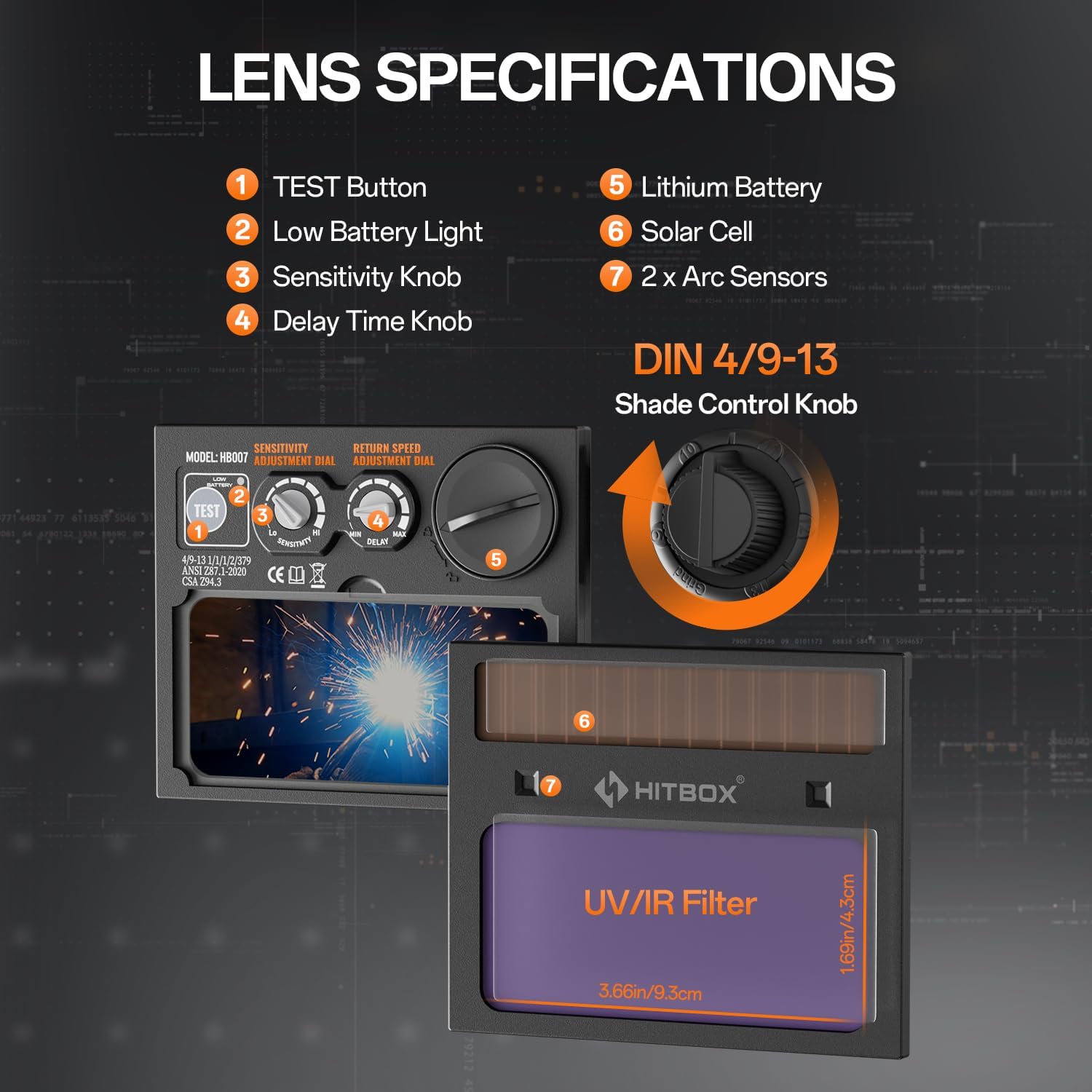
Figure 2: Lens specifications and controls.
- TEST knap: Used to check the auto-darkening function.
- Lavt batteri lys: Angiver, hvornår batteriet skal udskiftes.
- Følsomhedsknap: Adjusts the sensitivity of the arc sensors.
- Delay Time Knob: Controls the time the lens stays dark after the arc stops.
- Lithium batteri: Provides power to the auto-darkening filter.
- Solcelle: Extends battery life by charging from welding light.
- Lysbuesensorer: Detect the welding arc to trigger darkening.
- Shade Control Knob: Adjusts the dark shade level (DIN 4/9-13).
Inkluderet tilbehør:

Figur 3: Medfølgende tilbehør.
- Svejsehjelm x 1
- Outer Protection Board x 1
- CR2450 Battery x 3 (Note: Product specifications state 3 batteries, image shows 2 replaceable batteries plus one pre-installed)
- Brugervejledning x 1
4. Opsætning
4.1 Justering af hovedbøjle
Proper adjustment of the headband is crucial for comfort and stability during use.

Figure 4: Headband adjustment points.
- Juster topstrop: Loosen or tighten the top strap to adjust the helmet's height on your head.
- Width Knob: Rotate the knob at the back of the headband to adjust the circumference for a snug fit.
- Angle Knob: Adjust the angle of the helmet relative to your face for optimal viewing og komfort.
- Comfort Cushion: Ensure the comfort cushion rests properly against your forehead to reduce pressure points.
4.2 Batteriinstallation/-kontrol
The helmet is powered by a CR2450 lithium battery, supplemented by solar cells. Ensure the battery is correctly installed and functional.
- Locate the battery compartment, typically on the auto-darkening filter cartridge.
- Indsæt CR2450-batteriet med den korrekte polaritet.
- Tryk på PRØVE button (1 in Figure 2) to verify the auto-darkening function. The lens should momentarily darken.
- If the low battery light (2 in Figure 2) illuminates, replace the battery.
5. Betjeningsvejledning
The HT-111 helmet offers various adjustments to suit different welding and grinding tasks.

Figure 5: Clear view before welding and auto-darkening during welding.
5.1 Tænd/sluk
The auto-darkening filter is solar-powered and automatically activates when exposed to light. There is no manual on/off switch for the auto-darkening function itself.
5.2 Shade Control
The external shade control knob (8 in Figure 2) allows adjustment from DIN 4 (light state) to DIN 9-13 (dark state). Rotate the knob to select the appropriate shade level for your welding process.
5.3 Følsomhedsjustering
The sensitivity knob (3 in Figure 2) controls how easily the arc sensors detect the welding arc. Adjust it to prevent false darkening from ambient light or to ensure darkening in low-amp TIG svejsning.
5.4 Delay Time Adjustment
The delay time knob (4 in Figure 2) sets how long the lens remains dark after the welding arc ceases. A shorter delay is suitable for tack welding, while a longer delay is recommended for high-ampErage-svejsning for at beskytte øjnene mod efterglød.
5.5 Welding and Grind Modes
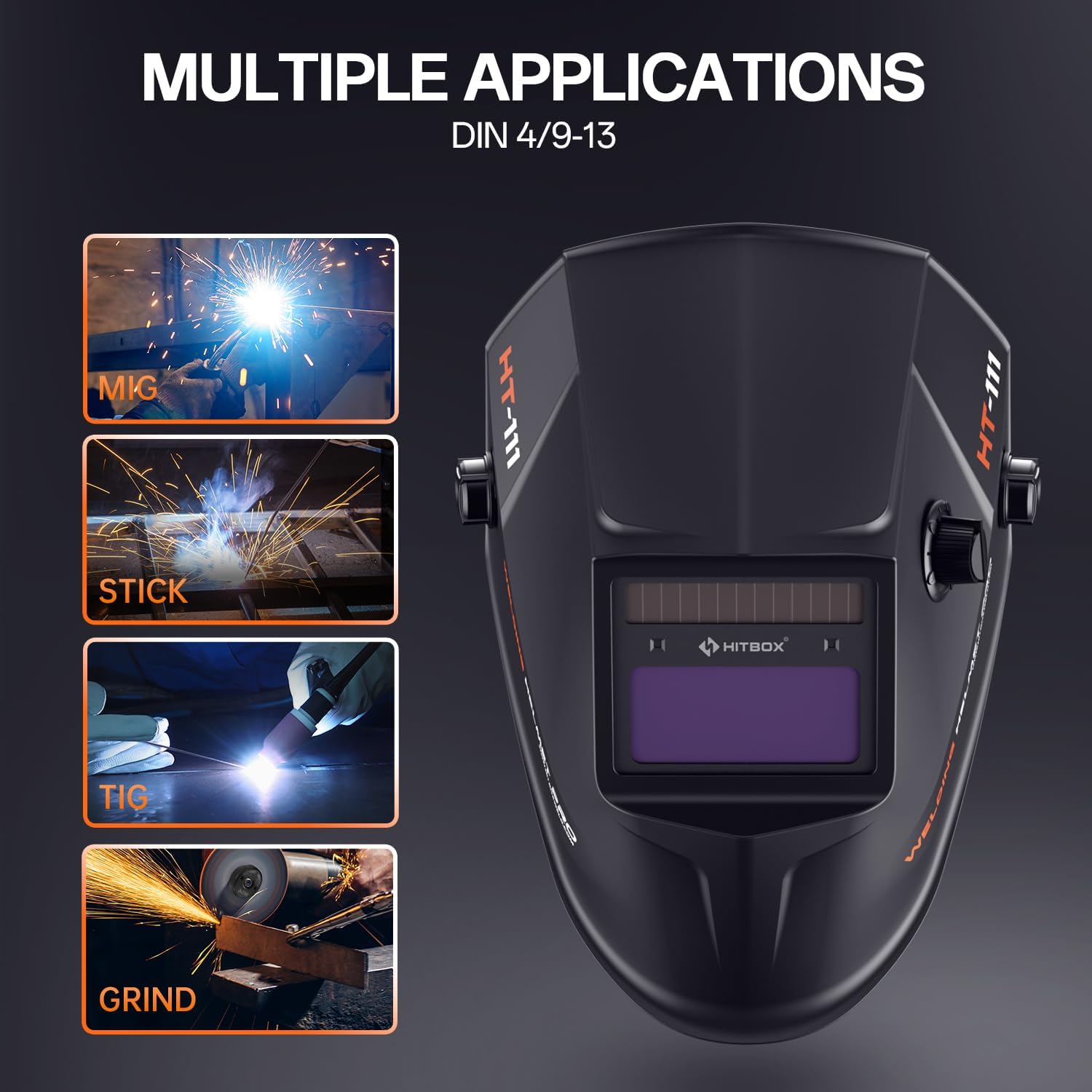
Figure 6: Multiple applications supported by the helmet.
The HT-111 helmet supports various applications:
- Svejsetilstand: For MIG, TIG, ARC (Stick), and other welding processes. The lens automatically darkens to the selected shade (DIN 9-13) upon arc ignition.
- Slibetilstand: For grinding operations. The lens remains in its light state (DIN 4) to provide clear vision while protecting against sparks and debris. Ensure the helmet is set to Grind Mode before starting grinding to prevent accidental darkening.
5.6 Shade Number Selection Guide
Refer to the table below for recommended shade numbers based on welding process and current (Amperes).
Figure 7: Shade number selection table.
| Behandle | Nuværende (A) | |||||||||||||||||
|---|---|---|---|---|---|---|---|---|---|---|---|---|---|---|---|---|---|---|
| 5 | 10 | 15 | 30 | 40 | 70 | 100 | 125 | 150 | 175 | 200 | 225 | 250 | 300 | 350 | 400 | 500 | 600 | |
| MMA | 9 | 10 | 11 | 12 | 13 | 14 | ||||||||||||
| MAG | 10 | 11 | 12 | 13 | 14 | |||||||||||||
| TIG | 9 | 10 | 11 | 12 | 13 | 14 | ||||||||||||
| MIG | 10 | 11 | 12 | 13 | 14 | |||||||||||||
| PAC | 11 | 12 | 13 | 14 | ||||||||||||||
| POTE | 9 | 10 | 11 | 12 | 13 | 14 | ||||||||||||
6. Vedligeholdelse
Regelmæssig vedligeholdelse sikrer din svejsehjelms lange levetid og korrekte funktion.
6.1 Rengøring
- Rengør hjelmskallen med en mild sæbeopløsning. Undgå skrappe opløsningsmidler.
- Wipe the auto-darkening filter and protection lenses with a soft, clean cloth. Do not use abrasive materials or cleaners that could scratch the lens.
- Keep the arc sensors clean and free from obstructions.
6.2 Replacing Outer Protection Board
The outer protection board protects the auto-darkening filter from spatter and scratches. Replace it when it becomes scratched or damaged to maintain clear vision.
- Carefully remove the old protection board from its frame.
- Insert a new outer protection board (one is included as an accessory) into the frame, ensuring it sits securely.
6.3 Replacing CR2450 Battery
When the low battery indicator illuminates, replace the CR2450 battery.
- Locate the battery compartment on the auto-darkening filter.
- Åbn rummet og fjern det gamle batteri.
- Isæt et nyt CR2450-batteri, og sørg for at polariteten vender korrekt (+ siden opad).
- Close the compartment and press the TEST button to confirm functionality.
7. Fejlfinding
If you encounter issues with your welding helmet, refer to the following common problems and solutions.
| Problem | Mulig årsag | Løsning |
|---|---|---|
| Linsen mørkner ikke, når lysbuen tændes. |
|
|
| Lens darkens intermittently or flashes. |
|
|
| Dårlig sigtbarhed gennem linsen. |
|
|
| Hjelmen føles ubehagelig eller ustabil. | Headband not properly adjusted. | Adjust the top strap, width knob, and angle knob for a secure and comfortable fit. |
8. Specifikationer
Detailed technical specifications for the HITBOX HT-111 Auto Darkening Welding Helmet.
| Feature | Specifikation |
|---|---|
| Model | HT111 |
| Viewing område | 3.66 x 1.69 cm |
| Lysbuesensorer | 2 stk |
| UV/IR beskyttelse | DIN 16 |
| Lys tilstand | DIN 4 |
| Mørk tilstand | DIN 9-13 |
| Skift tid | 1/30000s (0.04ms) |
| Forsinkelseskontrol | 0.1-1.0 s |
| Strømforsyning | Li-battery & Solar |
| Batteritype | CR2450 (udskiftelig) |
| Batterikapacitet | 600mAh |
| Way to Shift Dark State | Outer Stepless Shift |
| Driftstemperatur | -5°C til +55°C |
| Low Battery Tip | LED indikation |
| Grind Function | Ja |
| Svejseproceskompatibilitet | MMA, MIG/MAG, TIG |
| Varens vægt | 13.8 ounce |
| Produktdimensioner | 11.02 x 9.84 x 11.02 tommer |
9. Garanti og support
HITBOX is committed to providing reliable welding products and customer satisfaction. If you encounter any quality problems with your HT-111 welding helmet, please contact our customer service team. We are dedicated to arranging an immediate replacement or a full refund as per our after-sale service policy.
For support, please refer to the contact information provided with your product packaging or visit the official HITBOX webwebsted.