
Indledning
Thank you for choosing the HUANUO Electric Standing Desk Frame. This manual provides detailed instructions for the assembly, operation, and maintenance of your new height-adjustable desk frame. Please read this manual thoroughly before installation and use to ensure proper function and safety.
Opsætning og montering
Before beginning assembly, ensure all parts are present and undamaged. It is recommended to assemble the desk frame on a soft, clean surface to prevent scratches.
- Udpak komponenter: Carefully remove all parts from the packaging. Refer to the parts list in your package for verification.
- Saml ben og fødder: Attach the desk feet to the bottom of the lifting columns using the provided screws. Ensure they are securely fastened.
- Forbind tværstænger: Attach the crossbars between the two lifting columns. Adjust the length of the crossbars to match your desired desktop size.
- Installer motor og styreboks: Secure the motor and control box to the designated locations on the frame. Connect all necessary cables according to the wiring diagram provided in your package.
- Tilslut kontrolpanel: Mount the control panel to the underside of your desktop in an easily accessible location.
- Monter skrivebord: Carefully place your desktop onto the assembled frame. Secure the desktop to the frame using appropriate screws (desktop not included).
- Kabelstyring: Organize all cables using the included cable ties or management solutions to prevent tangling and damage.

Billede: Overview of the HUANUO Electric Standing Desk Frame components, including legs, feet, crossbars, and motor assembly, ready for setup.

Image: Close-up illustrating the improved solid construction of the desk frame, highlighting 30% longer plates and 30% thicker columns for enhanced stability and a maximum load capacity of 100kg.
Operation
The HUANUO Electric Standing Desk Frame features an intuitive control panel for easy height adjustment and memory presets.

Image: The desk's control panel, showing the digital height display, up/down adjustment buttons, and four programmable memory preset buttons (1, 2, 3, 4).
Justering af højde:
- Tryk på Op (^) knappen for at hæve skrivebordet.
- Tryk på Ned (v) knappen for at sænke skrivebordet.
- Release the button at your desired height. The current height will be displayed on the digital screen.
Indstilling af hukommelsesforudindstillinger:
- Juster skrivebordet til den ønskede højde ved hjælp af Op/Ned-knapperne.
- Press one of the memory preset buttons (1, 2, 3 eller 4) indtil du hører et bip eller ser displayet blinke, hvilket indikerer, at højden er blevet gemt.
- To recall a saved height, simply press the corresponding memory preset button. The desk will automatically move to the stored position.

Image: Illustration of the desk's height adjustment range, showing a user transitioning from a sitting position (72cm) to a standing position (118cm), promoting a better way to work.

Image: Close-up of the desk's high-quality brushless motor, highlighting its durability with 100,000 lift tests and a low noise level of ≤55 dB during operation.
Opretholdelse
Regular maintenance ensures the longevity and smooth operation of your HUANUO Electric Standing Desk Frame.
- Rensning: Tør skrivebordsstellet af med en blød, tør kludamp klud. Undgå slibende rengøringsmidler eller opløsningsmidler, der kan beskadige overfladen.
- Kabelstyring: Periodically check and reorganize cables to prevent pinching or damage.
- Fastgørelseskontrol: Every few months, check all screws and bolts to ensure they are tight. Retighten if necessary.
- Vægtgrænse: Do not exceed the maximum weight capacity of 100 kg (220 lbs) to prevent damage to the motor and frame.
Fejlfinding
If you encounter any issues with your desk frame, refer to the following common problems and solutions:
| Problem | Mulig årsag | Løsning |
|---|---|---|
| Skrivebordet bevæger sig ikke. | Power cable disconnected, overload, or motor error. | Check power connection. Reduce weight on desk. Perform a reset (refer to specific reset instructions in your package). |
| Ujævne bevægelser eller rystelser. | Loose fasteners, uneven floor, or unbalanced load. | Ensure all screws are tightened. Adjust foot pads for stability. Distribute weight evenly on the desktop. |
| Fejlkode på display. | Specifik systemfejl. | Consult the detailed error code list in your package or contact customer support. Often, a power cycle (unplug for 30 seconds, then plug back in) can resolve minor errors. |
Specifikationer
Below are the technical specifications for the HUANUO Electric Standing Desk Frame (Model: BSQTECH-DEHNESD0728).
| Feature | Detalje |
|---|---|
| Mærke | HUANUO |
| Modelnummer | BSQTECH-DEHNESD0728 |
| Farve | Hvid |
| Produktdimensioner | 6.69 cm D x 42.52 cm B x 15.94 cm H (kun ramme) |
| Justerbart højdeområde | 70 cm til 118 cm (27.5" til 46.5") |
| Maksimal vægtkapacitet | 100 kilo (220 lbs) |
| Varens vægt | 21 kilo (46.2 lbs) |
| Montering påkrævet | Ja |
| Inkluderede komponenter | Høretelefonkrog |
| Motortype | Brushless (low noise, high durability) |
| Støjniveau | ≤55 dB |
| UPC | 810158829909 |

Billede: View of the desk frame's reinforced double beams, indicating enhanced structural integrity and stability.
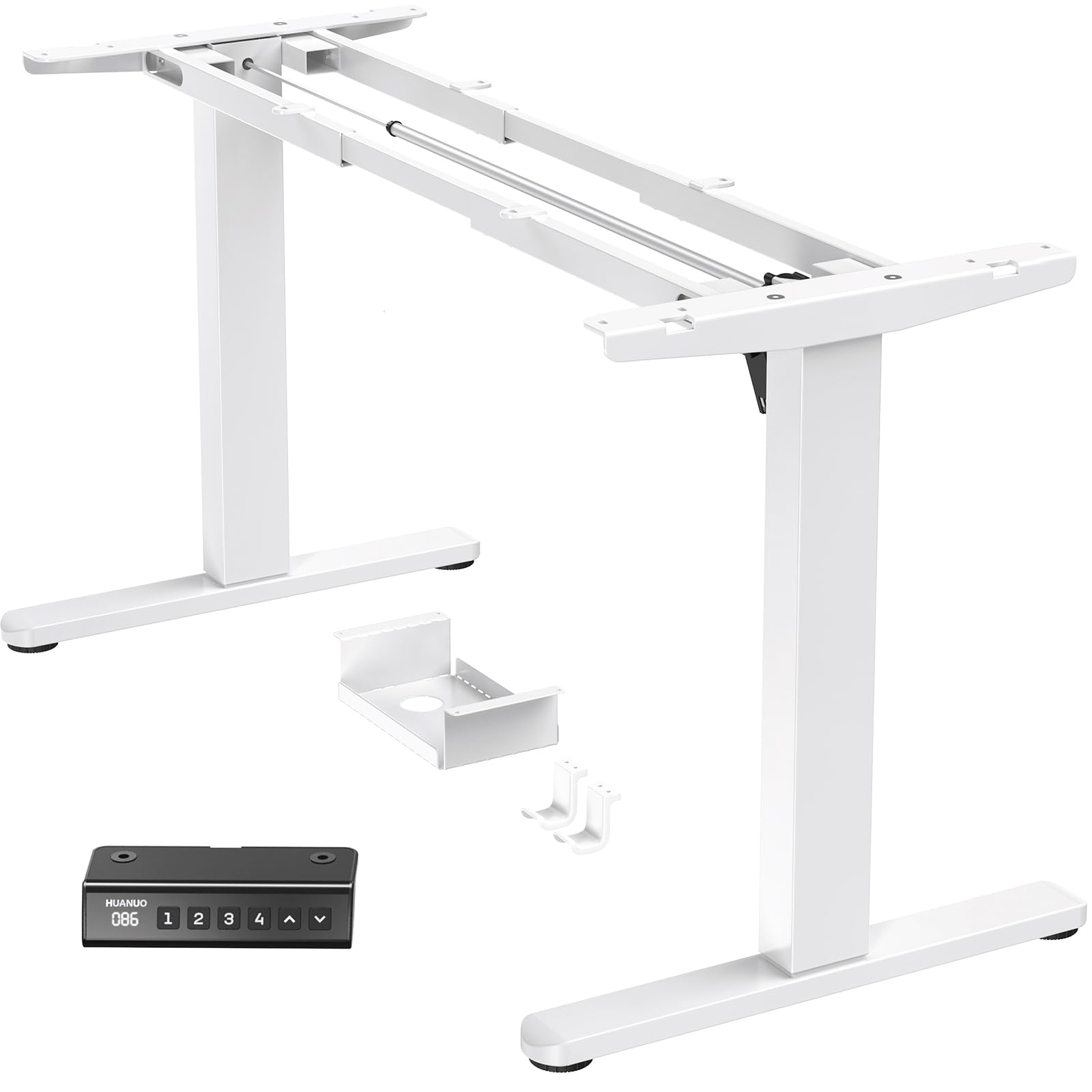
Image: Diagram showing the adjustable width of the desk frame (100-180cm) and height range (72-118cm), along with compatible desktop sizes (e.g., 110cm, 120cm, 140cm, 220cm wide, and 60cm, 70cm, 80cm, 90cm deep).
Garanti og support
HUANUO provides a limited warranty for this product. For specific warranty terms and conditions, please refer to the warranty card included in your product packaging or visit the official HUANUO webwebsted.
If you require technical assistance, have questions about assembly, or need to report a missing/damaged part, please contact HUANUO customer support:
- Online support: Visit the HUANUO official webwebsted for ofte stillede spørgsmål og supportressourcer.
- E-mail: Se din produktdokumentation for at finde kundeservice-e-mailadressen.
- Telefon: Se produktdokumentationen for kundeservicetelefonnummeret.
Please have your model number (BSQTECH-DEHNESD0728) and purchase date ready when contacting support.