
1. Introduktion
The BUSICOM PC-SeaV15c is a 15-inch Windows IoT touch panel PC designed for commercial and industrial applications. This manual provides essential information for the safe and efficient setup, operation, and maintenance of your device. Please read this manual thoroughly before using the product and retain it for future reference.
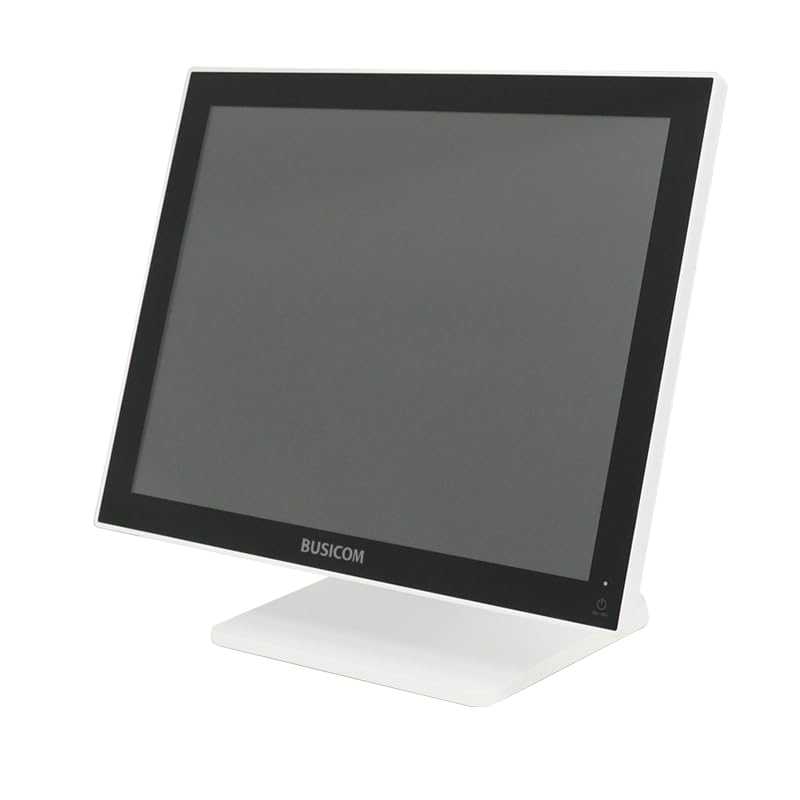
Figur 1: Forside view of the BUSICOM PC-SeaV15c Touch Panel PC.
2. Produktet er slutview
2.1 Nøglefunktioner
- Avanceret design: Features an ultra-thin bezel and a highly durable 7H reinforced display for enhanced aesthetics and protection.
- Overlegen ydeevne: Equipped with Microsoft Windows 10 IoT Enterprise, ensuring long-term support and reliable operation.
- Intuitive Touch Panel: Utilizes a capacitive touch method, offering a familiar and responsive touch experience similar to smartphones and tablets.
- Nem vedligeholdelse: Designed for simple RAM and SSD replacement, facilitating upgrades and servicing.
- Alsidige grænseflader: Provides a wide range of connectivity options to integrate with various peripherals.
- Effektiv opbevaring: SSD storage ensures fast processing speeds, quiet operation, and excellent shock resistance.
2.2 Komponenter
The package typically includes the BUSICOM PC-SeaV15c unit and a power adapter. Additional accessories may vary.

Figure 2: Front and side profile of the PC-SeaV15c unit.

Figur 3: Bagside view showing access panels for RAM and SSD components.
3. Opsætningsvejledning
3.1 Udpakning
- Carefully remove the PC-SeaV15c from its packaging.
- Check for any visible damage. If damaged, contact your vendor immediately.
- Sørg for, at alle anførte komponenter er til stede.
3.2 Tilslutning af eksterne enheder
Refer to the interface diagram below for port locations and types.

Figure 4: Detailed diagram of the PC-SeaV15c's rear and bottom interfaces.
- Strømtilslutning: Connect the provided power adapter to the DC In port and then to a power outlet.
- USB-enheder: Use the USB 2.0 (4 ports) and USB 3.0 (2 ports) for connecting keyboards, mice, printers, and other USB peripherals.
- Netværks forbindelse: Connect an Ethernet cable to the LAN port for wired network access.
- Lydudgang: Connect external speakers or headphones to the Audio Out port.
- Serial Ports (RJ45): Utilize COM1, COM2, COM3, and COM6 for connecting specialized POS peripherals such as barcode scanners or receipt printers.
- Cash Drawer (RJ11): Connect a compatible cash drawer to the RJ11 port.
- Eksternt display: If an external monitor is required, connect it to the Mini DisplayPort.
- USB Type-C: For compatible devices.
3.3 Tænd/sluk
- Tænd: Press the power button located on the upper right side of the display bezel or the power mark on the rear panel.
- Sluk: To safely shut down the system, use the standard Windows shutdown procedure. Avoid direct power disconnection during operation to prevent data loss.
4. Betjeningsvejledning
4.1 Windows 10 IoT Enterprise
The PC-SeaV15c operates on Windows 10 IoT Enterprise 2021. Familiarize yourself with the Windows operating system for basic navigation, application management, and system settings.
4.2 Touch Panel Usage
The capacitive touch screen supports multi-touch gestures.
- Tryk på: Svarende til et museklik.
- Dobbeltklik: Svarende til et dobbeltklik.
- Tryk og hold: Svarende til et højreklik.
- Stryg: For scrolling or navigating.
- Knib-for-at-zoome: Brug to fingre til at zoome ind eller ud.
5. Vedligeholdelse
5.1 Rengøring af enheden
- Sluk altid for enheden og tag stikket ud af stikkontakten inden rengøring.
- Brug en blød, fnugfri klud lidt damprengøres med vand eller et ikke-slibende skærmrensemiddel.
- Do not spray liquids directly onto the screen or device.
- Undgå at bruge skrappe kemikalier, opløsningsmidler eller slibende materialer.
5.2 RAM and SSD Replacement
The PC-SeaV15c is designed for easy replacement of RAM and SSD components. Refer to Figure 3 for the access panel location. For detailed instructions on component replacement, consult a qualified technician or the BUSICOM support webwebsted.
6. Fejlfinding
Dette afsnit indeholder løsninger på almindelige problemer, du kan støde på.
- Enheden tændes ikke:
- Sørg for, at strømadapteren er korrekt tilsluttet både enheden og en fungerende stikkontakt.
- Kontroller, at stikkontakten fungerer ved at tilslutte en anden enhed.
- Berøringsskærmen reagerer ikke:
- Genstart enheden.
- Sørg for, at skærmen er ren og fri for blokeringer.
- Ingen visning:
- Kontroller, om enheden er tændt.
- If an external display is connected, ensure the correct input source is selected on the external display.
- Periferiudstyr ikke detekteret:
- Ensure the peripheral is correctly connected to the appropriate port (USB, LAN, COM).
- Prøv at tilslutte den eksterne enhed til en anden port.
- Check the peripheral's own power supply, if applicable.
For further assistance, please contact BUSICOM customer support.
7. Specifikationer
| Feature | Detalje |
|---|---|
| Mærke | BUSICOM |
| Modelnavn | PC-SeaV15c |
| Farve | Hvid |
| Skærmstørrelse | 15 tommer |
| Opløsning | 1024x768 |
| Operativsystem | Windows 10 IoT Enterprise 2021 |
| CPU Brand | Intel |
| Processor stik | Intel® N97 |
| CPU hastighed | 3.6 GHz |
| Hukommelsestype | DDR4 |
| Installeret RAM | 4 GB |
| Harddisk type | SSD |
| SSD kapacitet | 128 GB (ifølge produkttitel) |
| Grafikkorttype | Integreret |
| VRAM-type | DDR4 SDRAM |
| VRAM-kapacitet | 4 GB |
| USB 2.0 porte | 4 |
| USB 3.0 porte | 2 |
| Optisk drev | Ingen |
| Produktets vægt | 6 kilo |
| Højde (ca.) | 307.5 mm (as per dimension diagram) |

Figur 5: Bagside view of the PC-SeaV15c with approximate height dimension.
8. Garanti og support
For warranty information and technical support, please refer to the warranty card included with your product or visit the official BUSICOM webwebsted. Behold din købskvittering som købsbevis i tilfælde af garantikrav.
BUSICOM Official Webwebsted: BUSICOM Store on Amazon.co.jp