
1.Overview
This manual provides detailed instructions for the Jazmm CD Cassette Player Combo with Bluetooth, Model CD-W16. This versatile audio system offers multiple playback options including CD, cassette tape, FM radio, Bluetooth, USB, TF card, and AUX-IN. It features 10W HiFi speakers, a built-in rechargeable battery, and remote control for convenient use in various settings.

Image 1.1: The Jazmm CD Cassette Player Combo (Model CD-W16) highlighting its seven playback modes: CD Player, FM Radio, TF Card Playback, USB Playback, Tape Player, AUX-IN Playback, and Bluetooth 5.1.
2. Vigtige sikkerhedsoplysninger
- Læs alle instruktioner, før du betjener enheden.
- Gem denne vejledning til fremtidig reference.
- Udsæt ikke enheden for regn eller fugt for at forhindre brand eller elektrisk stød.
- Bloker ikke ventilationsåbninger. Installer i overensstemmelse med producentens anvisninger.
- Må ikke installeres i nærheden af varmekilder såsom radiatorer, varmeapparater, komfurer eller andre apparater (inklusive ampløftere), der producerer varme.
- Beskyt netledningen mod at blive trådt på eller klemt, især ved stik, stikkontakter og det sted, hvor de kommer ud af apparatet.
- Brug kun tilbehør/tilbehør specificeret af producenten.
- Træk stikket ud af dette apparat under tordenvejr, eller når det ikke skal bruges i længere perioder.
- Overlad al service til kvalificeret servicepersonale. Service er påkrævet, når apparatet er blevet beskadiget på nogen måde.
3. Produktfunktioner
The Jazmm CD Cassette Player Combo (Model CD-W16) is designed for versatile audio playback and recording. Key features include:
- 7-in-1 Playback Modes: Supports CD, Cassette Tape, FM Radio, Bluetooth 5.1, USB, TF Card, and AUX-IN.
- CD-afspiller: Compatible with CD, CD-R, CD-RW, MP3, and WMA formats. Features song programming.
- Kassetteafspiller og -optager: Play existing tapes or record audio onto blank tapes using the built-in microphone.
- FM-radio: Extended antenna for improved reception, automatic scanning, and storage for up to 30 preset stations (FM 87.5-108MHz).
- Bluetooth 5.1: Supports both Bluetooth transmission (to external Bluetooth speakers/headphones) and reception (from mobile devices).
- Hi-Fi-højttalere: Dual 10W HiFi speakers deliver clear sound with strong bass and pure treble.
- 5 EQ Sound Modes: Customize your audio experience with NORMAL, ROCK, POP, JAZZ, and CLASS settings.
- Flere indgange: USB port, TF (Micro SD) card slot, and 3.5mm AUX-IN jack for various media sources.
- Genopladeligt batteri: Built-in 5000mAh rechargeable battery for portable use.
- Fjernbetjening: Conveniently operate the device from a distance of up to 7 meters.
- Hovedtelefonstik: 3.5mm headphone output for private listening.
4. Pakkens indhold
Tjek venligst pakken for følgende varer:
- Jazmm CD Cassette Player Combo (Model CD-W16)
- Fjernbetjening
- Strømadapter/kabel
- Brugermanual
5. Betjeningselementer og porte
Familiarize yourself with the controls and connection ports on your device.
Kontrol på frontpanelet:
- FUNC/REP/PROG: Function/Repeat/Program button.
- VOL- / VOL+: Volume down / Volume up.
- SCAN: Scan for radio stations.
- EQ: Equalizer indstillinger.
- FORRIGE NÆSTE: Forrige nummer / Næste nummer.
- SPIL/PAUSE: Afspil/pause knap.
- STOP/Skub ud: Stop playback / Eject CD or cassette.
- FFWD / REW: Fast forward / Rewind (for cassette).
- REC: Record button (for cassette).
- Power knap: Tænder/slukker enheden.
- LCD-skærm: Viser aktuel tilstand, spornummer, tid osv.
Side/Rear Panel Ports:
- Hovedtelefonstik (3.5 mm): Til tilslutning af hovedtelefoner.
- AUX-INDGANG (3.5 mm): Til tilslutning af eksterne lydenheder.
- USB-port: Til USB-flashdrev.
- TF-kortslot: Til Micro SD-kort.
- DC IN-port: Til tilslutning af strømadapter.
- FM-antenne: Udtrækkelig antenne til radiomodtagelse.
6. Opsætning
- Strømtilslutning:
Connect the provided power adapter to the DC IN port on the device and plug it into a standard wall outlet. The internal battery will begin charging automatically.
- Indledende opkrævning:
For optimal battery life, fully charge the device before first use. The charging indicator light will show charging status.
- Antenna (for FM Radio):
Extend the telescopic FM antenna for better radio reception.
- Tænd:
Tryk på Magt button to turn on the device. The LCD display will illuminate.
7. Betjeningsvejledning
7.1 CD-afspilning
- Åbn dækslet til cd-rummet.
- Placer en CD (med etiketten opad) på spindlen.
- Luk låget til cd-rummet ordentligt.
- Tryk på FUNK knappen gentagne gange, indtil "CD"-tilstand er valgt.
- Tryk på AFSPIL/PAUSE knappen for at starte afspilning.
- Bruge FORR og NÆSTE knapper til at springe spor over.
- Trykke STOP/Skub ud for at stoppe afspilningen.
7.2 Cassette Tape Playback & Recording

Image 7.1: The Jazmm CD Cassette Player Combo with a cassette tape inserted into the front loading slot.
- Åbn døren til kassetterummet.
- Insert a cassette tape with the open edge facing the player.
- Luk døren til kassetterummet.
- Tryk på FUNK knappen gentagne gange, indtil "TAPE"-tilstand er valgt.
- Tryk på AFSPIL/PAUSE knappen for at starte afspilning.
- Bruge FFWD or REW for fast winding.
- To record: Insert a blank tape. Press the REC button. The device will record audio from the built-in microphone. Press STOP/Skub ud for at afslutte optagelsen.
7.3 FM-radiofunktion

Image 7.2: The Jazmm CD Cassette Player Combo with its telescopic FM antenna fully extended for optimal radio reception.
- Træk FM-antennen helt ud.
- Tryk på FUNK knappen gentagne gange, indtil "FM"-tilstand er valgt.
- Tryk på SCAN knappen for automatisk at scanne og gemme tilgængelige FM-stationer.
- Bruge FORR og NÆSTE buttons to navigate through saved preset stations.
7.4 Bluetooth-forbindelse
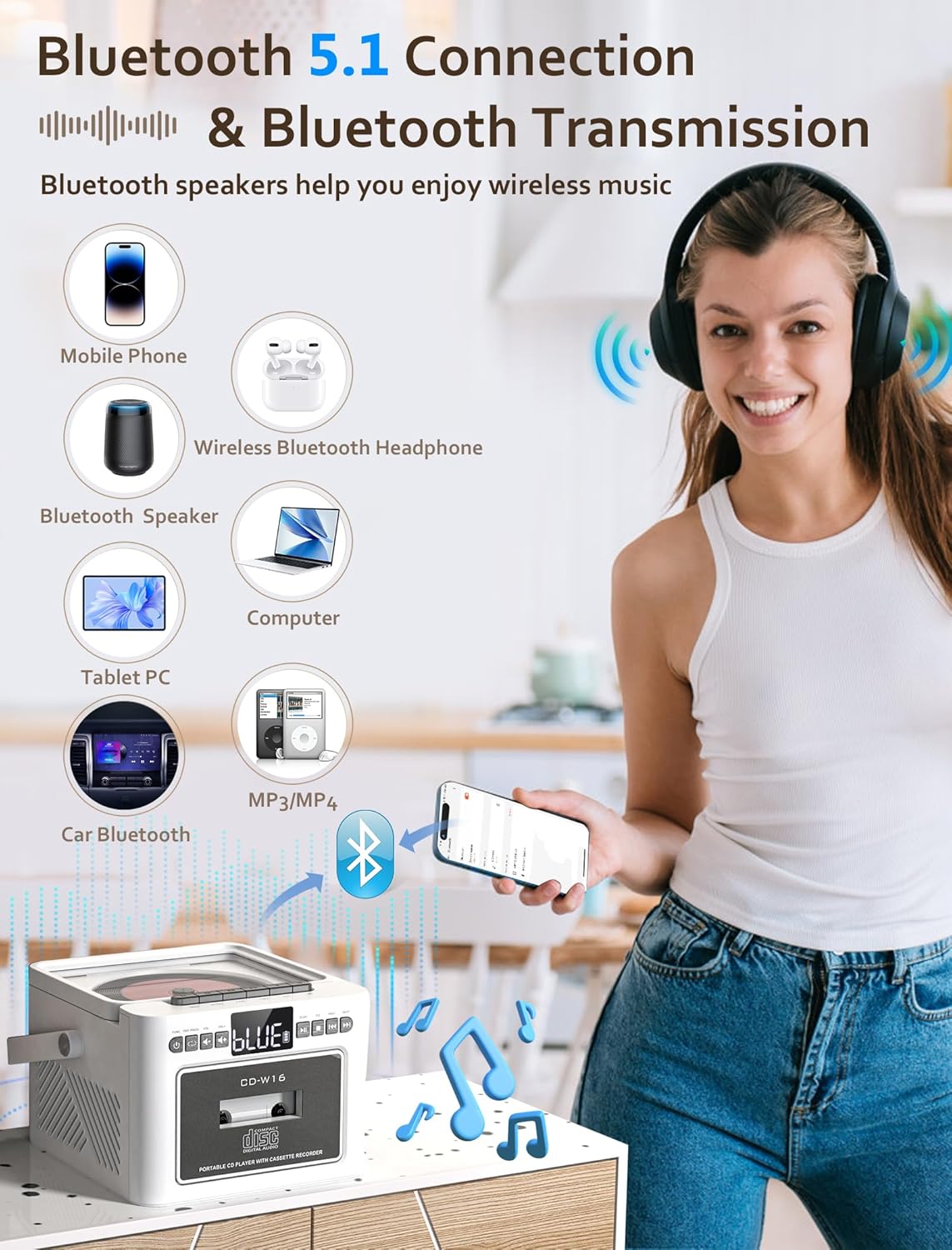
Image 7.3: The Jazmm CD Cassette Player Combo illustrating its Bluetooth 5.1 capabilities for both connecting to mobile devices and transmitting to Bluetooth speakers or headphones.
- Tryk på FUNK button repeatedly until "BT" (Bluetooth) mode is selected. The display will show "BLUE" and flash, indicating it's in pairing mode.
- On your external device (smartphone, tablet, etc.), enable Bluetooth and search for "CD-W16" (or similar).
- Select "CD-W16" to pair. Once connected, the "BLUE" indicator will stop flashing.
- You can now play audio from your device through the boombox speakers.
- Bluetooth transmission: To transmit audio from the boombox (e.g., CD playback) to external Bluetooth headphones or speakers, ensure the external device is in pairing mode. The boombox will automatically search and connect.
7.5 USB / TF Card / AUX-IN Playback
- USB/TF-kort: Insert a USB flash drive into the USB port or a TF (Micro SD) card into the TF card slot. Press the FUNK button to select "USB" or "TF" mode. Playback will begin automatically.
- AUX-IN: Connect an external audio device (e.g., MP3 player) to the AUX-IN port using a 3.5mm audio cable (not included). Press the FUNK button to select "AUX" mode. Control playback from your external device.
7.6 Brug af fjernbetjeningen

Image 7.4: The Jazmm CD Cassette Player Combo shown with its included remote control, allowing for convenient operation from a distance.
The remote control allows you to operate most functions from a distance. Ensure there are no obstructions between the remote and the boombox. Insert batteries (not included) into the remote control before use.
8. Vedligeholdelse
- Rensning: Brug en blød, tør klud til at rengøre enhedens yderside. Brug ikke slibende rengøringsmidler eller opløsningsmidler.
- CD-linsepleje: Hvis der opstår problemer med afspilning af CD'er, skal du bruge en almindelig CD-linserenser.
- Rengøring af kassettehoved: Periodically clean the cassette player's heads with a cotton swab lightly dampened with isopropyl alcohol to ensure optimal sound quality.
- Opbevaring: Når enheden ikke er i brug i længere perioder, skal den opbevares et køligt og tørt sted.
- Batteripleje: To prolong battery life, avoid fully discharging the battery frequently. Recharge the battery regularly, even if the device is not in active use.
9. Fejlfinding
| Problem | Mulig årsag | Løsning |
|---|---|---|
| Ingen strøm | Power adapter not connected; Battery discharged. | Ensure power adapter is securely connected and plugged into a working outlet. Charge the battery. |
| Ingen lyd | Lydstyrken er for lav; Forkert tilstand valgt; Hovedtelefoner er tilsluttet. | Increase volume. Select the correct playback mode (CD, BT, FM, etc.). Disconnect headphones if sound is desired from speakers. |
| CD not playing / skipping | CD dirty or scratched; CD inserted incorrectly; CD format not supported. | Clean the CD with a soft cloth. Reinsert the CD label side up. Ensure the CD is a supported format (CD, CD-R, CD-RW, MP3, WMA). |
| Kassettebåndet afspiller ikke | Tape inserted incorrectly; Tape tangled or damaged. | Reinsert the tape correctly. Check the tape for damage. |
| Dårlig FM-radiomodtagelse | Antennen ikke strakt ud; Svagt signal. | Træk FM-antennen helt ud. Flyt enheden for bedre modtagelse. |
| Bluetooth-parring mislykkedes | Device not in pairing mode; Boombox too far from device. | Ensure both devices are in pairing mode. Move devices closer. Restart Bluetooth on both devices. |
10. Specifikationer
| Feature | Detalje |
|---|---|
| Model | CD-W16 |
| Mærke | Jazmm |
| Produktmål (L x B x H) | 7.5 x 6.2 x 4.3 tommer |
| Forbindelsesteknologi | Auxiliary, Bluetooth, USB |
| Højttaler type | Stereo (Dual 10W HiFi Speakers) |
| Strømkilde | Batteridrevet (indbygget 5000mAh genopladeligt batteri) |
| FM-radiofrekvens | 87.5-108 MHz |
| Bluetooth version | 5.1 |
| Understøttede medier | CD, CD-R, CD-RW, MP3, WMA, Cassette Tape, USB, TF Card |
11. Garanti og support
Jazmm offers a lifetime warranty on this portable CD player boombox. For any inquiries, technical assistance, or warranty claims, please contact our customer service team. We provide 24/7 world-class customer service to ensure your satisfaction.
Please refer to your purchase documentation or the Jazmm official webwebstedet for specifikke kontaktoplysninger.