
1. Introduktion
This manual provides detailed instructions for the operation and maintenance of your Docooler Digital Voice Recorder. Please read this manual thoroughly before using the device to ensure proper function and to maximize its capabilities. This device is designed for recording audio in various settings, including lectures, meetings, and interviews, featuring noise reduction and voice-activated recording.
2. Produktet er slutview
The Docooler Digital Voice Recorder is a compact and portable audio recording device. It features a clear digital display, intuitive controls, and a robust design for reliable performance. Key features include intelligent noise cancellation, voice-activated recording, and a choice of 8GB or 32GB storage capacity.

Figur 2.1: Forside view of the Docooler Digital Voice Recorder, showing the display and control buttons.

Figure 2.2: The compact size of the Docooler Digital Voice Recorder, shown held in a hand.

Figure 2.3: Illustration of the voice-activated recording feature, automatically starting when sound reaches a detectable level.
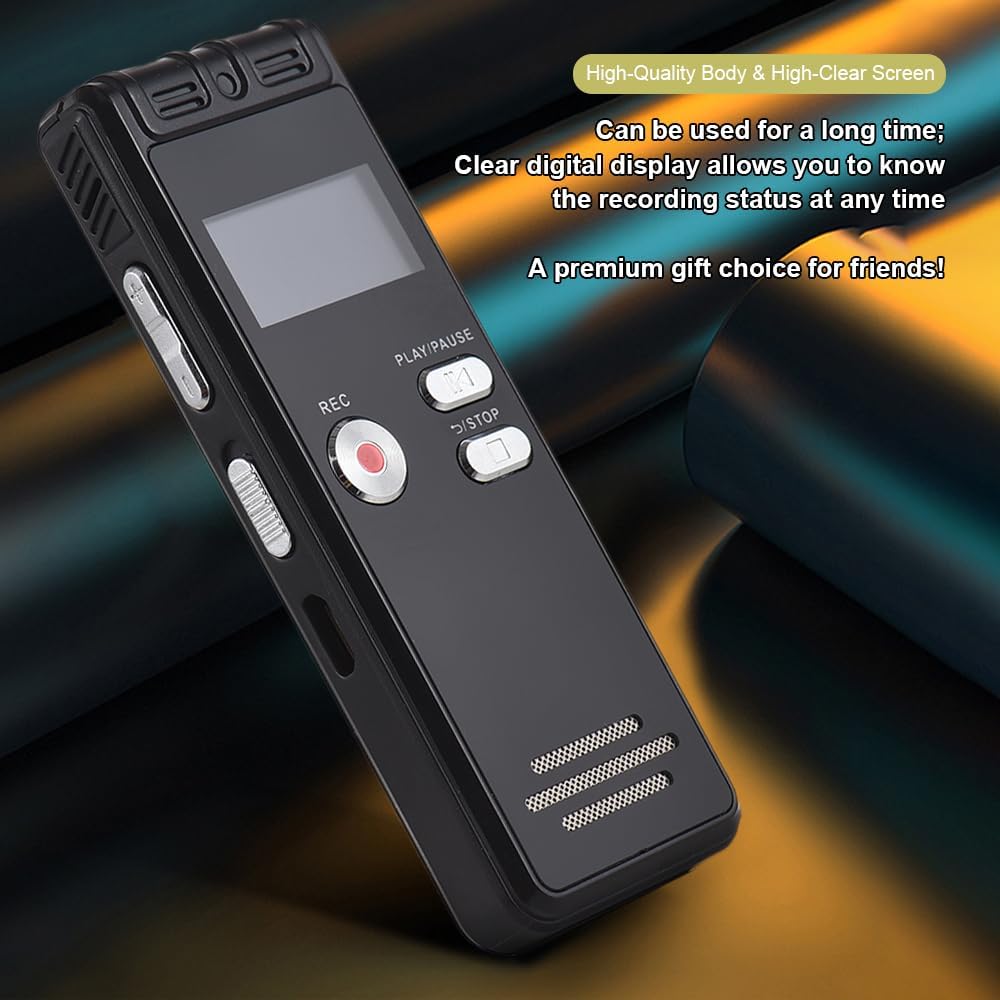
Figure 2.4: The durable construction and clear digital display of the recorder, providing real-time recording status.

Figure 2.5: The device features a built-in high-quality omnidirectional microphone for 360-degree panoramic sound capture.

Figure 2.6: The recorder's compact dimensions allow it to be easily carried in a pocket or bag.

Figure 2.7: The device supports one-click recording and saving, simplifying the recording process.

Figur 2.8: Eksamples of various environments where the recorder can be effectively used, such as meetings, lectures, training sessions, and teaching.
3. Pakkens indhold
Kontroller venligst, at alle nedenstående varer er inkluderet i din pakke:
- 1x Voice Recorder
- 1 x USB-kabel
- 1x hovedtelefon
- 1x Adapters (likely phone line adapter)
- 1x Connect Cable (likely for phone recording)
- 1x Manual (dette dokument)

Figure 3.1: The Docooler Digital Voice Recorder shown with its complete set of accessories, including USB cable, headphones, and connection cables.
4. Opsætning
4.1 Opladning af enheden
- Connect the included USB cable to the recorder's USB port.
- Plug the other end of the USB cable into a computer's USB port or a compatible USB wall adapter (not included).
- The device's screen will indicate charging status. A full charge typically takes approximately 2-3 hours.
4.2 Tænd/sluk
- Sådan tænder du: Tryk på tænd/sluk-knappen, og hold den nede, indtil skærmen lyser.
- To power off: Press and hold the Power button until the screen turns off.
4.3 Tilslutning af hovedtelefoner
Insert the included headphones into the 3.5mm headphone jack on the device for private playback of recordings.
5. Betjeningsvejledning
5.1 Grundlæggende optagelse
- Sørg for, at enheden er tændt.
- Tryk på REC knappen for at starte optagelsen. Optagelsesindikatoren lyser.
- Tryk på for at sætte optagelsen på pause AFSPIL/PAUSE knap. Tryk igen for at genoptage.
- For at stoppe optagelsen og gemme file, tryk på STOP knappen. Optagelsen gemmes automatisk.
5.2 Voice-Activated Recording (VOR)
This feature allows the recorder to automatically start recording when sound is detected and pause when silence occurs, conserving memory and battery life.
- Navigate to the VOR settings in the device menu.
- Enable the VOR function and adjust the sensitivity level as needed.
- Tryk på REC button. The device will now record only when sound is present.
- Tryk på STOP button to end the voice-activated recording session.
5.3 Afspilning
- From the main menu, select the 'Recordings' or 'Files' option.
- Use the navigation buttons to select the desired audio file.
- Tryk på AFSPIL/PAUSE knappen for at starte afspilning.
- Use the volume controls on the side of the device to adjust the playback volume.
- Tryk på STOP knappen for at afslutte afspilningen.
5.4 Støjreduktion
The device is equipped with an intelligent noise reduction feature. This function is typically active by default to enhance audio clarity. Refer to the device's settings menu for options to adjust or disable noise reduction if available.
6. Vedligeholdelse
- Hold enheden tør. Undgå udsættelse for fugt eller væsker.
- Rengør enheden med en blød, tør klud. Brug ikke slibende rengøringsmidler eller opløsningsmidler.
- Undgå at tabe enheden eller udsætte den for kraftige stød.
- Opbevar enheden et køligt, tørt sted væk fra direkte sollys og ekstreme temperaturer.
- Sikkerhedskopier regelmæssigt vigtige optagelser til en computer for at forhindre datatab.
7. Fejlfinding
7.1 Enheden tænder ikke
- Sørg for, at batteriet er opladet. Tilslut enheden til en strømkilde med USB-kablet, og lad den oplade i mindst 30 minutter.
- Press and hold the Power button for several seconds.
7.2 Dårlig optagelseskvalitet
- Sørg for, at mikrofonen ikke er blokeret.
- Record in a quieter environment to minimize background noise.
- Check the microphone sensitivity settings in the device menu.
- Ensure the device is placed close enough to the sound source.
7.3 Cannot Play Back Recordings
- Verify that recordings exist in the device's memory.
- Check the volume level during playback.
- Ensure headphones are properly connected if using them.
7.4 Enhed genkendes ikke af computeren
- Sørg for, at USB-kablet er korrekt tilsluttet til både enheden og computeren.
- Prøv at tilslutte til en anden USB-port på din computer.
- Genstart din computer, og prøv igen.
8. Specifikationer
| Mærke | Docooler |
| Model | Digital stemmeoptager |
| Kapacitetsmuligheder | 8 GB, 32 GB |
| Farve | Sort |
| Materiale | ABS |
| Batteri | 300mAh |
| Varens vægt | 2.38 ounces (ca. 67.5 g) |
| Pakkedimensioner | 4.65 x 3.23 x 0.59 tommer (11.8 x 8.2 x 1.5 cm) |
| Fabrikant | docooler |
| ASIN | B0D9WB349S (for 8GB variant) |
9. Garanti og support
For garantioplysninger og kundesupport henvises til den dokumentation, der blev leveret ved køb, eller kontakt din forhandler. Gem din købskvittering som købsbevis i tilfælde af garantikrav.