
1. Introduktion
Tak for købetasing the Deeyaple Portable Bluetooth Speaker A10. This compact and portable speaker is designed for outdoor use, featuring IPX7 waterproofing, Bluetooth 5.3 connectivity, True Wireless Stereo (TWS) pairing, and an RGB pulsating light. This manual provides essential information for setting up, operating, and maintaining your speaker.
2. Sikkerhedsoplysninger
- Vandtæthed: The speaker is IPX7 waterproof, meaning it can be submerged in up to 1 meter of water for 30 minutes. Ensure the charging port cover is securely closed before exposure to water. Do not expose to saltwater or other chemicals.
- Temperatur: Avoid exposing the speaker to extreme temperatures (hot or cold) to prevent damage to the battery and internal components.
- Opladning: Use only the provided Type-C charging cable. Do not use damaged cables or chargers. Ensure the charging port is dry before charging.
- Rensning: Rengør højttaleren med en blød, damp klæde. Brug ikke slibende rengøringsmidler eller opløsningsmidler.
- Demontering: Forsøg ikke at skille ad, reparere eller modificere højttaleren. Dette vil ugyldiggøre garantien og kan forårsage skade eller personskade.
- Høreværn: Undgå at lytte ved høj lydstyrke i længere perioder for at forhindre høreskader.
3. Pakkens indhold
Tjek venligst pakken for følgende varer:
- Deeyaple Portable Bluetooth Speaker A10
- Type-C Charging Cable (Note: Power adapter not included)
- Brugermanual
4. Produktet er slutview
Gør dig bekendt med højttalerens komponenter og betjeningselementer.

Billede: Deeyaple A10 Portable Bluetooth Speaker with dimensions (10cm height, 8cm diameter) and control panel visible. The control panel includes power, volume down, volume up, and a multi-function button, along with a Type-C charging port at the bottom.
Kontrolknapper:
- Tænd/sluk-knap (①): Tryk og hold nede for at tænde/slukke. Tryk kort for at afspille/sætte musik på pause eller besvare/afslutte opkald.
- Volume Down Button (<): Kort tryk for at sænke lydstyrken. Langt tryk for forrige nummer.
- Volume Up Button (>): Kort tryk for at øge lydstyrken. Langt tryk for næste nummer.
- Multi-function Button (∞): Short press to change RGB light mode. Long press to activate voice assistant.
Porte:
- Type-C opladningsport: Bruges til opladning af højttaleren.
5. Opsætning
5.1 Opladning af højttaleren
- Open the protective cover of the Type-C charging port.
- Connect the Type-C charging cable to the speaker's charging port and the other end to a USB power adapter (not included) or a computer's USB port.
- LED-indikatoren viser opladningsstatus. En fuld opladning tager cirka 3-4 timer.
- Once fully charged, disconnect the cable and securely close the protective cover to maintain IPX7 waterproofing.
5.2 Tænd/sluk
- Tænd: Press and hold the Power Button (①) for 2-3 seconds until you hear an audible prompt and the LED indicator lights up.
- Sluk: Press and hold the Power Button (①) for 2-3 seconds until you hear an audible prompt and the LED indicator turns off.
5.3 Bluetooth -parring
The speaker uses Bluetooth 5.3 for a fast and reliable connection.
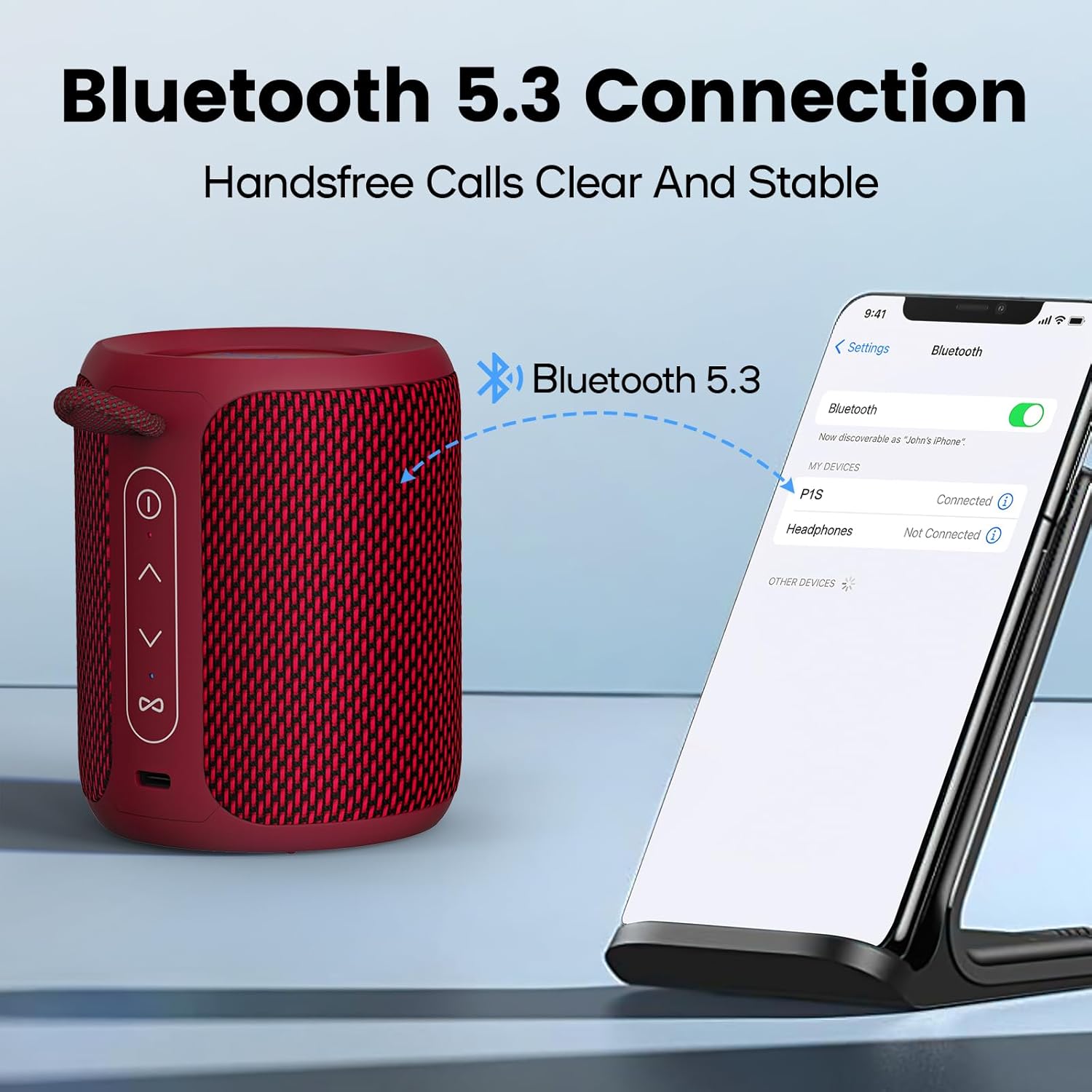
Billede: A Deeyaple A10 speaker shown next to a smartphone displaying its Bluetooth settings. The phone screen shows 'P1S' (an alternative model name) as a discoverable device, indicating a successful Bluetooth connection.
- Sørg for, at højttaleren er tændt og i Bluetooth-parringstilstand (LED-indikatoren blinker).
- Gå til Bluetooth-indstillingerne på din smartphone eller anden Bluetooth-aktiveret enhed.
- Søg efter available devices and select "Deeyaple A10" (or similar name like "P1S") from the list.
- Once connected, you will hear an audible confirmation, and the LED indicator will stop flashing.
5.4 Ægte trådløs stereo (TWS) parring
You can pair two Deeyaple A10 speakers together for a 360° surround sound experience.

Billede: Two Deeyaple A10 speakers are positioned on a table, with a dotted line and music note icon indicating their wireless stereo connection. This illustrates the True Wireless Stereo (TWS) pairing feature.
- Ensure both Deeyaple A10 speakers are powered on and not connected to any other Bluetooth device.
- On one of the speakers (this will be the primary speaker), double-press the Power Button (①). The speaker will enter TWS pairing mode.
- De to højttalere vil automatisk søge efter og oprette forbindelse til hinanden. Du vil høre en hørbar bekræftelse, når TWS-parringen er gennemført.
- Now, connect your device to the primary speaker via Bluetooth as described in section 5.3. Both speakers will play audio simultaneously.
6. Betjeningsvejledning
6.1 Musikafspilning
- Afspil/pause: Short press the Power Button (①).
- Lydstyrke op: Short press the Volume Up Button (>).
- Skrue ned for lyden: Short press the Volume Down Button (<).
- Næste nummer: Long press the Volume Up Button (>).
- Forrige nummer: Long press the Volume Down Button (<).
6.2 Opkaldshåndtering
The built-in HD microphone allows for hands-free calls when connected to your smartphone.
- Besvar opkald: Short press the Power Button (①) when an incoming call rings.
- Afslut opkald: Short press the Power Button (①) during a call.
- Afvis opkald: Long press the Power Button (①) when an incoming call rings.
6.3 RGB-lysstyring
The speaker features colorful LED lights that pulsate synchronously with music.

Billede: Three Deeyaple A10 speakers are shown with their top LED rings illuminated in green, red, and blue, demonstrating the dynamic RGB light feature. The background features large 'RGB' letters.
- Skift lystilstand: Short press the Multi-function Button (∞) to cycle through different light modes or colors.
- Sluk lyset: Continue pressing the Multi-function Button (∞) until the lights turn off.
7. Vedligeholdelse
- Rensning: Tør højttaleren af med en blød, let fugtig kludamp klæde. Brug ikke skrappe kemikalier, rengøringsopløsningsmidler eller stærke rengøringsmidler.
- Opbevaring: Opbevar højttaleren et køligt, tørt sted væk fra direkte sollys og ekstreme temperaturer, når den ikke er i brug i længere perioder.
- Batteripleje: For at forlænge batteriets levetid skal du oplade højttaleren helt inden første brug og genoplade den mindst én gang hver tredje måned, hvis den ikke bruges regelmæssigt.
- Vandtætning: Always ensure the charging port cover is sealed tightly to maintain the IPX7 waterproof rating.
8. Fejlfinding
| Problem | Mulig årsag | Løsning |
|---|---|---|
| Højttaleren tænder ikke. | Lavt batteri. | Oplad højttaleren i 3-4 timer. |
| Kan ikke parre med Bluetooth-enhed. | Højttaleren er ikke i parringstilstand. Bluetooth er slået fra på din enhed. Højttaleren er allerede tilsluttet en anden enhed. Too far from the device. | Ensure speaker is powered on and LED is flashing. Slå Bluetooth til på din enhed. Disconnect from other devices or restart the speaker. Flyt højttaleren tættere på din enhed (inden for 10 meter). |
| Ingen lyd eller lav lydstyrke. | Volume too low on speaker or device. Højttaleren er ikke korrekt tilsluttet. | Increase volume on both speaker and connected device. Re-pair the speaker with your device. |
| TWS-parring mislykkes. | Højttalerne er for langt fra hinanden. One speaker is already connected to a device. | Ensure speakers are close to each other. Disconnect both speakers from any Bluetooth devices before initiating TWS pairing. |
| RGB-lysene virker ikke. | Lysene er slukket. | Short press the Multi-function Button (∞) to cycle through light modes. |
9. Specifikationer
| Feature | Specifikation |
|---|---|
| Modelnummer | A10 |
| Bluetooth version | 5.3 |
| Vandtæt vurdering | IPX7 |
| Udgangseffekt | 15 watt (maks. 24 watt) |
| Frekvensrespons | 20 KHz |
| Batterikapacitet | 2500 mAh (litium-ion) |
| Opladningstid | 3-4 timer |
| Afspilningstid | Ca. 12 timer (ved 50 % volumen) |
| Wireless Range | Op til 10 meter (33 fod) |
| Produktmål (L x B x H) | 9 x 12 x 9 cm (3.54 x 4.72 x 3.54 tommer) |
| Produktets vægt | 350 gram (0.77 lbs) |
| Lydudgangstilstand | Stereoanlæg |
| Inkluderede komponenter | Microphone, Type-C Charging Cable |
| Kompatible enheder | Bærbar computer, smartphone, tablet, fjernsyn |
| Materiale | Synthetic (plastic) or similar |
10. Garanti og support
Deeyaple products are designed and manufactured to the highest quality standards. This product is covered by a limited warranty from the date of purchase. Please refer to the warranty card included in your package for specific terms and conditions.
For technical support, troubleshooting assistance, or warranty claims, please contact our customer service team through the retailer where you purchased the product or visit the official Deeyaple webwebsted for kontaktoplysninger.