
ECHTPower SP06GA
ECHTPower Switch 2 Wireless Controller User Manual
Model: SP06GA | Brand: ECHTPower
1. Introduktion
Welcome to your new ECHTPower Switch 2 Wireless Controller. This manual provides detailed instructions for setup, operation, maintenance, and troubleshooting to ensure you get the most out of your gaming experience. This controller features vibrant RGB lighting, advanced macro programming, responsive turbo functions, and adjustable vibration feedback, offering broad compatibility with Nintendo Switch/Switch 2, PC, Android, and iOS devices.
2. Sikkerhedsoplysninger
- Udsæt ikke controlleren for ekstreme temperaturer, fugtighed eller direkte sollys.
- Undgå at tabe controlleren eller udsætte den for kraftige stød.
- Forsøg ikke at skille controlleren ad eller ændre den. Dette vil ugyldiggøre garantien.
- Hold controlleren væk fra vand og andre væsker.
- Brug kun det medfølgende opladningskabel eller et tilsvarende certificeret kabel.
- Opbevares utilgængeligt for små børn.
3. Pakkens indhold
Kontroller venligst pakkens indhold for at sikre, at alle varer er til stede:
- 1 x ECHTPower Wireless Controller (Starry Sky Blue)
- 1 x USB ladekabel
- 1 x brugermanual
4. Controllerlayout
Familiarize yourself with the buttons and features of your ECHTPower controller:
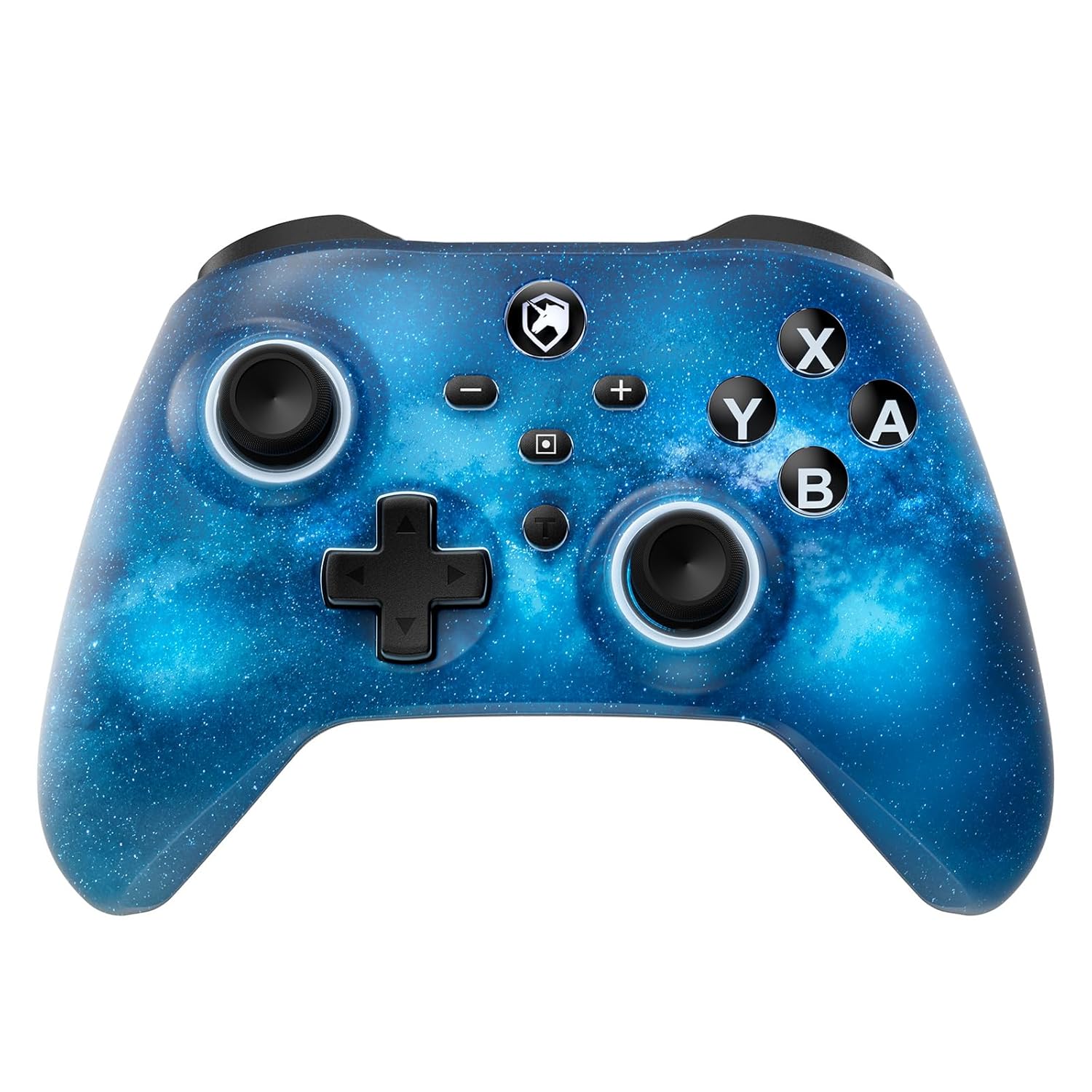
Front view of the ECHTPower Wireless Controller, showcasing its Starry Sky Blue design and button layout.
- Venstre analoge pind: Til bevægelse og kamerastyring.
- Højre analoge pind: Til kamerastyring og sigtning.
- D-Pad: Retningsbestemt input.
- A/B/X/Y-knapper: Standard handlingsknapper.
- V/H-knapper: Skulderknapper.
- ZL/ZR-udløsere: Analoge triggere til præcis input.
- Hjemknappen: Vender tilbage til systemets startskærm.
- Skærmbillede-knap: Tager skærmbilleder.
- Plus (+) / Minus (-) knapper: Navigation i systemmenuen.
- Turbo (T)-knap: Aktiverer og justerer turbofunktioner.
- Macro (M) Button: Initiates macro programming.
- M1/M2 knapper: Programmable back paddles.
5. Opsætning
5.1 Indledende opladning
Before first use, fully charge your controller. Connect the included USB charging cable to the controller's USB-C port and a USB power source (e.g., console, PC, USB wall adapter). The charging indicator will illuminate during charging and turn off when fully charged.

The controller features a 1000mAh battery, providing approximately 6-8 hours of playtime with lights on, and takes 2-3 hours to fully charge.
5.2 Pairing with Nintendo Switch/Switch 2
To pair your controller with a Nintendo Switch or Switch 2 console:
- Vælg HOME-menuen Controllere > Skift greb/rækkefølge.
- På controlleren skal du trykke på og holde Hjem-knap for 3-5 seconds until the LED indicators begin to flash rapidly.
- Når de er parret, lyser den/de tilsvarende afspiller-LED('er) på controlleren konstant.

The ECHTPower controller is compatible with Nintendo Switch 2, though it does not support the C key, 3.5mm audio jack, or wake-up function on Switch 2.
5.3 Parring med pc (Windows)
To connect to a Windows PC:
- Sørg for, at din pc har Bluetooth aktiveret.
- Gå til Indstillinger > Enheder > Bluetooth og andre enheder.
- Vælge Tilføj Bluetooth eller anden enhed > Bluetooth.
- Tryk og hold på Hjem-knap on the controller until the LEDs flash.
- Vælg controlleren fra listen over tilgængelige enheder, der skal parres.
5.4 Pairing with Android/iOS
To connect to Android or iOS devices:
- Aktiver Bluetooth på din mobilenhed.
- Tryk og hold på Hjem-knap on the controller until the LEDs flash.
- Select the controller from the Bluetooth device list on your phone/tablet.

The ECHTPower Wireless Controller offers wide compatibility across Switch, PC, Android, and iOS platforms.
6. Betjeningsvejledning
6.1 Tænd/sluk
- Tænd: Tryk på Hjem-knap engang.
- Sluk: Tryk og hold på Hjem-knap for 5 seconds, or the controller will automatically power off after 5 minutes of inactivity (adjustable via KeyLinker app).
6.2 RGB-lysstyring
The controller features 9 different light effects and 3 light models (Breathing Cycle, Laser Mode, Neon Mode) with 4 levels of brightness adjustment (25%-50%-75%-100%).
- Skift farve: Trykke Macro (M) + Minus (-).
- Skift lystilstand: Trykke Macro (M) + Plus (+).
- Juster lysstyrke: Trykke Macro (M) + Left Analog Stick (down).

The controller's RGB lighting offers 9 colors and 4 light modes, creating a dynamic visual experience.
Official ECHTPower video demonstrating the wireless controller's features, including its RGB lighting and responsiveness.
6.3 Makroprogrammering
The programmable function allows you to map up to 16 button functions to the M1 or M2 back paddles, enabling complex skill execution with a single press.
- Gå ind i programmeringstilstand: Tryk og hold på Macro (M) button, og tryk derefter på M1- eller M2-knap you wish to program. The indicator light will flash slowly.
- Optagelsessekvens: Press the sequence of buttons you want to record (up to 16 inputs).
- Afslut programmeringstilstand: Tryk på Macro (M) button again. The indicator light will stop flashing.
- Ryd makro: In programming mode, press the M1- eller M2-knap twice without inputting any sequence.

The controller's ultra-programmable design allows mapping various buttons to the M1 and M2 back paddles for enhanced gameplay.
6.4 Turbofunktion
The controller supports both auto and manual Turbo functions with three adjustable speeds: 5 rounds/s, 12 rounds/s, and 25 rounds/s.
- Indstil turbo: Tryk og hold på Turbo (T)-knap, then press the desired action button (A/B/X/Y/L/R/ZL/ZR). The button will now have Turbo functionality.
- Juster turbohastighed: Tryk og hold på Turbo (T)-knap, og tryk derefter på Right Analog Stick (up/down) to cycle through speeds.
- Klar turbo: Tryk og hold på Turbo (T)-knap, then press the Turbo-enabled action button again.

The controller offers strong manual and auto turbo capabilities, allowing up to 25 shots per second for rapid actions.
6.5 Vibrationsjustering
The built-in dual vibration motors provide 4 levels of feedback: Strong, Medium, Weak, and None, for a realistic gaming experience.
- Juster vibration: Tryk og hold på Turbo (T)-knap, og tryk derefter på D-Pad (up/down) to cycle through vibration intensities.

Adjustable dual vibration provides four intensity levels (0%, 30%, 70%, 100%) for a customized gaming experience.
7. Vedligeholdelse
- Rensning: Brug en blød, tør klud til at rengøre controlleren. Brug ikke skrappe kemikalier eller slibende materialer.
- Opbevaring: Opbevar controlleren et køligt, tørt sted væk fra direkte sollys og ekstreme temperaturer, når den ikke er i brug.
- Batteripleje: For at forlænge batteriets levetid bør du undgå at aflade controlleren helt ofte. Oplad den regelmæssigt, selvom den ikke er i konstant brug.
8. Fejlfinding
If you encounter any issues with your ECHTPower controller, please refer to the table below for common problems and solutions:
| Problem | Mulig årsag | Løsning |
|---|---|---|
| Controlleren tænder ikke. | Lavt batteri. | Charge the controller for 2-3 hours. |
| Kan ikke parres med enheden. | Controlleren er ikke i parringstilstand; Bluetooth-interferens; enhed Bluetooth slukket. | Ensure controller is in pairing mode (flashing LEDs). Turn off/on device Bluetooth. Move closer to the device. |
| Buttons/Joysticks unresponsive. | Connection issue; software glitch. | Reconnect the controller. Reset the controller (refer to manufacturer's specific reset instructions if available, usually a small pinhole button). |
| Vibration not working or too weak/strong. | Vibration setting is off or at minimum/maximum. | Adjust vibration intensity using Turbo (T) + D-Pad (up/down). |
| Macro not working correctly. | Forkert programmering. | Re-program the macro carefully following the instructions in Section 6.3. |
9. Specifikationer
| Feature | Detalje |
|---|---|
| Modelnummer | SP06GA |
| Batterikapacitet | 1000 mAh Lithium Ion |
| Opladningstid | Ca. 2-3 timer |
| Spilletid | Approx. 6-8 hours (with lights on) |
| Kompatibilitet | Nintendo Switch/Switch Lite/Switch 2, PC (Windows), Android, iOS |
| Forbindelse | Trådløs (Bluetooth), Kablet (USB-C) |
| Vibration | Dual motors, 4 adjustable levels |
| Gyro sensor | 6-axis gyro |
| Dimensioner | 6.3 x 4.69 x 2.72 tommer |
| Vægt | 9.91 ounce |
10. Garanti og support
ECHTPower provides a standard warranty for this product. For detailed warranty information, product support, or any questions not covered in this manual, please contact ECHTPower customer service through the retailer's platform or visit the official ECHTPower webwebsted. Gem venligst din købsbevis til garantikrav.
Ask a question about this manual
Ask about setup, troubleshooting, compatibility, parts, safety, or missing instructions. Manuals+ will review the question and use this page’s manual context to help answer it.