
1. Introduktion
This manual provides comprehensive instructions for the installation, operation, maintenance, and troubleshooting of your EIMSOAH 7in HD Carplay Screen. Please read this manual thoroughly before using the product to ensure proper function and safety.
The EIMSOAH Carplay Screen is an advanced in-dash navigation and multimedia system designed to enhance your driving experience with features such as wireless CarPlay/Android Auto, GPS navigation, and a high-definition touch screen display.
2. Sikkerhedsoplysninger
Always prioritize safety. Improper installation or operation can lead to damage to the device, vehicle, or personal injury. Observe the following safety guidelines:
- Sørg for, at køretøjets tænding er slukket, og at batteriet er frakoblet før montering for at forhindre kortslutninger.
- Kontakt en professionel til installation, hvis du er usikker på nogle trin.
- Do not operate the device in a way that distracts you from driving. Always keep your eyes on the road.
- Undgå at udsætte enheden for ekstreme temperaturer, direkte sollys i længere perioder eller overdreven fugtighed.
- Do not attempt to disassemble or modify the unit. This will void the warranty and may cause damage.
- Ensure all wiring is properly insulated and secured to prevent short circuits or interference.
3. Pakkens indhold
Bekræft, at alle nedenstående varer er til stede i din pakke:
- 1 x Car Multimedia Player Display
- 7 x Wiring Harnesses (various types for power, audio, video, etc.)
- 1 x GPS Box/Antenna
- 1 x Brugsanvisning (dette dokument)
- 1 x Wiring Instruction Diagram

Figure 3.1: Complete package contents including the main display unit, wiring harnesses, and GPS antenna.
4. Opsætning og installation
This section outlines the general steps for installing the EIMSOAH Carplay Screen. Specific wiring details are provided in the separate Wiring Instruction Diagram included in your package. Professional installation is recommended.
- Klargør køretøjet:
- Turn off the vehicle's ignition and remove the key.
- Disconnect the negative terminal of the car battery to prevent electrical hazards.
- Carefully remove the existing car stereo or dashboard panel to access the wiring harness and mounting area.
- Tilslut ledningsnet:
- Refer to the provided Wiring Instruction Diagram for detailed connections.
- Connect the main power harness, speaker wires, and other necessary connections (e.g., AUX, USB, reverse camera input if applicable) to the corresponding ports on the car multimedia player.
- Sørg for, at alle forbindelser er sikre og korrekt isolerede.
- Installer GPS-antenne:
- Monter GPS-antennen på et sted med frit view af himlen, typisk på instrumentbrættet eller under forruden, væk fra metalforhindringer.
- Route the GPS antenna cable to the back of the head unit and connect it to the designated GPS input.
- Monter enheden:
- Carefully slide the car multimedia player into the dashboard opening.
- Secure the unit using the provided mounting brackets or screws, ensuring it is firmly in place.
- Tilslut batteriet igen og test:
- Tilslut bilbatteriets minuspol igen.
- Turn on the vehicle's ignition and power on the car multimedia player.
- Test all functions, including audio, touch screen response, GPS signal, Bluetooth connectivity, and any connected accessories (e.g., reverse camera).
- Saml dashboardet igen:
- Once all functions are verified, carefully reassemble the dashboard panels.

Figure 4.1: The Carplay screen integrated into a vehicle's dashboard.
5. Betjeningsvejledning
The EIMSOAH Carplay Screen operates on Android 12, providing a user-friendly interface. Below are common operations:
5.1 Grundlæggende navigation
- Tænd/sluk: Tryk og hold tænd/sluk-knappen nede (normalt på venstre side af enheden) for at tænde eller slukke for enheden. Et kort tryk slår typisk lyden fra/til.
- Lydstyrkekontrol: Use the volume buttons on the unit or steering wheel controls (if configured) to adjust audio levels.
- Startskærm: Tap the "Home" icon to return to the main application screen.
- Tilbage knap: Tap the "Back" icon to return to the previous screen or menu.
- Seneste apps: Tap the "Recent Apps" icon to view og skifte mellem nyligt åbnede applikationer.
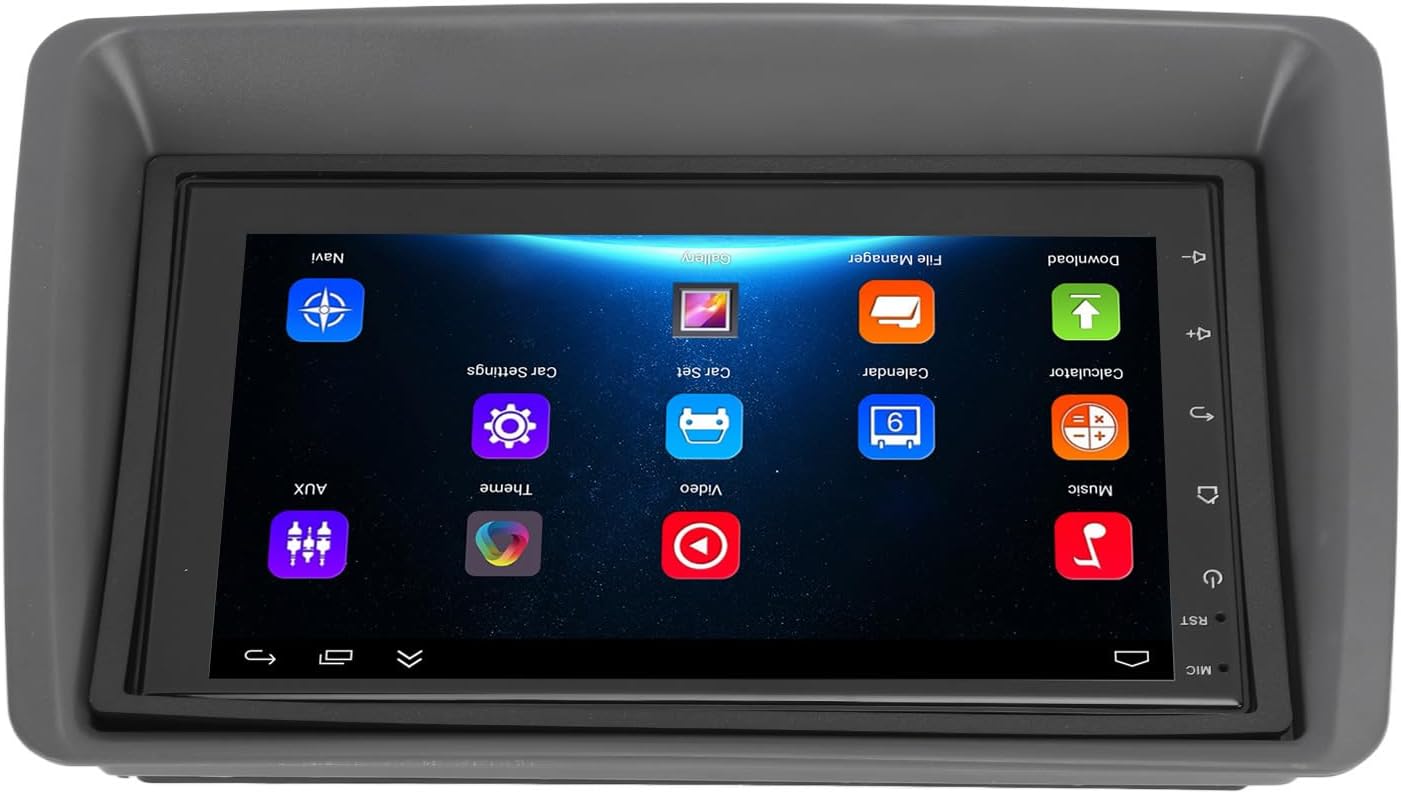
Figure 5.1: Main user interface of the Carplay screen.
5.2 Trådløs CarPlay / Android Auto
Enheden understøtter trådløs Apple CarPlay og Android Auto for problemfri smartphone-integration.
- Sørg for, at Bluetooth og Wi-Fi er aktiveret på din smartphone.
- On the Carplay screen, navigate to the "CarPlay" or "Android Auto" application.
- Follow the on-screen prompts to pair your phone via Bluetooth. Once paired, the system will automatically establish a Wi-Fi connection for CarPlay/Android Auto functionality.
- Your phone's compatible apps (navigation, music, messaging) will be displayed on the Carplay screen.
5.3 GPS-navigation
The unit supports both online and offline GPS navigation.
- Online navigation: Connect the unit to Wi-Fi (via a mobile hotspot or vehicle Wi-Fi) to use online mapping services. Download navigation apps from the pre-installed app store.
- Offline-navigation: Download map data for offline use within your preferred navigation application. This allows navigation without an active internet connection.
5.4 Bluetooth-forbindelse
Tilslut din smartphone via Bluetooth for håndfri opkald og streaming af lyd.
- Go to the "Settings" menu on the Carplay screen and select "Bluetooth".
- Aktivér Bluetooth, og gør enheden synlig.
- On your smartphone, search for available Bluetooth devices and select "EIMSOAH Carplay" (or similar name).
- Bekræft parringskoden på begge enheder.
- Once connected, you can make/receive calls and play audio through the car's speakers.
5.5 Delt skærmvisning
The unit supports split-screen functionality, allowing two applications to be viewed samtidigt.
- Åbn det første program, du ønsker at bruge.
- Press and hold the "Recent Apps" button (or swipe up and hold from the bottom of the screen, depending on the Android version).
- Træk den første app til den ene side af skærmen.
- Vælg den anden applikation fra listen over seneste apps eller app-skuffen for at udfylde den anden halvdel af skærmen.
5.6 Reverse Image Function
If a compatible reverse camera is connected (not included), the screen will automatically display the reverse view når køretøjet sættes i bakgear.
- Ensure the reverse camera is properly installed and connected to the designated video input.
- The system will automatically switch to the camera view når bakgear er lagt i.
6. Vedligeholdelse
Proper maintenance ensures the longevity and optimal performance of your EIMSOAH Carplay Screen.
- Rengøring af skærmen: Brug en blød, fnugfri klud til forsigtigt at tørre skærmen af. Ved genstridige pletter, tør let afampRengør kluden med vand eller et skærmsikkert rengøringsmiddel. Undgå slibende materialer eller barske kemikalier.
- Softwareopdateringer: Periodically check for software updates through the system settings (if available) to ensure you have the latest features and bug fixes.
- Miljøforhold: Avoid exposing the unit to extreme temperatures, high humidity, or direct sunlight for extended periods.
- Kabelstyring: Sørg for, at alle kabler er korrekt tilsluttet og ikke er klemt eller udsat for overdreven slitage.
7. Fejlfinding
If you encounter issues with your EIMSOAH Carplay Screen, refer to the following common problems and solutions:
| Problem | Mulig årsag | Løsning |
|---|---|---|
| Enheden tænder ikke. | No power supply; loose wiring; blown fuse. | Check power connections and vehicle fuse box. Ensure battery is connected. |
| Ingen lydudgang. | Volume muted; speaker wires disconnected; incorrect audio settings. | Check volume level and mute status. Verify speaker wire connections. Adjust audio output settings. |
| Berøringsskærmen reagerer ikke. | Software glitch; screen protector interference; physical damage. | Restart the unit. Remove any screen protectors to test. If problem persists, contact support. |
| GPS-signalet er svagt eller mistet. | GPS antenna obstructed or disconnected; poor satellite coverage. | Sørg for, at GPS-antennen har en fri view of the sky and is securely connected. Move to an open area. |
| Problemer med Bluetooth-forbindelse. | Bluetooth off on device/phone; pairing error; interference. | Ensure Bluetooth is enabled on both devices. Delete previous pairings and re-pair. Move phone closer to unit. |
| CarPlay/Android Auto opretter ikke forbindelse. | Wi-Fi/Bluetooth issues; phone compatibility; app issues. | Verify Wi-Fi and Bluetooth are active. Restart phone and unit. Ensure phone OS is up to date. |
If the problem persists after trying these solutions, please contact EIMSOAH customer support for further assistance.
8. Specifikationer
Detailed technical specifications for the EIMSOAH 7in HD Carplay Screen:
| Feature | Beskrivelse |
|---|---|
| Skærmstørrelse | 7 tommer |
| Operativsystem | Android 12 |
| CPU | 4 Kerne |
| Skærmopløsning | 1024x600 |
| Bluetooth version | 4.0 |
| Radio | FM/RDS |
| Udgangseffekt | 4 x 45W |
| Image Connection | For Android / For iOS (Wireless Apple CarPlay, Wired/Wireless Android Auto) |
| GPS-navigation | Support Online/Offline Navigation |
| Berøringsskærmtype | HD Capacitive Multi-Point Touch |
| Wireless WI-FI | Support 3G/4G/5G wireless signal reception |
| Split Screen Display | Supported (left and right split screen) |
| Ratkontrol | Understøttet |
| Reverse Image Input | Supported (HD reverse video input, camera not included) |
| USB-funktion | Two USB ports (media playback, file transfer, DVR) |
| AUX funktion | Audio/Video input from external devices |
| Beskyttende kredsløb | Overbelastning, Overvoltage, kortslutning |
| Sluk hukommelsen | Understøttet |
| Video input/output | Two video inputs, one video output |
| Lydudgang | Left Audio Output, Right Audio Output |
| Understøttede billedformater | JPEG, GIF, PNG, BMP, JPG |
| Understøttede videoformater | MP4 / MP5 / MKV / AVI / RMVB / 1080P |
| Understøttede lydformater | MP3 / WMA / WAV / FLAC |
| Sprog | Built-in Multiple Languages (Simplified Chinese, Traditional Chinese, English, German, Russian, Spanish, Italian, etc.) |
| Tilpasning | Replacement for Fiat Panda 2003-2012 |
| Varens vægt | 2.57 pund |
| Pakkedimensioner | 14.17 x 8.27 x 4.72 tommer |
9. Garanti og support
EIMSOAH products are designed for reliability and performance. For warranty information and technical support, please refer to the following:
- Garanti: Specific warranty terms and conditions may vary. Please refer to the warranty card included with your product or contact the seller/manufacturer directly for details regarding coverage period and claims process.
- Teknisk support: For technical assistance, troubleshooting beyond this manual, or inquiries about parts and service, please contact EIMSOAH customer support through the retailer where you purchased the product or visit the official EIMSOAH brand store on Amazon: EIMSOAH Store.