
Indledning
This manual provides instructions for the ECONTROLLY L-27-5KEY replacement remote control. This remote is designed to be compatible with various Optoma projector models without requiring any programming or setup. Simply insert batteries and begin use.
Opsætning
Installation af batteri
Fjernbetjeningen kræver to AAA-batterier (medfølger ikke).
- Find batterirummets dæksel på bagsiden af fjernbetjeningen.
- Tryk ned på tappen, og skub dækslet af.
- Isæt to AAA-batterier, og sørg for, at de positive (+) og negative (-) poler er justeret med markeringerne inde i batterirummet.
- Skub batteridækslet tilbage på plads, indtil det klikker sikkert.

Betjeningsvejledning
Grundlæggende betjening
This remote control is pre-programmed and requires no setup. Simply insert batteries and point the remote towards your Optoma projector to operate it.
Kompatible projektormodeller
This remote control is compatible with the following Optoma projector models:
- HD2200, HD22, HD20-LV, HD200X-LV
- VDHDNG, VDHDNZ, HD180, HD65
- HD70S, HD71S, HD50, BR-3042B
- HD21, HD200X, HD20, HD23
Nøglefunktioner
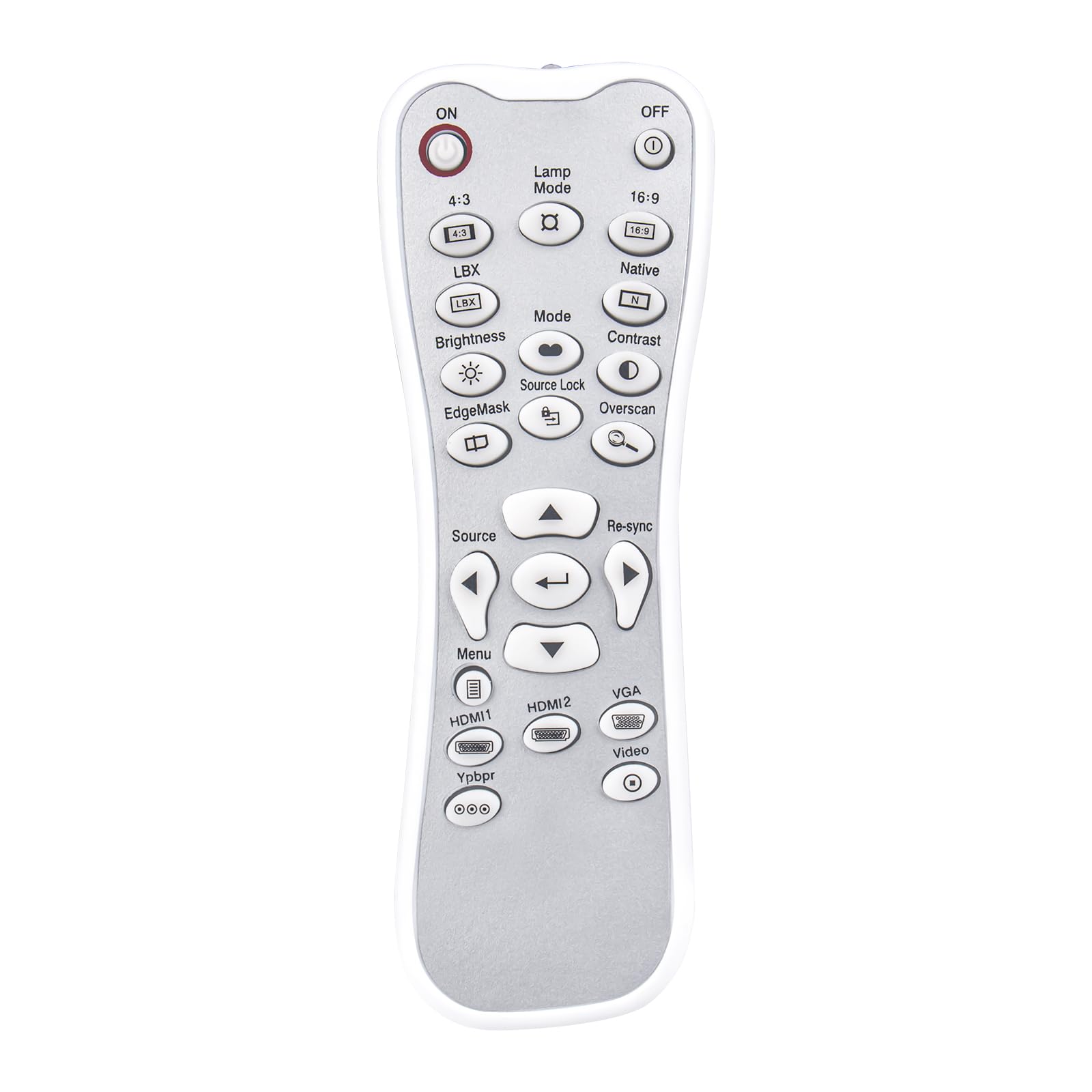
The remote features standard projector control buttons. Refer to your projector's manual for specific functions of each button. Common buttons include:
- ON/OFF: Powers the projector on or off.
- Lamp Mode: Adjusts lamp lysstyrkeindstillinger.
- Kilde: Selects input sources (HDMI1, HDMI2, VGA, Video, YPbPr).
- Menu: Accesses the projector's on-screen menu.
- Navigationsknapper: Up, Down, Left, Right arrows for menu navigation.
- Indtast/OKBekræfter valg.
- Synkroniser igen: Resynchronizes the input signal.
- Kontrast / Lys: Adjusts image contrast and brightness.
- Mode: Cycles through display modes.
- Aspektforhold: 4:3, 16:9, Native, LBX.
Opretholdelse
Rensning
Wipe the remote control with a soft, dry cloth. Do not use abrasive cleaners, solvents, or harsh chemicals, as these may damage the surface or internal components.
Udskiftning af batteri
Replace batteries when the remote control's performance degrades or stops functioning. Always replace both batteries at the same time with new AAA batteries. Do not mix old and new batteries or different types of batteries.
Opbevaring
Store the remote control in a cool, dry place away from direct sunlight, extreme temperatures, and high humidity. Remove batteries if the remote will not be used for an extended period to prevent leakage.
Fejlfinding
| Problem | Mulig årsag | Løsning |
|---|---|---|
| Fjernbetjeningen svarer ikke | Døde eller forkert installerede batterier | Kontroller batteriernes retning, og udskift dem med nye AAA-batterier. |
| Fjernbetjeningen har begrænset rækkevidde | Obstruction between remote and projector; weak batteries | Ensure a clear line of sight to the projector's IR receiver. Replace batteries. |
| Specifikke knapper virker ikke | Projector model incompatibility for that function | While the remote is broadly compatible, some specific functions may vary by projector model. Refer to your projector's manual for detailed button functionality. |
If issues persist after troubleshooting, please contact customer support for further assistance.
Specifikationer
- Modelnavn: L-27-5KEY
- Mærke: EKONTROLLIGT
- Forbindelse teknologi: Infrarød
- Controller type: Knap kontrol
- Maksimal rækkevidde: 33 fod (ca. 10 meter)
- Varens vægt: 1 Ounce (approximately 28 grams)
- Dimensioner (L x B x H): 5 cm L x 2 cm B x 0.6 cm H (ca. 12.7 cm x 5.08 cm x 1.52 cm)
- Strømkilde: 2 x AAA batterier (medfølger ikke)
- Speciel funktion: Ingen programmering påkrævet
- Kompatible enheder: Optoma Projectors (specific models listed in Operating Instructions)

Garantioplysninger
All ECONTROLLY products undergo testing before shipping to ensure proper functionality. This remote control is designed for durability and wear resistance. For specific warranty details, please refer to the seller's policy at the time of purchase.
Kundesupport
If you have questions about compatibility or require further assistance, please contact us. You can leave a message online, and we will provide guidance.
Note: If your specific projector model is not listed in the compatibility section, please contact support before purchasing for at bekræfte kompatibilitet.