
1. Produktet er slutview

Image: The LEVN Wireless Headset HS019, a black on-ear headset with a microphone boom, designed for professional communication.
The LEVN Wireless Headset HS019 is designed for clear communication and productivity in professional and personal environments. It features advanced AI Noise Cancelling technology, Bluetooth 5.2 connectivity, and a versatile charging base with integrated USB ports. Enjoy extended usage with its long-lasting battery and flexible connection options.
2. Hvad er der i æsken
Kontroller venligst pakkens indhold for at sikre, at alle varer er til stede:
- LEVN Wireless Headset
- Opladningsbase
- USB dongle
- Brugermanual
- USB-C kabel
3. Opsætning
3.1 Opladning af headsettet
Before first use, fully charge your LEVN Wireless Headset. You can charge it using the included USB-C cable or by placing it on the multifunction charging base.
- Brug af USB-C-kabel: Connect the USB-C cable to the headset's charging port and to a USB power source (e.g., computer, wall adapter).
- Using Charging Base: Place the headset onto the charging base. Ensure the charging contacts align. The base also provides storage for the USB dongle.

Image: LEVN Wireless Headset placed on its multifunction charging base, which also features four USB ports for additional device connectivity. The base provides a convenient charging and storage solution.
The charging base includes four USB ports for flexible data transfer and connecting peripheral devices like mobile hard drives or USB flash drives, helping to keep your workspace organized.
3.2 Trådløs forbindelse
The headset offers two wireless connection methods: via the 2.4G USB dongle or Bluetooth 5.2.

Image: Illustration showing the two wireless connection methods for the LEVN Wireless Headset: a USB dongle for a stable 2.4G connection and Bluetooth 5.2 for broader compatibility.
3.2.1 Using the 2.4G USB Dongle
- Sæt USB-donglen i en ledig USB-port på din computer eller enhed.
- Power on the headset. It should automatically pair with the dongle.
- Once connected, the indicator light on the dongle will show a steady blue, and the headset will confirm connection.
- Ensure the LEVN Headset is selected as the audio input and output device in your computer's sound settings.
The USB dongle provides a secure, stable connection with low latency and an impressive wireless range of up to 15 meters (49 feet).
3.2.2 Using Bluetooth 5.2
- Tænd headsettet.
- Put the headset into pairing mode (refer to the headset's specific button combination for pairing, usually holding the power button for a few seconds until the indicator light flashes).
- Gå til Bluetooth-indstillingerne på din enhed (smartphone, tablet, computer) og søg efter nye enheder.
- Select "LEVN HS019" (or similar name) from the list of available devices to pair.
- Once connected, the headset's indicator light will show a steady blue, and you will hear a confirmation tone.
4. Betjeningsvejledning
4.1 Tænd/sluk
- Tænd: Tryk på tænd/sluk-knappen og hold den nede i cirka 3 sekunder, indtil indikatorlampen lyser.
- Sluk: Tryk på tænd/sluk-knappen og hold den nede i cirka 3 sekunder, indtil indikatorlampen slukker.
4.2 Opkaldskontrol
- Besvar/afslut opkald: Tryk én gang på multifunktionsknappen.
- Afvis opkald: Tryk og hold multifunktionsknappen nede i 2 sekunder.
- Lydstyrke op/ned: Use the physical volume rocker buttons located on the headset.
- Slå mikrofon til/fra: Press the dedicated Mute button on the microphone boom or earcup. This provides instant call privacy.
4.3 AI-støjreduktion
The LEVN HS019 features AI Noise Cancellation, which eliminates up to 99.9% of background noise, ensuring your voice remains clear during calls and online meetings. This feature is automatically active to optimize your audio experience.
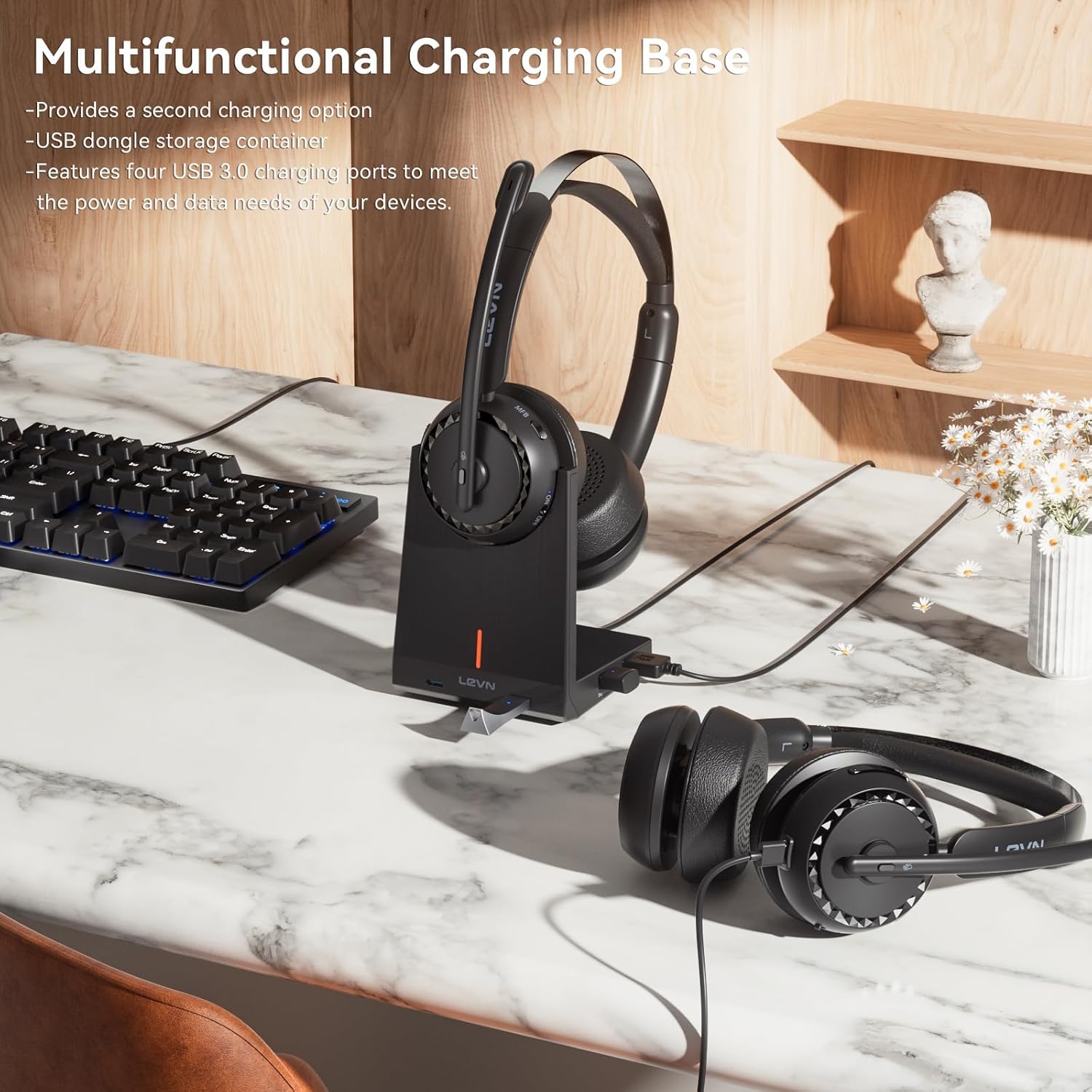
Image: A person wearing the LEVN Wireless Headset in an office environment, demonstrating the AI Noise Cancellation feature. Visual representation shows background noise being filtered out, resulting in clear voice transmission.
4.4 Batterilevetid
The headset is equipped with a high-capacity battery, providing up to 65 hours of continuous playback on a single charge. This ensures extended use for long work sessions or entertainment without frequent recharging.

Image: A LEVN Wireless Headset positioned above a clock face indicating "65h", surrounded by batteries, symbolizing its ultra-long battery life of 65 hours.
5. Vedligeholdelse
- Rensning: Use a soft, dry cloth to clean the headset and charging base. Avoid using harsh chemicals or abrasive materials.
- Opbevaring: When not in use, store the headset in a cool, dry place, preferably on its charging base to keep it charged and protected.
- Batteripleje: For at forlænge batteriets levetid bør du undgå at aflade headsettet helt ofte. Oplad det regelmæssigt.
- Komfort: The headset is designed for comfort with plush materials. Adjust the headband and earcups for a secure yet comfortable fit during extended use.

Image: The LEVN Wireless Headset resting on a soft, cloud-like surface, illustrating its comfortable design and feather-light feel for all-day wear.
6. Fejlfinding
If you encounter issues with your LEVN Wireless Headset, please refer to the following common solutions:
- Ingen lyd/Mikrofonen virker ikke:
- Sørg for, at headsettet er tændt og fuldt opladet.
- Verify the headset is correctly paired via Bluetooth or the USB dongle.
- Check your computer's sound settings to ensure the LEVN Headset is selected as the default input and output device.
- If using the USB dongle, try unplugging and re-inserting it. Restarting your computer may also resolve the issue.
- Ensure the microphone is not muted using the physical mute button.
- Connection Drops/Unstable Connection:
- Sørg for, at du er inden for den trådløse rækkevidde på 15 meter.
- Minimér interferens fra andre trådløse enheder (f.eks. Wi-Fi-routere, andre Bluetooth-enheder).
- Try re-pairing the headset with your device or re-inserting the USB dongle.
- Headsettet oplader ikke:
- Ensure the USB-C cable is securely connected to both the headset/charging base and the power source.
- If using the charging base, ensure the headset is correctly seated and the charging contacts are clean.
- Prøv et andet USB-C-kabel eller strømadapter.
7. Specifikationer
| Feature | Detalje |
|---|---|
| Mærke | LEVN |
| Modelnummer | HS019 |
| Modelnavn | LE-HS016 V3 |
| Forbindelsesteknologi | Wireless (Bluetooth 5.2, 2.4G USB Dongle) |
| Bluetooth rækkevidde | Op til 15 meter (49 fod) |
| Støjkontrol | AI støjreduktion |
| Øreplacering | On Ear |
| Batterilevetid | Op til 65 timer (afspilning) |
| Charging Ports on Base | 4 USB-porte |
| Kontroltype | Call Control (Buttons) |
| Frekvensområde | 20 Hz til 20,000 Hz |
| Materiale | Plastic, Stainless Steel, Leather |
| Vægt | 120 gram |
8. Garanti og support
LEVN products are designed for reliability and performance. For warranty information, technical support, or customer service inquiries, please refer to the official LEVN website or contact their customer support directly. The contact details are typically provided in the packaging or on the manufacturer's webwebsted.
Gem venligst dit købsbevis for garantikrav.