
1. Introduktion
Welcome to the instruction manual for your new SUNLUX 12-Digit Electronic Calculator. This manual provides essential information on how to set up, operate, maintain, and troubleshoot your device. Please read it thoroughly to ensure optimal performance and longevity of your calculator.
2. Pakkens indhold
Tjek venligst pakken for følgende varer:
- SUNLUX 12-Digit Electronic Calculator
- Instruktionsmanual (dette dokument)
3. Produktet er slutview
The SUNLUX 12-Digit Electronic Calculator is designed for ease of use and reliability, featuring a clear display and responsive keys. It operates on a dual power system, utilizing both solar energy and a backup battery.
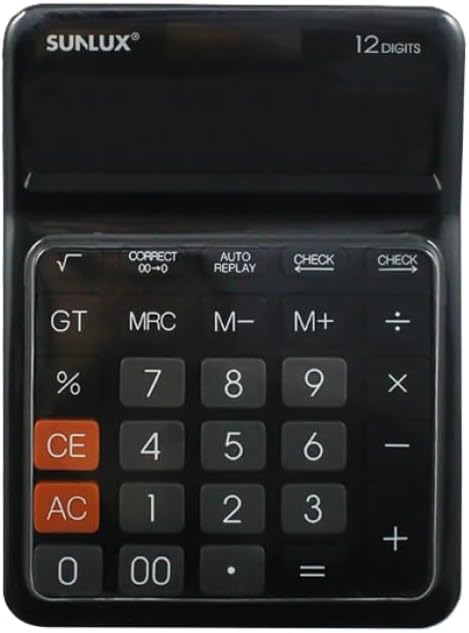
This image shows the front of the SUNLUX 12-digit electronic calculator, highlighting its display, numeric keypad, and function buttons. The calculator features a black casing with clearly labeled keys for various operations.
Nøglefunktioner
- 0-9, 00: Numeriske indtastningstaster.
- +: Addition.
- -: Subtraction.
- *: Multiplication.
- /: Division.
- =: Equals key, displays the result of a calculation.
- %: Procenttage beregning.
- √: Square root function.
- GT (Grand Total): Recalls the grand total of all calculations.
- MRC (Memory Recall/Clear): Recalls memory content (first press), clears memory (second press).
- M+ (Memory Plus): Tilføjer den viste værdi til hukommelsen.
- M- (Hukommelse minus): Trækker den viste værdi fra hukommelsen.
- CE (Klar indtastning): Clears the last entered number or calculation.
- AC (alt klart): Sletter alle indtastninger og hukommelse og nulstiller lommeregneren.
- KONTROLLERE: Tillader vedrviewgennemgang af tidligere beregningstrin.
- AUTO REPLAY: Automatically replays the calculation steps.
- CORRECT (00->0): Corrects the last digit entered.
4. Opsætning
Strømforsyning
Your SUNLUX calculator features a dual power system: solar power and battery power. Under sufficient light, the calculator will operate using solar power. In low light conditions, it will automatically switch to battery power.
Installation af batteri
While the calculator primarily uses solar power, a battery ensures operation in all lighting conditions. If the display is dim or unresponsive in low light, the battery may need replacement.
- Find batteridækslet på bagsiden af lommeregneren.
- Fjern forsigtigt dækslet.
- Insert a new battery (type typically AG10 or LR1130, check compartment for specific type if indicated) with the correct polarity (+/-).
- Sæt batterirummets dæksel på igen.
5. Betjeningsvejledning
Grundlæggende beregninger
- Tilføjelse: Enter first number, press +, enter second number, press =.
- Subtraktion: Enter first number, press -, enter second number, press =.
- Multiplikation: Enter first number, press *, enter second number, press =.
- Afdeling: Enter first number, press /, enter second number, press =.
Hukommelsesfunktioner
- M+: Tilføjer det aktuelt viste nummer til hukommelsen.
- M-: Trækker det aktuelt viste tal fra hukommelsen.
- MRC: Tryk én gang for at genkalde den værdi, der er gemt i hukommelsen. Tryk to gange for at slette hukommelsen.
- GT: Displays the grand total of all results obtained since the last AC press.
Særlige funktioner
- Procenttage (%): F.eksample, to calculate 10% of 200: Enter 200, press *, indtast 10, tryk %.
- Kvadratrod (√): Indtast et tal, og tryk derefter på √.
- KONTROLLERE: After a series of calculations, press CHECK to review the entered operations step-by-step.
- AUTO REPLAY: Press AUTO REPLAY to automatically cycle through the calculation steps.
- CORRECT (00->0): If you enter a wrong digit, press CORRECT to delete the last digit without clearing the entire entry.
6. Vedligeholdelse
Rensning
To clean your calculator, use a soft, dry cloth. Do not use liquid cleaners, abrasive pads, or chemical solvents, as these can damage the display or casing.
Opbevaring
Opbevar lommeregneren et køligt og tørt sted væk fra direkte sollys og ekstreme temperaturer. Undgå at placere tunge genstande oven på lommeregneren for at forhindre beskadigelse af displayet eller tasterne.
7. Fejlfinding
- Skærmen er tom eller svag:
Ensure the calculator is in a well-lit area for solar power. If the issue persists, the battery may need replacement. Refer to the "Battery Installation" section. - Forkerte beregningsresultater:
Trykke AC to clear all previous entries and memory. Re-enter your calculation carefully. Check if any memory functions (M+, M-, MRC) are active. - Tasterne reagerer ikke:
Ensure the calculator is clean and free from debris around the keys. If the problem persists, try replacing the battery.
8. Specifikationer
Tekniske detaljer
- Mærke: SUNLUX
- Model: 7886116
- Antal cifre: 12
- Dimensioner: 17.5 cm x 12.5 cm (approximately)
- Strømkilde: Dobbelt strøm (sol og batteri)
- Materiale: Plast og metal
- Varens vægt: 300 gram
- Oprindelsesland: Kina
9. Garanti og support
Garantioplysninger
This product is covered by the standard manufacturer's warranty. Please refer to your purchase documentation or contact your retailer for specific warranty terms and conditions.
Kundesupport
For any questions, technical assistance, or support regarding your SUNLUX calculator, please contact the retailer from whom you purchased the product. They will be able to provide the most accurate and timely assistance.