
1. Produktet er slutview
The tectake® Corner Workshop Shelf is a robust and versatile storage solution designed for workshops, cellars, garages, and other storage areas. It features a galvanized metal frame and five adjustable MDF shelves, offering significant load capacity and efficient use of corner spaces.
- High stability and load capacity.
- Galvanized metal construction for durability.
- Five individually adjustable MDF shelves.
- Reinforcing crossbars for enhanced stability.
- Easy, tool-free assembly.
- Rubber feet to protect flooring.
- Rounded edges for safety.

Figur 1: The tectake® Corner Workshop Shelf, showcasing its five shelves and robust construction. The image highlights its capacity to hold heavy items, with a visual indicator of 175 kg per shelf and a total capacity of 875 kg. Various tools and containers are stored on the shelves, demonstrating its practical application in a workshop or garage setting.

Figur 2: This image illustrates additional features of the tectake® Corner Workshop Shelf, including robust crossbars for increased stability, an enormous load capacity of up to 875 kg, 100% stability thanks to anti-slip feet, and its flexible combinability with other shelving units of the same width.
2. Sikkerhedsoplysninger
ADVARSEL: The maximum load capacity per shelf is 175 kg. The total load capacity for the entire unit is 875 kg. Exceeding these limits can lead to structural failure, damage to the product, and potential injury. Always adhere to the stated load capacities.
- Always assemble the shelf on a flat, stable surface.
- Ensure all components are securely fitted before loading the shelf.
- Distribute weight evenly across shelves. Avoid placing all heavy items on one side or one shelf.
- Do not climb on the shelf.
- Keep children and pets away from the shelf during assembly and when loaded.
- The rounded edges are designed to minimize injury risk during installation and use.
- Consider anchoring the shelf to a wall for additional stability, especially in areas prone to seismic activity or if heavy items are stored on upper shelves.
3. Pakkens indhold
Before beginning assembly, verify that all parts listed below are present and undamaged. If any parts are missing or damaged, contact customer support.
- Corner Workshop Shelf components (galvanized steel uprights, crossbars, corner connectors).
- 5 MDF shelves.
- Mounting hardware (if applicable for wall anchoring, otherwise for connecting shelf sections).
- Rubber feet for floor protection.
- Installationsvejledning (denne manual).
4. Opsætning og montering
The tectake® Corner Workshop Shelf features a plug-in system for easy, tool-free assembly. It is recommended to assemble the unit with two people for optimal ease and safety.
4.1 Forberedelse
- Ryd et rummeligt, fladt og rent område til samling.
- Unpack all components and lay them out, checking against the package contents list.
- Identify the uprights, crossbars, corner connectors, and MDF shelves.
4.2 Monteringstrin
- Saml rammen: Begin by connecting the uprights using the corner connectors and crossbars. The plug-in system allows components to slot together. Ensure each connection is firm.
- Installer de nederste hylder: Once the basic frame structure is stable, insert the first MDF shelf at the desired height. The shelves can be placed individually at any height. Ensure the reinforcing crossbars are correctly positioned under the MDF panels for support.
- Fortsæt med at bygge opad: Continue adding upright sections and shelves, working your way up. The design allows for flexible height adjustment of each shelf.
- Fastgør gummifødder: Once the frame is fully assembled and all shelves are in place, attach the rubber feet to the bottom of the uprights. These protect your floor and provide additional grip.
- Endelig kontrol: Before loading, gently shake the assembled shelf to ensure all connections are secure and the unit is stable.
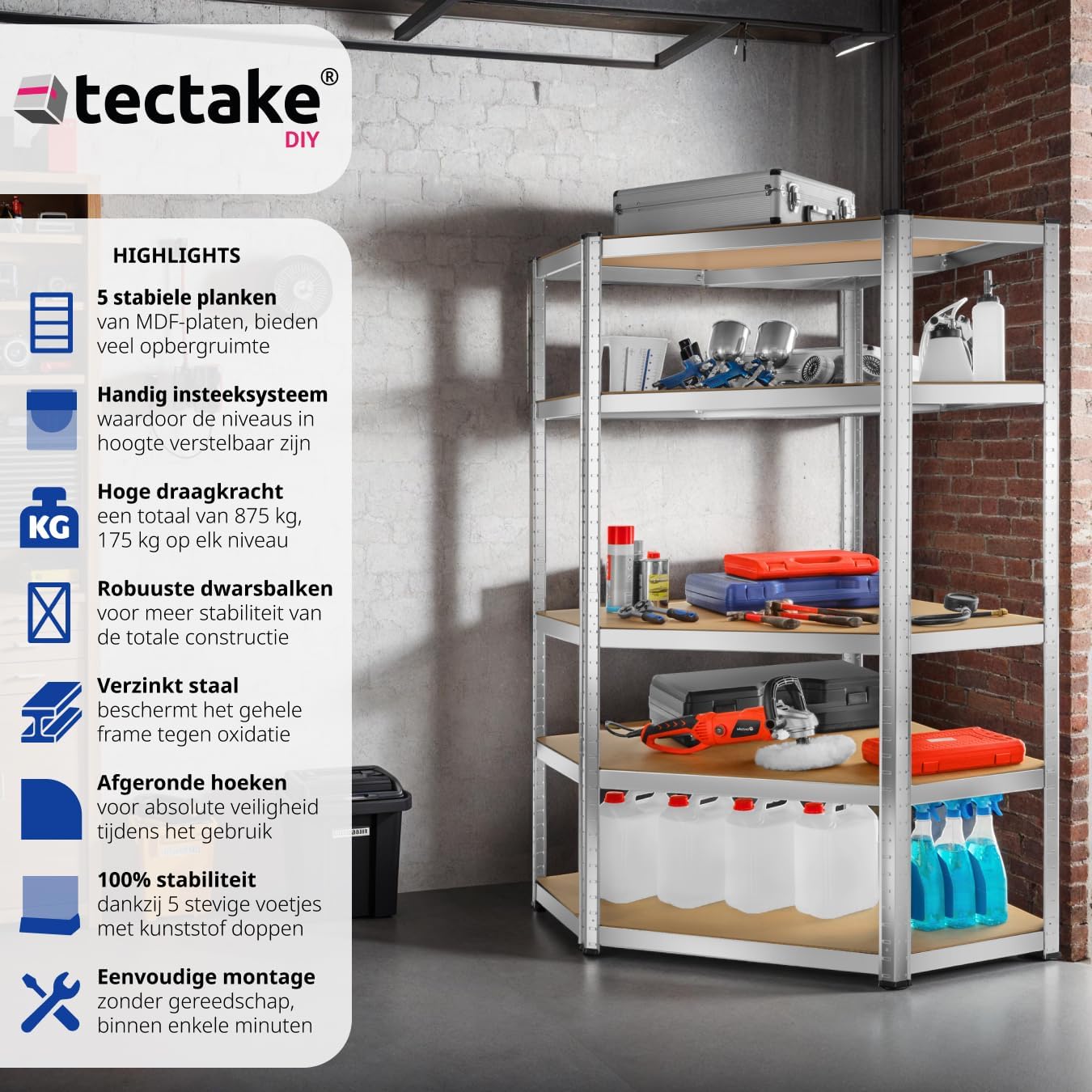
Figur 3: This image highlights the key features of the tectake® Corner Workshop Shelf, including its 5 stable MDF shelves, convenient plug-in system for adjustable height, high load capacity (875 kg total, 175 kg per shelf), robust crossbars, galvanized steel frame for rust protection, rounded corners for safety, 5 stable feet with plastic caps, and easy tool-free assembly.

Figur 4: An illustration emphasizing the "EXTRA STRONG" nature of the tectake® Corner Workshop Shelf. It details that the shelf is 100% rust-free due to galvanized steel, features sturdy MDF panels, a practical plug-in system for assembly, and floor-protective end caps. Each shelf is shown with a 175 kg load capacity indicator.
5. Brugsanvisning (brug)
The tectake® Corner Workshop Shelf is designed for organized storage of various items in your workshop, garage, cellar, or utility room.
- Indlæser: Place items on the shelves, ensuring that the weight is distributed as evenly as possible. Do not exceed the maximum load capacity of 175 kg per shelf or 875 kg total.
- Justering af hyldehøjde: The plug-in system allows for easy adjustment of shelf heights. To adjust, unload the shelf, carefully disassemble the relevant section, reposition the crossbars and shelf at the desired height, and reassemble securely.
- Corner Optimization: This shelf is specifically designed to utilize corner spaces efficiently, providing maximum storage in often-underused areas.
- Combination with Other Shelves: The shelf can be combined with other tectake® shelving units of the same width to create a larger, continuous storage system. Ensure proper connection and stability when combining units.

Figur 5: This image demonstrates the tectake® Corner Workshop Shelf optimally placed in a corner, highlighting its space-saving design. The shelf is shown empty, emphasizing its clean lines and readiness for storage. A small red vacuum cleaner is visible in the foreground, indicating a typical garage or utility room environment.

Figur 6: The tectake® Corner Workshop Shelf positioned in a workshop, filled with various tools and supplies. The image emphasizes its role as an "ultimate space saver" and highlights its "robust design" and "quick assembly" features. Other shelving units are visible in the background, suggesting its compatibility with existing storage systems.
6. Vedligeholdelse
Regular maintenance ensures the longevity and safe operation of your tectake® Corner Workshop Shelf.
- Rensning: Tør den galvaniserede stålramme af med en kludamp klud. Brug en tør eller let fugtet klud til MDF-hylderne.amp cloth. Avoid abrasive cleaners or excessive moisture, which can damage the MDF.
- Inspektion: Periodically check all connections to ensure they remain tight and secure. Inspect the MDF shelves for any signs of damage, warping, or excessive wear.
- Rustforebyggelse: The galvanized steel is designed to resist rust. However, avoid prolonged exposure to highly corrosive environments or standing water to maintain its condition.
7. Fejlfinding
This section addresses common issues you might encounter with your shelf.
| Problem | Mulig årsag | Løsning |
|---|---|---|
| Shelf feels unstable or wobbly. |
|
|
| Shelf sags or bows under load. |
|
|
| Difficulty adjusting shelf height. |
|
|
8. Specifikationer
Detailed technical specifications for the tectake® Corner Workshop Shelf.

Figur 7: A detailed diagram illustrating the dimensions and load capacities of the tectake® Corner Workshop Shelf. It shows the total dimensions (H x W x D: 180 x 89.5 x 89.5 cm), shelf thickness (5 mm), individual shelf load capacity (175 kg), and total load capacity (875 kg). The diagonal measurement to the center of the corner is also indicated as 70.5 cm.
| Feature | Detalje |
|---|---|
| Mærke | TecTake |
| Modelnummer | 405051 |
| Overordnede mål (H x B x D) | 180 x 89.5 x 89.5 cm |
| Vægt | 23.8 kg |
| Maksimal samlet lastekapacitet | 875 kg |
| Belastningskapacitet pr. hylde | 175 kg |
| Antal hylder | 5 |
| Hyldemateriale | MDF (mediumdensitetsfiberplade) |
| Hyldetykkelse | 5 mm |
| Rammemateriale | Galvaniseret stålplade |
| Speciel funktion | Heavy-duty, Corner design, Adjustable shelves |
| Samlingstype | Plug-in system (tool-free) |
9. Garanti og support
Information regarding warranty and customer support for the tectake® Corner Workshop Shelf is typically provided at the point of purchase or within the product packaging. For specific warranty details or technical assistance, please refer to the documentation included with your product or contact tectake customer service directly.
Spare parts availability information is not provided in the product details. Please contact the manufacturer or seller for inquiries regarding spare parts.