
BUNGPUNG BP-HDC-MC03
BUNGPUNG 8K@60Hz HDMI eARC Audio Extractor Adapter User Manual
Model: BP-HDC-MC03
Brand: BUNGPUNG
1. Introduktion
This manual provides detailed instructions for the installation, operation, and maintenance of your BUNGPUNG 8K@60Hz HDMI eARC Audio Extractor Adapter. This device is designed to extract audio signals from an HDMI source or a TV with ARC/eARC functionality, allowing you to output HDMI eARC audio to a soundbar or other audio system. It supports high-resolution video up to 8K@60Hz and is compatible with HDMI 2.1, HDCP 2.3, and HDR standards.

Figure 1: BUNGPUNG 8K@60Hz HDMI eARC Audio Extractor Adapter. This image shows the compact black adapter with green accents, featuring HDMI IN, OUT, eARC OUT ports, and control switches.
2. Nøglefunktioner
- HDMI eARC Audio Extraction: Extracts audio signals from an HDMI source or TV with ARC/eARC to output HDMI eARC audio to a soundbar.
- Ultra HD Video Support: Supports video resolutions up to 8K@60Hz 4:2:0 12bit, 4K@120Hz 4:4:4 12bit, and UltraHD 4K@60Hz RGB 4:4:4. Backwards compatible with 480i / 480p / 720p / 1080i / 1080P@60/120Hz.
- Advanced Compatibility: Compatible with HDMI 2.1, HDCP 2.3, and HDR. Supports deep color (30 bit, 36 bit, 48 bit).
- eARC-funktionalitet: When eARC is enabled, the TV(eARC) OUT port functions as an ARC/eARC audio channel, returning audio from the 8K TV. When eARC is off, audio for the soundbar comes from the HDMI input source.
- Bred enhedskompatibilitet: Works with Blu-ray players, DVDs, HD players, Amazon Fire TV, Apple TV, PS3/4 Pro, Xbox, PCs/Laptops, HD cameras, Chromecast, Fire Stick, Roku, HDDVR, full HD TVs, monitors, projectors, speakers, amplifiers, and soundbars.
- Holdbar konstruktion: Features a durable metal body for rapid heat absorption and dissipation, reducing EMI/RFI noise interference.
- Kompakt og nem at bruge: Compact size with plug-and-play installation. Includes an independent power supply for stable operation.
3. Pakkens indhold
Sørg venligst for, at alle varer er til stede og i god stand, når du åbner pakken:
- BUNGPUNG 8K@60Hz HDMI eARC Audio Extractor Adapter (BP-HDC-MC03)
- DC 5V strømadapter
- Brugervejledning (dette dokument)
4. Opsætning og forbindelser
4.1. Enhed overview
Familiarize yourself with the ports and indicators on the adapter:

Figur 2: Top og bagside view of the adapter showing input/output ports, LEDs, and control switches.

Figure 3: Detailed diagram explaining the function of each port, LED, and switch.
Front Panel Indicators and Controls:
- Power LED: Red when the device is powered on.
- IN LED: Green when an input signal is detected.
- OUT LED: Green when the OUT port connects to a TV.
- Soundbar LED: Green when the eARC OUT port connects to a soundbar.
- eARC LED: Flashing indicates eARC/ARC is not working properly. Solid green indicates eARC/ARC is working properly.
- eARC button: Press to enable or disable the eARC function.
- EDID DIP Switch: Used to set EDID modes. Refer to Section 5.2 for details.
- SERVICE Port: Firmwareopdatering og debug-port.
Bagpanelporte:
- IN (Source) Port: HDMI signal input port, connects to an HDMI source device (e.g., PS5, Blu-ray player, PC).
- OUT (TV(eARC)) Port: HDMI output port, connects to a TV. Can be used as an ARC/eARC audio channel when the eARC function is enabled.
- eARC OUT (Soundbar) Port: HDMI audio output port, connects to a soundbar or other audio system.
- DC 5V port: Power input port for the included DC 5V/1A power adapter.
4.2. Tilslutningstrin
Follow these steps to connect your adapter:
- Connect an HDMI cable from your source device (e.g., Blu-ray player, game console, PC) to the IN (Source) port on the adapter.
- Tilslut et HDMI-kabel fra OUT (TV(eARC)) port on the adapter to the HDMI input on your TV or display.
- Tilslut et HDMI-kabel fra eARC OUT (Soundbar) port on the adapter to the HDMI input on your soundbar or audio receiver.
- Connect the included DC 5V power adapter to the DC 5V port on the adapter, then plug the power adapter into a wall outlet.
- Power on all connected devices (source, TV, soundbar, and the adapter).

Figure 4: Typical connection setup for the HDMI eARC Audio Extractor Adapter.
5. Betjening
5.1. eARC Function Control
The adapter provides flexibility in how audio is routed, depending on whether the eARC function is enabled or disabled.
eARC OFF Mode:
When the eARC function is turned OFF (by pressing the eARC button until the eARC LED is off or flashing), the audio signal for the soundbar is extracted directly from the HDMI input source. The HDMI OUT port will carry both video and audio to the TV, and the eARC OUT port will carry the extracted audio to the soundbar.

Figure 5: Audio routing when eARC function is OFF. Audio is extracted from the HDMI IN source.
eARC ON Mode:
When the eARC function is turned ON (by pressing the eARC button until the eARC LED is solid green), the TV(eARC) OUT port acts as an ARC/eARC audio channel. In this mode, the audio signal for the soundbar is returned from the 8K TV connected to the OUT port. This is useful for playing audio from smart TV apps or broadcast channels through your soundbar.

Figure 6: Audio routing when eARC function is ON. Audio is returned from the TV via eARC.
5.2. EDID Management
The EDID (Extended Display Identification Data) DIP switch allows you to manually configure the audio and video capabilities reported by the adapter to the source device. This can help resolve compatibility issues or force specific resolutions/audio formats.
The DIP switch has two positions (1 and 0) for each setting. Refer to the diagram below for specific configurations:
Figure 7: EDID DIP switch settings and their corresponding audio/video output modes.
| DIP Setting (1=Up, 0=Down) | Beskrivelse |
|---|---|
| [DIP]=111 | Copy OUT port sink video EDID, Audio 7.1CH |
| [DIP]=110 | Copy OUT port sink video and Audio EDID |
| [DIP]=101 | FRL12G_8K_HDR, 2.0CH |
| [DIP]=100 | FRL12G_8K_HDR, 5.1CH |
| [DIP]=011 | FRL10G_8K_HDR, 7.1CH |
| [DIP]=010 | FRL10G_8K_HDR, 2.0CH |
| [DIP]=001 | FRL10G_8K_HDR, 5.1CH |
| [DIP]=000 | FRL10G_8K_HDR, 7.1CH |
Note: Always power cycle the adapter after changing EDID DIP switch settings for the changes to take effect.
6. Specifikationer
| Attribut | Værdi |
|---|---|
| Produktmål (L x B x H) | 3.94 x 2.76 x 0.79 tommer (95 mm x 68 mm x 18 mm) |
| Varens vægt | 0.007 ounces (ca. 178 g) |
| Modelnummer | BP-HDC-MC03 |
| Fabrikant | BUNGPUNG |
| Kompatible enheder | Laptop, Speaker, Television, Blu-ray player, DVD, HD player, Game Consoles (PS3/4 Pro, Xbox), Streaming Devices (Amazon Fire TV, Apple TV, Chromecast, Fire Stick, Roku), Projectors, Amplifiers, Soundbars |
| Connector Type | HDMI |
| Understøttelse af videoopløsning | Up to 8K@60Hz 4:2:0 12bit, 4K@120Hz 4:4:4 12bit, UltraHD 4K@60Hz RGB 4:4:4. Backwards compatible with 480i / 480p / 720p / 1080i / 1080P@60/120Hz. |
| HDMI overensstemmelse | HDMI 2.1, HDCP 2.3, HDR |
| Color Depth Support | 30 bit, 36 bit, 48 bit |
| Strømforsyning | DC 5V/1A (included adapter) |
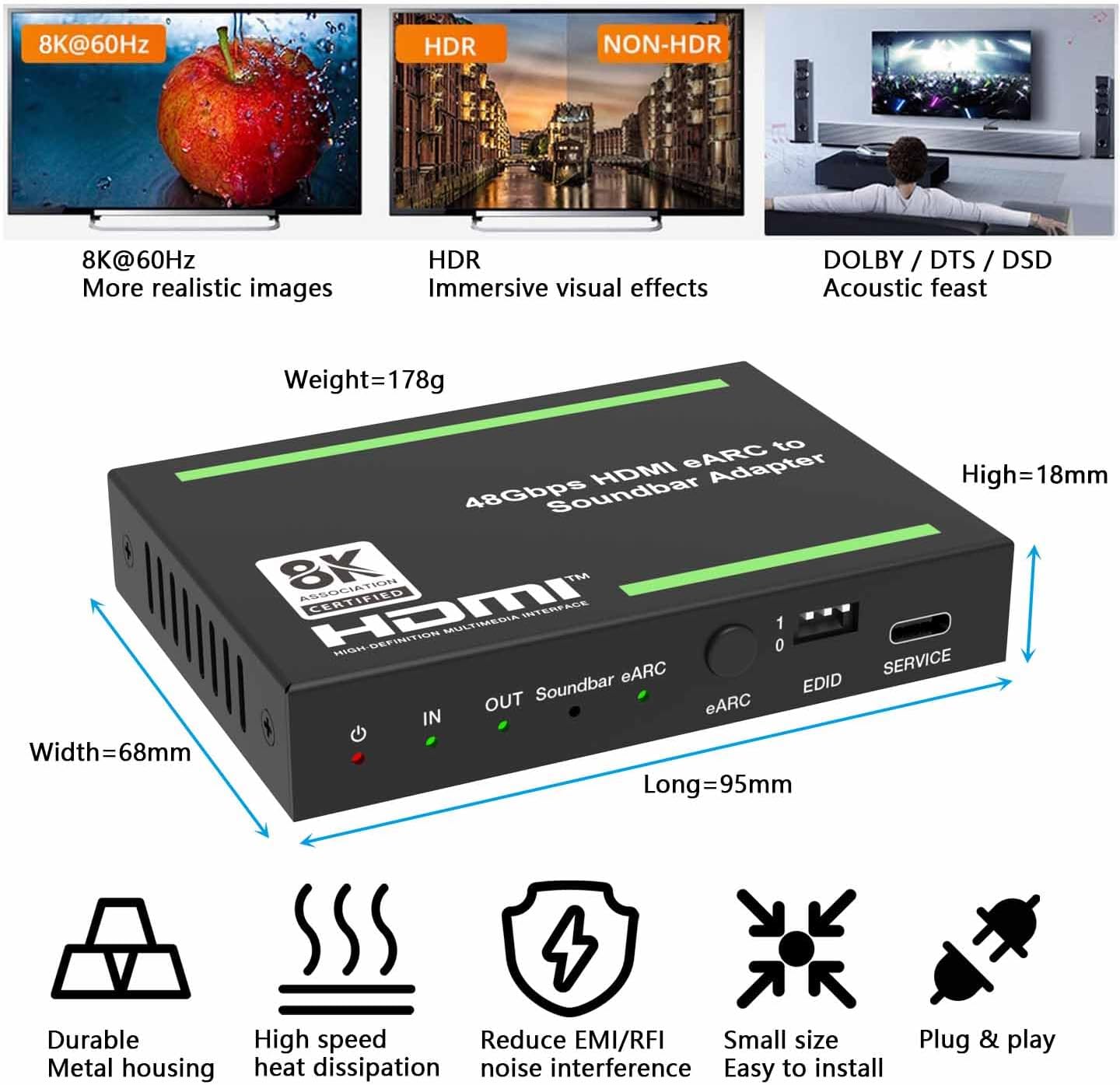
Figure 8: The adapter supports 8K@60Hz Ultra HD for clear images and synchronized audio/video output.

Figure 9: Diagram illustrating the compact dimensions of the adapter (Length 95mm, Width 68mm, Height 18mm).
7. Fejlfinding
Hvis du støder på problemer, bedes du følge følgende almindelige fejlfindingstrin:
- No Video Output / Black Screen:
- Ensure all HDMI cables are securely connected to the correct ports.
- Verify the power adapter is connected and the Power LED on the adapter is red.
- Try a different HDMI cable, especially a certified HDMI 2.1 cable for 8K/4K@120Hz signals.
- Adjust the EDID DIP switch settings (refer to Section 5.2) to match your display's capabilities or try a different EDID mode.
- Bypass the adapter to test if the source and display work directly.
- Ensure your display supports the resolution and refresh rate output by your source device.
- No Audio Output / Distorted Audio:
- Check all audio connections to your soundbar/receiver.
- Verify the Soundbar LED is green, indicating a connection.
- Ensure the eARC function is set correctly (ON for TV audio, OFF for source audio) as described in Section 5.1.
- Adjust the EDID DIP switch settings (refer to Section 5.2) to ensure the correct audio format is being sent.
- Check the audio settings on your source device and TV to ensure they are outputting compatible audio formats.
- If experiencing noise, ensure the source device is powered on before the adapter and sound system, and power off the sound system before the source device.
- eARC LED Flashing:
- This indicates that the eARC/ARC function is not working properly.
- Ensure your TV's HDMI port supports ARC/eARC and that the function is enabled in your TV's settings.
- Try power cycling all devices (TV, soundbar, adapter, source).
- Ensure you are using high-quality HDMI cables.
- CEC-problemer:
- CEC (Consumer Electronics Control) functionality can sometimes be inconsistent between different brands.
- Ensure CEC is enabled on your TV and source devices.
- If issues persist, you may need to manually control power and input selection on your devices.
8. Garanti og support
This BUNGPUNG product is covered by a one-year warranty from the date of purchase. This warranty covers defects in materials and workmanship under normal use.
If you have any questions regarding compatibility, initial defects, or require technical assistance, please do not hesitate to contact BUNGPUNG customer support. Please have your model number (BP-HDC-MC03) and purchase details ready when contacting support.
For support, please visit the official BUNGPUNG webwebsted eller kontakt din forhandler.
Ask a question about this manual
Ask about setup, troubleshooting, compatibility, parts, safety, or missing instructions. Manuals+ will review the question and use this page’s manual context to help answer it.