
1. Introduktion
This manual provides detailed instructions for the installation, operation, and maintenance of the Yitouniu EWeLink 2-Channel Smart WiFi Switch Relay. This device enables remote control of household appliances and electronic devices via a mobile application, RF remote control, and voice commands through smart assistants like Alexa and Google Home. It supports various operating modes and timing functions to enhance smart home automation.
2. Sikkerhedsoplysninger
- Sørg for, at strømmen er afbrudt før installation eller vedligeholdelse for at forhindre elektrisk stød.
- Installation should be performed by qualified personnel or under strict adherence to electrical safety guidelines.
- Overskrid ikke den maksimale strøm og voltage-klassificeringer angivet for enheden.
- Hold enheden væk fra vand, fugt og ekstreme temperaturer.
- Verify all wiring connections are secure and correct before restoring power.
3. Produktet er slutview
The Yitouniu EWeLink Smart WiFi Switch Relay is a compact, 2-channel device designed for integrating traditional appliances into a smart home system. It features WiFi and Bluetooth connectivity for app control and supports RF 433MHz for remote control.

Billede 3.1: Forside view of the Yitouniu EWeLink Smart WiFi Switch Relay. The device is white with branding and connection labels visible.

Billede 3.2: Nærbillede view of the Yitouniu EWeLink Smart WiFi Switch Relay, showing input terminals (N, L), output terminals (NO, COM, NC), and model information.

Image 3.3: The compact size of the Yitouniu EWeLink Smart WiFi Switch Relay, held in a hand for scale.
4. Specifikationer
| Parameter | Værdi |
|---|---|
| Input bindtage | AC/DC 85-250V, Micro USB 5V input |
| Maks. Strøm | 10A |
| Max Power | 2200W |
| WiFi-standard | WiFi 2.4GHz b/n/g + Bluetooth (IEEE 802.11b/g/n) |
| Driftstemperatur | -20°C til 70°C |
| Materiale | Flammehæmmende ABS |
| Produktdimensioner | 2.76 x 1.77 x 1.1 tommer |
| Varens vægt | 1.76 ounce |
| Kontakttype | Normalt åben |
| International Protection Rating | IP65 |
| Certificering | FCC |
5. Opsætning og installation
5.1 Ledningsinstruktioner
The device supports both AC/DC 85-250V input and Micro USB 5V input. Ensure correct wiring based on your application. The relay has Normally Open (NO), Common (COM), and Normally Closed (NC) contacts for controlling external devices.
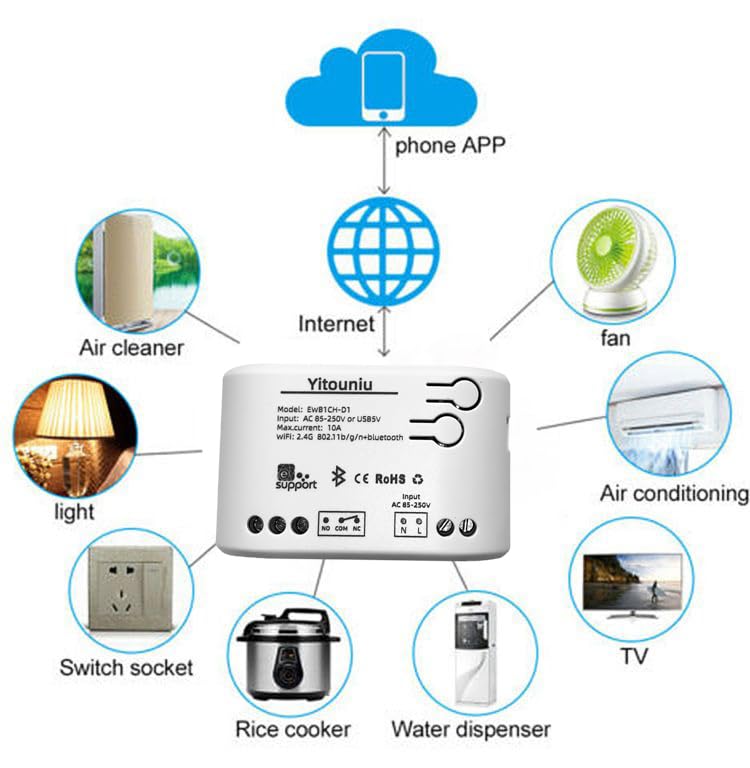
Image 5.1: Diagram illustrating the connectivity of the Yitouniu EWeLink Smart WiFi Switch Relay to various household appliances like lights, fans, and air conditioners, all controlled via a phone app and the internet.
5.2 Download og parring af app
- Download eWeLink app fra Apple App Store eller Google Play Store.
- Registrer en konto og log ind.
- Power on the Smart WiFi Switch Relay.
- Open the eWeLink app, tap the '+' icon to add a device.
- Følg instruktionerne på skærmen for at forbinde enheden til dit 2.4 GHz WiFi-netværk.

Image 5.2: Screenshots of the eWeLink app interface, showing controls for a garage door (ON/OFF) and a scheduling function for setting specific times.
6. Driftstilstande
The device supports three operating modes: self-locking, interlocking, and inching (micromotion). These modes can typically be configured within the eWeLink app or via physical buttons on the device, depending on the specific model variant.
- Selvlåsende tilstand: Each channel operates independently. Pressing the button (or app control) turns the relay ON, pressing it again turns it OFF.
- Sammenlåsningstilstand: When one channel is turned ON, all other channels are automatically turned OFF. This is useful for applications where only one device should be active at a time.
- Inching (Micromotion) Mode: The relay turns ON for a set duration (e.g., 0.5 seconds to 1 hour) and then automatically turns OFF. This is suitable for momentary actions like garage door openers or pulse controls.
7. App-styring og stemmestyring
7.1 eWeLink App Features
The eWeLink app provides comprehensive control over your Smart WiFi Switch Relay:
- Fjernbetjening til/fra: Control connected devices from anywhere with an internet connection.
- Timingfunktioner: Set schedules, countdowns, or recurring timers for automatic on/off operations.
- Uafhængig kontrol: Each of the two channels can be controlled independently.
- Deling af enhed: Share control of your devices with family members.
- Gruppekontrol: Organize multiple smart devices into groups for simultaneous control.

Image 7.1: A user remotely controlling home lighting via the eWeLink mobile application, demonstrating the convenience of app-based control.

Image 7.2: Illustration of the eWeLink app's group control and sharing functions, allowing multiple users to manage devices across different rooms.

Image 7.3: The timing function interface within the eWeLink app, enabling users to set specific on/off times for connected appliances.
7.2 Integration af stemmestyring
The Yitouniu Smart WiFi Switch Relay is compatible with popular voice assistants, including Amazon Alexa and Google Home/Nest. To enable voice control:
- Ensure your Smart WiFi Switch Relay is successfully paired with the eWeLink app.
- Åbn Alexa- eller Google Home-appen.
- Gå til afsnittet 'Færdigheder' eller 'Fungerer med Google'.
- Søg efter and enable the 'eWeLink Smart Home' skill/service.
- Tilknyt din eWeLink-konto, når du bliver bedt om det.
- Discover devices. Your Smart WiFi Switch Relay should now be controllable via voice commands.
Example kommandoer:
- "Alexa, tænd lyset i stuen."
- "Hej Google, sluk ventilatoren."

Image 7.4: A user interacting with voice assistants like Amazon Alexa and Google Home to control smart devices, highlighting the voice control capability of the relay.
8. Vedligeholdelse
The Yitouniu Smart WiFi Switch Relay requires minimal maintenance. Follow these guidelines:
- Rensning: Wipe the device with a dry, soft cloth. Do not use liquid cleaners or solvents.
- Tilslutningskontrol: Kontrollér jævnligt ledningsforbindelserne for at sikre, at de forbliver fastgjorte.
- Firmwareopdateringer: Keep the eWeLink app updated to receive the latest firmware for the device, which may include performance improvements and new features.
9. Fejlfinding
- Enheden opretter ikke forbindelse til WiFi:
- Sørg for, at dit WiFi-netværk er 2.4 GHz. Enheden understøtter ikke 5 GHz-netværk.
- Kontroller, om den indtastede WiFi-adgangskode i appen er korrekt.
- Flyt enheden tættere på din WiFi-router.
- Genstart enheden og din router.
- Device offline in app:
- Kontroller, at din internetforbindelse derhjemme er aktiv.
- Kontroller om enheden har strøm.
- Genstart enheden.
- Stemmestyring virker ikke:
- Confirm the eWeLink skill/service is enabled and linked in your Alexa or Google Home app.
- Ensure the device is named clearly in the eWeLink app and discovered by your voice assistant.
- Tjek din internetforbindelse.
- Device not responding to RF remote:
- Ensure the RF remote is paired with the switch. Refer to the RF pairing instructions (if applicable to your specific remote).
- Check the battery in the RF remote.
10. Hvad er der i æsken
Når du åbner produktemballagen, bør du finde følgende:
- 1 x Yitouniu Wifi 2-Channel Relay Switch
- 1 x Brugsanvisning (dette dokument)
11. Garanti og support
This product comes with a standard manufacturer's warranty. For specific warranty terms, conditions, and duration, please refer to the documentation included with your purchase or contact Yitouniu customer support. For technical assistance or further inquiries, please visit the official Yitouniu webwebstedet eller kontakt deres kundeservicekanaler.