
FLEXISPOT OC4-PRO
FLEXISPOT OC4-PRO Office Chair User Manual
Model: OC4-PRO
1. Introduktion
Thank you for choosing the FLEXISPOT OC4-PRO Office Chair. This ergonomic chair is designed to provide maximum comfort and support for extended periods, featuring multiple adjustment points including headrest, lumbar support, armrests, and seat height. This manual provides essential information for assembly, operation, maintenance, and troubleshooting to ensure optimal use and longevity of your chair.
2. Sikkerhedsoplysninger
- Læs alle instruktioner omhyggeligt før montering og brug.
- Sørg for, at alle komponenter er forsvarligt fastgjort, inden stolen tages i brug.
- Stå ikke på stolen, og brug den ikke som skammel.
- Overskrid ikke den maksimale vægtkapacitet på 181.44 kg.
- Hold børn og kæledyr væk fra stolen under montering.
- Brug stolen på en flad, stabil overflade.
- Undgå at udsætte stolen for direkte sollys eller ekstreme temperaturer.
3. Pakkens indhold
Kontroller venligst, at alle komponenter er til stede, før monteringen påbegyndes. Hvis der mangler eller er beskadigede dele, skal du kontakte kundeservice.
- Armlæn
- Lændestøtte
- Hjul
- Gaslift
- Nakkestøtte
- Brugervejledning (denne manual)
- Monteringsværktøj
- Stol Base
- Sædepude
- Ryglæn
4. Monteringsvejledning
Assembly of the FLEXISPOT OC4-PRO chair is designed to be straightforward and can typically be completed within 30 minutes. A detailed user manual with step-by-step diagrams and all necessary assembly tools are included in the package. Please follow the specific instructions provided in the separate assembly guide for your model.
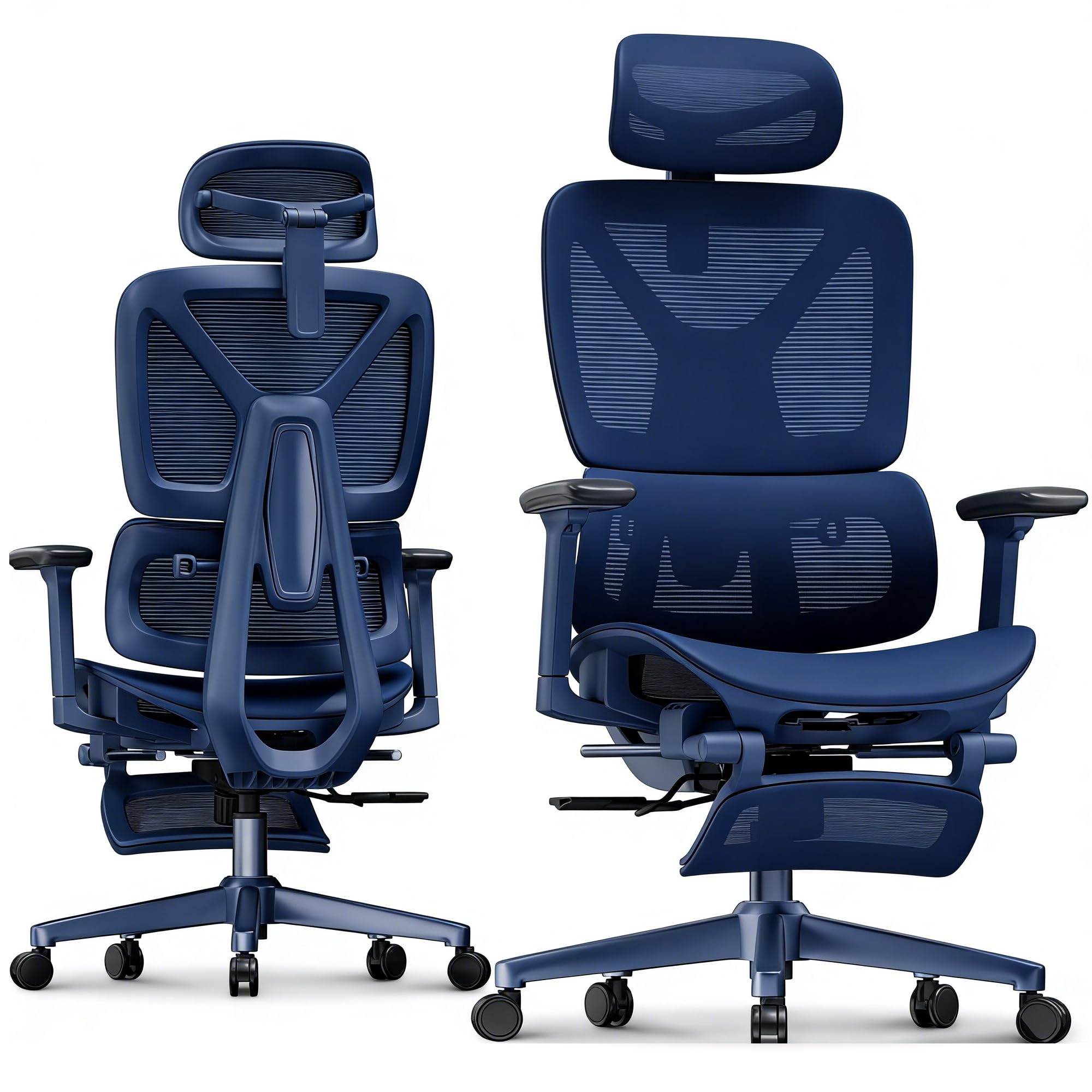
Image: FLEXISPOT OC4-PRO Office Chair. This image shows the fully assembled chair, highlighting its ergonomic design and mesh backrest.
5. Betjeningsvejledning
The FLEXISPOT OC4-PRO chair offers multiple adjustment features to customize your seating experience.
5.1. Sædehøjdejustering
Locate the lever on the right side beneath the seat. To raise the seat, lift the lever while taking your weight off the chair. To lower the seat, lift the lever while seated. Release the lever at the desired height.
5.2. Justering af læne- og vippefunktion
The chair features an adjustable back angle and tilt tension. Use the lever on the left side to lock or unlock the recline function. Rotate the knob located beneath the seat, usually at the front, to adjust the tilt tension. Turn clockwise to increase tension (making it harder to recline) and counter-clockwise to decrease tension (making it easier to recline).
5.3. Justering af lændestøtte
The multi-functional lumbar support system can be adjusted vertically and horizontally to fit the curve of your lower back. Locate the adjustment controls on the backrest to position the lumbar support for optimal comfort.
5.4. Justering af armlæn
The 3D armrests can be adjusted in three dimensions: height, forward/backward, and pivot (inward/outward). Use the buttons or levers on the armrests to unlock and adjust them to your preferred position. Ensure they are locked securely after adjustment.
5.5. Justering af hovedstøtte
The headrest can be adjusted for height and angle. Gently push or pull the headrest to move it up or down, and tilt it to find the most comfortable position for your neck and head.
5.6. 360° Rotation and Casters
The chair is equipped with a 360° swivel mechanism and smooth-rolling casters for easy movement. Ensure the casters are clean and free of debris for optimal performance on hard floors.
6. Vedligeholdelse
- Rensning: For general cleaning, wipe the chair with a damp cloth. For mesh and fabric areas, dry clean as needed. Avoid harsh chemical cleaners that may damage the material.
- Inspektion: Kontrollér regelmæssigt alle skruer og bolte for at sikre, at de er spændte. Spænd dem igen om nødvendigt.
- Hjulpleje: Hold hjulene fri for hår og snavs for at sikre en jævn bevægelse.
- Opbevaring: Store the chair in a cool, dry place away from direct sunlight when not in use for extended periods.
7. Fejlfinding
| Problem | Mulig årsag | Løsning |
|---|---|---|
| Stolen justerer ikke højden | Fejl på gasløft, eller håndtaget er ikke aktiveret. | Sørg for, at højdejusteringshåndtaget er helt aktiveret. Hvis problemet fortsætter, skal gasliften muligvis udskiftes. Kontakt kundesupport. |
| Stolen knirker eller vakler | Løse skruer eller komponenter. | Check and tighten all screws and bolts, especially those connecting the seat, backrest, and base. |
| Hjulene ruller ikke jævnt | Affald sidder fast i hjulene eller er beskadigede hjul. | Remove any hair or debris from the caster wheels. If casters are damaged, they may need replacement. |
| Ryglænet kan ikke lænes tilbage eller låses | Recline mechanism locked or tilt tension too high. | Ensure the recline lock lever is disengaged. Adjust the tilt tension knob counter-clockwise to reduce tension. |
8. Specifikationer
| Mærke | FLEXISPOT |
| Modelnavn | OC4-PRO (Ergonomic office chair) |
| Farve | Sort |
| Materiale | Mesh & Nylon & Steel (Fill Material: Memory Foam) |
| Produktmål (D x B x H) | 73.9D x 73.9B x 133.1H Centimeter |
| Varens vægt | 40 pund (18.14 kg) |
| Maksimal vægtanbefaling | 400 LBS (181.44 kg) |
| Særlige funktioner | Ergonomic, Adjustable Headrest, 3D Arm Rest, Adjustable Lumbar, Tilt, Back Support, Adjustable Recliner, Adjustable Height, Tilt Tension Control |
| Montering påkrævet | Ja |
| Certificeringer | BIFMA, SGS |
9. Garanti og support
FLEXISPOT stands behind the quality of its products. For warranty information, technical support, or assistance with parts, please contact FLEXISPOT customer service. Refer to the official FLEXISPOT webwebstedet eller din købsdokumentation for specifikke garantivilkår og kontaktoplysninger.
Kundeservice: For any questions or concerns, please reach out to FLEXISPOT's professional customer service team.
Relaterede dokumenterOC4-PRO


Ask a question about this manual
Ask about setup, troubleshooting, compatibility, parts, safety, or missing instructions. Manuals+ will review the question and use this page’s manual context to help answer it.