
1. Introduktion
The Lemnoi Digital Calendar Day Clock is designed to assist individuals, particularly seniors with memory loss or Alzheimer's, by clearly displaying the time, day, date, and period of the day. It features a 7-inch HD display, multiple alarm and reminder functions, automatic dimming, and support for various languages. This manual provides detailed instructions for setting up and operating your clock.

Figur 1: Forside view of the Lemnoi Digital Calendar Day Clock displaying the time, day, and date.
2. Opsætning
2.1 Pakkens indhold
- Lemnoi Digital Calendar Day Clock
- Strømadapter (Type-C)
- Brugermanual
2.2 Tænding af enheden
- Connect the provided Type-C power cable to the 'Type-C Power' port on the back of the clock.
- Sæt strømadapteren i en almindelig stikkontakt.
- The clock will automatically power on and display the initial setup screen.
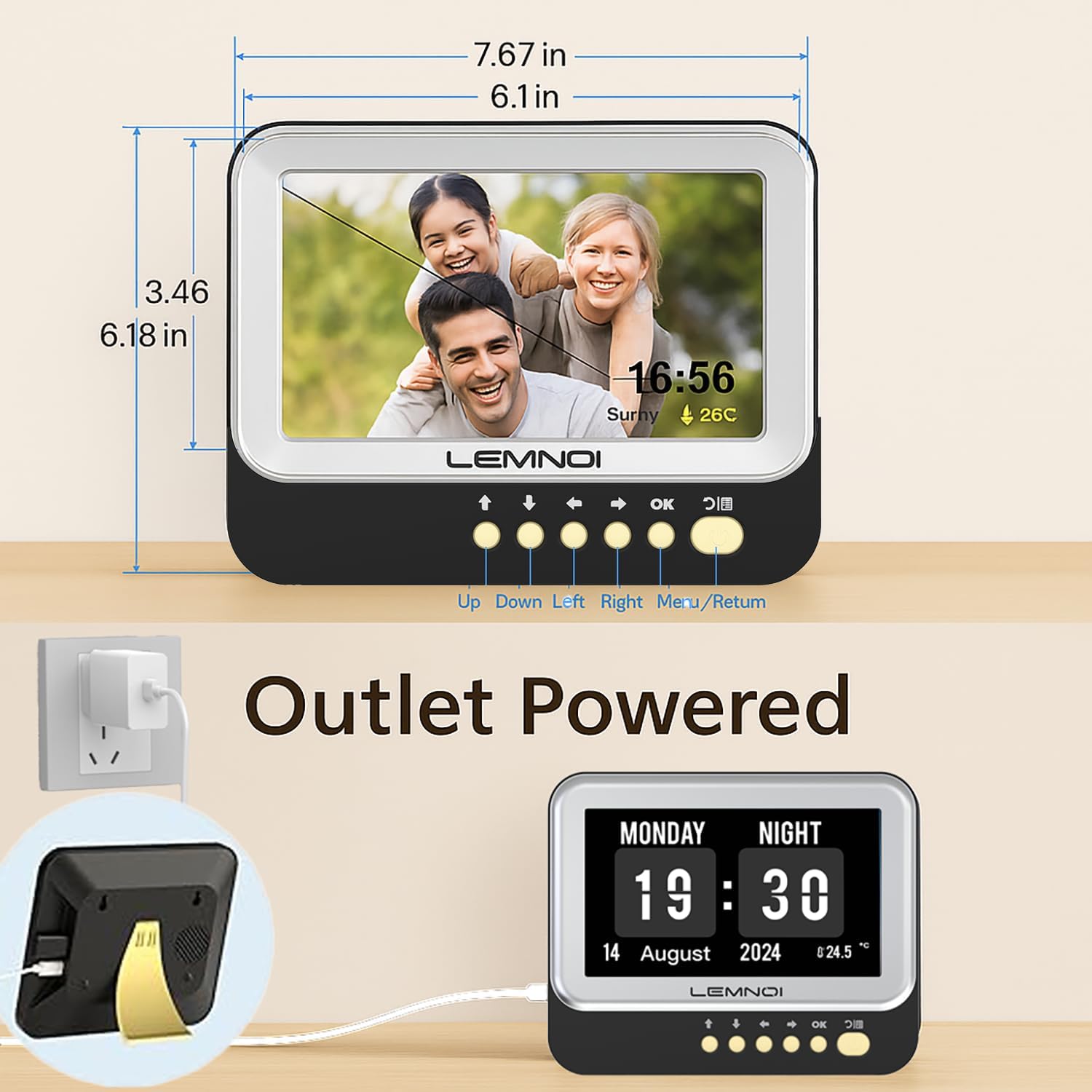
Figur 2: Bagside view of the clock highlighting the USB port and Type-C power input.
2.3 Initial Settings (Date, Time, Language)
Upon first power-on, or after a factory reset, you will be guided through initial settings:
- Brug UP og NED knapper til at navigere gennem mulighederne.
- Brug VENSTRE og HØJRE knapper for at ændre værdier.
- Trykke OK to confirm a selection or move to the next setting.
- Trykke MENU/RETURN to go back to the previous screen or exit a menu.
- Set the current Dato (Month, Day, Year).
- Set the current Tid (Hour, Minute, AM/PM or 24-hour format).
- Vælg din foretrukne Sprog (English, German, French, Italian, Spanish are available).
3. Betjeningsvejledning
3.1 Skærmtilstande
The clock offers 6 distinct display modes. To switch between modes, press the VENSTRE or HØJRE navigation buttons on the front panel.

Figur 3: Eksamples of the 6 available display modes, showing variations in layout and background.
3.2 Brightness Adjustment and Auto Dimming
The clock features 5 levels of brightness. You can manually adjust the brightness or enable the auto-dimming function.
- Manuel lysstyrke: Navigate to the 'Brightness' setting in the menu and use the VENSTRE og HØJRE buttons to select a brightness level from 1 to 5.
- Automatisk dæmpning: Enable this feature in the 'Brightness' menu. The clock will automatically dim at night and brighten in the morning. You can customize the start and end times for auto-dimming and set a specific sleep brightness level (e.g., 0% for completely off).

Figure 4: Visual representation of the 5-level adjustable brightness and auto-dimming function.
3.3 Sommertid (DST)
The clock includes an automatic Daylight Saving Time function. When enabled, it will automatically adjust for summer/winter time changes in March and October.
4. Alarmer og påmindelser
The Lemnoi clock offers extensive alarm and reminder capabilities to support daily routines.
4.1 Setting Daily Alarms
You can set up to 15 normal daily alarms. Each alarm can be configured for specific times and recurrence patterns (every day, weekdays, weekends, or specific dates).
- Navigate to the 'Alarm' section in the main menu.
- Select 'Create an alarm' or choose an existing alarm slot.
- Indstil Time og Minut til alarmen.
- Vælg Gentage mønster.
- Vælg en passende Mærke for the alarm (see 4.3).
- Choose an alarm Sund (6 muligheder tilgængelige).
- Bekræft dine indstillinger.
4.2 Setting Medication Reminders
The clock supports up to 15 medication reminders, allowing you to set specific alerts for morning, afternoon, and evening medication times.
- Navigate to the 'Take Medicine' section in the main menu.
- Select a medication reminder slot.
- Set the desired time for morning, afternoon, or evening reminders.
- Bekræft dine indstillinger.
4.3 Alarm Labels and Visual Cues
The clock features 12 distinct alarm labels with vivid color images to make reminders easier to understand. These include reminders for activities such as waking up, drinking water, eating, bathing, walking, and doctor appointments.
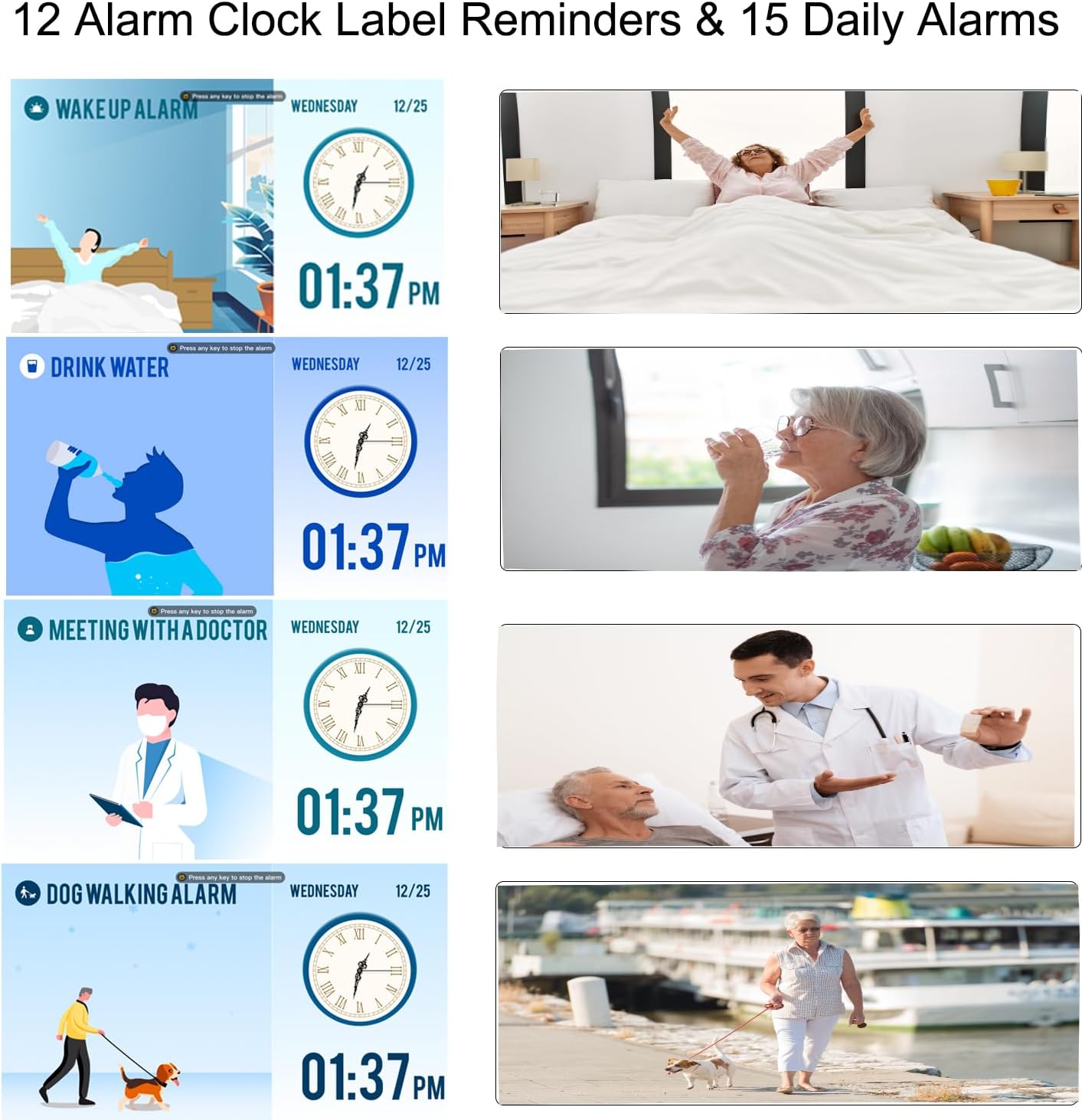
Figure 5: Visual alarm labels for various daily activities, enhancing clarity for users.
5. Funktion til digital fotoramme
The Lemnoi clock can also function as a digital photo frame, allowing you to display photos and videos.
- Insert a USB flash drive containing your photos and videos into the USB port on the back of the clock.
- Navigate to the 'Photo Frame' or 'Media Playback' option in the menu (exact menu name may vary).
- Select the desired photos or videos to play.

Figure 6: The clock displaying personal photos, showcasing its digital photo frame feature.
6. Vedligeholdelse
To ensure the longevity and optimal performance of your Lemnoi Digital Calendar Day Clock, follow these maintenance guidelines:
- Rensning: Wipe the screen and exterior with a soft, dry, lint-free cloth. Do not use abrasive cleaners, solvents, or aerosol sprays, as these can damage the finish or screen.
- Placering: Place the clock on a stable, flat surface or mount it securely on a wall. Avoid direct sunlight, extreme temperatures, and high humidity.
- Magt: Use only the provided power adapter. Disconnect power during electrical storms or when not in use for extended periods.
7. Fejlfinding
If you encounter any issues with your clock, refer to the following common problems and solutions:
| Problem | Mulig årsag | Løsning |
|---|---|---|
| Uret tænder ikke. | Strømadapteren er ikke tilsluttet eller defekt. | Ensure the Type-C cable is securely connected to the clock and the adapter is plugged into a working outlet. Try a different outlet. |
| Display is blank or too dim. | Brightness setting is too low or auto-dimming is active. | Adjust the brightness manually in the settings. Check auto-dimming settings and ensure the sleep brightness is not set to 0% during active hours. |
| Alarmerne lyder ikke. | Alarm is disabled, volume is too low, or incorrect time set. | Verify alarm settings (enabled, time, repeat). Check the volume level in the clock's settings. |
| Date or Time is incorrect. | Incorrect manual setting or DST issue. | Go to 'Date & Time' settings to correct. Ensure DST is set correctly if applicable. |
8. Specifikationer
- Mærke: Lemnoi
- Modelnummer: SG9
- Farve: 7 cm sort
- Produktdimensioner: 19.56 x 3.81 x 15.75 cm
- Varens vægt: 290 g
- Voltage: 100V
- Materiale: Acrylonitril Butadien Styren (ABS)
- Skærmtype: Digital
- Særlige funktioner: Adjustable Brightness, Auto Dimmable, Daylight Saving, Temperature Display
- Skærmtilstande: 6
- Sprog: Engelsk, tysk, fransk, italiensk, spansk
- Alarmer: 15 Normal Alarms, 15 Medication Reminders
- Alarm Labels: 12 Visual Labels
- Photo Frame Function: Supports photos and videos via USB
9. Garanti og support
For warranty information, technical support, or any questions not covered in this manual, please contact Lemnoi customer service. Refer to the product packaging or the retailer's webwebstedet for specifikke kontaktoplysninger.
Note: Ingen officiel produktvideo URL was provided in the product data. If available, a video demonstrating key features would be embedded here.