
1. Produktet er slutview
The STUDIOFINIX 4-Channel Mini Bluetooth Amplifier is designed to power passive speakers, offering versatile connectivity options including Bluetooth 5.1, TWS, AUX, MIC, and USB. Its compact design allows for easy integration into various audio setups, from home entertainment to marine applications.
Nøglefunktioner
- Universal kompatibilitet: Suitable for wall-mounted, ceiling-mounted, marine, bookshelf, and other passive speakers.
- Bluetooth 5.1: Ensures faster transmission speed, longer distance, and stable performance for wireless audio streaming.
- Nem installation: Small and lightweight design for convenient placement on flat surfaces or within pre-cut speaker openings.
- Multifunktionel: Supports Bluetooth, TWS (True Wireless Stereo), AUX, MIC, and USB inputs, along with MONO output.
Hvad er der i æsken
- 4-Channel Bluetooth Amplifier Box (x1)
- 24V5A strømadapter (x1)
- Brugervejledning (x1)
- Skruetrækker (x1)
- Skruer (x2)
- Strømledning (x1)

Image: Contents of the package, including the amplifier, power adapter, power cord, screwdriver, screws, and user manual.
2. Produktdiagram og betjeningselementer
Sæt dig ind i amplifier's layout and control functions.
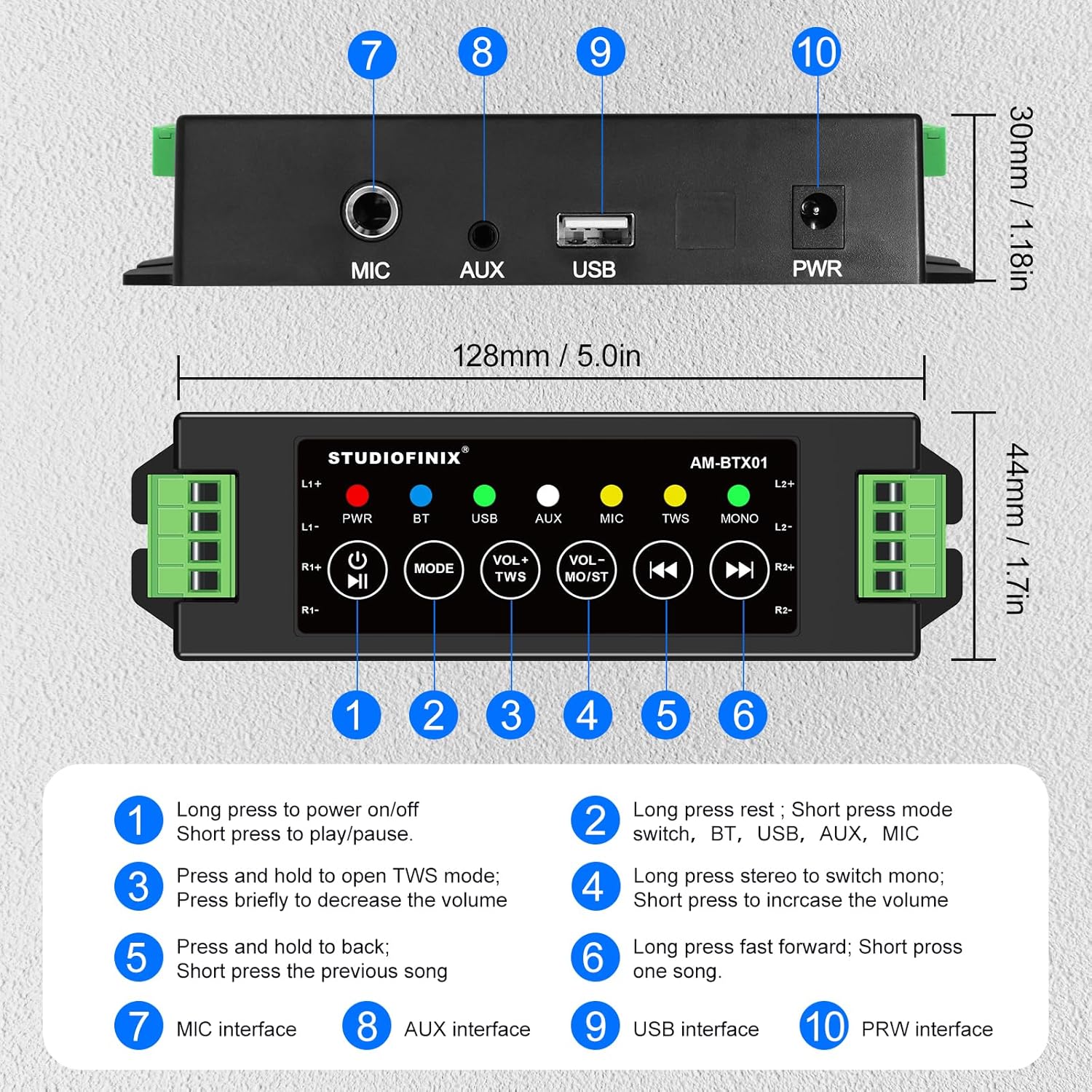
Billede: Top og bagside view af amplifier, highlighting numbered controls and interfaces.
Kontrolfunktioner
| Ingen. | Control/Interface | Fungere |
|---|---|---|
| 1 | Tænd/sluk-knap / Afspil/pause | Long press to power on/off. Short press to play/pause audio. |
| 2 | Mode knap | Long press to reset. Short press to switch between BT, USB, AUX, and MIC modes. |
| 3 | VOL- / TWS Button | Press and hold to open TWS mode. Briefly press to decrease the volume. |
| 4 | VOL+ / MONO Button | Long press to switch between stereo and mono output. Briefly press to increase the volume. |
| 5 | Forrige track-knap | Press and hold to fast backward. Short press for the previous song. |
| 6 | Knappen Næste spor | Long press to fast forward. Short press for the next song. |
| 7 | MIC interface | Input for microphone connection. |
| 8 | AUX interface | Input for auxiliary audio devices. |
| 9 | USB interface | Input for USB audio sources. |
| 10 | PWR interface | Power input for the 24V5A adapter. |
3. Opsætning og installation
Tilslutning af passive højttalere
De amplifier supports up to four passive speakers. Ensure proper polarity when connecting speaker wires.
- Identify the positive (+) and negative (-) terminals on your passive speakers.
- Connect the positive (+) wire from each speaker to the corresponding L1+, L2+, R1+, R2+ terminals on the amplivligere.
- Connect the negative (-) wire from each speaker to the corresponding L1-, L2-, R1-, R2- terminals on the amplivligere.
- Use the included screwdriver to secure the speaker wires in the terminal blocks.
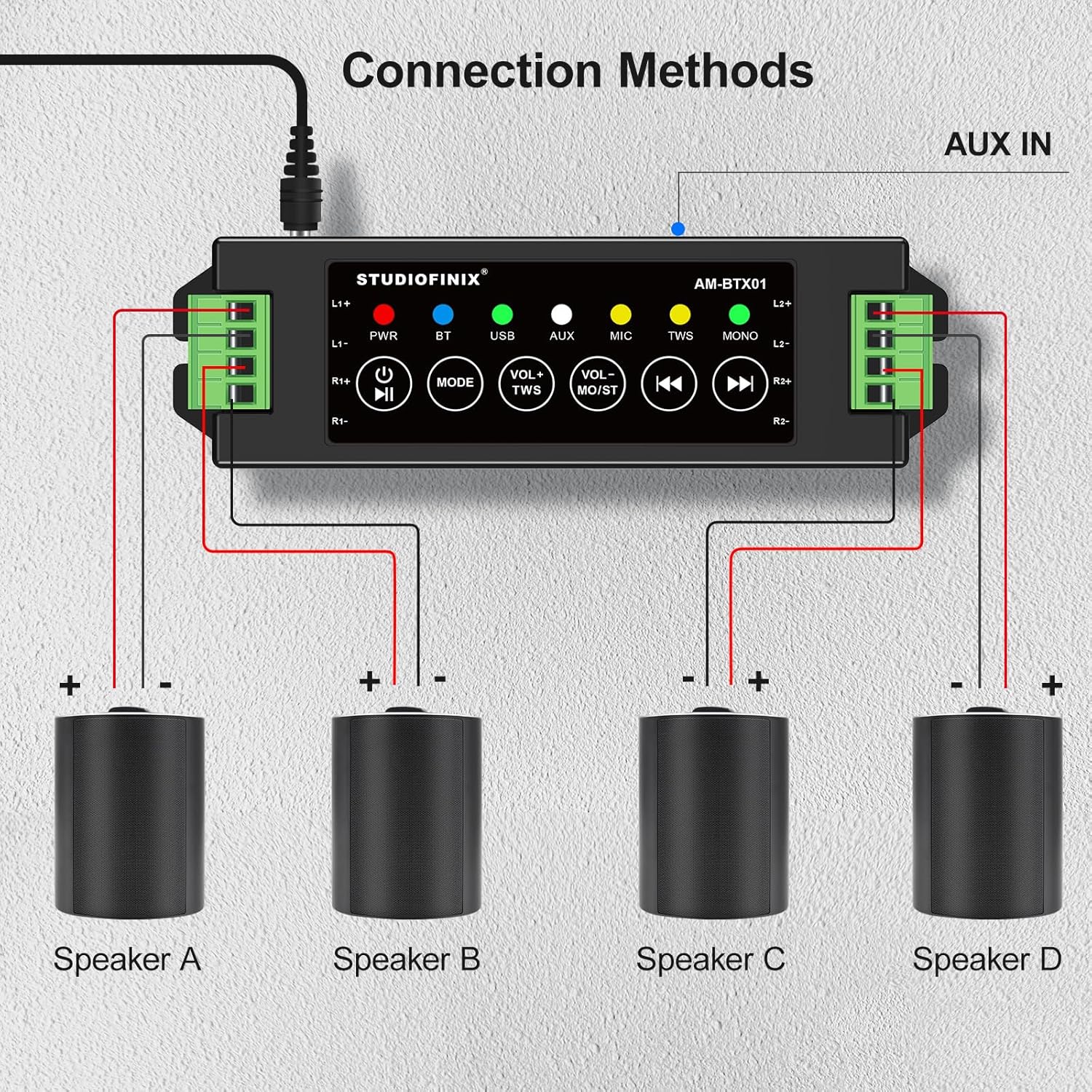
Image: Visual guide for connecting four speakers to the amplifier's output terminals.
Strømtilslutning
Connect the provided 24V5A power adapter to the PWR interface (10) on the amplifier, then plug the adapter into a suitable power outlet.

Image: Detail of the amplifier's power input (PWR) and auxiliary input (AUX) ports.
4. Betjening
Tænd/sluk
Long press the Power Button (1) to turn the amplifier on or off. The PWR indicator light will illuminate when the device is powered on.
Bluetooth-parring
- Sørg for amplifier is powered on and in Bluetooth (BT) mode. The BT indicator light will flash, indicating it's ready for pairing.
- Aktiver Bluetooth på din mobilenhed (smartphone, tablet osv.) og søg efter tilgængelige enheder.
- Select "STUDIOFINIX" or a similar name from the list of devices to pair.
- Once paired, the BT indicator light will become solid, and you will hear a confirmation tone.
TWS (ægte trådløs stereo) -tilstand
TWS mode allows you to pair two STUDIOFINIX amplifiers for a true wireless stereo experience.
- Sørg for begge dele amplifiers are powered on and not connected to any Bluetooth device.
- On one amplifier, press and hold the VOL- / TWS Button (3) until you hear a confirmation tone, indicating TWS pairing mode.
- De to amplifiers will automatically search and pair with each other. Once paired, one amplifier will act as the master and the other as the slave.
- Now, connect your mobile device to the master amplifier via Bluetooth as described above. Audio will play through both amplifiers in stereo.

Image: Visual representation of two amplifiers being paired using the TWS function.
Input Mode Selection (AUX, USB, MIC)
Short press the Mode Button (2) to cycle through the available input modes: Bluetooth (BT), USB, AUX, and MIC. The corresponding indicator light will illuminate for the active mode.
Lydstyrkekontrol og afspilning
- Lydstyrkejustering: Briefly press the VOL- / TWS Button (3) to decrease volume, and the VOL+ / MONO Button (4) to increase volume.
- Afspil/pause: Short press the Power Button (1) to play or pause audio.
- Forrige/næste nummer: Short press the Previous Track Button (5) for the previous song, and the Next Track Button (6) for the next song.
- Hurtigt frem/tilbage: Long press the Previous Track Button (5) to fast backward, and the Next Track Button (6) to fast forward.
Mono/stereo skift
Long press the VOL+ / MONO Button (4) to switch the audio output between stereo and mono modes. The MONO indicator light will show the current setting.
5. Fejlfinding
| Problem | Mulig årsag | Løsning |
|---|---|---|
| Ingen strøm | Strømadapteren er ikke tilsluttet eller defekt. | Sørg for, at strømadapteren er korrekt tilsluttet amplifier and a working power outlet. Check if the power adapter is functional. |
| Ingen lyd fra højttalerne | Incorrect speaker wiring; volume too low; wrong input mode selected; device not paired. | Verify speaker wire connections for correct polarity. Increase volume. Ensure the correct input mode (BT, AUX, USB, MIC) is selected. Confirm Bluetooth device is paired. |
| Bluetooth forbinder ikke | AmpFjernbetjeningen er ikke i parringstilstand; enheden er for langt væk; interferens. | Sørg for amplifier is in BT mode and the BT indicator is flashing. Move your device closer to the amplifier. Avoid strong electromagnetic interference. Try resetting Bluetooth on both devices. |
| TWS-parring mislykkedes | One or both amplifiers already paired; incorrect TWS activation. | Sørg for begge dele amplifiers are unpaired from other Bluetooth devices. Follow TWS pairing instructions carefully, initiating TWS mode on only one amplifier først. |
| Dårlig lydkvalitet | Low quality audio source; speaker impedance mismatch; loose connections. | Brug lyd af høj kvalitet files. Ensure speakers are compatible with the amplifier's output. Check all cable connections. |
6. Specifikationer
| Feature | Detalje |
|---|---|
| Mærke | STUDIOFINIX |
| Modelnummer | RM |
| Højttaler Maksimal udgangseffekt | 120 watt |
| Forbindelsesteknologi | Bluetooth |
| Lydudgangstilstand | Stereoanlæg |
| Monteringstype | Vægmontering, loftmontering |
| Indkapslingsmateriale | Plast eller metal |
| Antal lydkanaler | 4.0 |
| Trådløs teknologi | Bluetooth |
| Forbindelsesprotokol | AUX, Bluetooth |
| Kontrolmetode | Røre |
| Varens vægt | 0.53 kilo |
| Kompatible enheder | Bærbar computer, smartphone, tablet |
| Strømkilde | Elektrisk med ledning |
7. Sikkerhedsoplysninger
- Udsæt ikke ampfor vand eller for høj fugtighed.
- Undgå at placere enheden i nærheden af varmekilder eller i direkte sollys.
- Brug kun den medfølgende strømadapter for at undgå skader.
- Forsøg ikke at åbne eller reparere enheden selv. Kontakt kvalificeret servicepersonale.
- Opbevares utilgængeligt for børn.
8. Produktvideo
Video: An official product video from Studiofinix Direct demonstrating the 4-Channel Mini Bluetooth Amplifier for Passive Speakers, showcasindens funktioner og funktionalitet.
9. Garanti og support
This STUDIOFINIX product comes with a limited warranty. For detailed warranty information or technical support, please refer to the contact information provided in your product packaging or visit the official STUDIOFINIX webwebsted.