
ALIENTEK T80P+C2C+4 type tips+PD 65W
ALIENTEK T80/T80P Mini Digital Soldering Iron Kit User Manual
Model: T80P+C2C+4 type tips+PD 65W
Brand: ALIENTEK
1. Introduktion
The ALIENTEK T80/T80P is a portable, mini digital soldering iron designed for precision soldering tasks. Featuring PD/QC 100W power input via a Type-C interface, it offers rapid heating and precise temperature control. Its compact design and OLED screen make it suitable for various applications, including electronics repair, jewelry, and mobile devices.
This manual provides essential information for the safe and effective use of your ALIENTEK T80/T80P soldering iron, including setup, operation, maintenance, and troubleshooting.
2. Sikkerhedsoplysninger
Always observe the following safety precautions when operating the soldering iron:
- Øjenbeskyttelse: Brug altid sikkerhedsbriller for at beskytte dine øjne mod loddedampe og -stænk.
- Ventilation: Use the soldering iron in a well-ventilated area or with a fume extractor to avoid inhaling harmful solder fumes.
- Varme overflader: The soldering iron tip and surrounding metal parts become extremely hot during operation. Avoid direct contact with skin. Use the included stand to rest the iron when not in use.
- Strømkilde: Ensure your power adapter provides sufficient output. If the iron restarts after heating, it indicates insufficient power. Select a lower working voltage or use an adapter with adequate output power.
- Elektrisk sikkerhed: Do not operate the soldering iron with wet hands or in damp conditions. Disconnect power when not in use or before performing maintenance.
- Opbevaring: Allow the soldering iron to cool completely before storing it. Store in a dry, safe place away from children.
3. Pakkens indhold
Bekræft at alle varer er til stede i din pakke:
- ALIENTEK T80/T80P Soldering Iron
- USB Type-C til Type-C-kabel
- Soldering Iron Tips (various types included based on kit)
- Loddejernsstativ
- PD 65W Power Adapter (if included in kit)
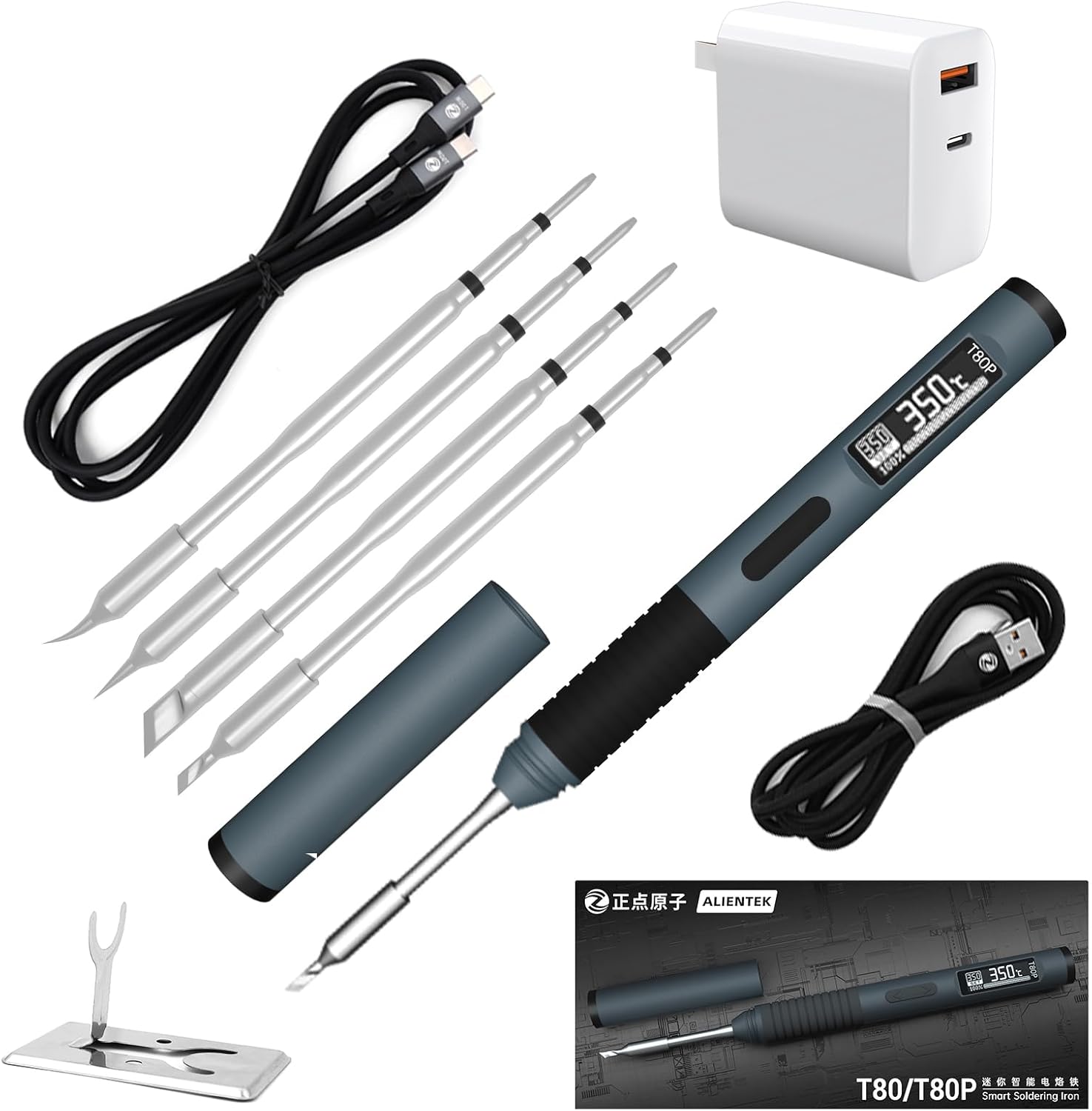
Image 3.1: Complete ALIENTEK T80/T80P Soldering Iron Kit, showing the iron, various tips, USB-C cable, power adapter, and stand.

Image 3.2: The standard shipping list for the ALIENTEK T80/T80P Smart Soldering Iron, showing the packaged product and included accessories.
4. Produktet er slutview
The ALIENTEK T80/T80P soldering iron features a compact design with an OLED display for clear temperature and status indication. It utilizes a Type-C port for power input and is compatible with PD/QC fast charging protocols.

Image 4.1: Diagram illustrating the components of the T80 and T80P models, including the T80P-xx Tip, Anti-slip silicone cover, Key A, Key B, OLED Screen, and Type-C Port. A table below compares the T80 and T80P models, highlighting differences in heating core type, heating core size, resistance value, machine weight, and tinning time.

Billede 4.2: Overview of key features for the ALIENTEK T80/T80P Smart Soldering Iron, including 100W Power, PD/QC Protocol, CNC Aluminum Alloy construction, and 2-second molten tin time for the T80 model.
5. Opsætning
Follow these steps to set up your soldering iron:
- Indsæt loddespids: Carefully insert the desired soldering tip into the heating element of the iron. Ensure it is fully seated.
- Tilslut strøm: Connect the Type-C cable to the soldering iron's Type-C port and the other end to a compatible PD/QC power adapter (9-20V, up to 100W).
- Tænd: The device will automatically power on once connected to a suitable power source. The OLED screen will display the current status.

Image 5.1: Diagram showing the correct insertion of soldering tips, indicating approximate insertion depths for different tip types.
6. Betjeningsvejledning
6.1 Temperaturjustering
The ALIENTEK T80/T80P allows for precise temperature adjustment from 176°F to 842°F (80°C to 450°C). Use the control buttons (Key A and Key B) to navigate the menu and adjust the temperature. The OLED screen will display the set temperature and current temperature.

Image 6.1: Various user interface screens displayed on the OLED, including temperature setting (350°C), menu options (Vol Info, Temp Step), language selection (English), sleep mode (200°C), standby mode (50°C), and upgrade prompt.
6.2 Strømjustering
The soldering iron supports adjustable power from 18W to 100W, with 6 available power gears. This allows for fine-tuning the power output to suit different soldering needs.

Image 6.2: Interface for 18-100W power adjustment, showing 6 power gears (100W, 65W, 36W, 24W, 27W, 18W) and instructions for fine-tuning power: 1. Press A or B to select adjustment item; 2. Long press B to select, short press to adjust, long press A to exit; 3. Select OK and press and hold B to save. Note: The T80 will jump temperature when using a new heating core and will stabilize after several uses.
6.3 Smart Features (Auto Sleep/Dormancy)
The T80/T80P features an intelligent induction sleep mode. When the iron is put down, it automatically enters hibernation mode, prolonging the life of the heating core and saving energy. Picking up the iron will wake it up.

Image 6.3: Illustration of the Induced Dormancy feature, showing the soldering iron in sleep mode (200°C) and explaining that putting down the host enters hibernation and picking it up wakes it up, prolonging heating core life and saving energy.
6.4 Temperature Control Accuracy
The device maintains temperature control accuracy of less than or equal to 2%.

Image 6.4: Graph illustrating the rapid heating (2S Molten Tin for T80) and stable temperature control accuracy (≤2%) over time for the ALIENTEK T80 soldering iron. Note: The T80 will jump temperature when using a new heating core and will stabilize after several uses.
7. Vedligeholdelse
7.1 Pleje af loddespids
- Rengør regelmæssigt: Always clean the soldering tip before and after use. Use a damp sponge or brass wool to wipe off excess solder and oxidation.
- Tin spidsen: Apply a small amount of fresh solder to the tip before storing it. This helps prevent oxidation and prolongs tip life.
- Udskift slidte spidser: Replace tips that are heavily oxidized, pitted, or no longer hold solder effectively.
7.2 Generel rengøring
- Tør loddekolbens hus af med en blød, tør klud. Brug ikke slibende rengøringsmidler eller opløsningsmidler.
- Ensure the Type-C port is free of debris.
8. Fejlfinding
- Problem: Soldering iron restarts or fails to heat properly.
- Løsning: This often indicates that the output power of your current power adapter is insufficient. Ensure your adapter provides adequate wattage (up to 100W) and voltage (9-20V). Try selecting a lower working voltage setting on the iron if your adapter's output is limited.
- Problem: Temperature display is erratic or unstable.
- Løsning: Ensure the soldering tip is fully inserted and making good contact. If using a new heating core, the temperature may jump initially but should stabilize after several uses. If the issue persists, the tip or heating element may need replacement.
- Problem: Soldering iron does not power on.
- Løsning: Verify that the Type-C cable is securely connected to both the iron and the power adapter. Ensure the power adapter is functioning correctly and providing power. Try a different Type-C cable or power adapter if available.
9. Specifikationer

Image 9.1: Basic parameters for the T80/T80P Smart Soldering Iron, including dimensions (L175mm Ø14mm), product name, power supply (Type-C), operating voltage (DC 9~20V), fast charging protocol (PD2.0/3.0, QC2.0/3.0), temperature range (80~450°C), adjustable power (18~100W), and screen type (0.87' OLED 128*32 Pixel).
| Feature | Specifikation |
|---|---|
| Mærke | ALIENTEK |
| Model | T80/T80P |
| Strømkilde | PD/DC (Type-C) |
| Wattage | 18 - 100 watts (Adjustable) |
| Operation Voltage | 9 - 20 volt |
| Temperaturområde | 80-450 °C (176-842 °F) |
| Vise | 0.87" OLED Screen (128*32 Pixel) |
| Opvarmningstid | Seconds (2S Molten Tin for T80) |
| Speciel funktion | Portable, Auto Sleep, Digital Display |
| Materiale | Copper (for tips), CNC Aluminum Alloy (body) |
| Varelængde | 3.85 Inches (approx. 175mm) |
| Varens vægt | 12.3 ounces (ca. 350 gram) |
| Batterier påkrævet | No (requires external power supply) |
10. Garanti og support
Specific warranty details are not provided in the product information. For warranty claims, technical support, or service inquiries, please contact ALIENTEK directly through their official webwebstedet eller den forhandler, hvor du købte produktet. Gem din købskvittering som købsbevis.
For further assistance, refer to the ALIENTEK brand store on Amazon: ALIENTEK Store
Ask a question about this manual
Ask about setup, troubleshooting, compatibility, parts, safety, or missing instructions. Manuals+ will review the question and use this page’s manual context to help answer it.