
Indledning
Thank you for choosing the DELLA 10000 BTU Portable Air Conditioner. This unit is designed to provide efficient cooling, dehumidification, and fan functions for spaces up to 450 sq. ft. With smart features like WiFi connectivity and compatibility with Alexa, you can control your comfort from anywhere. This manual provides essential information for safe operation, installation, maintenance, and troubleshooting.
Vigtige sikkerhedsinstruktioner
WARNING: To reduce the risk of fire, electrical shock, or injury, observe the following:
- Læs alle instruktioner, før du bruger dette apparat.
- Brug kun denne enhed til dets tilsigtede formål som beskrevet i denne vejledning.
- Sørg for, at strømforsyningen matcher voltage angivet på mærkatet.
- Betjen ikke enheden med en beskadiget ledning eller stik.
- Træk altid stikket ud, når det ikke er i brug, eller før rengøring.
- Hold enheden væk fra varmekilder og direkte sollys.
- Bloker ikke luftindtag eller -udtag.
- Dette apparat er ikke beregnet til brug af personer (inklusive børn) med nedsatte fysiske, sensoriske eller mentale evner, eller mangel på erfaring og viden, medmindre de har fået opsyn eller instruktion i brugen af apparatet af en person, der er ansvarlig for deres sikkerhed.
Produktkomponenter og funktioner

Figur 1: The DELLA Portable Air Conditioner unit shown with its remote control and a smartphone displaying the control app. The unit is white, compact, and features caster wheels for easy mobility.
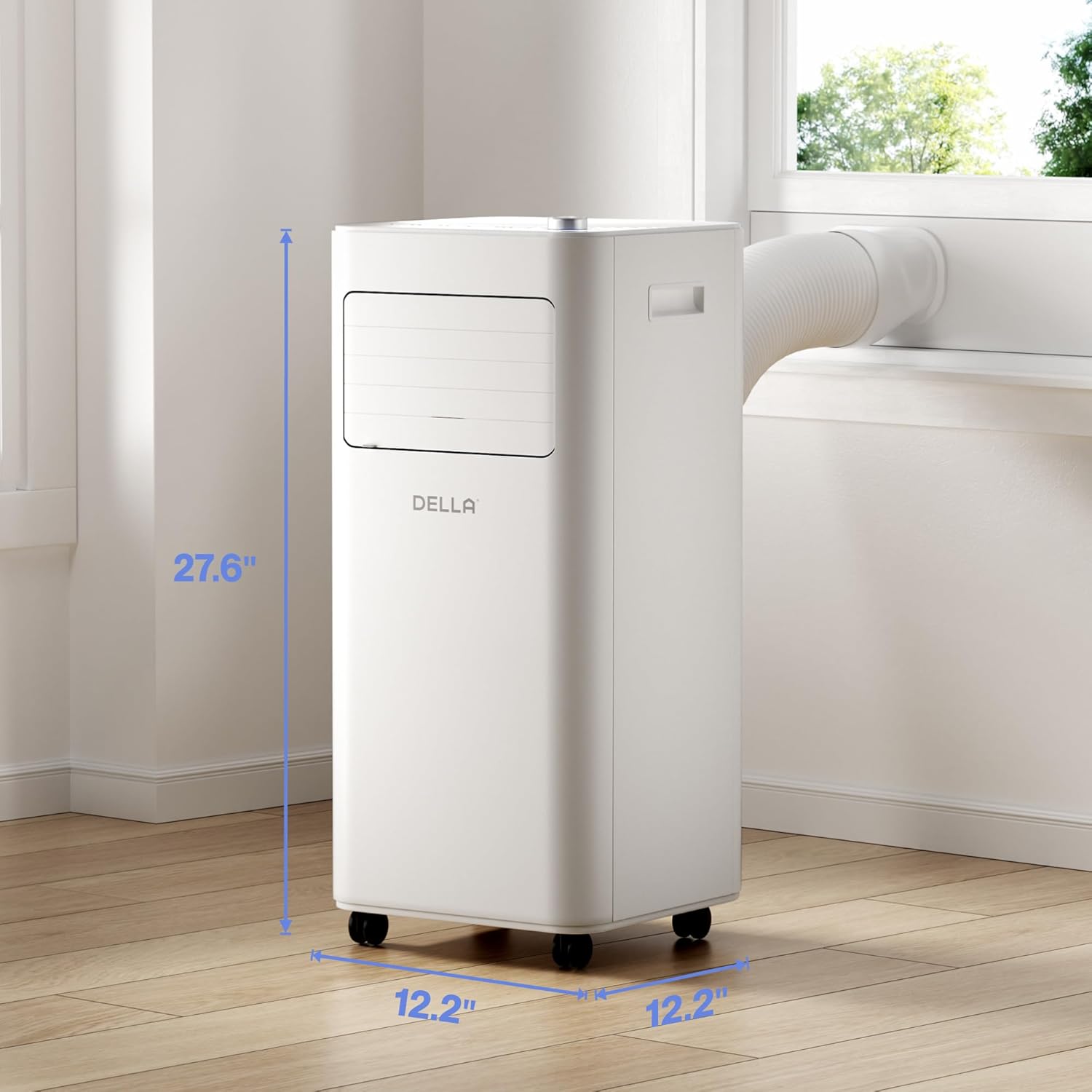
Figur 2: Detailed dimensions of the portable air conditioner. The unit measures 27.6 inches in height, 12.2 inches in width, and 12.2 inches in depth, making it suitable for various room layouts.

Figur 3: Nærbillede view of the intuitive soft-touch control panel located on the top of the unit. It includes controls for Sleep Mode, Child Lock, 24H Timer/WiFi, 2 Fan Speeds, Mode Select, Power ON/OFF, and Temperature Control, along with a digital display.
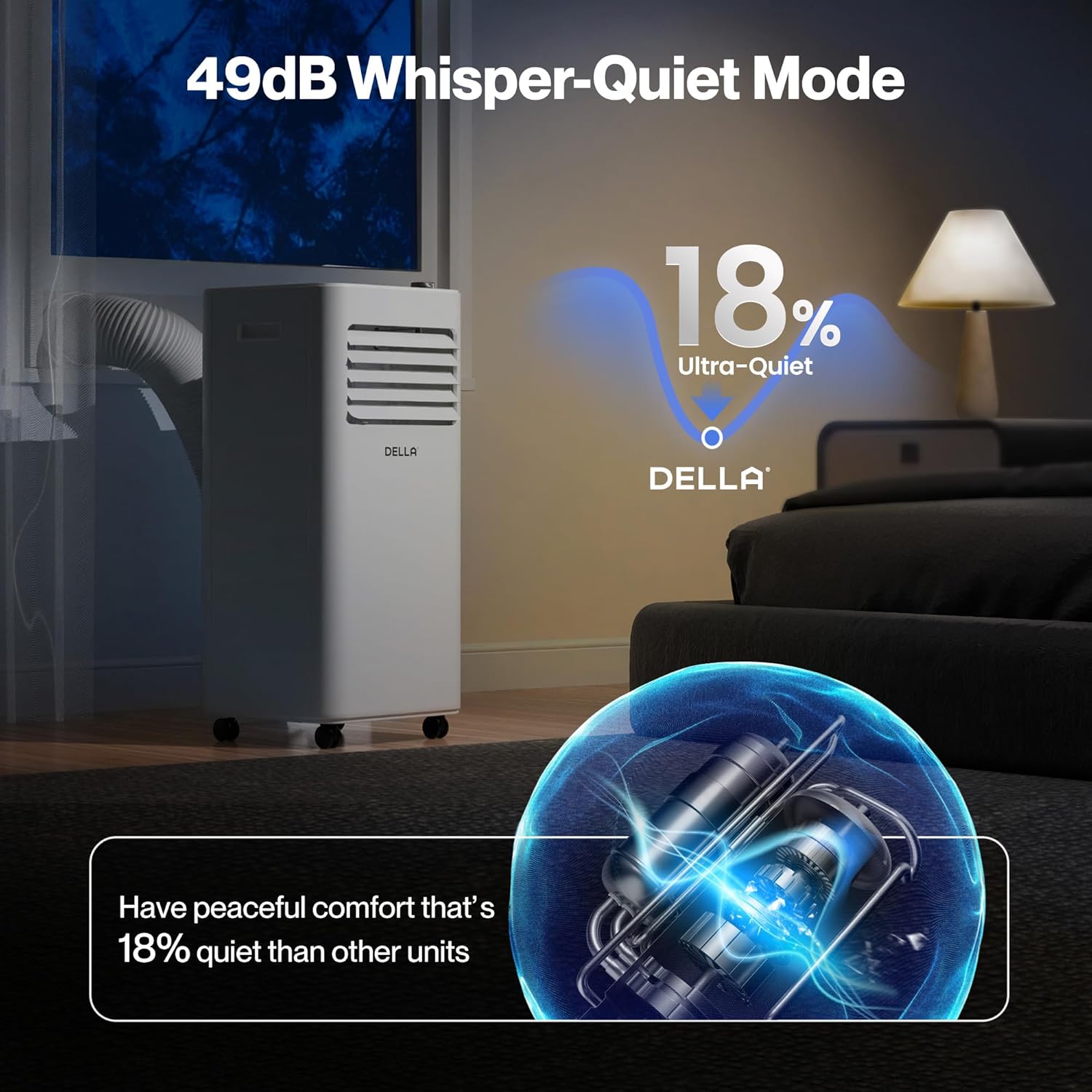
Figur 4: The portable AC unit operating in a bedroom, highlighting its 49dB Whisper-Quiet Mode. This feature ensures peaceful comfort, being 18% quieter than comparable units.

Figur 5: An internal diagram illustrating the "Ultimate Efficiency" of the unit, powered by MightyAir X. It shows a 30% more efficient design and a 10,000 BTU cooling capacity covering up to 450 sq. ft.

Figur 6: The unit showcasing its MightyAir X Tech, which provides 30% more speed and long-range wind blowing up to 16 feet, ensuring faster and more effective cooling throughout the room.
Opsætning og installation
The DELLA Portable Air Conditioner is designed for quick and easy installation without the need for cutting or drilling. Follow these steps to set up your unit:
- Udpakning: Carefully remove the unit and all accessories from the packaging. Ensure all components are present: main AC unit, exhaust hose, window kit (adjustable sealing board), remote control, and user manual.
- Placering: Place the unit on a flat, stable surface. The unit features caster wheels for easy movement. Ensure there is at least 20 inches of space around the unit for proper airflow.
- Installation af udstødningsslange:
- Attach the exhaust hose to the back of the AC unit by sliding and twisting it into the designated port until it clicks securely into place.
- Attach the other end of the exhaust hose to the adjustable window sealing board port.
- Installation af vinduessæt:
- Adjust the window sealing board to fit your window opening (suitable for both horizontal and vertical windows, 25.5" to 64.1" range).
- Secure the window kit in place, ensuring a tight seal to prevent hot air from entering the room.
- Tilslut udstødningsslangen til vinduessættet.
- Strømtilslutning: Sæt netledningen i en jordet stikkontakt.
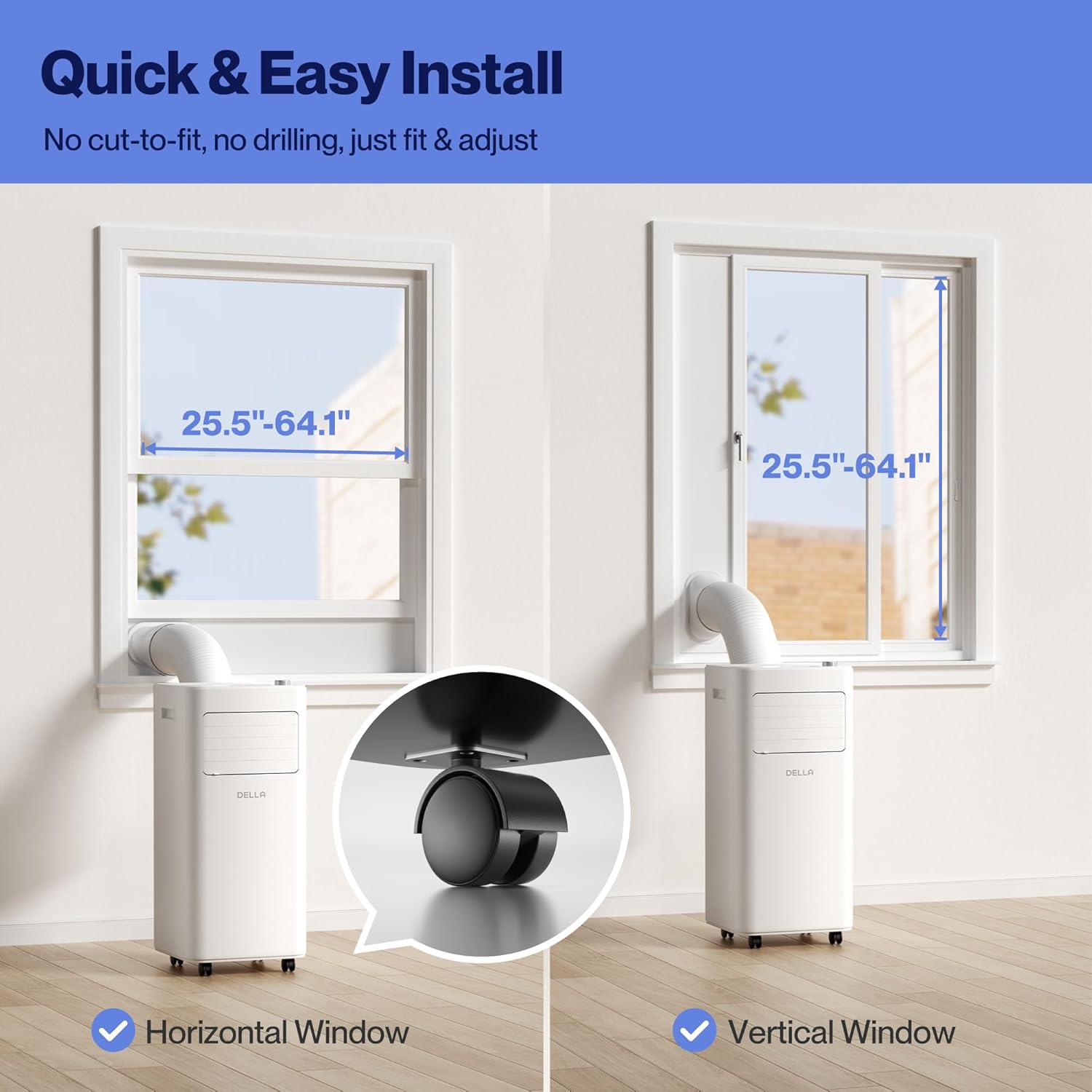
Figur 7: Visual guide for quick and easy installation, showing how the unit fits into both horizontal and vertical windows with the adjustable window kit. A close-up of the smooth-rolling caster wheels is also shown.
Video 1: En omfattende overview of the DELLA Portable AC, demonstrating its features, ease of setup, and various functionalities. This video provides a visual guide to the initial installation process, including connecting the exhaust hose and window kit.
Betjeningsvejledning
Your DELLA Portable Air Conditioner offers multiple operating modes and control options for personalized comfort.
Kontrolpanel og fjernbetjening
The unit can be controlled via the intuitive soft-touch control panel on top of the unit or the included remote control. Both offer similar functionalities.
- Tænd/sluk: Tryk på Power-knappen for at tænde eller slukke for enheden.
- Valg af tilstand: Cycle through Cooling, Dehumidifier, and Fan modes.
- Cool tilstand: Provides 10,000 BTU cooling capacity for rooms up to 450 sq. ft. Adjustable temperature from 61°F to 90°F.
- Tørretilstand (affugter): Reduces humidity in the air. Offers 20% higher dehumidifier capacity than traditional models.
- Ventilatortilstand: Circulates air with adjustable 2 fan speeds. Features auto-swing up-down for optimal air distribution.
- Temperaturkontrol: Use the temperature up/down buttons or rotary knob to set your desired temperature.
- Blæserhastighed: Adjust fan speed between low and high settings.
- 24H timer: Set a timer for the unit to automatically turn on or off within a 24-hour period.
- Sove mode: Aktiverer en stille driftstilstand, øges gradvistasing the temperature for comfortable sleep.
- Børnelås: Låser kontrolpanelet for at forhindre utilsigtede ændringer.
Smart WiFi and App Control
The unit is Smart WiFi Enabled and can be controlled via the free Della+ App, compatible with Alexa and Google Assistant. This allows for remote control and advanced features like Geo Fencing Cooling.
- App-download: Download the "Della+" app from your smartphone's app store.
- Parring: Follow the in-app instructions to pair your portable AC unit with your home WiFi network.
- Fjernbetjening: Control all unit functions from your smartphone, including power, mode, temperature, and fan speed.
- Geo Fencing Cooling: Set up location-based automation to turn the unit on or off as you arrive or leave your home.
- Stemmestyring: Integrer med Alexa eller Google Assistant for håndfri betjening.

Figur 8: The unit's smart device app control feature, allowing users to manage comfort from anywhere, anytime using the free Della+ App. It also shows compatibility with Google Assistant and Alexa.
Video 2: A detailed guide on setting up and customizing the Geo Location function within the Della+ app. This feature allows the unit to automatically activate or deactivate based on your proximity to a preset location, enhancing convenience and energy efficiency.
Opretholdelse
Regular maintenance ensures optimal performance and extends the lifespan of your portable air conditioner.
Filterrensning
The unit is equipped with easy-to-clean reusable filters. Clean the air filter every two weeks or more frequently if the unit is used in a dusty environment.
- Turn off and unplug the unit before maintenance.
- Locate the air filter panels on the back of the unit.
- Fjern filterpanelerne.
- Vask filtrene under rindende vand (varmt, ikke hedt), eller brug en støvsuger til at fjerne støv.
- Allow the filters to air dry completely before reinstalling them. Do not expose to direct sunlight.
- Reinstall the dry filters into the unit.
Vandafløb
The unit features a 500ML water tank with a self-evaporate system, reducing the frequency of manual drainage. However, in high humidity conditions, the tank may fill up and require drainage.
- When the water tank is full, the "FL" indicator will illuminate on the display.
- Sluk og tag stikket ud af enheden.
- Placer en lav gryde eller beholder under drænåbningen nederst på bagsiden af enheden.
- Fjern aftapningsproppen, så vandet kan løbe ud.
- Når den er tømt, skal du sætte aftapningsproppen ordentligt på.
- For continuous drainage, connect a suitable drain hose (not included) to the drainage port and direct it to a floor drain or larger container.
Fejlfinding Guide
Før du kontakter kundesupport, bedes du se følgende tabel for almindelige problemer og løsninger på disse.
| Problem | Mulig årsag | Løsning |
|---|---|---|
| Enheden tænder ikke. | No power supply; Power cord unplugged; Circuit breaker tripped; Water tank full. | Kontroller stikkontakten; Sæt netledningen ordentligt i; Nulstil afbryderen; Tøm vandtanken. |
| Enheden køler ikke effektivt. | Luftfilter snavset; Rummet er for stort; Døre/vinduer er åbne; Udstødningsslangen er ikke korrekt installeret; Temperaturindstillingen er for høj. | Clean air filter; Ensure room size is within unit's capacity (450 sq. ft.); Close all doors and windows; Check exhaust hose connection and seal; Lower temperature setting. |
| Enheden er støjende. | Unit not on a flat surface; Air filter dirty; Obstruction in fan. | Placer enheden på en plan, stabil overflade; Rengør luftfilteret; Kontroller og fjern eventuelle blokeringer. |
| "FL" indicator is on. | Vandbeholderen er fuld. | Tøm vandbeholderen. |
| WiFi connection unstable. | Weak WiFi signal; Incorrect network settings. | Move unit closer to router; Ensure phone is on 2.4GHz network during setup; Re-pair unit with app. |
Specifikationer
- Model: 048-OPAC-6_1
- Kølekapacitet: 10,000 BTU
- Dækningsområde: Op til 450 sq. ft.
- Funktioner: Køling, Affugter, Ventilator
- Dimensioner (B x D x H): 12.2 x 12.2 x 27.6 tommer
- Støjniveau: 49 dB (Whisper-Quiet Mode)
- Kontrollere: Soft-touch panel, Remote Control, Smart WiFi App (Della+), Voice Control (Alexa, Google Assistant)
- Dræning: 500ML Self-Evaporate System, Manual Drainage Option
- Window Kit Compatibility: 25.5" - 64.1" (Horizontal/Vertical)
Garantioplysninger
DELLA products are backed by a 1-års garanti fra købsdatoen. Denne garanti dækker materiale- og fabrikationsfejl ved normal brug. Gem venligst din købsbevis i tilfælde af garantikrav.
Garantien dækker ikke:
- Damage caused by accident, abuse, misuse, or improper installation.
- Skader forårsaget af uautoriserede reparationer eller modifikationer.
- Almindelig slitage.
Kundesupport
For any questions, technical assistance, or warranty claims, please contact DELLA Customer Support. Our team of technicians is available to assist you.
- Live chat: Available 24/7 via the Della+ App or our official webwebsted.
- Telefonsupport: Speak to our technicians Monday-Friday, PST.
- Online ressourcer: Besøg Della Store on Amazon for yderligere produktinformation og support.