
Indledning
The ATN BlazeSeeker-210 Thermal Imaging Monocular is a compact and powerful device designed for enhanced visibility in various conditions. Featuring a 256x192 thermal sensor with 12 micron pixel size and a <35 NETD rating, it provides clear thermal imagery up to 460 meters. This monocular offers multiple color palettes, video recording, photo capture, and Wi-Fi connectivity for seamless integration with smart devices. Its low power consumption ensures up to 9 hours of continuous operation, making it ideal for extended use.
Hvad er der i æsken
- USB-C KABEL
- SOFT CARRYING CASE
- ATN BlazeSeeker-210 Thermal Imaging Monocular
Nøglefunktioner
- Quality Thermal Sensor: 256x192 (25 HZ) 12 µm (microns) pixel size and a 7 mm and 10mm lens for detection range up to 460m.
- NETD Rating <35mK: Low NETD rating for good sensitivity to temperature variations, creating an overall better image.
- Flere Viewing -tilstande: Five color palettes to choose from: White Hot, Black Hot, Iron Red, Alarm, Sepia, and Green Hot for a custom viewoplevelse.
- Video Record and Photo: Built-in still image and video recording capabilities. Videos and pictures can be stored on a MicroSD card with a capacity of up to 256GB.
- Built-in Wi-Fi and App Connectivity: Wireless connect to smartphone and App to adjust the monocular, take photos, or record thermal video directly from the smartphone.
Opsætning
- Udpakning: Carefully remove the ATN BlazeSeeker-210 monocular and all accessories from the packaging. Inspect for any damage.
- Opladning af batteriet: The monocular includes a built-in Lithium Ion battery. Connect the provided USB-C cable to the monocular's charging port and to a compatible USB power source (e.g., wall adapter, computer USB port). The charging indicator will show the charging status. Ensure the device is fully charged before first use for optimal battery life.
- Isætning af MicroSD-kort (valgfrit): For video recording and photo storage, insert a MicroSD card (up to 256GB, not included) into the designated slot. Ensure the card is inserted correctly according to the diagram near the slot.
- Tænd/sluk: Tryk på tænd/sluk-knappen (normalt markeret med et tænd/sluk-symbol) og hold den nede for at tænde eller slukke enheden.
Betjeningsvejledning
Grundlæggende betjening
- Viewing: Hold the monocular to your eye and adjust the diopter (if available) for a clear view på displayet.
- Fokusjustering: Rotate the focus ring on the objective lens to achieve a sharp image of your target.
- Zoom: Use the designated zoom buttons (often marked with '+' and '-' or up/down arrows) to adjust the magnification.
Viewi tilstande
The BlazeSeeker-210 offers multiple color palettes to optimize viewing for different environments and preferences. Cycle through these modes using the dedicated mode button (refer to your device's button layout for exact location).
- Hvid varm: Hot objects appear white, colder objects appear black.
- Black Hot: Hot objects appear black, colder objects appear white.
- Jernrød: Displays a spectrum of colors from black to red to yellow, indicating temperature differences.
- Alarm: Highlights the hottest areas in a distinct color.
- Sepia: Provides a warm, brown-toned image.
- Green Hot: Displays a green-toned image, often preferred for reduced eye strain during prolonged use.
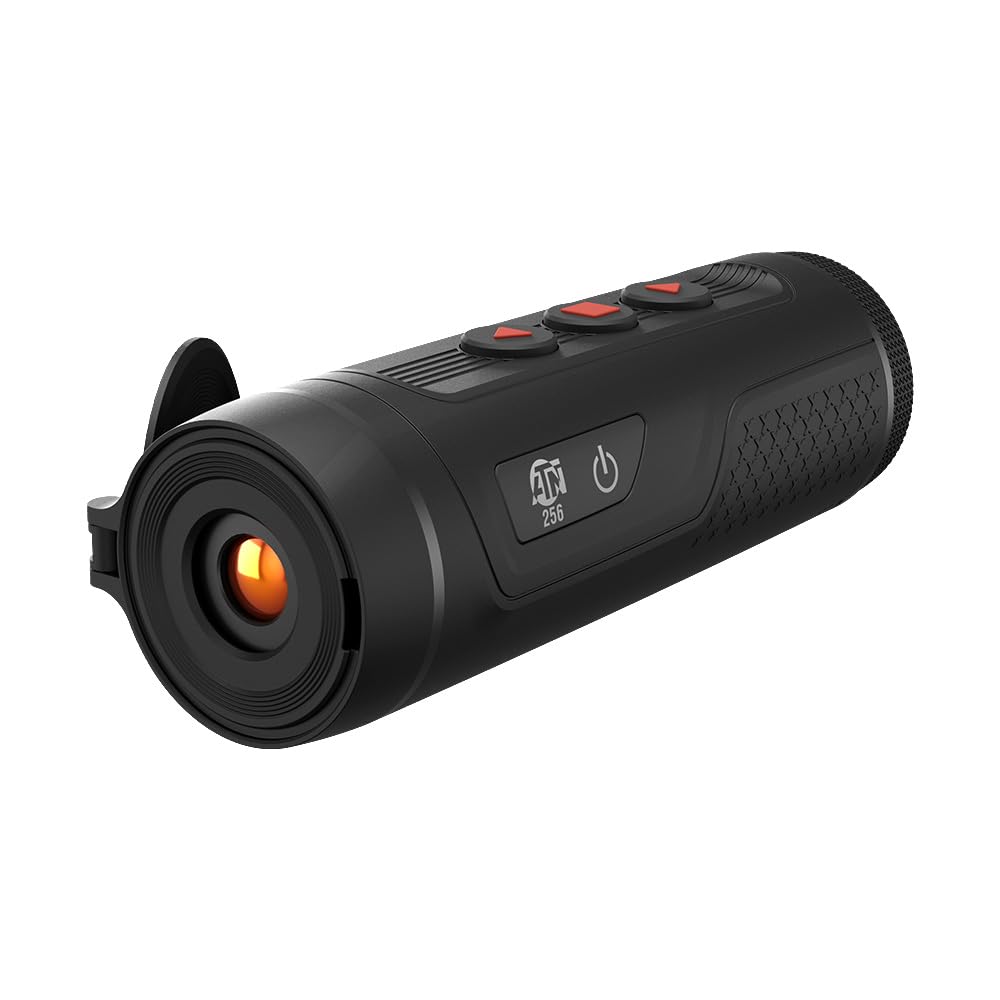
Image: The ATN BlazeSeeker-210 Thermal Monocular in use, demonstrating various thermal viewing modes like green hot, black hot, and a thermal sensor overlay.
Video: En officiel overview of the ATN BlazeSeeker Thermal Hunting Monocular, showcasing its features and thermal imaging capabilities in various modes.
Videooptagelse og fotooptagelse
The monocular allows you to capture still images and record videos directly to an inserted MicroSD card.
- Tager et billede: Briefly press the photo capture button (usually a dedicated button or a short press of a multi-function button). The screen may briefly flash or display an icon to confirm capture.
- Optagelse af video: Press the video record button (often a dedicated button or a long press of a multi-function button) to start recording. Press it again to stop recording. A recording indicator (e.g., a red dot or timer) will typically appear on the display during recording.
- Adgang til medier: Captured photos and videos can be reviewed on the device or by connecting the monocular to a computer via USB-C, or by removing the MicroSD card and inserting it into a card reader.

Image: The ATN BlazeSeeker-210 Thermal Monocular demonstrating its video record and photo capabilities, with a smartphone showing captured thermal footage.
Wi-Fi og app-forbindelse
The ATN BlazeSeeker-210 can connect wirelessly to your smartphone via Wi-Fi, allowing you to control the monocular, view live footage, and manage media through a dedicated mobile application.
- Download appen: Download the official ATN app from your smartphone's app store (iOS or Android).
- Enable Wi-Fi on Monocular: Turn on the Wi-Fi feature on your BlazeSeeker-210 (refer to the device's menu for the Wi-Fi setting).
- Opret forbindelse til Wi-Fi: On your smartphone, go to Wi-Fi settings and connect to the network broadcast by your monocular (e.g., "ATN_BlazeSeeker_XXXX"). The default password is often "12345678" or found in the device's menu.
- Start app: Open the ATN app. It should automatically detect and connect to your monocular, providing access to live view, settings, and media management.

Image: The ATN BlazeSeeker-210 Thermal Monocular highlighting its built-in Wi-Fi and app connectivity features.
Opretholdelse
- Rensning: Use a soft, lint-free cloth to clean the exterior of the monocular. For the lens, use a specialized lens cleaning cloth and solution. Avoid abrasive materials.
- Opbevaring: Store the monocular in its soft carrying case in a cool, dry place when not in use. Avoid extreme temperatures and humidity.
- Batteripleje: For long-term storage, ensure the battery is charged to approximately 50%. Recharge periodically if stored for extended periods to prevent deep discharge.
- Firmwareopdateringer: Periodically check the ATN website for firmware updates. Follow the instructions provided by ATN for safe and proper firmware installation.
Fejlfinding
| Problem | Mulig årsag | Løsning |
|---|---|---|
| Enheden tænder ikke. | Lavt eller afladet batteri. | Oplad batteriet ved hjælp af det medfølgende USB-C-kabel. |
| Billedet er sløret eller ude af fokus. | Forkert fokusjustering. | Adjust the objective lens focus ring and diopter for your vision. |
| Kan ikke oprette forbindelse til Wi-Fi/app. | Wi-Fi not enabled on monocular; incorrect password; app not updated. | Ensure Wi-Fi is enabled on the device. Verify Wi-Fi password. Update the ATN app to the latest version. |
| Kan ikke optage video eller tage billeder. | Intet MicroSD-kort isat, eller kortet er fuldt/beskadiget. | Insert a compatible MicroSD card. Check card capacity and format if necessary. |
| Kort batterilevetid. | Frequent use of power-intensive features (Wi-Fi, recording); battery degradation. | Reduce use of Wi-Fi and continuous recording. Ensure full charge before use. If battery life significantly degrades, contact support. |
Specifikationer
| Feature | Detalje |
|---|---|
| Termisk sensor | 256x192 (25 Hz) |
| Pixel størrelse | 12 µm |
| NETD-vurdering | <35mK |
| Detektionsområde | Op til 460 meter |
| Forstørrelse | 1.5-12x |
| Farvepaletter | White Hot, Black Hot, Iron Red, Alarm, Sepia, Green Hot |
| Videooptagelse | Ja |
| Fotografering | Ja |
| Opbevaring | MicroSD-kort op til 256GB |
| Wi-Fi | Yes (App Connectivity) |
| Batterilevetid | Op til 9 timer |
| Produktdimensioner | 5.9 x 2 x 2.2 tommer |
| Varens vægt | 9.6 ounce |
| Varemodelnummer | TIMNBLS210 |
| Batteritype | 1 Lithium Ion (inkluderet) |

Image: The compact and lightweight design of the ATN BlazeSeeker-210 Thermal Monocular, illustrating its dimensions and portability.

Image: The ATN BlazeSeeker-210 Thermal Monocular highlighting its low power consumption, providing over 9 hours of operation.
Garanti og support
For warranty information, please refer to the documentation included with your product or visit the official ATN website. For technical support, product inquiries, or service, please contact ATN customer support directly. Contact details can typically be found on the manufacturer's webwebsted eller i produktemballagen.
Forslag 65 Advarsel: Dette produkt kan indeholde kemikalier, der af staten Californien er kendt for at forårsage kræft og fosterskader eller andre reproduktionsskader. For mere information, gå til www.P65Warnings.ca.gov.