
1. Vigtige sikkerhedsinstruktioner
Læs venligst alle instruktioner omhyggeligt, inden du bruger dette apparat, og gem dem til senere brug. Manglende overholdelse af disse instruktioner kan resultere i elektrisk stød, brand eller alvorlig personskade.
- Sørg for, at voltagDen strømstyrke, der er angivet på typeskiltet, svarer til din elnetstrøm.tage.
- Ventilatoren, stikket eller ledningen må ikke nedsænkes i vand eller andre væsker.
- Unplug the fan from the power outlet when not in use, when moving it, and before cleaning.
- Hold ventilatoren utilgængeligt for børn og kæledyr.
- Brug ikke ventilatoren med en beskadiget ledning eller et beskadiget stik, eller efter at apparatet ikke fungerer korrekt eller er blevet beskadiget på nogen måde.
- Avoid placing fingers or other objects through the fan guards when the fan is operating.
- Do not use the fan near windows, as rain may create an electrical hazard.
- Placer ventilatoren på en stabil, plan overflade for at forhindre den i at vælte.
- Dette apparat er kun til indendørs brug.
2. Produktet er slutview
The MISTRAL MHV840R-G is an 8-inch DC High Velocity Fan designed for efficient air circulation with advanced features. It includes a remote control for convenient operation, multiple speed settings, a timer, motion sensor, and auto-oscillation capabilities.
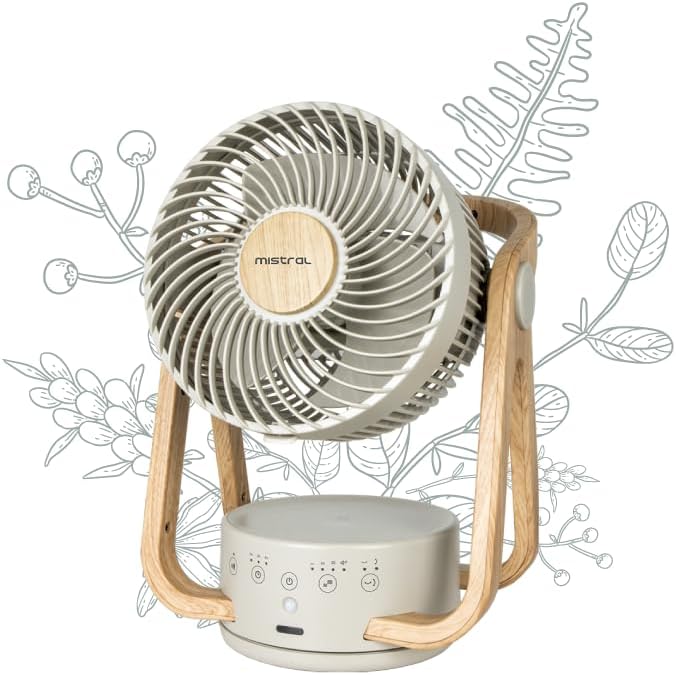
Figur 1: Front view of the fan, highlighting the fan head, control panel, and stable base.

Figur 2: Tilbage view of the fan, illustrating the rear grille and the fan's overall structure.
Komponenter:
- Ventilatorhoved: Contains the 5 ABS blades and protective grilles.
- Basisenhed: Houses the electronic controls, LED display, and motion sensor.
- Stå: Wooden-style frame supporting the fan head, allowing for vertical angle adjustment.
- Kontrolpanel: Soft-touch buttons on the base for manual operation.
- Fjernbetjening: For praktisk trådløs betjening.
- Strømledning: Til tilslutning til en stikkontakt.
3. Opsætning
Follow these steps to set up your MISTRAL MHV840R-G fan:
- Udpakning: Carefully remove the fan and all accessories from the packaging. Retain packaging for storage or if return is necessary.
- Placering: Placer ventilatoren på en fast, plan overflade på det ønskede sted. Sørg for, at der er tilstrækkelig plads omkring ventilatoren for optimal luftgennemstrømning og oscillation.
- Strømtilslutning: Sæt netledningen i en standard 240V AC stikkontakt.
- Fjernbetjenings batteri: Insert the required batteries into the remote control (batteries not included). Ensure correct polarity.
4. Betjeningsvejledning
The fan can be operated using the soft-touch control panel on the base or the included remote control.
4.1 Kontrolpanelets funktioner:
- Tænd/sluk-knap (O/I): Tryk for at tænde eller slukke for ventilatoren.
- Hastighedsknap (+/-): Press to cycle through the 4 speed settings: Low, Mid, Hi, Turbo.
- Tilstandsknap (M): Selects different fan modes (e.g., Normal, Natural, Sleep). Refer to the LED display for current mode.
- Timer-knap (T): Indstiller driftstimeren til op til 4 timer. Hvert tryk øger timerindstillingen.
- Oscillationsknap (OSC): Activates or deactivates horizontal (60° Left-Right) and vertical (90° Up-Down) auto-oscillation.
- Motion Sensor Button (PIR): Activates or deactivates the motion sensor function. When active, the fan will adjust operation based on detected movement.
- LED-lysknap (Lys): Tænder eller slukker LED-lyset.
- Buzzer Button (Summer): Toggles the audible buzzer sound for button presses on or off.
4.2 Fjernbetjening:
The remote control duplicates all functions available on the control panel for convenient operation from a distance. Point the remote control towards the fan's base unit for optimal response.
4.3 Auto-Oscillation:
The fan features both horizontal (60° left-right) and vertical (90° up-down) auto-oscillation. Press the OSC button to activate or deactivate this feature, distributing airflow across a wider area.
4.4 Motion Sensor (PIR):
When the motion sensor is activated, the fan can detect movement in its vicinity. It may adjust its speed or turn off/on based on the presence of a user, optimizing energy consumption. Refer to the LED display for the motion sensor status.
5. Vedligeholdelse
Regelmæssig rengøring vil bidrage til at opretholde ventilatorens ydeevne og forlænge dens levetid.
- Tag altid stikket ud af ventilatoren fra stikkontakten før rengøring.
- Udvendig rengøring: Tør ventilatorens yderflader af med en blød, tør klud.amp klud. Brug ikke slibende rengøringsmidler eller opløsningsmidler, da disse kan beskadige overfladen.
- Gitter og knive: Use a vacuum cleaner with a brush attachment or a soft brush to remove dust from the front and rear grilles and the fan blades. For thorough cleaning, the front grille may be removable (refer to specific disassembly instructions if provided in a separate service manual).
- Opbevaring: Hvis ventilatoren opbevares i længere tid, skal den rengøres grundigt og opbevares i originalemballagen eller et støvfrit miljø.
6. Fejlfinding
Hvis du støder på problemer med din ventilator, kan du se følgende almindelige problemer og løsninger:
| Problem | Mulig årsag | Løsning |
|---|---|---|
| Ventilatoren tænder ikke. | Ingen strømforsyning. Tænd/sluk-knappen er ikke trykket ned. | Kontroller, om netledningen er sat ordentligt i en fungerende stikkontakt. Tryk på tænd/sluk-knappen på kontrolpanelet eller fjernbetjeningen. |
| Svag eller ingen luftstrøm. | Ventilatorhastigheden er indstillet for lavt. Luftindtag/-udtag blokeret. Støvophobning på knivene. | Forøg blæserhastigheden. Ensure nothing is obstructing the fan grilles. Clean the fan blades and grilles as per maintenance instructions. |
| Oscillationen virker ikke. | Oscillationsfunktionen er deaktiveret. | Tryk på OSC-knappen for at aktivere oscillationen. |
| Fjernbetjening virker ikke. | Batterierne er døde eller isat forkert. Blokering mellem fjernbetjening og ventilator. | Udskift batterierne, og sørg for korrekt polaritet. Remove any obstructions and point the remote directly at the fan's base. |
| Buzzer sound is off. | Buzzer function deactivated. | Press the Buzzer button to activate the sound. |
Hvis problemet fortsætter efter at have prøvet disse løsninger, bedes du kontakte kundesupport.
7. Specifikationer
| Feature | Specifikation |
|---|---|
| Mærke | MISTRAL |
| Modelnummer | MHV840R-G |
| Type | 8" DC High Velocity Fan |
| Strømkilde | Elektrisk med ledning |
| Wattage | 21 watt |
| Voltage | 240 volt |
| Antal hastigheder | 4 (Turbo / Hi / Mid / Low) |
| Timer | Op til 4 timer |
| oscillation | 60° Left-Right, 90° Up-Down Auto-Oscillation |
| Særlige funktioner | Motion Sensor, Remote Controlled, LED Light, Soft Touch Electronic Control, Buzzer cancellable |
| Produktmål (D x B x H) | 26D x 26.5W x 36H centimeter |
| Varens vægt | 2.05 kilo |
| Materiale | Plastic, Acrylonitrile Butadiene Styrene (ABS) blades |
| Farve | Off White |
8. Garanti og support
For warranty information or technical support, please refer to the warranty card included with your product or contact MISTRAL customer service. Keep your purchase receipt as proof of purchase.
MISTRAL Customer Service: Please visit the official MISTRAL webwebstedet eller se din produktemballage for kontaktoplysninger.