
Indledning
This user manual provides detailed instructions for the Docooler Wireless Gaming Mouse, featuring a transparent crystal shell, tri-mode connectivity (USB Wired, 2.4G Wireless, and Bluetooth), adjustable DPI settings, and vibrant RGB lighting. Please read this manual thoroughly to ensure proper use and optimal performance of your new gaming mouse.

Image: The Docooler Wireless Gaming Mouse, showcasing its transparent crystal shell and internal RGB lighting.
Produktegenskaber
- Transparent Crystal Shell: The mouse features a fully transparent PC shell, offering a unique aesthetic and allowing visibility of internal components and lighting.
- Tri-mode-tilslutning: Supports three connection methods:
- USB-kablet: For en stabil forbindelse med lav latenstid.
- 2.4G trådløs: Utilizes a USB receiver for reliable wireless performance.
- Bluetooth: For convenient wireless connection to compatible devices.
- Justerbar DPI: Five adjustable DPI levels (1200-1600-2000-2400-3600DPI) for precise control and adaptability to various tasks and games.
- RGB belysning: Features multiple RGB lighting backlight effects with 11 light guides, creating an immersive visual experience.
- Type-C hurtigopladning: Built-in 650mAh lithium battery with Type-C charging port, providing long endurance of up to 30 days on a full charge.
- Ergonomisk design: Designed for comfortable use during extended periods, with an upgraded oil-repellent coating for fingerprint resistance.
- Lydløse klik: Equipped with mute buttons for quiet operation.
- Bred kompatibilitet: Compatible with various devices including PCs, laptops, and other commonly used electronic devices.

Billede: En overview of the mouse's features, including 3 modes, RGB light, mute button, ergonomic design, transparent shell, 5-step DPI, rechargeable battery, and game engine.

Image: A detailed display of the mouse's components, including the anti-slip roller, transparent body, charging support, and multimedia side keys.
Pakkens indhold
Tjek venligst pakken for følgende varer:
- Docooler Wireless Gaming Mouse
- USB-modtager (2.4G)
- USB Type-C opladerkabel
- Brugermanual
Opsætning og tilslutning
Indledende opladning
Before first use, it is recommended to fully charge the mouse. Connect the supplied USB Type-C charging cable to the mouse's charging port and the other end to a USB power source (e.g., computer USB port, USB wall adapter). The RGB lighting may indicate charging status.
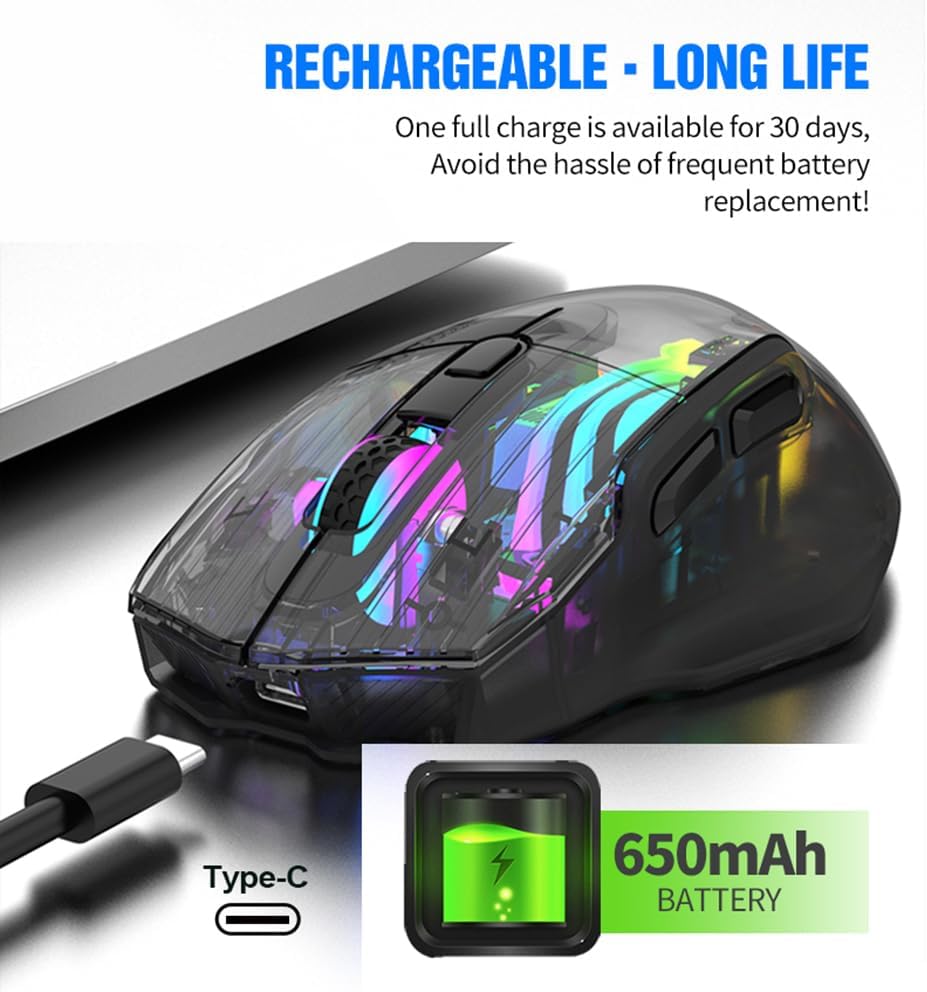
Image: The Docooler Wireless Gaming Mouse connected via its Type-C charging cable, illustrating its rechargeable battery feature.
Tilslutning via 2.4G trådløs tilstand
- Find USB-modtageren, som normalt opbevares i et rum på undersiden af musen.
- Sæt USB-modtageren i en ledig USB-port på din computer.
- Turn on the mouse using the power switch located on the underside. Ensure the mode switch is set to 2.4G wireless mode (indicated by a specific icon or position).
- Musen burde automatisk oprette forbindelse til din computer.
Tilslutning via Bluetooth-tilstand
- Turn on the mouse and set the mode switch on the underside to Bluetooth mode (indicated by a Bluetooth icon or position).
- Åbn Bluetooth-indstillingerne på din computer eller enhed.
- Søg efter new devices. The mouse should appear as "Docooler Mouse" or similar.
- Select the mouse to pair. Follow any on-screen prompts if a pairing code is required (usually 0000 or 1234, but often not needed for mice).
Connecting via USB Wired Mode
- Connect the supplied USB Type-C cable to the mouse's port.
- Tilslut den anden ende af USB-kablet til en ledig USB-port på din computer.
- The mouse will function as a wired mouse and will also charge simultaneously.

Image: A diagram illustrating the three connection modes: 2.4G wireless, wired (USB to Type-C), and Bluetooth mode.
Driftstilstande
The Docooler Wireless Gaming Mouse supports three distinct operating modes: 2.4G Wireless, Bluetooth, and USB Wired. You can switch between these modes using the switch located on the underside of the mouse. Select the mode that best suits your current needs and device compatibility.
DPI justering
The mouse offers five adjustable DPI (Dots Per Inch) levels to customize cursor sensitivity. This allows for precise control for tasks requiring accuracy or rapid movement for gaming. The available DPI settings are 1200, 1600, 2000, 2400, and 3600 DPI.
To adjust the DPI, press the DPI switch button, typically located near the scroll wheel on the top of the mouse. Each press will cycle through the available DPI settings. The RGB lighting may change to indicate the current DPI level.

Image: The Docooler Wireless Gaming Mouse with an arrow pointing to the DPI switch, illustrating its function for adjusting sensitivity.
RGB belysning
The mouse features dynamic RGB lighting with 16.8 million colors and various effects, enhancing your gaming or work environment. The translucent shell allows the internal LEDs and light guides to create an immersive lighting display.
To switch between different lighting effects, use the dedicated light effect switching button, which is typically located on the underside of the mouse. Pressing this button will cycle through the available RGB modes.

Image: Two Docooler Wireless Gaming Mice (white and black variants) displaying their vibrant RGB illusion lighting, with a close-up of the light effect switching button on the underside.
Opladning
The mouse is equipped with a built-in 650mAh lithium battery, providing extended usage time. A full charge can last up to 30 days, depending on usage patterns and RGB lighting settings.
To charge the mouse, connect the provided USB Type-C cable to the charging port on the front of the mouse and to a USB power source. The mouse can be used while charging in wired mode.
Ergonomics and Compatibility
The Docooler Wireless Gaming Mouse is designed with an ergonomic curve to provide a comfortable grip, reducing strain during long periods of use. Its lightweight construction and oil-repellent coating contribute to a pleasant user experience.
This mouse offers wide compatibility with various operating systems and devices, including but not limited to PCs, laptops, Smart TVs, and All-in-one PCs. For specific device compatibility, please refer to your device's specifications or contact customer support.

Image: The Docooler Wireless Gaming Mouse positioned in front of various compatible devices such as a Smart TV, PC, All-in-one PC, and Notebook, highlighting its wide compatibility.
Opretholdelse
To ensure the longevity and optimal performance of your Docooler Wireless Gaming Mouse, follow these maintenance guidelines:
- Rensning: Brug en blød, tør klud til at tørre musens overflade af. Ved genstridigt snavs kan du bruge en let tør klud.amp cloth can be used, but ensure no liquid enters the mouse. Avoid using harsh chemicals or abrasive cleaners.
- Opbevaring: Opbevar musen et køligt, tørt sted væk fra direkte sollys og ekstreme temperaturer.
- Batteripleje: Avoid completely draining the battery frequently. Charge the mouse regularly to maintain battery health. If storing for a long period, charge the battery to about 50% and recharge every few months.
- USB-modtager: Når USB-modtageren ikke er i brug, skal den opbevares i det dertil indrettede rum på musen for at forhindre tab.
Fejlfinding
| Problem | Mulig årsag | Løsning |
|---|---|---|
| Musen svarer ikke. | Low battery; Incorrect connection mode; USB receiver not properly connected (2.4G); Bluetooth not paired. | Charge the mouse; Ensure the mode switch is set correctly (2.4G, BT, or Wired); Re-insert USB receiver; Re-pair Bluetooth. |
| RGB-lysene virker ikke. | Lights turned off; Low battery. | Press the light effect switching button on the underside; Charge the mouse. |
| Markørbevægelsen er uregelmæssig eller langsom. | Low DPI setting; Dirty sensor; Uneven surface. | Increase DPI using the DPI switch button; Clean the optical sensor with a soft cloth; Use on a clean, flat mouse pad or surface. |
| Musen afbrydes ofte. | Interferens; Afstand fra modtager/enhed; Lavt batteri. | Reduce interference (move away from other wireless devices); Ensure mouse is within range; Charge the mouse. |
Specifikationer
- Modelnummer: LWE1749742334267PB
- Forbindelse: Tri-Mode (2.4G Wireless, Bluetooth, USB Wired)
- DPI niveauer: 1200 / 1600 / 2000 / 2400 / 3600 DPI
- Batterikapacitet: 650mAh lithium batteri
- Opladningsport: USB Type-C
- Belysning: RGB Backlight (16.8 Million Colors)
- Antal knapper: 7
- Produktdimensioner: 5.04 x 3.03 x 0.04 tommer
- Varens vægt: 7 ounce
- Skalmateriale: Gennemsigtig PC
Garanti og support
Docooler products are manufactured to the highest quality standards. This product is covered by a manufacturer's warranty against defects in materials and workmanship. For detailed warranty information, please refer to the warranty card included with your product or visit the official Docooler webwebsted.
If you encounter any issues or have questions regarding your Docooler Wireless Gaming Mouse, please contact our customer support team. Provide your product model number (LWE1749742334267PB) and a detailed description of the issue for faster assistance.
Docooler Customer Support:
- Webwebsted: Visit the Docooler Store on Amazon (til generelle forespørgsler og produktinformation)
- E-mail: Se produktemballagen eller den officielle webwebsted for direkte support-e-mail.