
1. Introduktion
Thank you for choosing the JONSBO TK-3 White ATX Mid Tower PC Case. This manual provides detailed instructions for the proper installation, operation, and maintenance of your new PC case. Please read this manual thoroughly before beginning assembly to ensure optimal performance and longevity of your components.

Figure 1: JONSBO TK-3 White ATX Mid Tower PC Case. This image displays the overall design of the white PC case, highlighting its one-piece curved glass panel and compact form factor.
2. Produktfunktioner
The JONSBO TK-3 White PC Case is designed for high compatibility and efficient cooling, featuring a unique aesthetic and practical internal layout.
- One-Piece Curved Glass: Offers a 270-degree side view, providing a column-less display of internal hardware. A 2H hardness glass protection film is applied to the glass surfaces.
- BTF Motherboard Support: Compatible with back-plug (BTF) motherboards (ATX, Micro-ATX, ITX) for cleaner cable routing.
- Avanceret kølesystem: Supports dual 360mm All-In-One (AIO) liquid coolers (top and bottom) and up to 10 fan positions for optimal airflow and heat dissipation.
- High Hardware Compatibility: Accommodates ATX power supplies up to 220mm, CPU coolers up to 165mm in height, and graphics cards up to 420mm in length.
- Fleksible opbevaringsmuligheder: Supports various drive configurations including 2.5" SSDs and 3.5" HDDs.
- Forreste I/O-porte: Includes 1x USB 3.2 Gen2 Type-C and 2x USB 3.0 ports for convenient connectivity.

Figure 2: Curved Glass Panel. This image illustrates the one-piece curved glass design, showcasing the internal components without obstruction.
3. Opsætning og installation
Before starting, ensure you have all necessary components and tools. Handle all parts with care, especially the glass panel. Do not remove the curved-glass explosion-proof film.
3.1 Installation af bundkort
- Carefully remove the side panels to access the interior of the case.
- Install the necessary motherboard standoffs for your ATX, Micro-ATX, or ITX motherboard.
- Align your motherboard with the standoffs and I/O shield, then secure it with screws. For BTF motherboards, ensure all back-plug connections are accessible and properly aligned.

Figure 3: BTF Motherboard Layout. This diagram illustrates the internal layout for BTF (back-plug) motherboard installation, showing designated areas for various connectors (auxiliary power, 24-pin power, audio/pre-interface, SATA/USB interface).
3.2 Cooling System Installation (Fans & AIO)
The TK-3 supports extensive cooling configurations.
- Fan Positions:
- Top: 3x 120mm or 2x 140mm fans
- Bottom: 3x 120mm fans
- Motherboard Side: 3x 120mm fans
- Bagpå: 1x 120 mm blæser
- AIO-understøttelse:
- Top: 360mm or 280mm AIO
- Bottom: 360mm AIO
- 2x 2.5" SSDs + 1x 3.5" HDD
- OR 1x 2.5" SSD + 2x 3.5" HDDs
Install fans or AIO radiators in the desired positions, ensuring proper airflow direction. The case is designed for vertical upward airflow to prevent heat accumulation.

Figure 4: Cooling System Support. This diagram illustrates the various fan and AIO radiator mounting positions within the JONSBO TK-3 case, highlighting the potential for dual 360mm AIO setups and multiple fan configurations.
3.3 Installation af grafikkort (GPU)
The case supports graphics cards up to 420mm in length. Remove the necessary PCI expansion slot covers, insert your GPU, and secure it with screws.
3.4 Installation af strømforsyningsenhed (PSU).
The TK-3 supports ATX power supplies up to 220mm. Install the PSU in the designated rear mount area, typically in the separated compartment for improved cable management.
3.5 Installation af drev
Etuiet tilbyder fleksible opbevaringsmuligheder:
Mount your drives in the dedicated bays, typically located in the rear compartment for efficient cable routing.
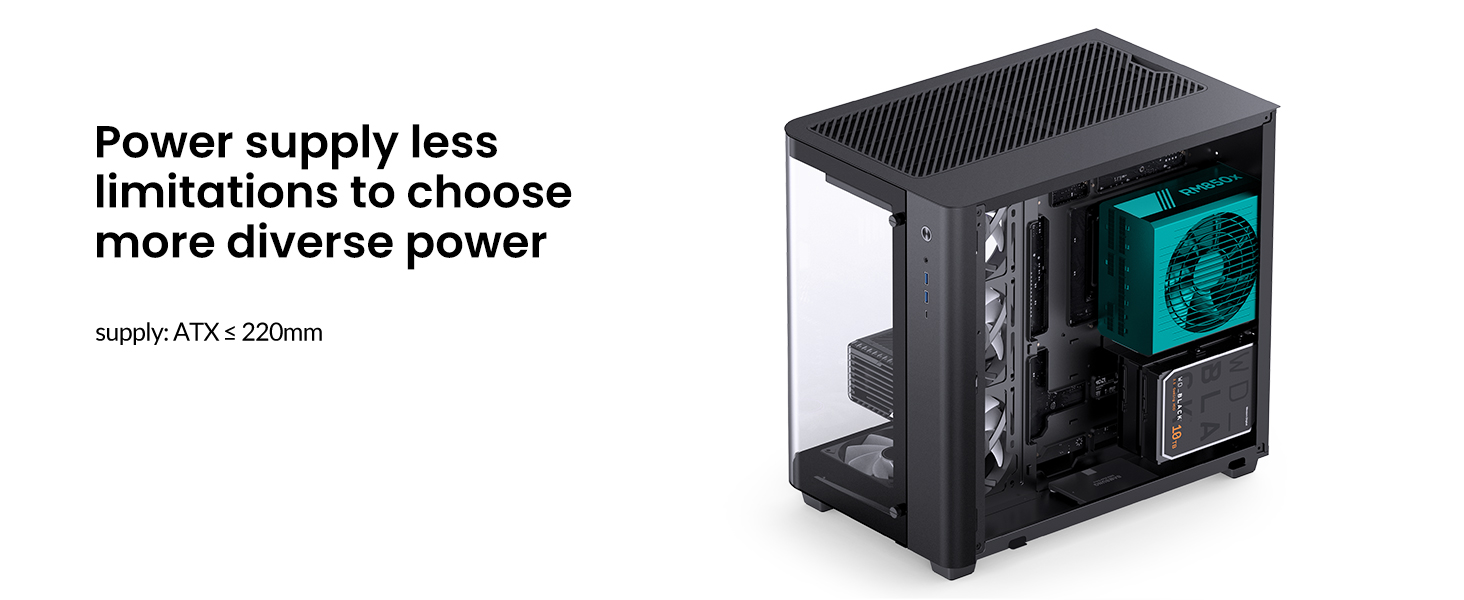
Figure 5: Drive Bay Configuration. This image illustrates the flexible drive bay options, showing how 2.5" SSDs and 3.5" HDDs can be installed in various combinations within the case's separated compartment.
3.6 Forreste I/O-forbindelser
Connect the front panel cables (USB 3.2 Gen2 Type-C, USB 3.0, audio, power, reset) to their corresponding headers on your motherboard. Refer to your motherboard manual for specific header locations.

Figure 6: Front I/O Ports. This image details the front panel connectivity, including the USB 3.2 Gen2 Type-C port, USB 3.0 ports, and audio jacks.
4. Betjening
Når alle komponenter er installeret og fastgjort, skal du tilslutte dine eksterne enheder og strømkablet. Tryk på tænd/sluk-knappen på frontpanelet for at starte dit system.
4.1 Luftstrømsstyring
The JONSBO TK-3 is designed with a vertical upward airflow path to minimize heat accumulation. Ensure your installed fans are oriented correctly to facilitate this airflow. Bottom intake fans and top/rear exhaust fans are generally recommended for optimal cooling performance.
5. Vedligeholdelse
Regular maintenance helps ensure the longevity and performance of your PC components.
- Støvrensning: Rengør støvfiltre (hvis de er til stede) og interne komponenter regelmæssigt med trykluft. Sørg for, at systemet er slukket og at stikket er taget ud, før rengøring.
- Glass Panel Care: Clean the curved glass panel with a soft, lint-free cloth and a mild glass cleaner. Avoid abrasive materials that could scratch the surface.
- Kabelstyring: Kontroller jævnligt kabelføringen for at sikre, at ingen kabler blokerer luftstrømmen eller ventilatorens drift.
6. Fejlfinding
Dette afsnit omhandler almindelige problemer, du kan støde på under montering eller betjening.
- Problemer med komponenttilpasning: If a component (e.g., large GPU, CPU cooler) does not fit, double-check the maximum supported dimensions listed in the specifications. Ensure all cables are routed efficiently to avoid obstruction.
- Dårlig luftgennemstrømning/høje temperaturer: Verify that all fans are installed in the correct orientation (intake/exhaust) and that dust filters are clean. Ensure no cables are blocking airflow paths.
- Frontpanel I/O virker ikke: Check all front panel header connections to the motherboard. Ensure they are securely seated and connected to the correct pins as per your motherboard manual.
- Loose Screws/Panels: Ensure all screws, especially for the glass panels, are tightened gently but firmly. Avoid over-tightening to prevent stripping.
If you encounter persistent issues, refer to your individual component manuals or contact JONSBO customer support.
7. Specifikationer
| Feature | Detalje |
|---|---|
| Modelnavn | TK-3 White |
| Sagstype | Mid Tower |
| Dimensioner (L x B x H) | 438mm x 288mm x 415mm (17.24 x 11.34 x 16.34 inches, including foot) |
| Materiale | 0.7mm Steel, Tempered Glass |
| Bundkort kompatibilitet | ATX, Micro-ATX, ITX (BTF support) |
| PCI -udvidelsespladser | 7 |
| Max. GPU Length | 420 mm (16.53 tommer) |
| Maks. CPU køler Højde | 165 mm (6.49 tommer) |
| Maks. PSU længde | 220 mm (8.66 tommer) |
| Drive Bays | 2x 2.5" SSD + 1x 3.5" HDD OR 1x 2.5" SSD + 2x 3.5" HDD |
| Fan Support | Top: 3x 120mm / 2x 140mm Bund: 3x 120 mm MB Side: 3x 120mm Bag: 1x 120mm |
| AIO Radiator Support | Top: 360mm / 280mm Bund: 360 mm |
| Front I / O-porte | 1x USB 3.2 Gen2 Type-C, 2x USB 3.0, Audio (2-in-1) |
| Varens vægt | 16.09 pund (7.3 kg) |

Figure 7: Case Dimensions. This diagram provides a visual representation of the JONSBO TK-3 PC case dimensions (width, depth, height) in millimeters.
8. Garanti og support
JONSBO products are manufactured to high-quality standards. For warranty information, please refer to the specific warranty card included with your product or visit the official JONSBO website. If you require technical assistance or have questions regarding your JONSBO TK-3 White PC Case, please contact JONSBO customer support through their official channels.