
1. Introduktion
Thank you for choosing the Acekool PAC-M07 Portable Air Conditioner. This 3-in-1 unit provides cooling, dehumidification, and fan functions to enhance your indoor comfort. This manual contains important information regarding the safe operation, installation, use, and maintenance of your appliance. Please read it thoroughly before use and keep it for future reference.
2. Sikkerhedsoplysninger
For at mindske risikoen for brand, elektrisk stød eller personskade skal du altid følge disse grundlæggende forholdsregler:
- Læs alle instruktioner omhyggeligt, før apparatet tages i brug.
- Sørg for, at strømforsyningen matcher voltage angivet på mærkatet.
- Slut altid enheden til en jordet stikkontakt. Brug ikke forlængerledninger eller adapterstik.
- Brug ikke enheden, hvis netledningen eller stikket er beskadiget. Kontakt kvalificeret servicepersonale for reparation.
- Hold apparatet væk fra varmekilder, direkte sollys og brandfarlige materialer.
- Do not block the air inlets or outlets. Maintain at least 20 cm clearance from walls and furniture.
- Unplug the unit from the power outlet before cleaning, maintenance, or moving.
- Do not use the appliance in wet environments such as bathrooms or laundry rooms.
- The refrigerant R290 is flammable. Handle with care and ensure proper ventilation during installation and maintenance.
- Dette apparat er ikke beregnet til brug af personer (inklusive børn) med nedsatte fysiske, sensoriske eller mentale evner, eller mangel på erfaring og viden, medmindre de har fået opsyn eller instruktion i brugen af apparatet af en person, der er ansvarlig for deres sikkerhed.
3. Pakkens indhold
Kontroller, at alle varer er til stede og i god stand:
- Acekool Portable Air Conditioner Unit
- Udstødningsslange
- Window Sealing Kit (Window slide plate, exhaust hose adapter, window adapter)
- Fjernbetjening
- Afløbsslange (til kontinuerlig dræning)
- Brugermanual
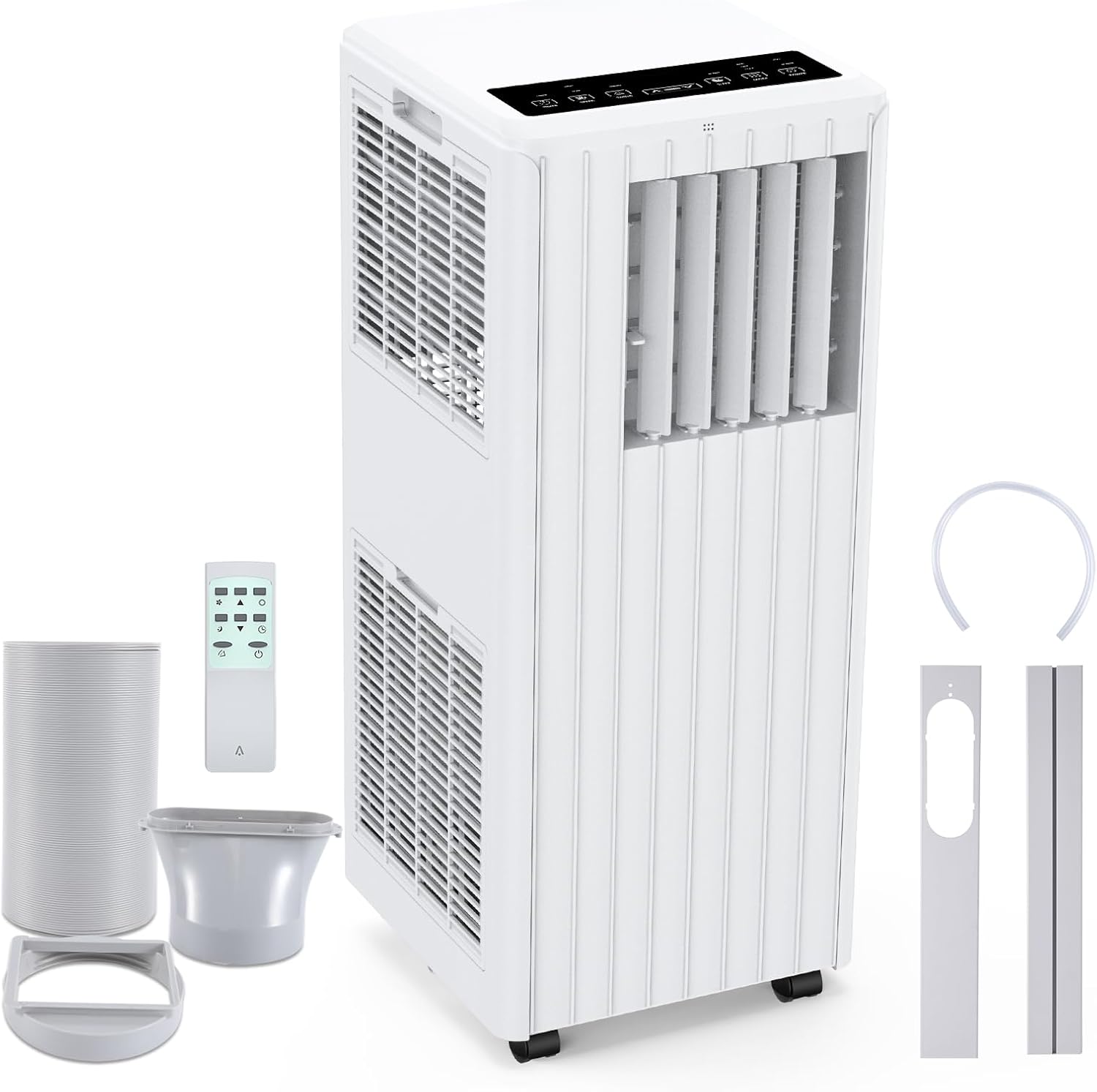
Image: Portable Air Conditioner unit with exhaust hose, window kit, remote control, and drain hose.
4. Produktfunktioner
The Acekool PAC-M07 offers a range of features for optimal comfort:
- Kraftig køling: 7000 BTU cooling capacity, ideal for rooms up to 250 sq ft.
- 3-i-1 funktionalitet: Offers Cooling, Fan, and Dehumidifier modes.
- Effektiv affugtning: Fjerner op til 36 liter fugt om dagen.
- Justerbare ventilatorhastigheder: Two fan speeds (Low/High) for customized airflow.
- Digitalt display og fjernbetjening: Easy operation via the control panel or included remote.
- 24-timers timer: Programmér enheden til at tænde eller slukke automatisk.
- Sove mode: Provides quiet operation and gradual temperature adjustment for comfortable sleep.
- Auto-Evaporation System: Reduces the need for manual drainage by evaporating condensate.
- Automatisk afrimning: Prevents ice build-up on the evaporator coils.
- Vaskbart luftfilter: Removable and antibacterial filter ensures clean air.
- Bærbart design: Integrated handle and four smooth-rolling wheels for easy movement.
- Miljøvenligt kølemiddel: Uses R290 refrigerant, which is environmentally safe.

Image: Visual representation of the 3-in-1 operation system: Cooling, Dehumidifying, and Fan modes.

Image: The unit operating in Sleep Mode at night, emphasizing features like automatic shut-off, 24-hour smart timer, and ultra-quiet performance.
5. Opsætning
5.1 Placering
Place the air conditioner on a flat, stable surface. Ensure there is at least 20 cm (8 inches) of space around the unit for proper airflow. Avoid placing it in direct sunlight or near heat sources.
5.2 Montering af udstødningsslange
- Skru udstødningsslangeadapteren på den ene ende af udstødningsslangen.
- Tilslut den anden ende af udstødningsslangen til udstødningsudløbet på bagsiden af klimaanlægget.
5.3 Montering af vinduessæt
- Adjust the window slide plate to fit your window opening. Secure it in place.
- Attach the window adapter to the opening in the window slide plate.
- Connect the exhaust hose (with adapter) to the window adapter, ensuring a tight seal to prevent hot air from re-entering the room.
5.4 Drainage Setup (Optional for Dehumidifier Mode)
For continuous dehumidification or if the internal water tank fills up frequently, you can set up continuous drainage:
- Locate the continuous drain outlet at the back of the unit.
- Fjern gummiproppen.
- Connect the provided drain hose to the outlet.
- Direct the other end of the drain hose into a suitable container or floor drain, ensuring it is lower than the unit's drain outlet for gravity flow.

Image: Step-by-step guide illustrating the easy installation process, including connecting the exhaust hose and window kit.
6. Betjeningsvejledning
6.1 Kontrolpanel
The control panel on top of the unit allows you to manage all functions.

Billede: Detaljeret view of the control panel display with labels for each button and function.
- POWER -knap: Tænder eller slukker for enheden.
- MODE knap: Skifter mellem køle-, ventilator- og affugtertilstande.
- SPEED knap: Adjusts fan speed (Low/High) in Cooling and Fan modes.
- TIMER knap: Indstiller timeren for automatisk tænding eller automatisk slukning (1-24 timer).
- SWING knap: Aktiverer eller deaktiverer den automatiske lameludsving.
- SLEEP knap: Activates Sleep Mode for quieter operation and energy saving.
- OP/NED-pile: Adjusts temperature settings in Cooling mode or timer duration.
6.2 Fjernbetjening
Den medfølgende fjernbetjening giver nem adgang til alle funktioner på afstand.

Image: The portable air conditioner unit shown with its remote control.
6.3 driftstilstande
- Køletilstand: Press the MODE button until the snowflake icon appears. Use the UP/DOWN arrows to set your desired temperature (16-32°C).
- Ventilatortilstand: Press the MODE button until the fan icon appears. Use the SPEED button to select Low or High fan speed.
- Affugtertilstand: Press the MODE button until the water drop icon appears. The unit will operate to remove excess moisture from the air.
7. Vedligeholdelse
Regelmæssig vedligeholdelse sikrer optimal ydeevne og forlænger levetiden på dit klimaanlæg.
7.1 Rengøring af luftfilteret
Luftfilteret bør rengøres hver anden uge eller oftere afhængigt af brugen.
- Sluk for enheden, og tag stikket ud af stikkontakten.
- Find luftfilterpanelet (normalt på bagsiden eller siden af enheden).
- Træk forsigtigt luftfilteret ud.
- Vask filteret under rindende vand (varmt sæbevand, hvis det er meget snavset).
- Lad filteret lufttørre helt, før du sætter det i igen. Udsæt det ikke for direkte sollys.

Image: A hand demonstrating the removal of the washable air filter from the unit.
7.2 Vandafledning
The unit features an auto-evaporation system, but in high humidity conditions or dehumidifier mode, the internal water tank may fill. When the 'FULL' indicator lights up, the unit will stop operating.
- Sluk for enheden, og tag stikket ud.
- Place a shallow pan or tray under the drain outlet.
- Fjern aftapningsproppen, så vandet kan løbe ud.
- Når den er tømt, skal du sætte aftapningsproppen ordentligt på.
7.3 Opbevaring
Hvis enheden opbevares i en længere periode:
- Tøm alt vand ud af enheden.
- Rengør luftfilteret.
- Store the unit upright in a dry, cool place, away from direct sunlight.
8. Fejlfinding
Before contacting customer support, refer to the following troubleshooting guide for common issues:
| Problem | Mulig årsag | Løsning |
|---|---|---|
| Enheden tænder ikke | Ingen strømforsyning Netledningen er ikke sat i Strømafbryder udløst | Tjek stikkontakten Sørg for, at netledningen er korrekt tilsluttet Nulstil afbryder |
| Enheden køler ikke effektivt | Luftfilteret er snavset Temperaturindstillingen er for høj Vinduer/døre åbne Udstødningsslange ikke korrekt installeret Værelsesstørrelsen er for stor | Rens luftfilteret Sænk den indstillede temperatur Luk alle vinduer og døre Ensure exhaust hose is properly sealed Verify unit capacity matches room size |
| Vandlækage | Afløbsproppen er ikke fastgjort Continuous drain hose blocked or improperly connected | Sørg for, at aftapningsproppen er tæt lukket Check drain hose for kinks or blockages; ensure proper downward slope |
| Støjende drift | Enheden står ikke på en plan overflade Obstruction in fan or air vents | Placer enheden på en plan overflade Kontroller og fjern eventuelle forhindringer |
| Fjernbetjening virker ikke | Batterier døde eller forkert isat Blokering mellem fjernbetjening og enhed | Replace batteries; ensure correct polarity Remove any objects blocking the signal path |
9. Specifikationer
| Feature | Specifikation |
|---|---|
| Mærke | Acekool |
| Modelnummer | PAC-M07 |
| Kølekapacitet | 7000 BTU |
| Affugtningskapacitet | 36 liter/dag |
| Tilstande | Køling, Ventilator, Affugter |
| Blæserhastigheder | 2 (lav, høj) |
| Temperaturområde (køling) | 16-32 °C |
| Kølemiddel | R-290 |
| Voltage | 220 volt |
| Wattage | 780 watt |
| Støjniveau | 48 decibel |
| Produktmål (D x B x H) | 29.9 x 28.8 x 69.6 cm |
| Varens vægt | 22.5 kilo |
| Kontrolmetode | Remote Control, Digital Display |
| Filtertype | Removable, Antibacterial Air Filter |
10. Garanti og support
Your Acekool PAC-M07 Portable Air Conditioner comes with a limited warranty. Please refer to the warranty card included in your package for specific terms and conditions.
For technical support, troubleshooting assistance, or warranty claims, please contact Acekool customer service through the contact information provided in your warranty documentation or on the official Acekool website. Please have your model number (PAC-M07) and purchase details ready when contacting support.