
Oceanlend VQSQ80G4081ZKZ9WJ12M
Oceanlend Electric Wind Instrument User Manual
Model: VQSQ80G4081ZKZ9WJ12M | Brand: Oceanlend
1. Introduktion
Welcome to the user manual for your new Oceanlend Electric Wind Instrument. This versatile digital instrument combines the functionality of a flute and saxophone, offering a rich musical experience with modern features. Please read this manual carefully to understand the instrument's operation and ensure optimal performance.
2. Produktfunktioner
- LED Screen and Dual Voice Function: The instrument features a clear LED screen and is equipped with a dual voice function, allowing you to easily switch between two different tones.
- MIDI udgang: This electric wind instrument supports MIDI output, enabling connection to a computer or tablet for expanded creative possibilities.
- 15-Level Blowing Sensitivity and Transposition Function: With 15 levels of blowing sensitivity adjustment, you can customize the instrument's responsiveness to your playing style. The transposition function allows shifting the pitch up or down by 6 steps.
- Supports External Speakers and Headphones: You can connect external speakers or headphones to the instrument for a more immersive playing experience.
- Long Battery Life and Power Saving Mode: The instrument is powered by an 800 mAh rechargeable lithium-ion battery, providing lasting performance. It also features a power-saving mode that automatically shuts down after 10 minutes of inactivity to conserve energy.
3. Hvad er der i æsken
Sørg for, at alle følgende varer er til stede ved udpakning:
- 1 x Oceanlend Electric Wind Instrument
- 2 x udskiftelige mundstykker
- 1 x Opbevaringspose
- 1 x strømadapter
- 1 x Brugermanual (dette dokument)

Figur 3.1: Pakkens indhold
4. Opsætning
4.1 Opladning af instrumentet
Before first use, fully charge the instrument. Connect the provided power adapter to the DC 5V port on the instrument and plug it into a power outlet. The LED display will indicate charging status.

Figure 4.1: DC 5V Charging Port
4.2 Installing the Mouthpiece
Gently insert one of the provided mouthpieces into the top opening of the instrument until it is securely in place. Ensure it is firmly attached to prevent air leakage during play.

Figure 4.2: Mouthpiece Installation
4.3 Tilslutning af eksterne enheder
The instrument supports external audio output and MIDI connectivity:
- Hovedtelefoner/højttalere: Plug your headphones or external speakers into the 3.5mm audio jack for private practice or ampforstærket lyd.
- MIDI udgang: Use a compatible USB cable to connect the instrument's USB port to a computer or tablet for MIDI control. This allows you to use the instrument as a MIDI controller with various music software.

Figure 4.3: Audio and MIDI Ports
5. Operating the Instrument
5.1 Tænd/sluk
Press and hold the power button (usually located near the LED screen) for a few seconds to turn the instrument on or off. The LED screen will light up upon activation.
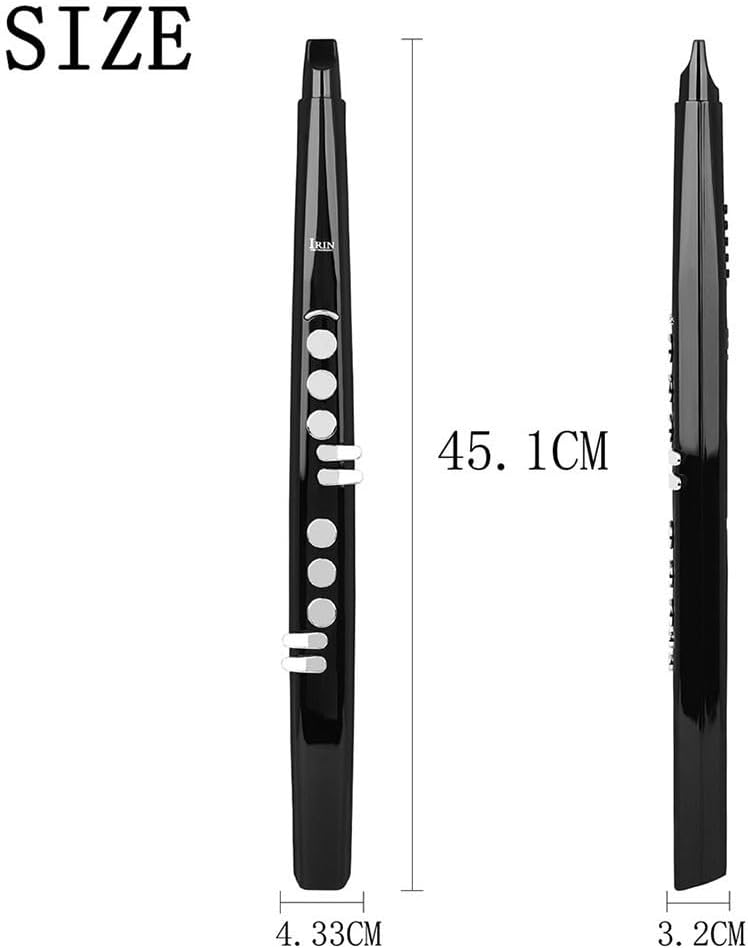
Figure 5.1: Instrument Overview (Front and Back)
5.2 Tone Selection and Dual Voice Function
The instrument comes with 13 built-in tones. Use the designated buttons (often labeled with arrows or 'Tone'/'Voice') to cycle through the available sounds. The dual voice function allows you to layer two tones simultaneously for a richer sound.
5.3 Justering af blæsefølsomhed
The instrument offers 15 levels of blowing sensitivity. This setting determines how responsive the instrument is to your breath. Adjust it to match your playing style and comfort level using the sensitivity adjustment buttons.
5.4 Transponering
The transposition function allows you to shift the pitch of the instrument up or down by up to 6 semitones. This is useful for playing in different keys without changing your fingering. Refer to the LED screen for the current transposition setting.

Figure 5.2: Control Buttons and Keys
5.5 MIDI Connectivity and App Learning
Once connected via MIDI (as described in Section 4.3), you can use the instrument with various digital audio workstations (DAWs) or music learning applications on your computer or tablet. Some apps may also support wireless connection for learning purposes.
6. Vedligeholdelse
6.1 Rengøring af instrumentet
- Mundstykke: Regularly remove and clean the mouthpiece with mild soap and water. Rinse thoroughly and allow it to air dry completely before reattaching.
- Legeme: Wipe the body of the instrument with a soft, dry cloth. Avoid using abrasive cleaners or solvents that could damage the finish.
6.2 Pleje af batterier
- Undgå at aflade batteriet helt ofte.
- If storing the instrument for an extended period, charge the battery to about 50% and store in a cool, dry place.
- Brug kun den medfølgende strømadapter til opladning.
6.3 Opbevaring
When not in use, store the instrument in its provided storage bag to protect it from dust, scratches, and impacts. Keep it away from extreme temperatures and direct sunlight.
7. Fejlfinding
| Problem | Mulig årsag | Løsning |
|---|---|---|
| Ingen lydudgang | Low battery; Volume too low; Headphones/speakers not connected properly; Incorrect tone selected. | Charge the instrument; Increase volume; Check audio connections; Select a different tone. |
| Instrumentet tænder ikke | Batteriet er helt afladet; Tænd/sluk-knappen er ikke trykket korrekt ind. | Charge the instrument for at least 30 minutes; Press and hold the power button firmly. |
| MIDI connection not working | Incorrect cable; Driver issues on computer/tablet; Software not configured for MIDI input. | Ensure you are using a data-transferring USB cable; Install necessary drivers; Check MIDI settings in your software. |
| Blowing sensitivity feels off | Sensitivity setting is not optimal for your playing style. | Adjust the blowing sensitivity level (1-15) until it feels comfortable. |
8. Specifikationer
| Feature | Detalje |
|---|---|
| Produktmål (L x B x H) | 50 x 2 x 2 cm (approx. 45.1 x 4.33 x 3.2 cm as per product description) |
| Modelnummer | VQSQ80G4081ZKZ9WJ12M |
| Farve | As pictured (Black) |
| Materiale | Acrylonitril Butadien Styren (ABS) |
| Batteri | 800 mAh / 3.7 V Rechargeable Lithium-ion |
| Toner | 13 types built-in |
| Blæsefølsomhed | 15 justerbare niveauer |
| Transponering | -6 to +6 steps |
| Forbindelse | MIDI Output, External Speaker/Headphone Support |
| Strømbesparende tilstand | Automatisk nedlukning efter 10 minutters inaktivitet |
9. Garanti og support
For technical assistance, troubleshooting beyond this manual, or warranty inquiries, please contact Oceanlend customer service through the retailer where you purchased the product. Please retain your proof of purchase for warranty claims.
Ask a question about this manual
Ask about setup, troubleshooting, compatibility, parts, safety, or missing instructions. Manuals+ will review the question and use this page’s manual context to help answer it.