1. Introduktion
This manual provides detailed instructions for the installation, operation, and maintenance of your Biorunn Android Car Stereo. Please read this manual thoroughly before using the product to ensure proper function and safety. This unit is designed for Mazda 2 and CX-3 models manufactured between 2014 and 2021.
2. Sikkerhedsoplysninger
- Kør altid køretøjet sikkert. Uopmærksom kørsel kan føre til ulykker.
- Do not attempt to install or repair the unit if you are not qualified. Consult a professional installer.
- Sørg for, at alle ledningsforbindelser er sikre og korrekt isolerede for at forhindre kortslutninger.
- Undgå at udsætte enheden for ekstreme temperaturer, direkte sollys i længere perioder eller for høj fugtighed.
- Hold lydstyrken på et niveau, der gør det muligt at høre trafiklyde udefra.
3. Kompatibilitet og kontrol før installation
This car stereo is compatible with Mazda 2 (2014-2021) and Mazda CX-3 (2014-2021) vehicles equipped with the original touch screen. Before installation, it is crucial to identify your vehicle's center console type. Please refer to the image below to determine if your console matches type A or type B.

Figur 3.1: Top image displays the Biorunn car stereo after installation in a vehicle dashboard. The bottom left image shows a 'Before installation' view of a Mazda center console labeled 'A'. The bottom right image shows another 'Before installation' view of a Mazda center console labeled 'B'. Identifying your console type is essential for correct installation.
4. Installationsvejledning
4.1 Ledningsforbindelser
Refer to the detailed wiring diagram below for proper connection of the car stereo to your vehicle's electrical system. Ensure all connections are secure and match the corresponding labels.

Figur 4.1: This diagram illustrates the various input and output connections on the rear of the car stereo. Key connections include power (ACC, B+, GND), speaker outputs (FR, FL, RR, RL), USB ports (USB1, USB2), camera input, GPS antenna, and a multifunctional plug for audio/video and CANBUS (if required). A cooling fan is also visible.
- Strømforbindelser: Connect ACC (Accessory), B+ (Battery Positive), and GND (Ground) wires to the corresponding vehicle wires.
- Højttalerforbindelser: Connect the Front Right (FR), Front Left (FL), Rear Right (RR), and Rear Left (RL) speaker wires.
- USB-porte: Utilize USB1 and USB2 for external devices or media.
- GPS-antenne: Tilslut GPS-antennen for navigationsfunktionalitet.
- Kamera input: Connect a reversing camera (not included) to the dedicated camera input.
- CANBUS: If your vehicle requires CANBUS integration, connect the appropriate cable to the multifunctional plug.
4.2 Montering af enheden
Carefully remove the original head unit from your vehicle. Install the Biorunn Android Car Stereo into the dashboard opening, ensuring all cables are properly routed and secured. Fasten the unit using the provided mounting brackets and screws.
5. Betjeningsvejledning
5.1 Indledende opsætning
Upon first power-on, the system will guide you through initial setup steps, including language selection, time zone, and Wi-Fi connection. Connect to a stable Wi-Fi network to enable online features and app downloads.

Figur 5.1: The main user interface of the Biorunn Android car stereo. It displays a music player widget, radio frequency, and icons for various applications such as Waze, Spotify, Music, Settings, and YouTube.
5.2 Radio Function (FM RDS)
The unit features an FM RDS radio with 18 preset stations. You can perform automatic searches for available channels or manually tune to specific frequencies. Drag and drop icons to organize your channel list.

Figur 5.2: The FM RDS Radio interface. It shows the current frequency (87.5 MHz), preset buttons (P1-P6), and controls for automatic search (AS) and local/distance reception (DX).
5.3 Bluetooth-funktion (BT 5.0)
The integrated Bluetooth 5.0 module supports hands-free calling, phonebook download, and music streaming. Pair your smartphone with the car stereo to access these features.
- Parring: Go to the Bluetooth settings on the car stereo and your phone. Select the car stereo from your phone's available devices and confirm the pairing code.
- Håndfri opkald: Once paired, you can make and receive calls directly from the car stereo's interface. The phonebook can be synchronized for easy contact access.
- Musikstreaming: Play audio from your phone through the car stereo's speakers.
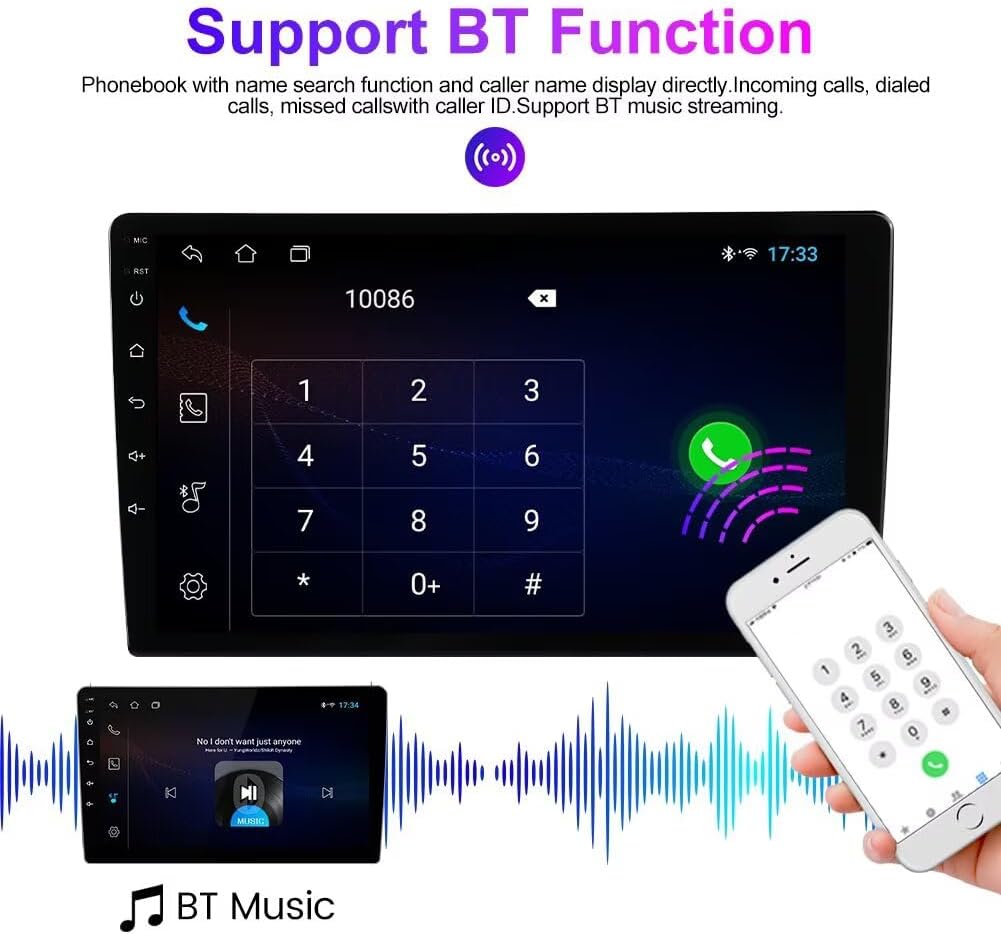
Figur 5.3: The Bluetooth function interface. The top part shows a dial pad for making calls and an incoming call notification. The bottom part illustrates Bluetooth music streaming with album art and playback controls.
5.4 Wireless Car-Play / Android Auto
The unit supports both wireless and wired Car-Play and Android Auto. Connect your compatible smartphone to access navigation, music, messages, and calls safely while driving.
- Trådløs forbindelse: Ensure Bluetooth and Wi-Fi are enabled on your phone and the car stereo. Follow the on-screen prompts to establish a wireless connection.
- Kablet forbindelse: Connect your phone to one of the USB ports using a certified USB cable.
5.5 GPS-navigation
The car stereo includes a built-in global positioning system (GPS) for navigation. After connecting the GPS antenna, you can use pre-installed navigation apps or download others from the app store.
5.6 Opdelt skærmfunktion
The split-screen feature allows two applications to be displayed simultaneously on the screen, enhancing multitasking capabilities. For example, du kan view navigation maps while controlling music playback.

Figur 5.4: The split-screen display. On the left, a video player is active, showing playback controls. On the right, a navigation map is displayed, indicating streets and points of interest. This allows for simultaneous use of two applications.
5.7 Ratstyring
The unit supports original steering wheel controls, allowing you to manage audio and other functions without taking your hands off the wheel. Configuration may be required in the system settings.
5.8 Reversing Video Input
The car stereo supports a reversing video input. When a compatible reversing camera (not included) is connected and the vehicle is in reverse gear, the display will automatically switch to the camera feed.

Figur 5.5: This image illustrates the reversing video function. The car stereo screen displays a rear view with dynamic parking guidelines. A car is shown in the process of backing up, indicating the camera's utility for parking assistance. Please note that the camera is not included with the stereo unit.
6. Vedligeholdelse
- Rensning: Brug en blød, tør klud til at rengøre skærmen og enheden. Undgå slibende rengøringsmidler eller opløsningsmidler.
- Softwareopdateringer: Periodically check for system software updates via the settings menu to ensure optimal performance and access to new features.
- Temperatur: Efterlad ikke enheden i direkte sollys eller ekstreme temperaturer i længere perioder.
7. Fejlfinding
Almindelige problemer og løsninger:
- Ingen strøm: Check all power connections (ACC, B+, GND). Ensure the vehicle's ignition is on. Check fuses.
- Ingen lyd: Verify speaker connections. Check volume settings. Ensure no audio source is muted.
- GPS-signaltab: Sørg for, at GPS-antennen er korrekt tilsluttet og har en klar view af himlen.
- Problemer med Bluetooth-forbindelse: Ensure Bluetooth is enabled on both devices. Try unpairing and re-pairing. Clear Bluetooth cache on your phone.
- Touchskærm reagerer ikke: Prøv at genstarte enheden. Hvis problemet fortsætter, kan en fabriksnulstilling være nødvendig (bemærk: dette vil slette alle brugerdata).
8. Specifikationer
| Feature | Specifikation |
|---|---|
| Operativsystem | Android |
| Kerne | 4 Kerne |
| Skærmstørrelse | 9 tommer IPS berøringsskærm |
| VÆDDER | 2 GB |
| ROM | 32 GB |
| Opløsning | 1280 x 720 |
| Bluetooth version | 5.0 |
| Forbindelse | Wi-Fi, USB |
| Særlige funktioner | Wireless Car-Play, Android Auto, Split Screen, GPS, FM RDS, Steering Wheel Control |
| Lydformater | MP3, WMA, AAC, RM, FALC osv. |
| Videoformater | MPEG-1/2/4, H264, H263, VC1, RV, RMVB, DivX, Sorenson SparK, Spark, VP8, AVS Stream |
9. Garantioplysninger
This Biorunn Android Car Stereo comes with a 1-year manufacturer's warranty from the date of purchase. The warranty covers defects in materials and workmanship under normal use. It does not cover damage caused by improper installation, accident, misuse, abuse, unauthorized modifications, or normal wear and tear. Please retain your proof of purchase for warranty claims.
10. Kundesupport
If you encounter any issues not covered in this manual or require further assistance, please contact the seller or visit the official Biorunn website for support. Provide your product model number and a detailed description of the issue for efficient service.