1. Produktet er slutview
The Dafit ZL02CPRO Smart Watch is a versatile wearable device designed for health monitoring, fitness tracking, and smart notifications. It features a 1.28-inch round TFT screen, Bluetooth call functionality, and multi-sport modes. This manual provides detailed instructions for setup, operation, and maintenance of your smart watch.
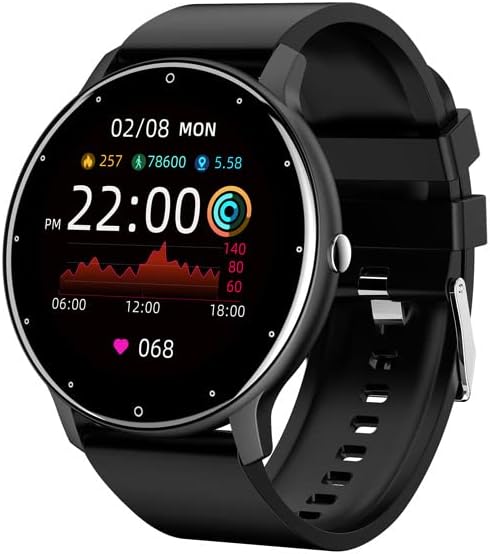
Figure 1.1: Dafit ZL02CPRO Smart Watch (Black Silicone Strap)
Dette billede viser hoveddelen view of the Dafit ZL02CPRO Smart Watch in black with a silicone strap. The watch face displays the current time, date, step count, distance, and heart rate data, illustrating its primary functions.
2. Hvad er der i æsken
Upon opening the product packaging, please verify that all the following items are included:
- Dafit ZL02CPRO Smart Watch
- Brugermanual
- Wristbands (Silicone or Steel, depending on model)
- Ladekabel
3. Opsætningsvejledning
3.1 Opladning af enheden
Before initial use, fully charge your smart watch. Connect the provided charging cable to the charging port on the watch and a standard USB power adapter (not included). A full charge typically takes approximately 2 hours. The watch can operate for 5-7 days on a single charge, depending on usage.
3.2 Appinstallation og parring
To unlock the full functionality of your smart watch, you need to install the companion application on your smartphone. The watch supports Android 5.0 and above, and Apple iOS 9.0 or later.
- Download appen: Søg efter "Dafit" in your smartphone's app store (Google Play Store for Android or Apple App Store for iOS) and install the application.
- Aktiver Bluetooth: Sørg for, at Bluetooth er aktiveret på din smartphone.
- Åbn appen: Launch the Dafit application and follow the on-screen instructions to create an account or log in.
- Par uret: Within the app, navigate to the device pairing section. The app will search for nearby devices. Select "ZL02CPRO" or the corresponding device name when it appears. Confirm the pairing request on both your phone and the watch if prompted.
- Maintain Connection: For optimal performance and to receive notifications, keep the Bluetooth distance between your watch and smartphone within 10 meters.
4. Betjeningsvejledning
4.1 Grundlæggende navigation
The ZL02CPRO Smart Watch features a full touch screen for intuitive navigation. Swipe across the screen to access different functions and menus. Press the side button to return to the main watch face or to power on/off the device.
4.2 Funktioner til sundhedsovervågning
The watch is equipped with sensors to track various health and fitness metrics:
- Aktivitetssporing: Monitors daily steps, calories burned, and distance traveled.
- Heart Rate Monitoring: Provides continuous or on-demand heart rate readings.
- Søvnovervågning: Sporer søvnmønstre og -kvalitet.
- Multisportstilstande: Supports various exercise modes to record specific workout data, including exercise time, heart rate tracking, and mileage. GPS movement track data is available when connected to your smartphone's GPS.
4.3 Smart Assistant-funktioner
Your smart watch acts as a personal assistant, keeping you connected and organized:
- Meddelelser: Receive alerts for incoming calls, SMS messages, and notifications from various applications directly on your wrist. You can reject calls from the watch.
- Fjernbetjening: Control music playback and trigger your smartphone's camera remotely.
- Vejrudsigt: Få vejropdateringer i realtid.
- Påmindelser: Set sedentary reminders and alarm clocks.
- Værktøjer: Access stopwatch functionality.
- Skærmindstillinger: Adjust screen brightness and activate power-saving mode.

Figure 4.1: Customizable Watch Faces and On-Wrist View
This image illustrates the variety of customizable watch faces available for the ZL02CPRO Smart Watch, allowing users to personalize their device. It also shows the watch being worn on a wrist, demonstrating its comfortable fit and display visibility during use.
4.4 Sprogsupport
The watch supports multiple languages, including Chinese, English, German, Spanish, French, Russian, Arabic, Ukrainian, Italian, and Portuguese. Language settings can typically be adjusted within the companion app.
5. Water Resistance and Care
The ZL02CPRO Smart Watch is IP68 waterproof, meaning it is resistant to dust and can withstand immersion in water up to 1.5 meters for 30 minutes. It can be worn when washing hands or in the rain. However, it is important to note that the watch is ikke suitable for use in showers, saunas, or during diving activities, as steam and high water pressure can damage the device.
To maintain the watch's condition, regularly clean the device and straps with a soft, dry cloth. Avoid exposing the watch to extreme temperatures or harsh chemicals.
6. Specifikationer
| Feature | Detalje |
|---|---|
| Skærmtype | TFT skærm |
| Skærmstørrelse | 1.28 tommer (rund) |
| Etui materiale | Plast PC |
| Remmateriale | Anti-static Silicone or Steel (depending on model) |
| Varens vægt | 80 gram (2.82 ounce) |
| Batterikapacitet | 230 mioamp Timer |
| Opladningstid | Ca. 2 timer |
| Batterilevetid | 5-7 dage (typisk brug) |
| Vandmodstandsvurdering | IP68 |
| Forbindelsesteknologi | Bluetooth |
| Operativsystemkompatibilitet | Android 5.0+ / iOS 9.0+ |
| GPS | Via smartphone |
| Modelnummer | cn101 |
7. Fejlfinding
If you encounter issues with your Dafit ZL02CPRO Smart Watch, please refer to the following common solutions:
- Uret tænder ikke: Sørg for, at uret er fuldt opladet. Tilslut det til opladningskablet og en strømkilde i mindst 30 minutter.
- Kan ikke parres med smartphone:
- Sørg for, at Bluetooth er aktiveret på din smartphone og uret.
- Make sure the watch is within 10 meters of your smartphone.
- Genstart både uret og din smartphone.
- Try unpairing and re-pairing the device through the Dafit app.
- Check if the Dafit app is updated to the latest version.
- Ikke modtaget meddelelse:
- Verify that the watch is successfully paired and connected via Bluetooth.
- Check notification permissions for the Dafit app in your smartphone's settings.
- Ensure notifications are enabled within the Dafit app for specific applications.
- Disable any "Do Not Disturb" or "Power Saving" modes on your phone or watch that might block notifications.
- Unøjagtige sundhedsdata:
- Sørg for, at uret sidder tæt på dit håndled, men ikke for stramt.
- Rengør sensoren på bagsiden af uret.
- For best results, ensure your profile information (height, weight) is accurate in the Dafit app.
- Kort batterilevetid:
- Reducer skærmens lysstyrke.
- Limit continuous heart rate monitoring.
- Deaktiver unødvendige notifikationer.
- Activate power-saving mode if available.
Hvis problemerne fortsætter, bedes du kontakte kundesupport for yderligere assistance.
8. Garanti og support
This product comes with a standard manufacturer's warranty. For specific warranty terms and conditions, please refer to the documentation provided with your purchase or contact the seller directly. For technical support or any questions regarding the operation of your Dafit ZL02CPRO Smart Watch, please reach out to the customer service team via the contact information provided by your retailer or on the product packaging.