
Indledning
Tak for købetasing the XDOBO Try&Go Mini 50W Bluetooth Speaker. This manual provides essential information for the safe and efficient use of your speaker. Please read it thoroughly before operation and retain it for future reference.

Image: The XDOBO Try&Go Mini 50W Bluetooth Speaker, showcasing its cylindrical design with control buttons and RGB LED light ring.
Sikkerhedsforanstaltninger
- Udsæt ikke højttaleren for ekstreme temperaturer eller direkte sollys.
- Undgå at tabe eller udsætte højttaleren for kraftige stød.
- Keep the speaker away from water and liquids, despite its IPX7 rating, to prevent damage to internal components. Ensure port covers are sealed when near water.
- Forsøg ikke selv at skille ad, reparere eller modificere højttaleren. Kontakt kvalificeret servicepersonale.
- Brug kun det medfølgende opladningskabel eller et tilsvarende certificeret kabel.
- Opbevares utilgængeligt for børn.
Pakkens indhold
Kontroller venligst, at alle varer er til stede i pakken:
- XDOBO Try&Go Mini 50W Bluetooth Speaker (x1)
- USB-C opladningskabel (x1)
- 3.5mm Stereo Audio Cable (AUX Cable) (x1)
- Brugervejledning (x1)
- Carrying Belt (x1)
Produkt overview
Familiarize yourself with the speaker's components and controls. The speaker features dual passive radiators and DSP technology for clear highs, rich mids, and enhanced bass without distortion at maximum volume.

Image: Diagram highlighting key features of the XDOBO Try&Go Mini, including 50W peak power, 48mm speaker unit, 5200mAh battery, RGB dual light, and DSP sound technology.
Kontrol og porte:
- Power knap: Tryk og hold nede for at tænde/slukke. Tryk kort for at afspille/pause.
- Lydstyrke op (+): Kort tryk for at øge lydstyrken. Langt tryk for næste nummer.
- Skrue ned for lyden (-): Kort tryk for at sænke lydstyrken. Langt tryk for forrige nummer.
- EQ knap: Short press to cycle through equalizer modes.
- RGB-lysknap: Short press to change light modes. Long press to turn lights on/off.
- Bluetooth/TWS-knap: Short press to enter Bluetooth pairing mode. Long press to initiate TWS pairing.
- USB-C-port: Til opladning af højttaleren.
- AUX-indgangsport: Til kablet lydforbindelse.
Opsætning
1. Opladning af højttaleren
Oplad højttaleren helt før første brug.
- Tilslut det medfølgende USB-C-opladerkabel til højttalerens USB-C-port.
- Tilslut den anden ende af kablet til en USB-strømadapter (medfølger ikke) eller en computers USB-port.
- LED-indikatoren viser opladningsstatus. Det tager typisk cirka 5 timer at oplade batteriet fuldt op.
- Når det er fuldt opladet, skal du frakoble ladekablet.
2. Tænd/sluk
- To power on, press and hold the Power button for 2-3 seconds until you hear an audible prompt and the LED lights activate.
- To power off, press and hold the Power button again for 2-3 seconds.
Betjeningsvejledning
1. Bluetooth-parring
The speaker uses Bluetooth 5.3 for stable and high-quality audio transmission.

Image: A visual representation of the advanced Bluetooth 5.3 chip, emphasizing stable and high-quality audio transmission.
- Ensure the speaker is powered on and in Bluetooth pairing mode (LED indicator will flash). If not, short press the Bluetooth button.
- Aktiver Bluetooth på din enhed (smartphone, tablet, pc), og søg efter tilgængelige enheder.
- Select "XDOBO Try&Go Mini" from the list.
- Once paired, the LED indicator will stop flashing, and you will hear a confirmation sound.
- Højttaleren genopretter automatisk forbindelsen til den sidst parrede enhed, når den tændes, hvis den er inden for rækkevidde.
2. Ægte trådløs stereo (TWS) parring
Pair two XDOBO Try&Go Mini speakers for an immersive 360° stereo sound experience.
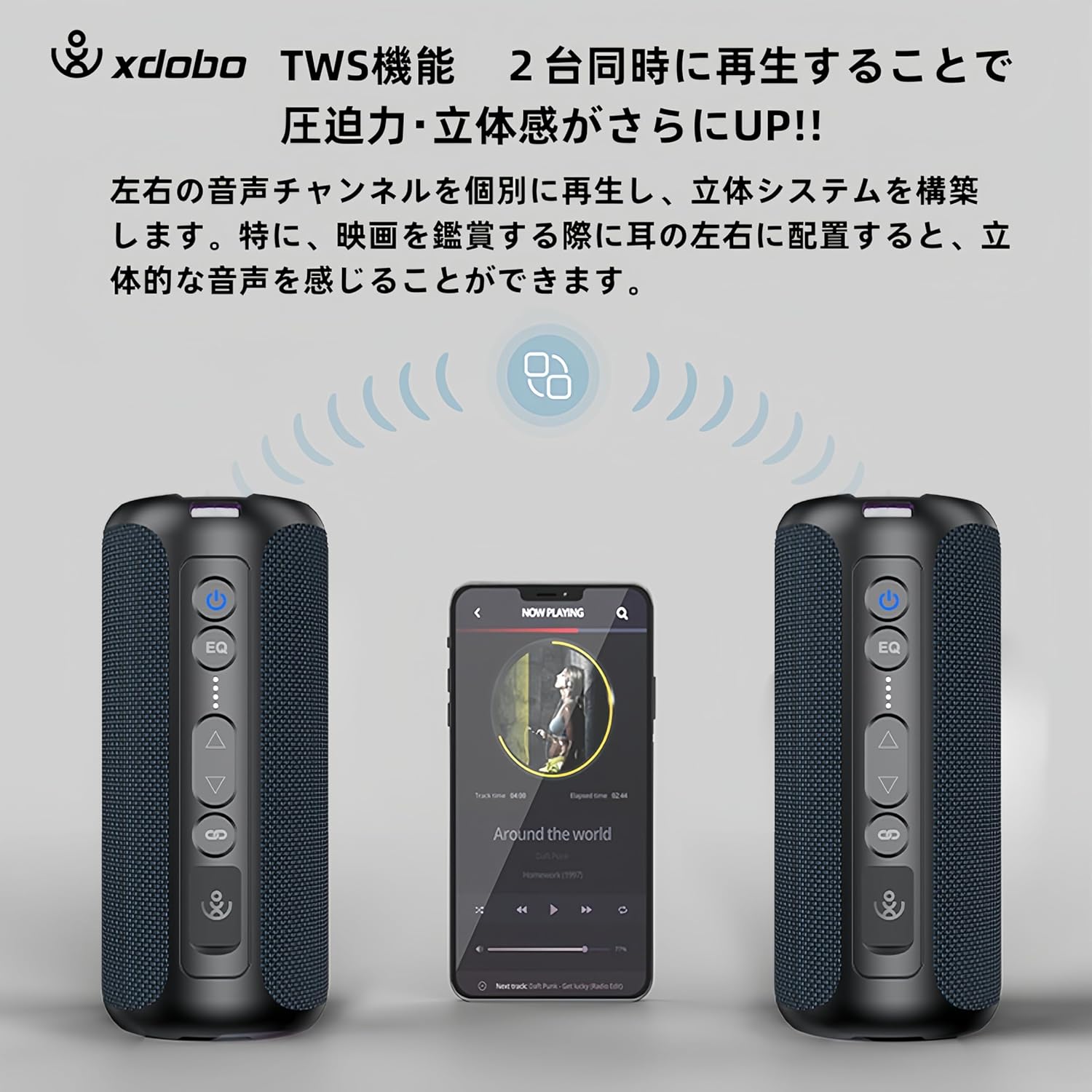
Image: A diagram illustrating two XDOBO Try&Go Mini speakers paired in TWS mode, creating a stereo sound field with a smartphone in the center.
- Sørg for, at begge højttalere er tændt og ikke er forbundet til nogen Bluetooth-enhed.
- On one speaker (this will be the primary speaker), long press the Bluetooth/TWS button. You will hear a prompt indicating TWS pairing mode.
- Den primære højttaler søger automatisk efter den sekundære højttaler.
- Once successfully paired, you will hear a confirmation sound, and the LED indicators on both speakers will synchronize.
- Tilslut nu din enhed til den primære højttaler via Bluetooth som beskrevet i "1. Bluetooth-parring". Lyden afspilles i stereo gennem begge højttalere.
3. AUX-indgangstilstand
Use the 3.5mm audio cable for a wired connection to devices without Bluetooth.
- Connect one end of the 3.5mm audio cable to the speaker's AUX-in port.
- Tilslut den anden ende til lydudgangsstikket på din enhed.
- Højttaleren skifter automatisk til AUX-indgangstilstand.
- Styr afspilning og lydstyrke fra din tilsluttede enhed.
4. RGB LED-belysning
The speaker features dynamic RGB LED lights to enhance your listening experience.
- Short press the RGB Light button to cycle through different lighting modes (e.g., solid color, pulsating, multi-color).
- Long press the RGB Light button to turn the LED lights on or off.
5. Håndfri opkald
Når højttaleren er tilsluttet en smartphone via Bluetooth, kan den bruges til håndfri opkald.
- Besvar opkald: Tryk kort på afbryderknappen.
- Afslut opkald: Tryk kort på tænd/sluk-knappen under et opkald.
- Afvis opkald: Tryk længe på tænd/sluk-knappen.
Opretholdelse
- Rensning: Tør højttaleren af med en blød, tør klud. Brug ikke slibende rengøringsmidler eller opløsningsmidler.
- Opbevaring: Store the speaker in a cool, dry place away from direct sunlight and extreme temperatures. If storing for an extended period, charge the battery to about 50% every few months to prolong battery life.
- Vandeksponering: While IPX7 waterproof, ensure the charging port and AUX port covers are securely closed before exposing to water. After water exposure, dry the speaker thoroughly before charging.
Fejlfinding
| Problem | Løsning |
|---|---|
| Højttaleren tænder ikke. | Sørg for, at batteriet er opladet. Tilslut til en strømkilde, og prøv igen. |
| Kan ikke parres via Bluetooth. |
|
| Ingen lyd eller lav lydstyrke. |
|
| TWS-parring mislykkes. |
|
| Lydforvrængning ved høj lydstyrke. | Reduce the volume on your device or the speaker. Ensure audio source quality is good. |
Specifikationer

Image: A table summarizing key specifications of the XDOBO Try&Go Mini, including maximum playback time, charging time, signal-to-noise ratio, frequency range, weight, and dimensions.
| Feature | Detalje |
|---|---|
| Modelnavn | Try&Go Mini |
| Mærke | XDOBO |
| Højttaler type | Udendørs |
| Forbindelsesteknologi | Bluetooth, AUX |
| Bluetooth version | 5.3 |
| Lydudgangstilstand | Stereoanlæg |
| Højttalerens maksimale output | 50 watt |
| Vandtæt vurdering | IPX7 |
| Batterikapacitet | 5200mAh |
| Maks. afspilningstid | Ca. 20 timer |
| Opladningstid | Ca. 5 timer |
| Signal-to-Noise Ratio (SN) | ≥80dB |
| Frekvensområde | 20Hz-20KHz |
| Produktdimensioner | 8D x 18B x 8H cm |
| Produktets vægt | 573 g |
| Strømkilde | Battery Powered (via USB-C) |
| Kompatible enheder | Smartphones, Tablets, PCs, TVs |
Garanti og support
XDOBO products are designed and manufactured to the highest quality standards. For warranty information or technical support, please refer to the contact details provided with your purchase or visit the official XDOBO webwebsted. Gem venligst din købsbevis til garantikrav.