
Andoer 0226b5d0-9fdc-46fa-87a1-023ef5ed8edc
Andoer 4K Digital Camera User Manual
Model: 0226b5d0-9fdc-46fa-87a1-023ef5ed8edc
Indledning
This manual provides detailed instructions for the safe and effective use of your Andoer 4K Digital Camera. Please read this manual thoroughly before operating the camera and retain it for future reference. This camera is designed for capturing high-quality photos at 48MP and videos at 4K resolution, featuring a 2.8-inch screen, 16X digital zoom, auto-focus, anti-shake technology, and a built-in flash.
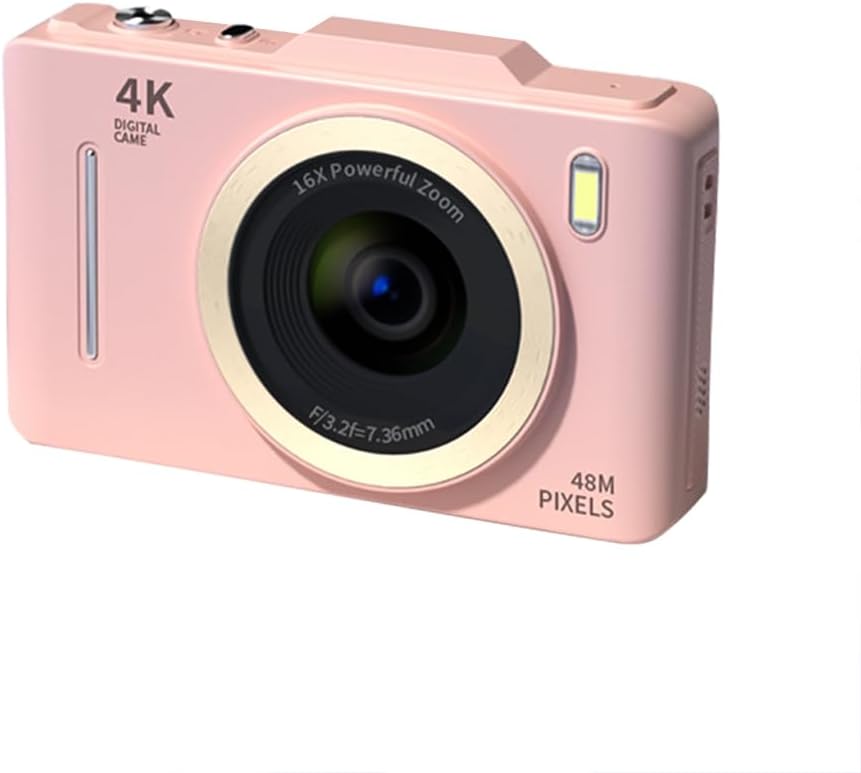
Billede: Forside view of the Andoer 4K Digital Camera in pink, showcasing its lens, flash, and 4K Digital Camera branding.
Vigtige sikkerhedsoplysninger
Advarsel:
- Not suitable for children. Please read the product instructions and applicable age range carefully before purchase and use.
- Udsæt ikke kameraet for vand eller overdreven fugt.
- Undgå at tabe kameraet eller udsætte det for hårde stød.
- Brug kun de angivne batterier og opladningsmetoder.
- Forsøg ikke at skille kameraet ad eller ændre det.

Image: A warning label indicating that the product is not suitable for children, with the warning translated into multiple languages.
Pakkens indhold
Kontroller venligst, at alle varer er til stede i pakken:
- Andoer 4K Digital Camera
- USB kabel
- Genopladeligt lithium batteri
- Brugermanual
- Håndledsrem (kan variere afhængigt af pakken)
Produkt overview
Gør dig bekendt med kameraets komponenter:
- Linse: Den primære optiske komponent til billedoptagelse.
- Blitz: Provides additional light in low-light conditions.
- 2.8 tommer LCD-skærm: For viewing live feed, reviewoptagelse af billeder/videoer og navigering i menuer.
- Kontrolknapper: Power, Shutter, Zoom (W/T), Menu, OK, Display, Delete.
- USB-port: Til opladning og dataoverførsel.
- Batterirum: Indeholder det genopladelige batteri.
- Hukommelseskortslot: Til isætning af SD-kort (medfølger ikke).

Billede: Bagside view of the camera highlighting the 2.8-inch display screen and various control buttons for navigation and operation.
Opsætning
1. Batteriinstallation og opladning
- Åbn batteridækslet, der er placeret i bunden af kameraet.
- Insert the provided lithium battery, ensuring the correct polarity.
- Luk batterirummets dæksel forsvarligt.
- Connect the camera to a power source using the USB cable for charging. The charging indicator light will illuminate.
- Opladningen er færdig, når indikatorlyset slukker.
2. Installation af hukommelseskort
Et hukommelseskort (SD-kort, medfølger ikke) er nødvendigt for at gemme fotos og videoer.
- Locate the memory card slot, usually near the battery compartment.
- Isæt SD-kortet med metalkontakterne vendt mod kameraets forside, indtil det klikker på plads.
- For at fjerne det skal du forsigtigt trykke på kortet, indtil det springer ud.
Betjeningsvejledning
Tænd/sluk
- Tryk og hold på Magt knappen for at tænde eller slukke kameraet.
Tager billeder
- Tænd kameraet.
- Komponer dit billede ved hjælp af den 2.8-tommer LCD-skærm.
- Tryk på Lukker button halfway down to activate auto-focus (AF).
- Once focused, press the Lukker button fully to capture the photo.
Optagelse af videoer
- Tænd kameraet.
- Switch to video mode (refer to the on-screen icons or menu for mode selection).
- Tryk på Lukker knappen for at starte optagelsen.
- Tryk på Lukker knappen igen for at stoppe optagelsen.
Zoomfunktion
- Brug W (Bred) og T (Telephoto) buttons to adjust the 16X digital zoom.

Image: A visual comparison demonstrating the effect of 1x digital zoom versus 16x digital zoom, showing how the camera can magnify distant subjects.
Brug af blitz
- The built-in flash can be activated in low-light conditions. Access flash settings via the menu to select modes like Auto Flash, Fill-in Flash, or Flash Off.

Image: Illustrates the effect of the built-in flash, showing a scene with and without flash to demonstrate improved lighting in dark environments.
Anti-shake-funktion
- The camera features digital anti-shake technology to reduce blur caused by camera movement. This feature is typically active by default or can be enabled in the settings menu.

Image: Demonstrates the effectiveness of the anti-shake feature by comparing a clear image taken with anti-shake mode to a blurry image without it, both showing people in motion.
Skønhedsfiltre
- Access the menu to apply various beauty filters (e.g., Original, Cool colors, Retro, Black and white) to your photos for creative effects.

Image: Displays different beauty filter options available on the camera, including Original, Cool colors, Retro, and Black and white, applied to a portrait.
Bevægelsesdetektion video
- Enable motion detection in the video settings. The camera will automatically start recording when movement is detected within the frame.

Image: Illustrates the motion detection feature, showing a dog in motion with a white square indicating the detection area.
Playback and Review
- Tryk på Afspilning button (often labeled with a play icon) to view optaget billeder og videoer.
- Brug navigationsknapperne til at rulle gennem dine medier.
- Tryk på Slet button to remove unwanted files.
Tilslutning til en computer
- Tilslut kameraet til din computer ved hjælp af det medfølgende USB-kabel.
- The camera will appear as a removable disk drive, allowing you to transfer files.
Opretholdelse
- Rengøring af linsen: Use a soft, lint-free cloth specifically designed for camera lenses. Do not use abrasive materials or harsh chemicals.
- Rengøring af skærmen: Wipe the LCD screen gently with a soft, dry cloth.
- Opbevaring: When not in use for extended periods, remove the battery and store the camera in a cool, dry place away from direct sunlight.
- Batteripleje: Oplad batteriet helt inden første brug. Undgå at aflade batteriet helt ofte for at forlænge dets levetid.
Fejlfinding
| Problem | Mulig løsning |
|---|---|
| Kameraet tænder ikke. | Sørg for, at batteriet er korrekt installeret og fuldt opladet. |
| Kan ikke tage billeder/optage videoer. | Check if a memory card is inserted and has sufficient free space. Ensure the camera is in the correct mode (photo/video). |
| Billeder er slørede. | Ensure the lens is clean. Check lighting conditions. Enable anti-shake feature. Hold the camera steady. |
| Flash is not working. | Check flash settings in the menu; ensure it's not set to 'Flash Off'. |
| Kameraet genkendes ikke af computeren. | Ensure the USB cable is securely connected. Try a different USB port or cable. Restart both camera and computer. |
Specifikationer
| Feature | Detalje |
|---|---|
| Mærke | Andoer |
| Modelnummer | 0226b5d0-9fdc-46fa-87a1-023ef5ed8edc |
| Effektiv stillopløsning | 48 MP |
| Video opløsning | 4K (2160p) |
| Skærmstørrelse | 2.8 tommer |
| Digital Zoom | 16X |
| Autofokus | Ja (Kontrastdetektion) |
| Billedstabilisering | Digital Anti-Shake |
| Indbygget Flash | Ja |
| Batteritype | Lithium Ion |
| Fotoformat | JPEG |
| Videoformat | MP4 |
| Ekstern grænseflade | USB |
| Sensortype | CMOS |
| Farve | Pink (variant) |
| Vandmodstandsniveau | Ikke vandafvisende |
Garanti og support
For warranty information and technical support, please refer to the documentation included with your purchase or visit the official Andoer webwebsted. Gem din købsbevis til garantikrav.
Andoer Official Store: Visit Andoer Store on Amazon
Ask a question about this manual
Ask about setup, troubleshooting, compatibility, parts, safety, or missing instructions. Manuals+ will review the question and use this page’s manual context to help answer it.