
1. Introduktion
This manual provides detailed instructions for setting up, operating, and maintaining your Womier SK80 PRO 75% Wireless Mechanical Keyboard. Please read this guide thoroughly to ensure proper usage and to maximize your keyboard's features.

Image 1.1: Womier SK80 PRO keyboard, wrist rest, and mouse pad setup.
2. Pakkens indhold
Bekræft at alle varer er til stede i din pakke:
- Womier SK80 PRO 75% Wireless Mechanical Keyboard
- Matching Wrist Rest
- Matching Mouse Pad
- USB-C kabel
- 2.4G USB Receiver (stored magnetically in the keyboard)
- Keycap aftrækker
- Aftrækker
- Brugervejledning (dette dokument)
3. Opsætning
3.1 Fysisk opsætning
- Placer tastaturet på en stabil overflade.
- Position the wrist rest in front of the keyboard for ergonomic support.
- Place the mouse pad next to your keyboard.
- Adjust the keyboard's feet for your preferred typing angle.

Image 3.1: Ergonomic design and dimensions of the keyboard and wrist rest.
3.2 Forbindelsestilstande
The Womier SK80 PRO supports three connection modes: 2.4G Wireless, Bluetooth, and USB-C Wired.
- 2.4G trådløs tilstand:
- Locate the 2.4G USB receiver stored magnetically on the underside of the keyboard.
- Sæt modtageren i en ledig USB-port på din computer.
- Switch the mode selector on the keyboard's underside to '2.4G'.
- Tastaturet burde oprette forbindelse automatisk.
- Bluetooth-tilstand:
- Switch the mode selector on the keyboard's underside to 'BT'.
- Aktiver Bluetooth på din enhed (computer, tablet, telefon) og søg efter nye enheder.
- Select 'Womier SK80 PRO' from the list of available devices to pair.
- The keyboard can connect to up to 3 Bluetooth devices. Use Fn + Q/W/E to switch between paired devices.
- USB-C kablet tilstand:
- Tilslut det medfølgende USB-C-kabel til tastaturets USB-C-port.
- Tilslut den anden ende af kablet til en ledig USB-port på din computer.
- Switch the mode selector on the keyboard's underside to 'USB'.
- Tastaturet fungerer som en kablet enhed og oplades samtidigt.

Image 3.2: The keyboard supports three versatile connection modes.
3.3 Driver/Software Installation
For advanced customization, including key remapping, macro settings, RGB lighting effects, and custom GIF images on the multimedia screen, download the official Womier SK80 PRO software from the Womier website. The software is compatible with Windows systems.
Video 3.3: Demonstration of the Womier SK80 PRO programming software.
4. Betjeningsvejledning
4.1 Grundlæggende tastaturfunktioner
The keyboard features a 75% layout with standard keys. Refer to the keycap legends for primary and secondary functions. Use the Fn key in combination with other keys to access secondary functions (e.g., media controls, F-keys).
4.2 Multimedia Screen Functions
The built-in color multimedia smart display screen can show various information and custom content:
- Vis oplysninger: Time, connection status, and battery level.
- Brugerdefinerede GIF-billeder: Upload custom GIF images via the software for a personalized display.

Image 4.1: Multimedia screen displaying various functions and custom GIFs.
Video 4.2: Demonstration of the multimedia display features.
4.3 Tilpasning af RGB-belysning
The keyboard features 16.8 million RGB backlight colors with south-facing LEDs for enhanced illumination. Customize lighting effects, brightness, and speed using the dedicated software or onboard controls (refer to the keyboard's quick guide for specific key combinations).

Image 4.3: RGB customization options via software.
4.4 Hot-swap-kontakter
The PCB supports 3-pin/5-pin hot-swappable switches, allowing you to easily replace the pre-lubed linear cream switches with other compatible mechanical switches without soldering.
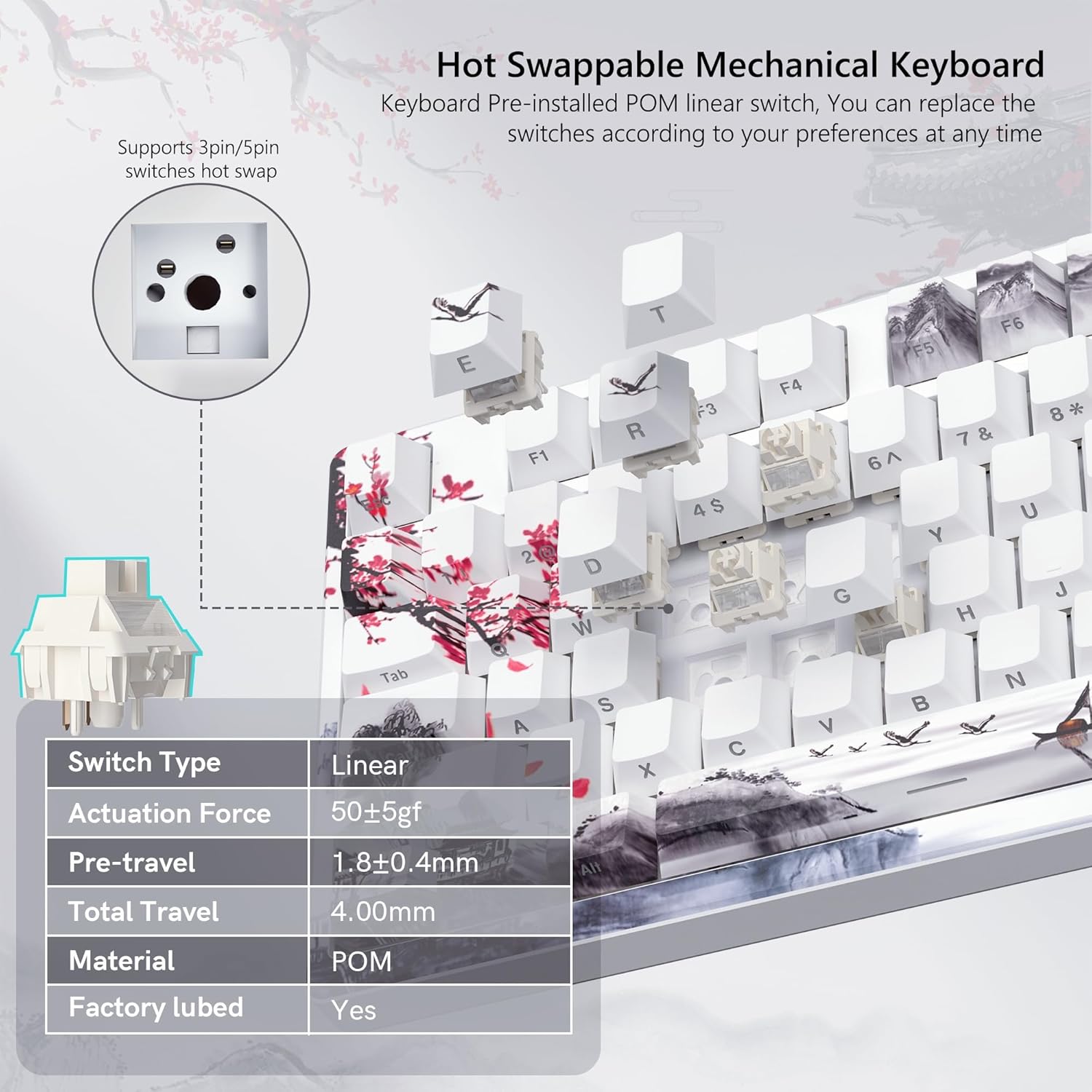
Image 4.4: Hot-swappable switch mechanism.
Video 4.5: Demonstration of hot-swappable switches and connectivity modes.
4.5 Key Remapping and Macro Settings
Utilize the Womier SK80 PRO software to redefine key functions and set up custom macros, enhancing your productivity and gaming experience.
5. Vedligeholdelse
5.1 Rengøring
- Frakobl tastaturet fra din enhed, før du rengør det.
- Brug en tastehætteaftrækker til forsigtigt at fjerne tastehætterne for grundig rengøring.
- Tør tastaturets overflade af med en blød kludamp klud. Undgå for meget fugt.
- Brug trykluft til at fjerne støv og snavs mellem tasterne.
5.2 Pleje af batterier
The keyboard is equipped with a 4000mAh battery. To prolong battery life:
- Oplad tastaturet helt før første brug.
- Undgå at aflade batteriet helt ofte.
- Opbevar tastaturet et køligt og tørt sted, når det ikke er i brug i længere perioder.
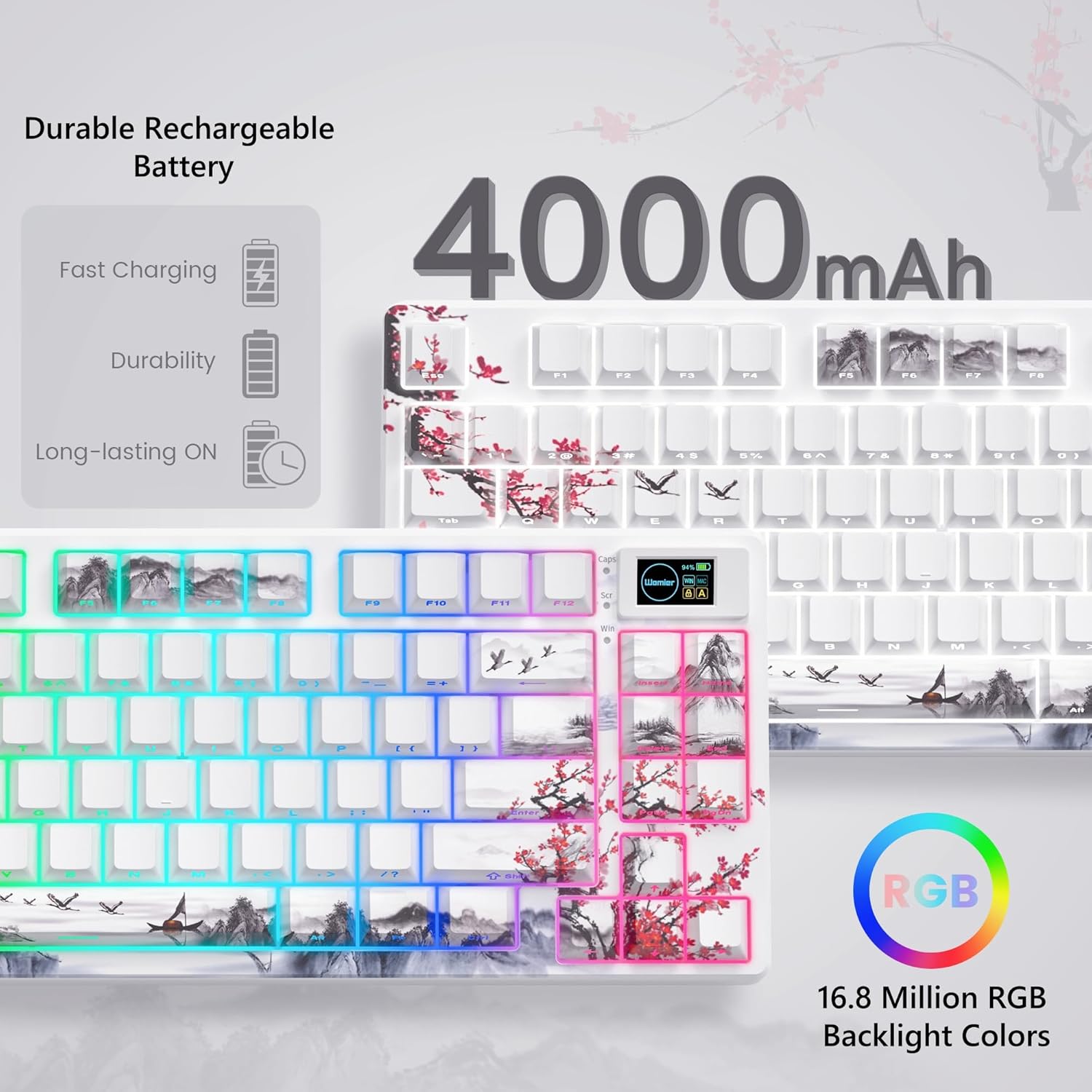
Image 5.1: Battery and RGB features.
5.3 Udskiftning af kontakt
For at udskifte kontakter:
- Brug den medfølgende tastaftrækker til at fjerne den ønskede tast.
- Use the switch puller to gently grasp and pull the switch upwards until it detaches from the PCB.
- Juster stifterne på den nye kontakt med hullerne på printkortet.
- Press the new switch firmly until it clicks into place. Ensure pins are not bent.
- Sæt tastaturdækslet på igen.
6. Fejlfinding
- Tastaturet reagerer ikke:
- Check the connection mode switch (2.4G, BT, USB) on the underside of the keyboard.
- Ensure the USB-C cable or 2.4G receiver is securely connected.
- For Bluetooth skal du sørge for, at tastaturet er parret og valgt på din enhed.
- Kontroller batteriniveauet; genoplad, hvis den er lav.
- RGB lighting not working/customizing:
- Sørg for, at tastaturet er tændt.
- Install and use the Womier SK80 PRO software for full customization.
- Refer to the quick guide for onboard RGB control shortcuts.
- Multimedia screen not displaying correctly:
- Ensure the keyboard is connected and powered.
- Use the Womier SK80 PRO software to upload or reset custom GIFs.
- Nøgler registreres ikke eller dobbelttastes:
- This may indicate a faulty switch. Use the switch puller to replace the affected switch.
- Sørg for, at kontakten er helt indsat i printkortet.
7. Specifikationer
| Feature | Detalje |
|---|---|
| Modelnummer | JM-AZ-129 |
| Layout | 75 % |
| Forbindelse | 2.4G trådløs, Bluetooth, USB-C kablet |
| Kompatible enheder | PC (Windows, Mac, Android, iOS) |
| Afbrydere | Womier Customized Pre-lubed Linear Cream Switches (Hot-swappable 3-pin/5-pin) |
| tasterne | Theme Art Keycaps (Shine-through) |
| Baggrundsbelysning | 16.8 Million RGB (South-facing LED) |
| Batterikapacitet | 4000mAh Lithium Polymer |
| Særlige funktioner | Color Multimedia Smart Display Screen, Gasket Mount Design, EVA Positioning Plate, Bottom Filling |
| Produktdimensioner | 13.39 x 6.69 x 1.38 tommer |
| Varens vægt | 2.97 pund |
8. Garanti og support
Womier products are designed for reliability and performance. For warranty information, technical support, or service inquiries, please visit the official Womier website or contact customer support directly. Keep your purchase receipt for warranty claims.