
1. Introduktion
The NIIMBOT D11H is a compact, portable, and inkless thermal label printer designed for various labeling needs. It connects wirelessly via Bluetooth to your smartphone, allowing for easy creation and printing of high-resolution labels. This manual provides essential information for setting up, operating, and maintaining your device.
2. Pakkens indhold
Bekræft, at alle nedenstående varer er inkluderet i din pakke:
- 1x NIIMBOT D11H Label Printer
- 1x Label Roll (pre-installed or included)
- 1x USB Type-C ladekabel
- 1x User Manual (Japanese)

3. Opsætning
3.1. Ilægning af etiketpapir
- Slide the cover button on the side of the printer to open the paper compartment.
- Insert the label roll into the compartment with the labels facing upwards, ensuring it is correctly aligned.
- Pull a small portion of the label paper out through the printer's exit slot.
- Luk låget sikkert.

3.2. Tænder
Press and hold the power button located on the front of the printer for 3 seconds until the indicator light turns green, indicating the device is powered on.
3.3. Download af app og Bluetooth-forbindelse
- Download the "NIIMBOT" app from the App Store (iOS) or Google Play Store (Android).
- Aktiver Bluetooth på din smartphone.
- Open the NIIMBOT app and tap on the "Connect" or "Printer Connection" option. The app will automatically scan for nearby devices.
- Select your NIIMBOT D11H printer from the list of available devices to establish a Bluetooth connection.

4. Betjeningsvejledning
4.1. Oprettelse af etiketter
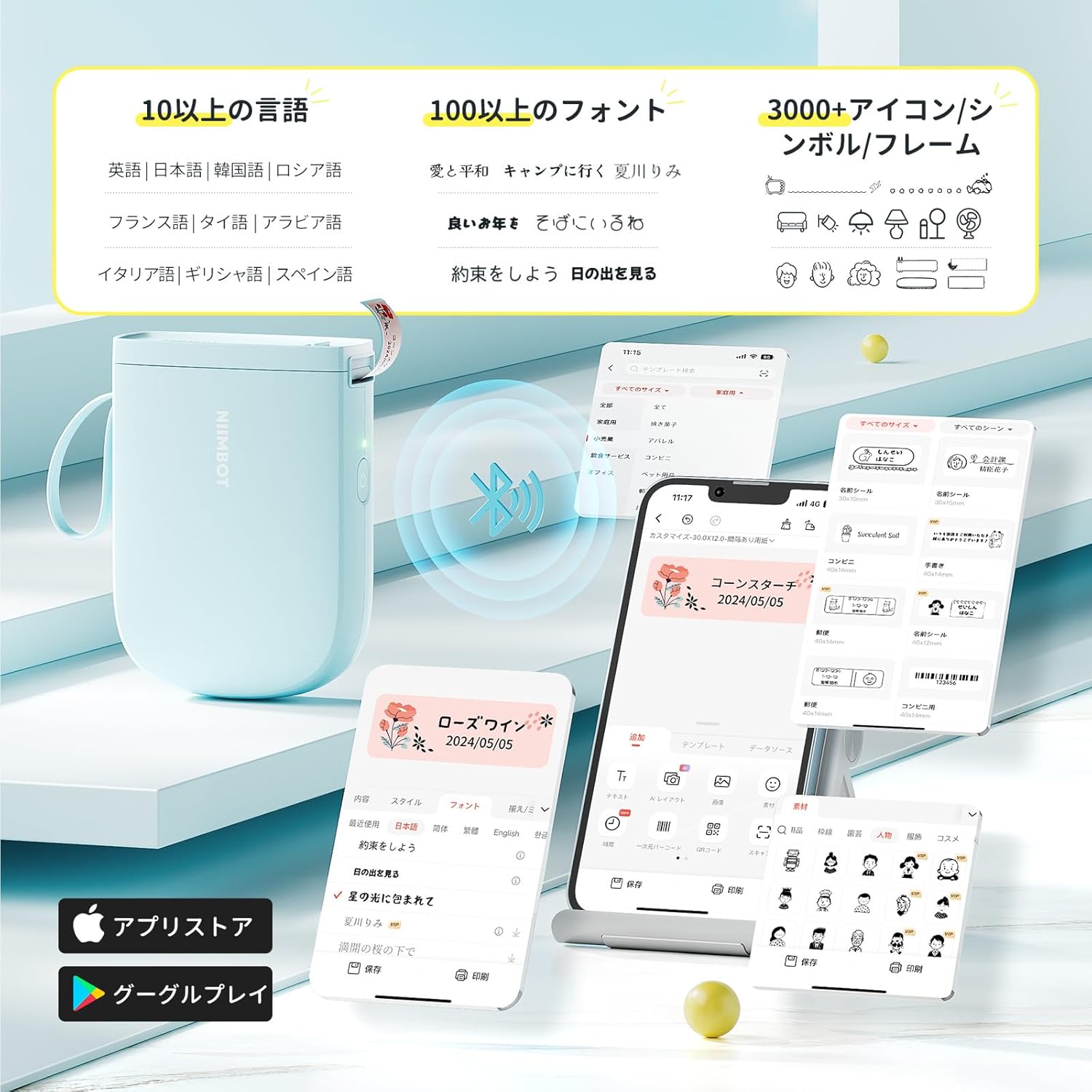
The NIIMBOT app offers a wide range of features for label creation:
- Tekstinput: Easily type and customize text with over 20 fonts and various styles.
- Skabeloner: Utilize automatic template matching and thousands of image elements for quick design.
- Image Recognition: Import images for printing.
- Stregkode/QR-kode: Generer og udskriv stregkoder og QR-koder.
- Batchudskrivning: Udskriv flere etiketter effektivt.

4.2. Udskrivning af etiketter
Once your label design is complete in the app, tap the "Print" button. You can adjust the number of copies and print density before confirming. The printer will automatically feed and cut the labels.
4.3. Alsidige anvendelser
The NIIMBOT D11H is suitable for a wide range of uses, including organizing documents, creating name tags, price tags, date reminders for food, and labeling items in the kitchen, office, or warehouse.


5. Vedligeholdelse
To ensure optimal performance and longevity of your NIIMBOT D11H label printer, follow these maintenance guidelines:
- Rensning: Regularly clean the print head with a soft, lint-free cloth moistened with alcohol. Ensure the printer is off before cleaning.
- Opbevaring: Opbevar printeren et køligt og tørt sted, væk fra direkte sollys og ekstreme temperaturer.
- Batteri: Oplad printeren regelmæssigt, selvom den ikke bruges ofte, for at opretholde batteriets sundhedstilstand.
6. Fejlfinding
If you encounter issues with your NIIMBOT D11H, refer to the following common troubleshooting steps:
- Printeren opretter ikke forbindelse: Ensure Bluetooth is enabled on your smartphone and the printer is powered on. Try restarting both devices and reconnecting through the app.
- Dårlig udskriftskvalitet: Check if the label paper is loaded correctly and is a genuine NIIMBOT thermal label. Clean the print head if necessary. Adjust print density in the app settings.
- Papir i klemme: Open the paper compartment, carefully remove any jammed paper, and reload the label roll correctly.
- Printeren svarer ikke: Ensure the battery is charged. If the device is unresponsive, try resetting it by holding the power button for an extended period (e.g., 10-15 seconds).
7. Specifikationer
| Feature | Specifikation |
|---|---|
| Mærke | NIIMBOT |
| Modelnavn | DOH |
| Forbindelsesteknologi | Bluetooth |
| Udskrivningsteknologi | Termisk |
| Maksimal udskriftsopløsning (monokrom) | 300 DPI |
| Maksimal udskrivningshastighed (monokrom) | 40.0 mm/s |
| Maks. mediestørrelse (papir) | 15 mm (bredde) |
| Produktdimensioner | 11 x 3 x 7 cm |
| Varens vægt | 360 g |
| Kompatible enheder | Smartphones (Android og iOS) |
| Farve | Blå |
8. Garanti og support
For warranty information or technical support, please refer to the official NIIMBOT webwebstedet eller kontakt din forhandler. Gem din købskvittering som købsbevis.