Indledning
This manual provides essential information for the safe and effective installation, operation, and maintenance of your TOPINCN 3-Phase DIN Rail Voltmeter Ammeter Overvoltage Overcurrent Protector. This device is designed to monitor three-phase AC voltage and current, providing automatic protection against overvoltage, undervoltage, and overcurrent conditions to safeguard electrical equipment.
Sikkerhedsoplysninger
ADVARSEL: Installation and maintenance should only be performed by qualified personnel. Disconnect all power before installation or servicing to prevent electric shock or equipment damage.
- Ensure the device is installed in a dry, well-ventilated area, away from direct sunlight and corrosive gases.
- Kontroller, at forsyningen voltage- og strømstyrkeværdierne stemmer overens med enhedens specifikationer.
- Brug ikke enheden, hvis den ser ud til at være beskadiget.
- Korrekt jording er afgørende for sikker drift.
Produkt overview
The TOPINCN CHLT 63 is a compact 3-phase protection device designed for DIN rail mounting. It features a digital display for real-time monitoring of voltage and current across three phases (L1, L2, L3) and provides automatic power cut-off in case of abnormal electrical conditions.
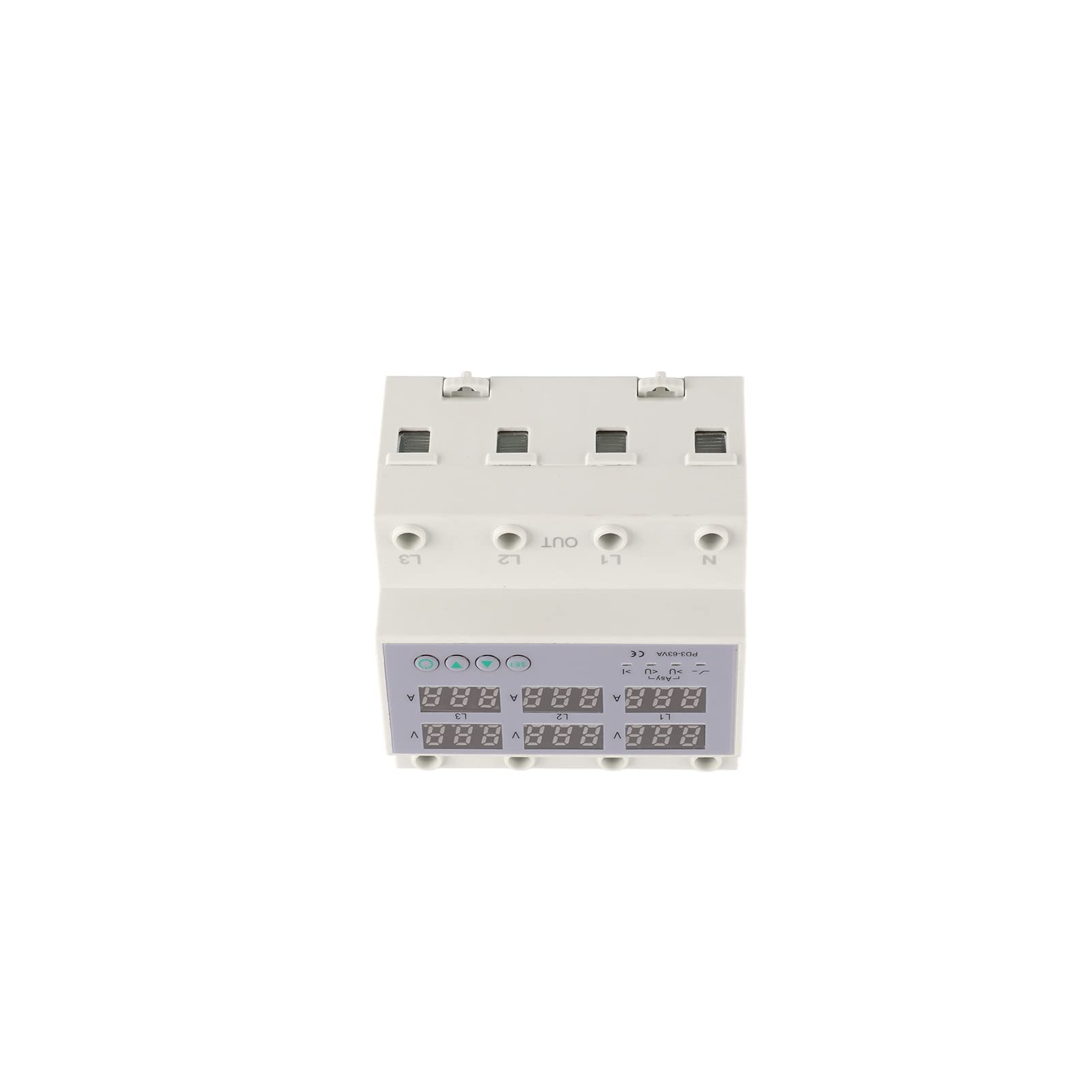
Figur 1: Forside view of the TOPINCN 3-Phase DIN Rail Voltmeter Ammeter Overvoltage Overcurrent Protector, showing the digital displays for voltage og strøm, og kontrolknapper.
Nøglefunktioner:
- Digital skærm: Real-time monitoring of 3-phase voltage og nuværende.
- Automatisk beskyttelse: Cuts off power during overvoltage, undervoltage, and overcurrent events.
- Automatisk nulstilling: Restores power automatically after fault conditions clear, preventing long-term power failure.
- DIN-skinneinstallation: Easy and stable mounting on standard DIN rails.
- Hurtigt svar: Sensitive components ensure rapid response to electrical anomalies.
Specifikationer
| Parameter | Værdi |
|---|---|
| Mærke | TOPINCN |
| Model | CHLT 63 |
| Belastningsstrøm | 1-40A (for 40 Amp variant) |
| Overvoltage Indstillingsområde | AC 390-500V |
| Undervoltage Indstillingsområde | AC 140-370V |
| Power Off Time (Voltage) | 5-300 sekunder |
| Power Off Time (Current) | 30-300 sekunder |
| Installation | Approx. 35mm DIN rail |
| Varens vægt | 14.5 ounce |
| Pakkedimensioner | 4.33 x 3.94 x 2.76 tommer |
Bemærk: Specifikationerne kan ændres uden varsel. Se produktetiketten for de mest nøjagtige oplysninger.
Opsætning og installation
The device is designed for easy installation on a standard 35mm DIN rail. Ensure all power is disconnected before proceeding.
- Montering: Securely attach the protector to a 35mm DIN rail in your electrical panel.
- Ledningsføring:
- Connect the incoming 3-phase power supply (L1, L2, L3) and Neutral (N) to the IN enhedens terminaler.
- Connect the protected load's 3-phase power (L1, L2, L3) and Neutral (N) to the UD enhedens terminaler.
- Sørg for, at alle forbindelser er tætte og sikre for at forhindre løse kontakter og overophedning.
- Tænd: Once wiring is complete and verified, restore power to the circuit. The device's digital display will illuminate.

Figure 2: Input terminals (IN) for L1, L2, L3, and Neutral (N).

Figure 3: Output terminals (OUT) for L1, L2, L3, and Neutral (N).
Betjeningsvejledning
Digital skærm:
The device features a clear digital display that shows real-time voltage (V) and current (A) for each of the three phases (L1, L2, L3). This allows for continuous monitoring of your electrical system's status.

Figure 4: Digital display showing real-time voltage and current values for L1, L2, and L3.
Indstilling af parametre:
The device allows for adjustment of overvoltage, undervoltage, and overcurrent protection thresholds, as well as power-off delay times. Refer to the specific button functions on the device for detailed setting procedures. Typically, a "SET" button is used to enter programming mode, and arrow buttons (up/down) are used to adjust values.
- Overvoltage Setting (Uvo): Adjust the maximum acceptable voltage (AC 390-500V). If voltage exceeds this, power will be cut off.
- Undervoltage Setting (Uve): Adjust the minimum acceptable voltage (AC 140-370V). If voltage drops below this, power will be cut off.
- Overcurrent Setting (I): Adjust the maximum acceptable current (1-40A for this model). If current exceeds this, power will be cut off.
- Power Off Time (V/I): Set the delay before power is cut off after a voltage or current anomaly is detected. This prevents nuisance tripping from momentary fluctuations.
Automatisk nulstillingsfunktion:
After the device cuts off power due to an overvoltage, undervoltage, or overcurrent event, it will automatically reset and restore power once the electrical conditions return to normal within the set delay time. This feature helps maintain continuous operation and prevents prolonged downtime.
Opretholdelse
The TOPINCN 3-Phase Protector is designed for minimal maintenance. However, regular checks can ensure optimal performance and longevity:
- Visuel inspektion: Undersøg regelmæssigt enheden for tegn på fysisk skade, misfarvning eller løse forbindelser.
- Rensning: Keep the device clean and free from dust and debris. Use a soft, dry cloth for cleaning. Do not use liquid cleaners.
- Tilslutningstjek: Sørg for, at alle ledningsforbindelser forbliver stramme og sikre.
- Miljøforhold: Kontroller, at driftsmiljøet holder sig inden for de angivne temperatur- og fugtighedsområder.
Fejlfinding
| Problem | Mulig årsag | Løsning |
|---|---|---|
| Enheden tænder ikke. | Ingen indgangsstrøm; forkert ledningsføring; intern fejl. | Kontroller hovedstrømforsyningen. Bekræft ledningsforbindelserne. Kontakt support, hvis problemet fortsætter. |
| Power cuts off frequently. | Voltage/current outside set limits; sensitive settings. | Tjek det faktiske volumentage/current readings. Adjust overvoltage/undervoltage/overcurrent settings if necessary, or increase power-off delay times. Consult an electrician to verify system stability. |
| Display shows error code or abnormal readings. | Sensor malfunction; internal fault. | Power cycle the device. If the issue persists, contact technical support. |
| Device does not reset automatically. | Fault condition persists; automatic reset function disabled (if applicable). | Sørg for fejltilstanden (overvolumentage, undervoltage, overcurrent) has cleared. Check device settings to confirm automatic reset is enabled. |
Garanti og support
For warranty information and technical support, please refer to the documentation provided with your purchase or contact TOPINCN customer service. Keep your purchase receipt as proof of purchase.
Kontaktoplysninger: Please visit the official TOPINCN webwebstedet eller din forhandlers supportside for de seneste kontaktoplysninger.