
1. Introduktion
Thank you for choosing the PULWTOP 9-in-1 Powered USB C Hub. This instruction manual provides essential information for the safe and efficient use of your new device. Please read it thoroughly before operation and retain it for future reference.
This USB C Powered Hub is designed to expand the connectivity of your laptop, desktop, or gaming host by adding multiple USB-C and USB-A ports for data transfer and charging. It comes with a dedicated power adapter to ensure stable performance across all connected devices.
2. Nøglefunktioner
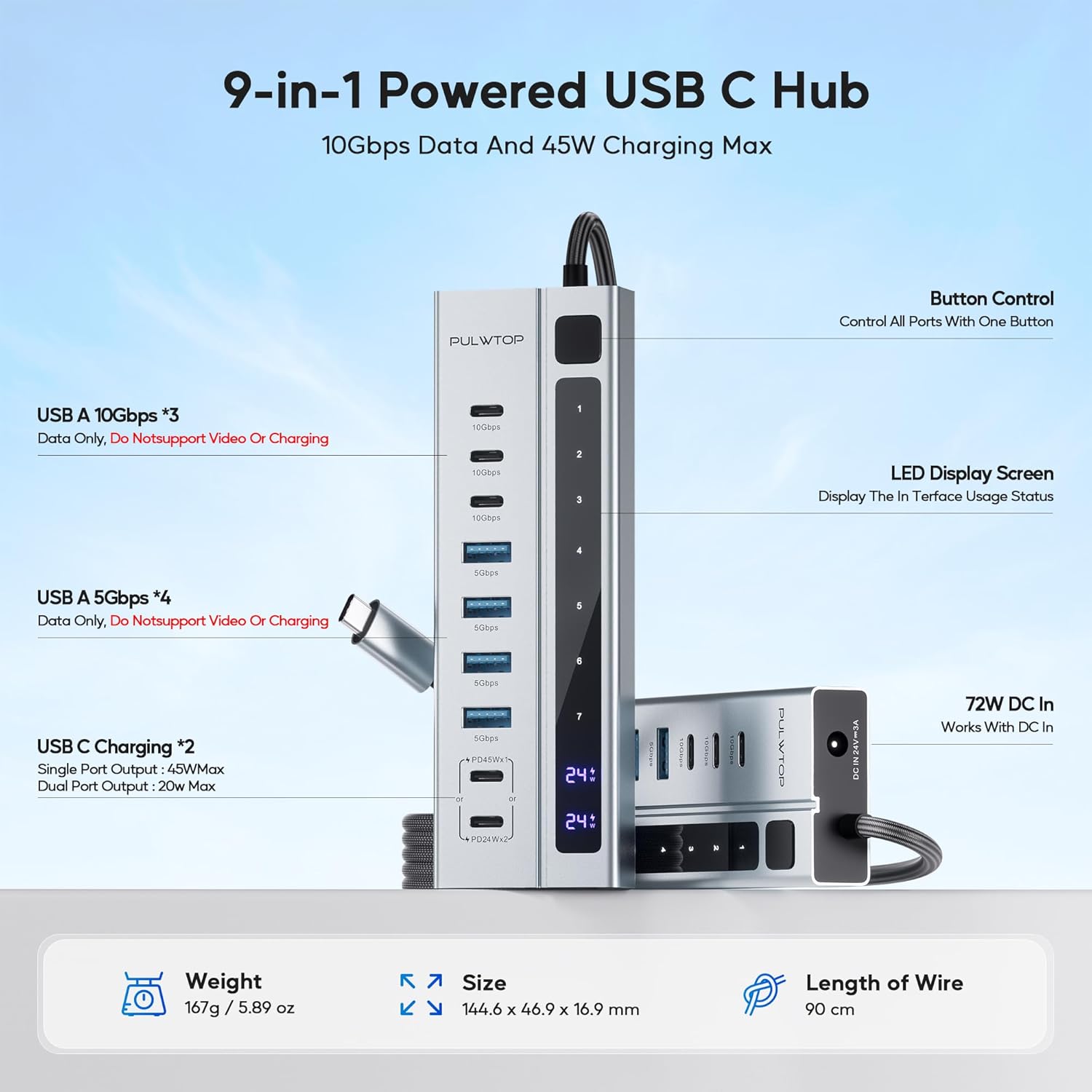
- Hybrid Powered USB C Hub: Adds 3 USB-C 3.2 10Gbps ports (Data ONLY), 4 USB-A 3.0 5Gbps ports (Data ONLY), and 2 USB-C PD Charging Ports (Charge ONLY).
- Kraftfuld og sikker: Equipped with a 72W (24V/3A) power adapter, supporting 1x45W or 2x24W charging via PD ports. Ensures secure and stable data transfer for all connected devices.
- Blazing-Fast Data Transfer: 3 USB-C ports provide up to 10Gbps and 4 USB-A 3.0 ports provide up to 5Gbps for rapid file overførsler.
- Sturdy Design & Button Control: High-quality aluminum housing with a durable 90cm braided cable. Features a single power button to control all ports.
- Note on Video Output: All ports of this Powered USB C Hub do NOT support video output function.
- Note on PD Charging: USB-C PD ports only support charging, without data and video transmission. Not designed to provide power to your laptop.
- Samsung Charging Protocol: Due to Samsung's charging protocol, the hub supports a maximum of 24W charging for Samsung phones and tablets.
3. Pakkens indhold
Sørg for, at alle varer er til stede og i god stand ved udpakning:
- PULWTOP 9-in-1 Powered USB C Hub
- 72W DC-strømadapter
- Brugermanual

4. Opsætningsvejledning
- Tilslut strømadapter: Plug the 72W DC Power Adapter into the DC IN 24V=3A port on the hub. Then, plug the power adapter into a wall outlet.
- Opret forbindelse til værtsenhed: Tilslut det integrerede USB-C-kabel fra hub'en til en kompatibel USB-C-port på din bærbare computer, stationære computer eller gaming-host.
- Tænd: Press the power button on the hub to activate the device. The LED display screen will show usage status.
- Tilslut ydre enheder: You can now connect your USB-C and USB-A devices to the available ports on the hub.

5. Betjeningsvejledning
5.1 Portfunktioner
- USB-C 3.2 10Gbps Ports (x3): These ports are for data transfer ONLY. They do NOT support video output or charging.
- USB-A 3.0 5Gbps Ports (x4): These ports are for data transfer ONLY. They do NOT support video output or charging.
- USB-C PD Charging Ports (x2): These ports are for charging ONLY. They do NOT support data transfer or video output. They can deliver 45W max for a single port or 24W max per port when both are connected.
5.2 Knapkontrol
The hub features a single power button that controls all ports. Press the button to turn the hub on or off. If you reconnect or restart your laptop, please press the USB-C hub's power button to re-enable the device.


5.3 Universel kompatibilitet
The PULWTOP 9-in-1 Powered USB C Hub is compatible with a wide range of operating systems and devices:
- Systemer: MacOS, Windows, Linux, ChromeOS, Android
- Værtsenheder: PC, Laptop, Phone, Tablet
- Periferiudstyr: Keyboard, Flash Drive, USB Fan, USB Lamp, HDD/SSD, Gamepad, Camera, Printer, Card Reader

5.4 Officiel produktvideo
6. Specifikationer
| Produktdimensioner | 4.25 x 1.85 x 0.66 tommer |
| Varens vægt | 1.32 pund |
| Varemodelnummer | CW2403000C6 |
| Mærke | PULWTOP |
| Fabrikant | PULWTOP |
| Hardware-interface | USB |
| Særlige funktioner | 9-Port Powered USB hub, Fast Data Transfer, Indicator Light, Multiple USB C Port Hub Powered |
| Kompatible enheder | Bærbare computere |
7. Vedligeholdelse
- Rensning: Brug en blød, tør klud til at rengøre navet. Undgå flydende rengøringsmidler eller aerosoler.
- Opbevaring: Opbevar hubben et køligt, tørt sted væk fra direkte sollys og ekstreme temperaturer.
- Håndtering: Undgå at tabe enheden eller udsætte den for kraftige stød.
8. Fejlfinding
- Enhed ikke genkendt:
- Ensure the hub's power adapter is securely plugged into a wall outlet and the hub.
- Verify the hub's integrated USB-C cable is firmly connected to your host device.
- Press the power button on the hub to ensure it is turned on.
- If using a Windows laptop, ensure its USB C port supports data transfer.
- Langsom dataoverførsel:
- Ensure your connected devices and cables support 10Gbps or 5Gbps speeds.
- Undgå at tilslutte for mange enheder med høj båndbredde samtidigt.
- Enheder, der ikke oplades:
- Confirm you are using the dedicated USB-C PD Charging Ports for charging.
- Check if the device you are trying to charge is compatible with the hub's charging output (e.g., Samsung devices have a 24W max limit).
- Ensure the hub's power adapter is providing sufficient power.
- Ingen videoudgang:
- This hub does NOT support video output from any of its ports. It is designed for data and charging only.
9. Garanti og support
For warranty information and technical support, please refer to the contact details provided on the product packaging or visit the official PULWTOP webwebsted. Gem din købskvittering som købsbevis i tilfælde af garantikrav.