
1. Introduktion
This manual provides detailed instructions for the installation, operation, and maintenance of the Intellinet 48-Port L3 Managed Gigabit PoE+ Switch, Model 562041. This device is designed for enterprise networks requiring efficient and scalable routing solutions with high-powered Power over Ethernet (PoE) capabilities.
2. Sikkerhedsoplysninger
Observe the following safety precautions to prevent damage to the device and injury to personnel:
- Sørg for korrekt jordforbindelse af enheden.
- Udsæt ikke kontakten for vand eller for høj luftfugtighed.
- Brug enheden inden for de angivne temperatur- og luftfugtighedsområder.
- Use only the power cable provided or a compatible replacement.
- Åbn ikke kontakten casing; overlad service til kvalificeret personale.
- Sørg for tilstrækkelig ventilation omkring kontakten for at forhindre overophedning.
3. Pakkens indhold
Bekræft at alle varer er til stede i pakken:
- Intellinet 48-Port L3 Managed Gigabit PoE+ Switch (Model 562041)
- Strømkabel
- 19" rackmount brackets
- Gummifødder
- Instruktioner (denne manual)
4. Produktet er slutview
The Intellinet 562041 is a robust Layer 3 managed switch featuring 48 Gigabit PoE+ ports and six 10G SFP+ uplink slots. It supports a total power budget of 850 watts for PoE devices.
4.1 Frontpanel
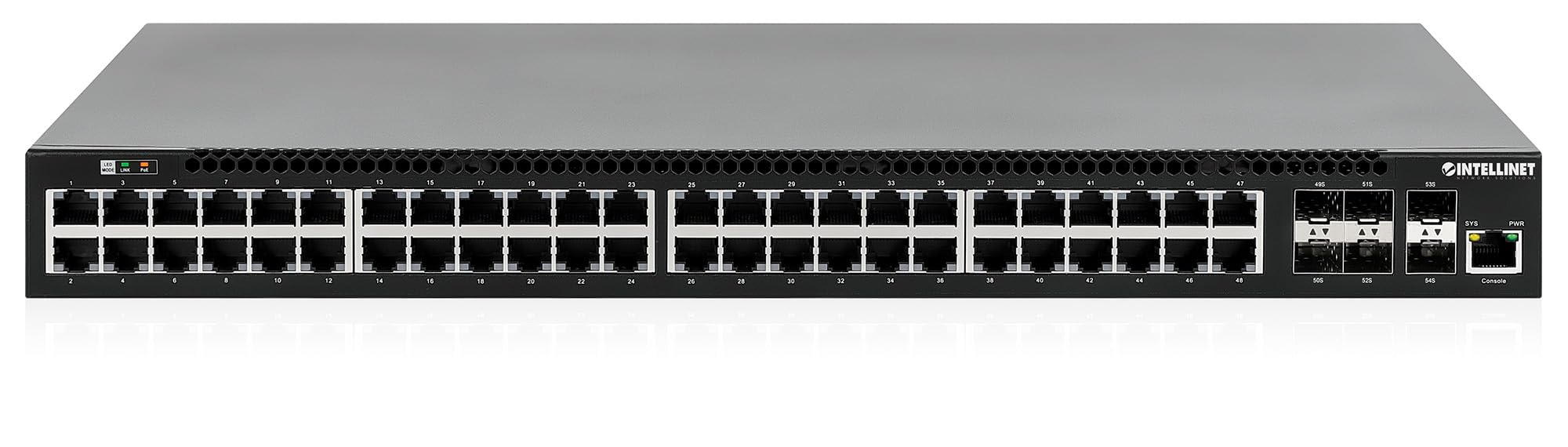
Frontpanelet indeholder:
- 48 x 10/100/1000 Mbps RJ45 Ports: These ports support Power over Ethernet Plus (PoE+) for connecting compatible devices.
- 6 x 10 Gigabit SFP+ Slots: For high-speed uplink connections to other network devices.
- LED-indikatorer: Provide status information for power, system, link activity, and PoE status.
- Konsolport: Til lokal administration og konfiguration.


4.2 Bagpanel

The rear panel typically includes the AC power input and cooling fans for heat dissipation.

5. Opsætning
5.1 Fysisk installation
The switch can be installed in a standard 19-inch equipment rack or placed on a desktop.
- Rackmonteret installation: Attach the provided rackmount brackets to the sides of the switch using the included screws. Secure the switch into a standard 19-inch rack.
- Desktop installation: Attach the provided rubber feet to the bottom of the switch to prevent scratching and ensure stability. Place the switch on a flat, stable surface.
5.2 Strømtilslutning
Connect the provided power cable to the AC power input on the rear panel of the switch and then to a grounded electrical outlet. Ensure the power switch is in the OFF position before connecting the power cable.
5.3 Netværksforbindelser
- PoE-enheder: Connect PoE-compatible devices (e.g., IP cameras, VoIP phones, wireless access points) to any of the 48 Gigabit RJ45 ports. The switch will automatically detect and provide power to these devices.
- Uplink-forbindelser: Insert compatible SFP+ transceivers into the 10 Gigabit SFP+ slots and connect them to your core network or other high-speed devices using appropriate fiber optic cables.
- Konsolforbindelse: For initial configuration or direct management, connect a console cable from your computer to the console port on the switch.
5.4 Indledende konfiguration
Refer to the separate software configuration guide for detailed instructions on accessing the switch's management interface (web-based GUI or command-line interface via console port) and performing initial setup, including IP address assignment, user accounts, and basic network settings.
6. Betjeningsvejledning
6.1 Lag 3-routing
This switch offers dynamic Layer 3 IP routing capabilities, including OSPF (Open Shortest Path First), RIP (Routing Information Protocol), and VRRP (Virtual Router Redundancy Protocol). These protocols enable efficient and scalable routing within complex network environments.

6.2 Power over Ethernet (PoE+)
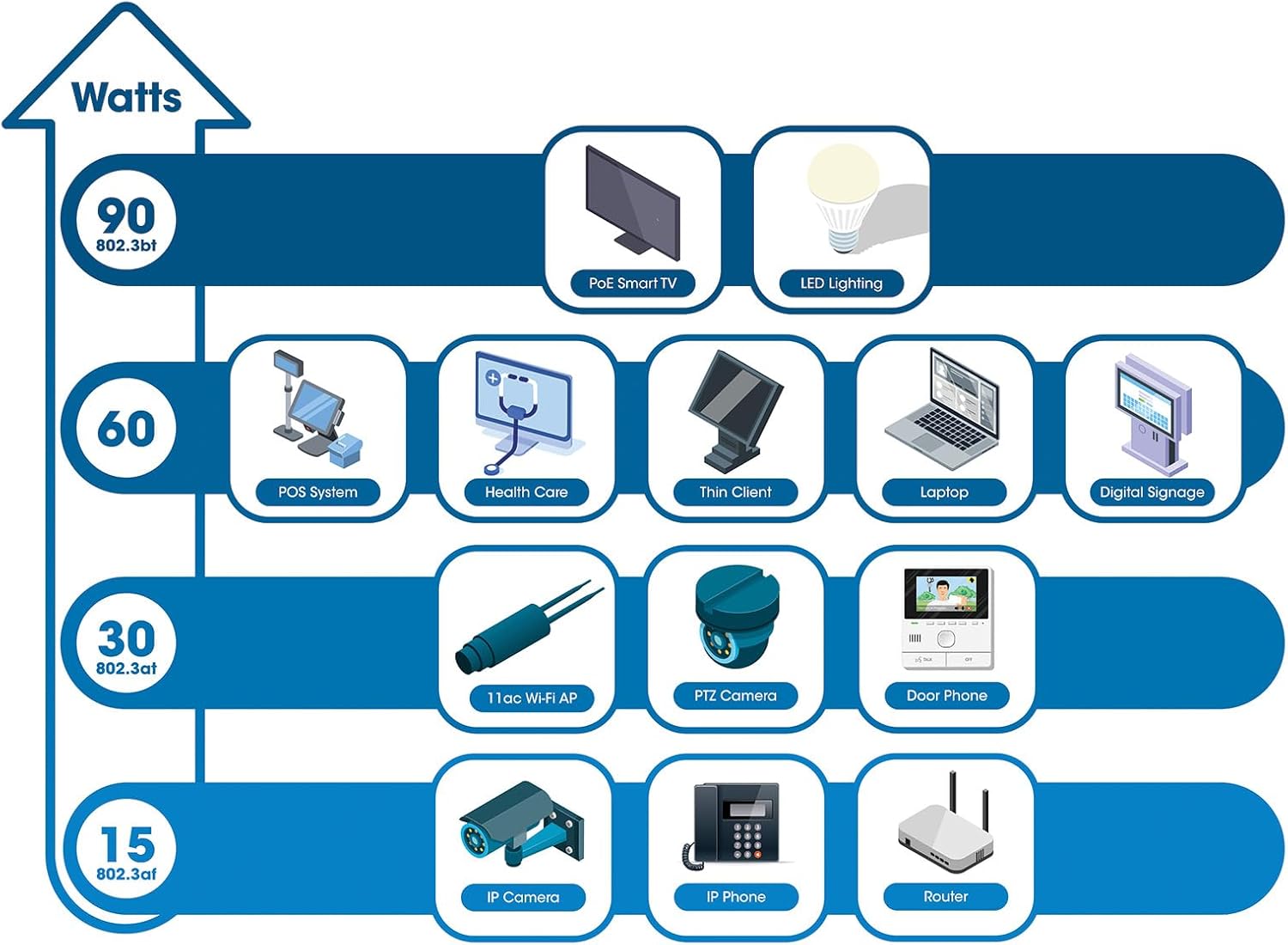
The switch provides up to 30 watts of power per port across its 48 PoE+ ports, with a total power budget of 850 watts. This allows for seamless integration of various PoE devices without the need for separate power adapters.
6.3 PoE Scheduling
The switch supports PoE scheduling, allowing administrators to define specific times for powering on, powering off, or rebooting connected PoE devices. This feature can optimize power consumption and enhance network security.


6.4 Self-Healing Functionality (PDM)
The Powered Device Monitor (PDM) feature enables the switch to proactively monitor the status of connected PoE devices. If a device becomes unresponsive, the PDM can automatically restart the PoE port to restore functionality, minimizing downtime and maintaining network integrity.
6.5 Cloud Management
The switch supports cloud management capabilities, allowing for remote configuration, monitoring, and troubleshooting of the device from a centralized platform. Refer to the cloud management documentation for setup and usage details.
7. Vedligeholdelse
7.1 firmwareopdateringer
Regularly check the Intellinet Network Solutions website for the latest firmware updates. Applying firmware updates can improve performance, add new features, and address security vulnerabilities. Follow the instructions provided with the firmware update package carefully.
7.2 Rengøring
To clean the switch, power it off and disconnect all cables. Use a soft, dry cloth to wipe the exterior. Do not use liquid or aerosol cleaners. Ensure ventilation openings are free from dust and debris.
7.3 Miljøhensyn
Ensure the switch operates within its specified temperature and humidity ranges. Avoid placing the switch in direct sunlight, near heat sources, or in areas with high dust accumulation.
8. Fejlfinding
Dette afsnit omhandler almindelige problemer, du kan støde på med switchen.
8.1 Ingen strøm
- Kontroller, at strømkablet er korrekt tilsluttet både afbryderen og en fungerende stikkontakt.
- Sørg for, at tænd/sluk-knappen på bagpanelet er i ON-positionen.
- Kontroller stikkontakten med en anden enhed for at bekræfte, at den fungerer.
8.2 Intet link på en port
- Kontroller Ethernet-kablets forbindelse i begge ender. Sørg for, at den er korrekt tilsluttet.
- Kontroller, at kablet ikke er beskadiget. Prøv et andet kabel.
- Sørg for, at den tilsluttede enhed er tændt og fungerer korrekt.
- Check the port status in the switch's management interface.
8.3 PoE-enhed modtager ikke strøm
- Confirm the connected device is a PoE-compatible device.
- Kontrollér PoE-status-LED'en for den specifikke port.
- Kontroller, at det samlede PoE-strømbudget (850 W) ikke overskrides af alle tilsluttede enheder.
- Utilize the Powered Device Monitor (PDM) feature to automatically restart the port if the device is unresponsive.
- Check PoE settings in the switch's management interface.
9. Specifikationer
| Feature | Specifikation |
|---|---|
| Modelnummer | 562041 |
| Mærke | INTELLINET NETVÆRKSLØSNINGER |
| Antal havne | 54 (48 x Gigabit PoE+, 6 x 10G SFP+) |
| Interface Type | PoE, SFP |
| Maksimal effekt (PoE-budget) | 850 watt |
| Dataoverførselshastighed | 10 Gigabits Per Second (SFP+ uplinks) |
| Varens vægt | 6.2 kilo (13.64 pund) |
| Produktmål (L x B x H) | 13.78 x 17.32 x 1.73 tommer |
| Øverste temperaturvurdering | 104 grader Fahrenheit (40°C) |
| Lavere temperaturvurdering | 32 grader Fahrenheit (0°C) |
| Kompatible enheder | Desktop, Router, PoE devices (IP cameras, VoIP phones, WAPs) |
| Inkluderede komponenter | 19" rackmount brackets, Instructions, Rubber feet, power cable |
| UPC | 766623562041 |
10. Garanti og support
10.1 Garantioplysninger
This Intellinet Network Solutions product is covered by a 3 års producentgarantiGem venligst din købsbevis i tilfælde af garantikrav. Garantien dækker materiale- og fabrikationsfejl ved normal brug.
10.2 Teknisk support
For technical assistance, product documentation, or to register your product, please visit the official Intellinet Network Solutions website or contact their customer support. Contact information can typically be found on the manufacturer's webwebsted eller i produktemballagen.