
1. Introduktion
This manual provides detailed instructions for the Rollei XTALK X5 2.4GHz Wireless Intercom Headset. It covers product components, setup procedures, operational guidelines, maintenance tips, troubleshooting solutions, and technical specifications. Please read this manual thoroughly before using the device to ensure proper function and longevity.
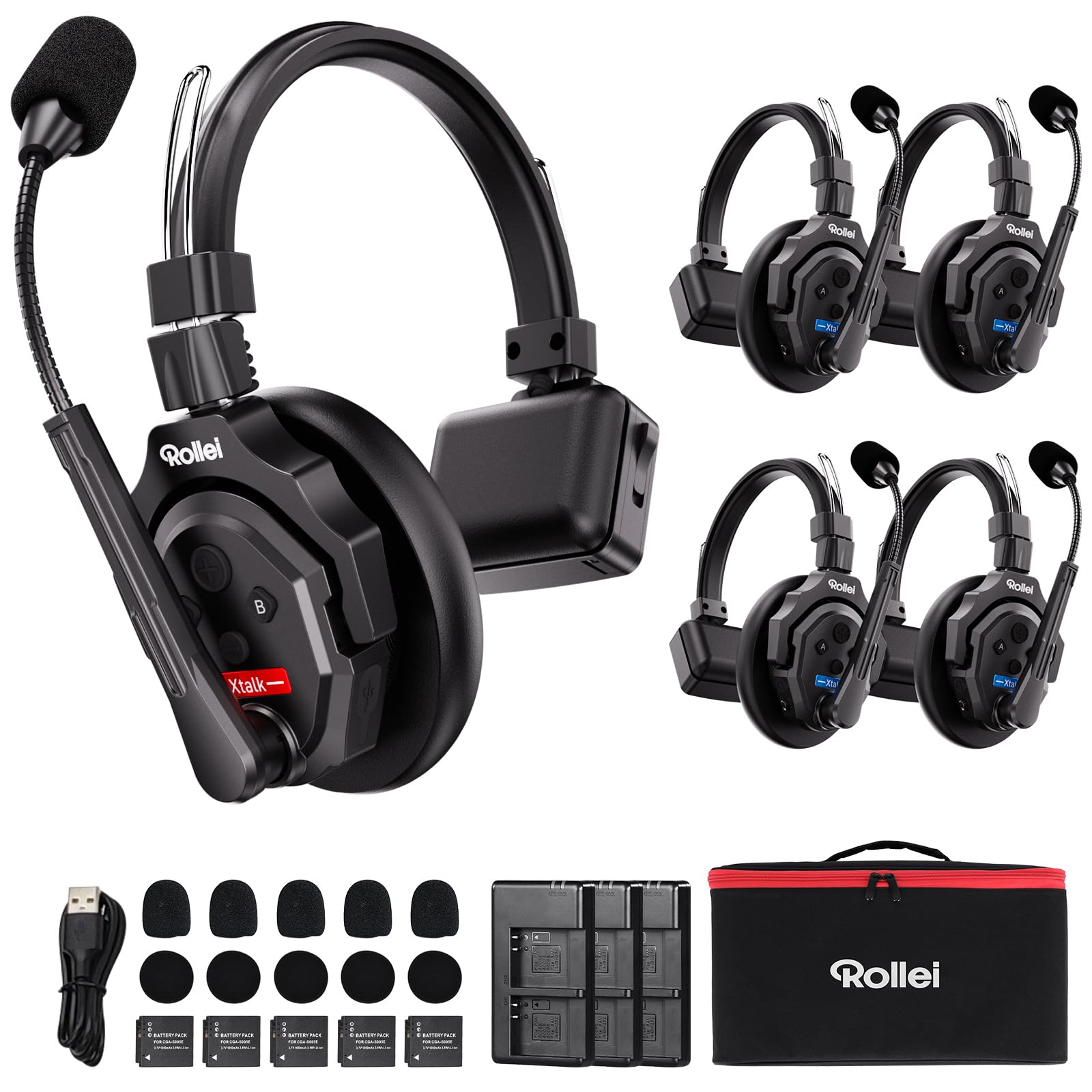
Figure 1: The Rollei XTALK X5 intercom headset, designed for professional wireless communication.
2. Hvad er der i æsken
The Rollei XTALK X5 package includes the following components:
- 5 x headsets
- 5 x Batterier
- 3 x opladere
- 3 x USB-C kabler
- 5 x Over-ear Cushions (Leatherette)
- 5 x Microphone Wind Protections
- 1 x Numbered Sticker Set
- 5 x Storage Bags
- 1 x Larger Storage Bag
- 1 x brugermanual
3. Opsætning
3.1 Batteriinstallation og opladning
Before initial use, ensure all batteries are fully charged. The headsets are equipped with interchangeable batteries.
- Insert the battery into the designated slot on the headset. Ensure it clicks securely into place.
- Connect the charger to a power source and attach the USB-C cable to the headset or directly charge the spare batteries using the provided chargers.
- A full charge typically takes approximately 2.5 hours. The battery provides up to 20 hours of continuous operation.

Figure 2: Battery installation and visual representation of 20-hour battery life.
3.2 Ear Cushion Selection and Attachment
The XTALK X5 includes two types of ear cushions for personalized comfort:
- Circum-aural leatherette cushions
- Supra-aural foam cushions
To change cushions:
- Gently remove the currently installed cushion by pulling it away from the earcup.
- Align the new cushion with the earcup and press it firmly around the edges until it is securely attached.

Figure 3: Replacing ear cushions for customized comfort.
3.3 Microphone Attachment and Adjustment
Attach the microphone wind protection foam to the microphone arm to minimize wind noise during outdoor use.
- Slide the foam cover onto the microphone head.
- Adjust the flexible microphone arm to position the microphone approximately 2-3 cm from your mouth for optimal voice capture.

Figure 4: Attaching wind protection and adjusting the microphone arm.
3.4 Initial Configuration (Master/Remote)
The XTALK X5 headsets can be configured as Master or Remote units and divided into two independent groups. Refer to the specific pairing instructions provided in the full user manual for detailed steps on establishing communication groups.

Figure 5: Master and Remote headset configuration diagram.
4. Betjeningsvejledning
4.1 Tænd/sluk
To power on the headset, press and hold the power button located on the earcup until the indicator light illuminates. To power off, press and hold the power button again until the indicator light turns off.
4.2 Microphone Mute Function
The microphone can be muted by raising the microphone arm upwards. To unmute, lower the microphone arm back into position.
4.3 Noise Cancellation (AEC) Activation
The XTALK X5 features Acoustic Echo Cancellation (AEC) for advanced noise suppression. This technology can be activated or deactivated by pressing a dedicated button (refer to the headset's controls for exact button location) to ensure clear audio in noisy environments.

Figure 6: Advanced noise cancellation technology in the XTALK X5.
4.4 Audio Monitoring via 3.5mm Jack
The integrated 3.5mm audio jack allows you to monitor audio directly from external devices such as cameras, recorders, or computers. Connect your audio source to the headset using a standard 3.5mm audio cable.

Figure 7: Using the 3.5mm audio jack for direct monitoring.
4.5 Communication Range and Stability
The XTALK X5 operates on a 2.4GHz frequency, providing a stable and reliable connection with an operational range of up to 350 meters. This extended range ensures mobility and uninterrupted communication in various professional environments.

Figure 8: Illustration of the 350-meter communication range.
5. Vedligeholdelse
5.1 Rengøring
Regularly clean the headset with a soft, dry cloth. For ear cushions, use a slightly damp cloth with mild soap if necessary, then wipe dry. Avoid using harsh chemicals or abrasive materials.
5.2 Pleje af batterier
To prolong battery life, avoid fully discharging the batteries frequently. Store batteries in a cool, dry place when not in use. If storing for extended periods, charge them to approximately 50% capacity.
5.3 Opbevaring
When not in use, store the headsets in the provided storage bags to protect them from dust and physical damage. Avoid exposing the headsets to extreme temperatures or humidity.
6. Fejlfinding
If you encounter issues with your Rollei XTALK X5 headset, refer to the following common problems and solutions:
| Problem | Mulig årsag | Løsning |
|---|---|---|
| Ingen lyd fra headset | Headset not powered on; low battery; incorrect pairing; volume too low. | Ensure headset is powered on. Charge battery. Re-pair headsets. Increase volume. |
| Poor connection or intermittent audio | Out of range; interference; obstacles between headsets. | Move closer to the Master unit. Avoid areas with high electromagnetic interference. Reduce physical obstructions. |
| Mikrofonen sender ikke | Microphone muted; microphone arm not positioned correctly. | Lower the microphone arm. Ensure the microphone is positioned correctly near your mouth. |
| Batteriet oplades ikke | Cable or charger fault; improper connection. | Check USB-C cable and charger for damage. Ensure secure connection. Try a different cable or charger. |
Hvis problemet fortsætter efter at have forsøgt disse løsninger, bedes du kontakte kundesupport.
7. Specifikationer
Key technical specifications for the Rollei XTALK X5 headset:
| Feature | Detalje |
|---|---|
| Mærke | Rollei |
| Modelnavn | Xtalk X5 |
| Forbindelsesteknologi | Wireless (Full Duplex / 2.4 GHz) |
| Kommunikationsområde | Op til 350 meter |
| Batterilevetid | Op til 20 timer |
| Opladningstid | Ca. 2.5 timer |
| Vægt | 188 grams (per unit) |
| Støjkontrol | Active Noise Suppression (AEC) |
| Hovedtelefonstik | 3.5 mm Jack |
| Frekvensområde | 20 Hz - 20,000 Hz |
| Materiale | Plast |
| Farve | Sort |
| Vandmodstandsniveau | Ikke vandtæt |
8. Garanti og support
8.1 Garantioplysninger
The Rollei XTALK X5 headset comes with a 24 måneders ombytningsgarantiGem venligst din købsbevis i tilfælde af garantikrav.
8.2 Kundesupport
For further assistance, technical support, or warranty inquiries, please visit the official Rollei brand store or contact customer service through the provided channels.
Rollei offers free returns within 14 days. For more information, please visit: Rollei Brand Store