
1. Introduktion
This manual provides detailed instructions for the installation, setup, and operation of your new Road Top 12.3-inch Ultra-Narrow Touchscreen. This system is designed to upgrade your BMW 5 Series F10/F11 (2012-2016 with NBT System) by adding wireless Apple CarPlay, Android Auto, and mirrorlink functionalities while retaining all original OEM features.

Video: Overståetview of the 12.3-inch Ultra-Narrow Linux Touchscreen for BMW 5 Series F10.
2. Sikkerhedsoplysninger
Advarsel:
- Professional installation is recommended. Incorrect installation may damage the vehicle's electrical system or the product.
- Frakobl altid køretøjets batteri, inden du påbegynder elektrisk arbejde, for at undgå kortslutninger.
- Sørg for, at alle forbindelser er sikre og korrekt isolerede for at undgå elektriske farer.
- Test all functions of the device thoroughly before reassembling the dashboard to confirm proper operation.
- Brug ikke enheden på en måde, der distraherer dig fra kørslen. Prioritér altid trafiksikkerhed.
3. Pakkens indhold
Bekræft at alle varer er til stede i pakken:
- Car Screen (12.3-inch Ultra-Narrow Touchscreen)
- Strømkabel
- USB kabel
- AUX kabel
- Beslag
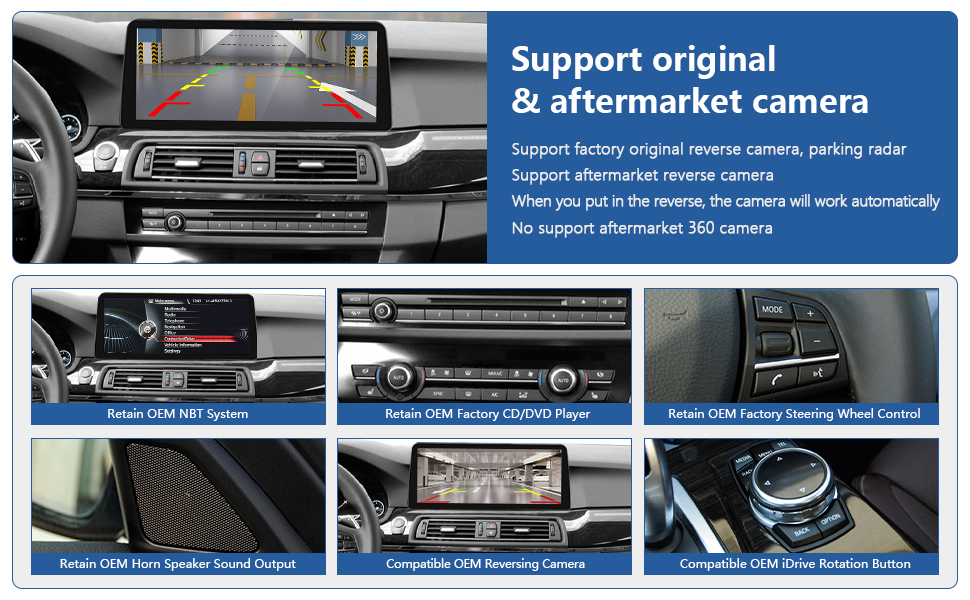
Image: Included components of the Road Top 12.3-inch Touchscreen system.
4. Kompatibilitet
This 12.3-inch Ultra-Narrow CarPlay Touchscreen is compatible with:
- BMW 5 Series F10/F11 (2012-2016 Year) with NBT System.
Important Note: Not compatible with BMW 5 Series F07 Car, or vehicles with CIC/EVO ID5/EVO ID6 systems.

Image: Visual guide for compatible BMW models and NBT system identification.
5. Nøglefunktioner
The Road Top 12.3-inch Touchscreen offers the following enhancements:
- Retains Original OEM System: Keeps all original car functions, including radio, amplifier, joystick control, and factory cameras.
- Trådløs CarPlay og Android Auto: Seamless integration for navigation, music, calls, and more.
- Trådløs spejlforbindelse: Supports screen mirroring for both iOS and Android phones.
- Touchskærm i høj opløsning: 1920x720 HD resolution for a clear display.
- Automatisk dag/nat-tilstand: Adjusts display brightness based on car headlights for comfortable viewing.
- Kamerasupport: Compatible with factory original reverse camera, parking radar, and aftermarket reverse/front view cameras (CVBS input). Does not support aftermarket 360 cameras.
- Kontrolmetoder: Supports hand touch control and original steering wheel control buttons.
- Forbedret lyd: Built-in Bluetooth module and EQ adjustable for optimal sound quality.

Image: Visual representation of the main features of the product.
6. Installationsvejledning
Important: Installation requires removing parts of the car dashboard. It is crucial to test all functions before fully reassembling the dashboard.
6.1 Generelle installationstrin
Video: Detailed installation guide for Wireless CarPlay in BMW 5 Series.
6.2 Fiber Optic Cable Transfer (If Applicable)
If your vehicle uses fiber optic cables for audio, you may need to transfer them to ensure sound functionality.
Video: Instructions on how to transfer fiber optic cables for audio connection.
6.3 Installationssammenligning

Image: Visual comparison of the dashboard before and after the new screen installation.
7. Opsætning
7.1 Screen Resolution Adjustment
If the screen display is distorted or incorrect after installation, adjust the resolution settings.
Video: Guide on adjusting screen resolution settings.
7.2 Sprogopsætning
Konfigurer systemsproget efter dine præferencer.
Video: Instructions for setting the system language.
7.3 Trådløs CarPlay-forbindelse
Connect your iPhone wirelessly to the system for CarPlay functionality.
Video: Steps to connect to Wireless CarPlay.
7.4 Wireless AirPlay Connection
Mirror your iPhone screen to the display using AirPlay.
Video: How to connect to Wireless AirPlay.
8. Betjeningsvejledning
8.1 Skift mellem systemer
Easily switch between the new Linux system and your original BMW OEM system.
Video: Demonstrates switching between the new system and the original BMW system.
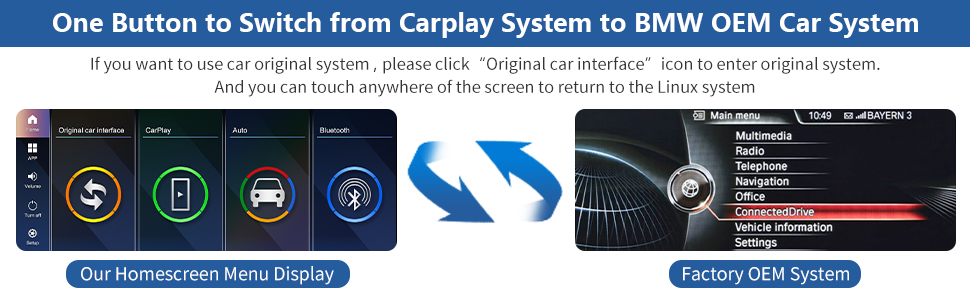
Image: Visual guide for switching between CarPlay and OEM systems.
8.2 Menu Display Interface
Explore the various menu options and interface of the Linux touchscreen.
Video: Overståetview of the Menu Display Interface for the BMW Linux Touchscreen.
8.3 Dag- og nattilstand
The system automatically adjusts the display between day and night modes based on your car's original headlights for optimal visibility.

Image: Illustration of automatic day and night mode adjustment.
8.4 Kamerafunktioner
The system supports various camera inputs, including original and aftermarket options.

Image: Details on supported camera functions.

Billede: Omfattende view of retained OEM functions and camera support.
8.5 Lydindstillinger
The system includes a built-in Bluetooth module and adjustable EQ for optimal audio experience.

Image: Information on AUX and Bluetooth audio support.
9. Fejlfinding
Most issues can be resolved by checking cable connections and settings. If you encounter problems, refer to the following common solutions:
- Ingen lyd: Ensure all audio cables are correctly connected. If your car uses fiber optic cables, confirm they are properly transferred. Check the AUX input setting in the system.
- Display Issues (Distorted/Incorrect): Adjust the screen resolution in the system settings (refer to Section 7.1).
- Connectivity Problems (CarPlay/Android Auto): Verify that Wi-Fi and Bluetooth are enabled on your phone and the system. Ensure correct pairing and authorization.
- Originale funktioner virker ikke: Double-check all wiring connections, especially those related to the OEM system. Ensure the system is correctly configured to retain OEM functions.
If problems persist, please contact Road Top Direct customer support for assistance.
10. Specifikationer
| Feature | Detalje |
|---|---|
| Varens vægt | 4.6 pund |
| Pakkedimensioner | 15.43 x 7.24 x 6.77 tommer |
| Skærmstørrelse | 12.3 tommer |
| Opløsning | 720 x 1280 |
| Speciel funktion | Apple CarPlay, Android Auto |
| Forbindelsesteknologi | Bluetooth |
| Type køretøjstjeneste | Bil |
| Monteringstype | Dashboard montering |
11. Garanti
This product comes with a standard manufacturer's warranty. Please refer to the product packaging or contact Road Top Direct for specific warranty terms and conditions.
12. Kundesupport
For any questions, technical assistance, or troubleshooting not covered in this manual, please contact Road Top Direct customer support. You can typically find contact information on the product packaging or the seller's page where you purchased the item.