
Indledning
The M-VAVE SMK-25 MINI is a compact and portable 25-key USB MIDI keyboard controller designed for music production on Mac and PC. It features velocity-sensitive keys, assignable controls, pitch and modulation functions, and versatile connectivity options including USB and Bluetooth. This manual provides detailed instructions for setting up, operating, maintaining, and troubleshooting your device.

Image: The M-VAVE SMK-25 MINI MIDI Keyboard Controller, showcasing its compact design and 25 velocity-sensitive keys.
Opsætning
1. Tænder
The SMK-25 MINI features a built-in rechargeable battery. To power on the device, press and hold the power button located on the side or top panel until the indicator light illuminates.
2. USB-forbindelse
For a wired connection to your computer (Mac or PC), use the provided USB-C cable. Connect one end to the USB-C port on the SMK-25 MINI and the other end to an available USB port on your computer. The device is plug-and-play, requiring no additional drivers for basic functionality.

Image: Illustration of the plug-and-play USB connection process for the MIDI keyboard controller to a computer.
3. Bluetooth-forbindelse
For at oprette forbindelse trådløst via Bluetooth:
- Ensure the SMK-25 MINI is powered on.
- Tryk på BT button on the controller to activate Bluetooth pairing mode. The Bluetooth indicator light will flash.
- On your computer or mobile device, navigate to Bluetooth settings and select "SMK-25 MINI" from the list of available devices.
- Når der er oprettet forbindelse, lyser Bluetooth-indikatoren konstant.
4. Software Setup (DAW Compatibility)
The SMK-25 MINI is compatible with various Digital Audio Workstations (DAWs) such as Ableton Live, GarageBand, Logic Pro, Studio One, Cubase, Pro Tools, and Reason Studios. After connecting the controller, open your preferred DAW and ensure the SMK-25 MINI is recognized as a MIDI input device in the software's preferences or settings.

Image: The M-VAVE SMK-25 MINI shown with various DAW logos, indicating broad software compatibility.
Betjeningsvejledning
1. Grundlæggende kontroller
- Hastighedsfølsomme taster: The 25 keys respond to how hard you press them, allowing for dynamic expression in your playing.
- Pitch Bend-knapper: Brug SLÅ OP og PITCH NED buttons to momentarily raise or lower the pitch of notes.
- Modulation Button: De MOD button can be assigned to control various parameters within your DAW or instrument, such as vibrato or filter cutoff.
- Sustain-knap: Tryk på SUS button to sustain notes, similar to a piano sustain pedal. An external sustain pedal can also be connected via the 3.5mm port.
- Oktavskift: Brug OC+ og OC- buttons to shift the keyboard's octave range up or down.
- Customization Knob: The rotary knob typically controls volume or can be assigned to other MIDI CC parameters for real-time control.

Billede: Nærbillede view of the M-VAVE SMK-25 MINI's control panel, highlighting the pitch, mod, sustain, arpeggiator, and octave shift buttons.
2. Avancerede funktioner
- Arpeggiator: Tryk på ARP button to activate the arpeggiator. You can then use the keys and other controls to adjust arpeggio patterns, tempo, gate length, and octave range. Refer to your DAW's manual for specific arpeggiator synchronization settings.
- Smart Chord & Scale Modes: De SC/CH button enables Smart Chord and Smart Scale modes. These modes assist in playing harmonically correct notes and chords within a selected scale, simplifying music creation.
Opretholdelse
To ensure the longevity and optimal performance of your M-VAVE SMK-25 MINI, follow these maintenance guidelines:
- Rensning: Brug en blød, tør klud til at rengøre controllerens overflade. Undgå slibende rengøringsmidler, opløsningsmidler eller voks.
- Opbevaring: Opbevar enheden et køligt, tørt sted væk fra direkte sollys, ekstreme temperaturer og høj luftfugtighed.
- Håndtering: Håndter controlleren forsigtigt. Undgå at tabe den eller udsætte den for hårde stød.
- Batteripleje: For optimal batterilevetid bør du undgå at aflade batteriet helt ofte. Oplad enheden regelmæssigt, især hvis den skal opbevares i længere tid.
Fejlfinding
| Problem | Mulig årsag | Løsning |
|---|---|---|
| Enheden tænder ikke. | Problem med lavt batteri eller strøm. | Charge the device using the USB-C cable. Ensure the power button is pressed correctly. |
| Ingen lyd- eller MIDI-input i DAW. | Incorrect connection or software settings. | Verify USB or Bluetooth connection. Check your DAW's MIDI input settings to ensure the SMK-25 MINI is selected and enabled. |
| Bluetooth-forbindelse mislykkes. | Pairing mode not active or interference. | Sørg for BT button is pressed and flashing. Move closer to the host device. Try restarting both devices. |
| Keys are unresponsive or inconsistent. | Software issue or physical obstruction. | Restart your DAW and the controller. Ensure no debris is lodged under the keys. |
Specifikationer
| Feature | Detalje |
|---|---|
| Model | SMK-25 MINI |
| Antal nøgler | 25, Velocity-Sensitive |
| Forbindelse | USB-C, Bluetooth |
| MIDI -porte | 3.5mm MIDI Out (TRS Type A compatible) |
| Sustain pedal input | 3.5mm (shared with MIDI Out) |
| Kontrolelementer | Pitch Up/Down, Mod, Sustain, Arpeggiator, Smart Chord/Scale, Octave Up/Down, Customization Knob |
| Batteri | Built-in, 780 mAh Lithium |
| Opladningstid | Cirka 5 timer |
| Arbejdstid | Cirka 30 timer |
| Standby tid | Cirka 40 timer |
| Kompatible enheder | PC, Mac, Tablet, Smartphone |
| Dimensioner | 15.12 x 5.63 x 2.64 tommer (ca.) |
| Vægt | 1.2 pund (ca.) |
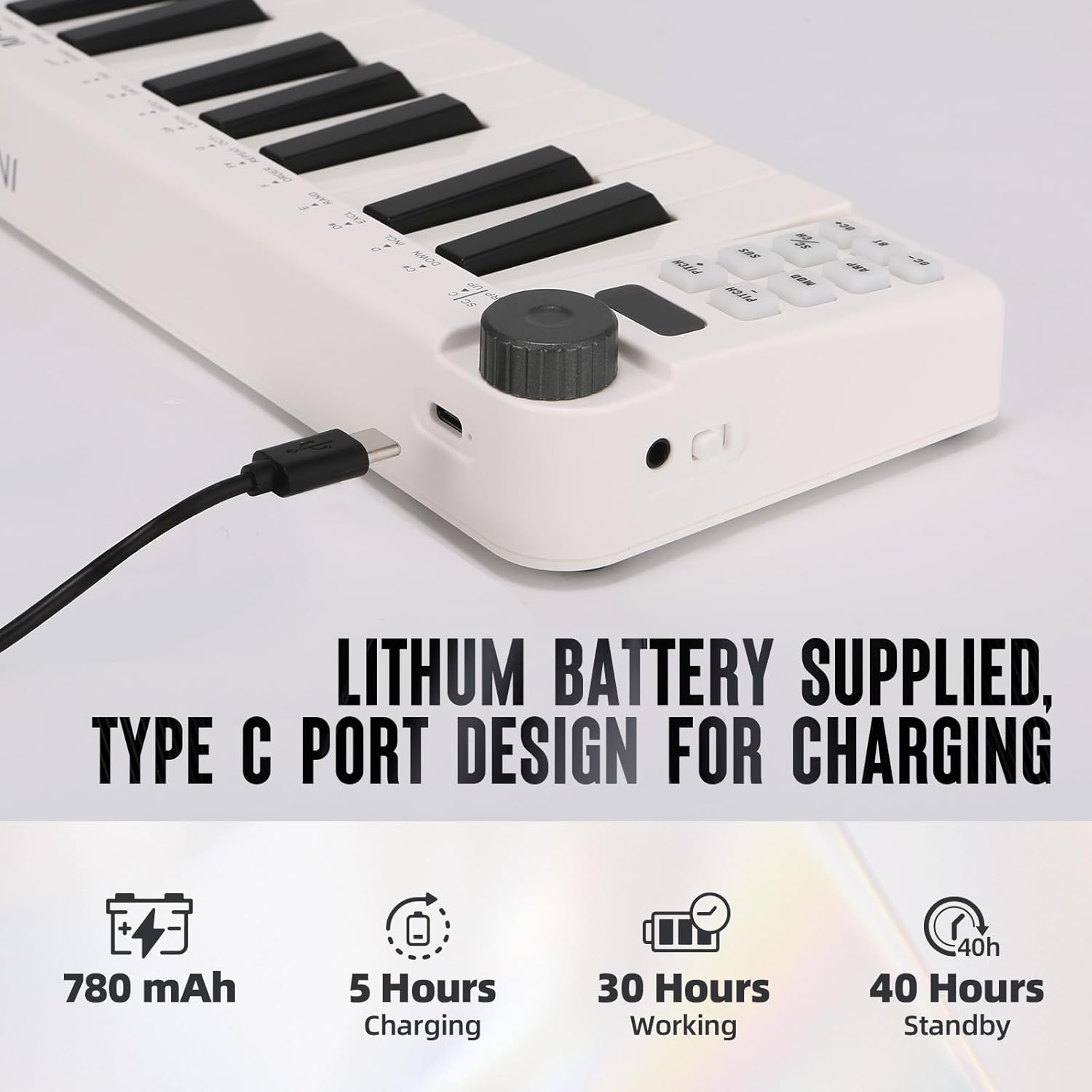
Image: Visual representation of the M-VAVE SMK-25 MINI's battery capacity, charging time, working time, and standby time.
Garanti og support
M-VAVE products are designed for reliability and performance. For warranty information, technical support, or service inquiries, please refer to the official M-VAVE webwebstedet eller kontakt deres kundesupport direkte. Gem din købskvittering som købsbevis i tilfælde af garantikrav.
M-VAVE aims to provide high-quality audio equipment and instruments. For assistance, their professional sales support team can address questions within 24 hours.
Besøg M-VAVE-butik på Amazon for mere information.