
1. Introduktion og sikkerhedsoplysninger
This manual provides essential instructions for the installation, operation, and maintenance of your GAMEMAX GX-850 80 Plus Gold Fully Modular Power Supply. Please read this manual thoroughly before installation and retain it for future reference.
1.1 Vigtige sikkerhedsadvarsler
- Fare for elektrisk stød: Strømforsyninger indeholder høje volatilitetertage components. Do not open the power supply unit. There are no user-serviceable parts inside. Opening the unit will void the warranty.
- Korrekt jording: Ensure your computer system is properly grounded to prevent electrical hazards.
- Afbryd strømmen: Always disconnect the AC power cord from the wall outlet before installing, removing, or servicing the power supply or any other computer components.
- Ventilation: Sørg for tilstrækkelig ventilation omkring strømforsyningen. Bloker ikke ventilationsåbninger.
- Fugtighed og temperatur: Do not operate the power supply in high humidity or high-temperature environments. Keep it away from water and heat sources.
- Professionel installation: Hvis du er usikker på nogen af installationstrinnene, skal du søge hjælp fra en kvalificeret tekniker.
2. Pakkens indhold
Verify that all items are present in your GAMEMAX GX-850 package:
- GAMEMAX GX-850 80 Plus Gold Fully Modular Power Supply
- Modular Cable Set (including ATX 24-pin, CPU 8-pin, PCIe 6+2-pin, SATA, Peripheral 4-pin cables)
- AC strømledning
- Monteringsskruer
- Brugervejledning (dette dokument)
3. Produktet er slutview
The GAMEMAX GX-850 is an 850-watt 80 Plus Gold certified fully modular power supply designed for desktop computers. It features an LLC and DC-DC circuit design for high efficiency and stable power delivery, along with an ultra-quiet FDB (Fluid Dynamic Bearing) fan for optimal cooling and low noise.
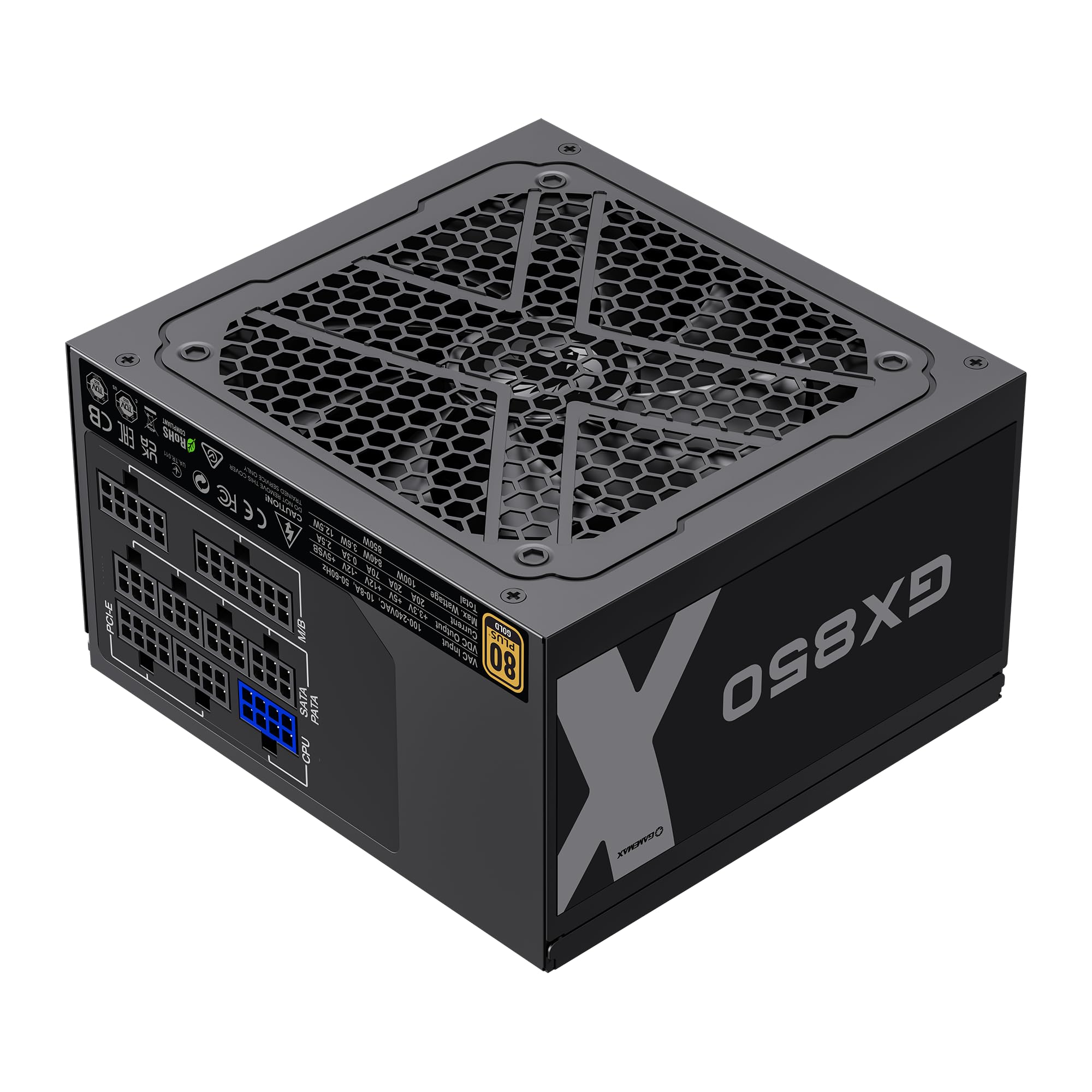
Image: The GAMEMAX GX-850 80 Plus Gold Fully Modular Power Supply, showcasing its black finish and modular design.
3.1 Nøglefunktioner
- 80 Plus Gold-certificeret: Sikrer høj energieffektivitet, hvilket reducerer varme- og driftsomkostninger.
- LLC+DC-DC Circuit: Advanced circuit design for stable voltage output and improved efficiency.
- Fuldt modulært design: Allows for custom cable management, reducing clutter and improving airflow.
- FDB Fan: Ultra-quiet temperature-controlled Fluid Dynamic Bearing fan for silent operation and extended lifespan.
- 105℃ Mainstream Capacitor: High-quality capacitors ensure long life and smooth power output.
- Omfattende beskyttelse: Features SIX levels of protection: Over Temperature Protection (OTP), Over Current Protection (OCP), Short Circuit Protection (SCP), Over Voltage Protection (OVP), under bindtage Protection (UVP), and Over Power Protection (OPP).
4. Opsætning og installation
Follow these steps to properly install your GAMEMAX GX-850 power supply into your computer system.
4.1 Installationstrin
- Forbered dit system: Sørg for, at din computer er helt slukket og taget stikket ud af stikkontakten. Åbn computerens kabinet.
- Fjern den gamle strømforsyning (hvis relevant): Disconnect all cables from your old power supply and remove it from the case.
- Monter den nye strømforsyning: Carefully place the GAMEMAX GX-850 into the power supply bay of your computer case. Secure it with the provided mounting screws. Ensure the fan is facing the correct direction for optimal airflow (typically facing down if your case has a bottom vent, or up if it's a top-mounted PSU).
- Tilslut modulære kabler: Identify the necessary cables for your components. Connect the modular cables to the corresponding ports on the power supply first, then route them to your components.
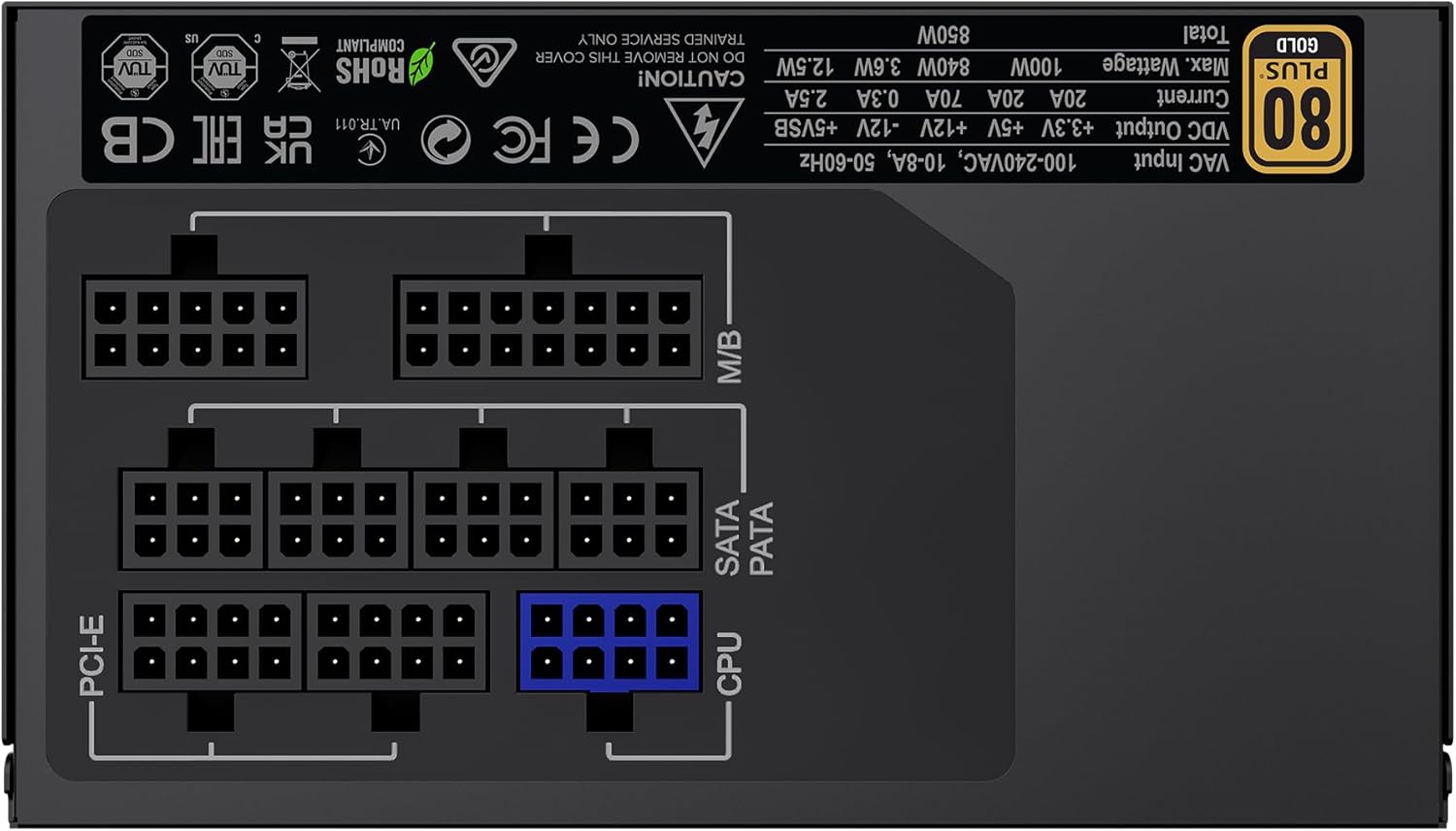
Billede: Bagside view of the GAMEMAX GX-850 showing the fully modular cable connection ports for PCI-e, M/B (Motherboard), SATA/PATA, and CPU cables.
- Motherboard (M/B): Tilslut 24-pin ATX-kablet til bundkortet.
- CPU: Connect the 8-pin (or 4+4-pin) CPU power cable to the CPU power connector on your motherboard.
- Graphics Cards (PCI-e): Connect the 6+2-pin PCIe power cables to your graphics card(s). Use separate cables for each connector if your GPU requires multiple.
- Storage Devices (SATA): Tilslut SATA-strømkabler til dine SSD'er, harddiske og optiske drev.
- Peripherals (PATA/Molex): Connect peripheral power cables to any other devices requiring them (e.g., fan controllers, older drives).
- Kabelstyring: Før kablerne pænt for at forbedre luftgennemstrømningen og æstetikken.
- Luk kabinettet og tilslut vekselstrøm: Close your computer case. Connect the AC power cord to the power supply and then to a grounded wall outlet.
5. Betjeningsvejledning
After successful installation, follow these steps to operate your system.
- Afbryderen: Sørg for, at tænd/sluk-knappen på bagsiden af strømforsyningen er i positionen 'ON' (I).
- Systemet tændes: Press the power button on your computer case to turn on the system.
- System Power Off: To turn off your system, use the operating system's shutdown procedure. For a hard shutdown, hold the case power button for several seconds. For complete power disconnection, switch the PSU's power switch to 'OFF' (O) and unplug the AC cord.
6. Vedligeholdelse
Regelmæssig vedligeholdelse er med til at sikre strømforsyningens levetid og optimale ydeevne.
- Støvrensning: Periodically clean the power supply's fan and ventilation grilles using compressed air to prevent dust buildup, which can impede cooling. Ensure the system is powered off and unplugged before cleaning.
- Kabeltjek: Occasionally check all modular cable connections to ensure they are securely seated.
- Miljøforhold: Maintain a clean, dry, and well-ventilated environment for your computer.
7. Fejlfinding
Hvis du støder på problemer med din strømforsyning, kan du se følgende almindelige fejlfindingstrin:
- Ingen strøm:
- Ensure the AC power cord is securely plugged into both the wall outlet and the power supply.
- Kontroller, at tænd/sluk-knappen på bagsiden af strømforsyningen er i positionen 'ON' (I).
- Verify that the 24-pin ATX and 8-pin CPU power cables are correctly and firmly connected to the motherboard.
- Test stikkontakten med en anden enhed for at bekræfte, at den har strøm.
- Systemustabilitet/Tilfældige nedlukninger:
- Ensure all modular cables are fully seated at both the PSU and component ends.
- Check for proper ventilation and ensure the PSU fan is spinning. Overheating can cause shutdowns.
- If you have recently added new components, ensure your 850W power supply is sufficient for the total system wattage.
- Ventilatoren drejer ikke:
- The GX-850 features a temperature-controlled fan. It may not spin at low loads or temperatures. This is normal operation.
- If the fan does not spin under load and the PSU feels hot, ensure there are no obstructions and consider contacting support.
If problems persist after performing these steps, contact GAMEMAX customer support or your retailer for further assistance.
8. Specifikationer
Detailed technical specifications for the GAMEMAX GX-850 80 Plus Gold Power Supply:
| Feature | Specifikation |
|---|---|
| Modelnavn | GX-850 Modular |
| Mærke | GAMEMAX |
| Output Wattage | 850 watt |
| Formfaktor | ATX |
| Effektivitetscertificering | 80 plus guld |
| Design af strømforsyning | Fuldt modulært |
| Afkølingsmetode | Air (FDB Fan) |
| Antal fans | 1 |
| Minimum input voltage | 115 volt |
| Maksimal indgang Voltage | 240 volt (AC) |
| Øverste temperaturvurdering | 105 Degrees Celsius (Capacitors) |
| Kompatible enheder | Stationær computer |
| Konnektortyper | ATX, PCI-e, SATA |
9. Garanti og support
GAMEMAX products are manufactured to high-quality standards. For warranty information, please refer to the warranty card included with your product or visit the official GAMEMAX webGarantibetingelserne kan variere afhængigt af region og forhandler.
For technical support or further inquiries, please contact GAMEMAX customer service through their official webwebstedet eller kontaktoplysningerne fra din forhandler.