
1. Introduktion
Tak for købetasing the Soundmaster MCD5600 Stereo System. This versatile audio system combines classic and modern audio technologies, including a record player, DAB+ and FM radio, double cassette deck, CD player, USB playback, and Bluetooth connectivity. It also features a digitization function to convert your analog media to MP3 files on a USB drive. This manual provides essential information for safe operation, setup, and maintenance of your device. Please read it thoroughly before use and retain it for future reference.
2. Sikkerhedsinstruktioner
- Strømkilde: Sørg for, at strømforsyningen matcher voltage specified on the unit. Disconnect from the power outlet during lightning storms or when unused for long periods.
- Ventilation: Bloker ikke ventilationsåbninger. Sørg for tilstrækkelig plads omkring enheden til korrekt luftgennemstrømning for at forhindre overophedning.
- Vand og fugt: Udsæt ikke enheden for regn, fugt, dryp eller stænk. Placer ikke genstande fyldt med væsker, såsom vaser, oven på apparatet.
- Varme: Hold enheden væk fra varmekilder såsom radiatorer, varmeapparater, komfurer eller andre apparater (herunder ampløftere), der producerer varme.
- Rensning: Rengør kun med en tør klud. Brug ikke flydende rengøringsmidler eller aerosolrens.
- Service: Forsøg ikke selv at servicere dette produkt. Overlad al service til kvalificeret servicepersonale.
- Placering: Placer enheden på en stabil, plan overflade for at forhindre den i at falde.
3. Pakkens indhold
Kontroller venligst, at alle genstande er til stede ved udpakning:
- Soundmaster MCD5600 Main Unit
- 2 x eksterne højttalere
- Fjernbetjening
- Instruktionsmanual (dette dokument)
- FM/DAB+ Antenna
- Strømkabel
4. Produktet er slutview
Familiarize yourself with the main components and controls of your stereo system.
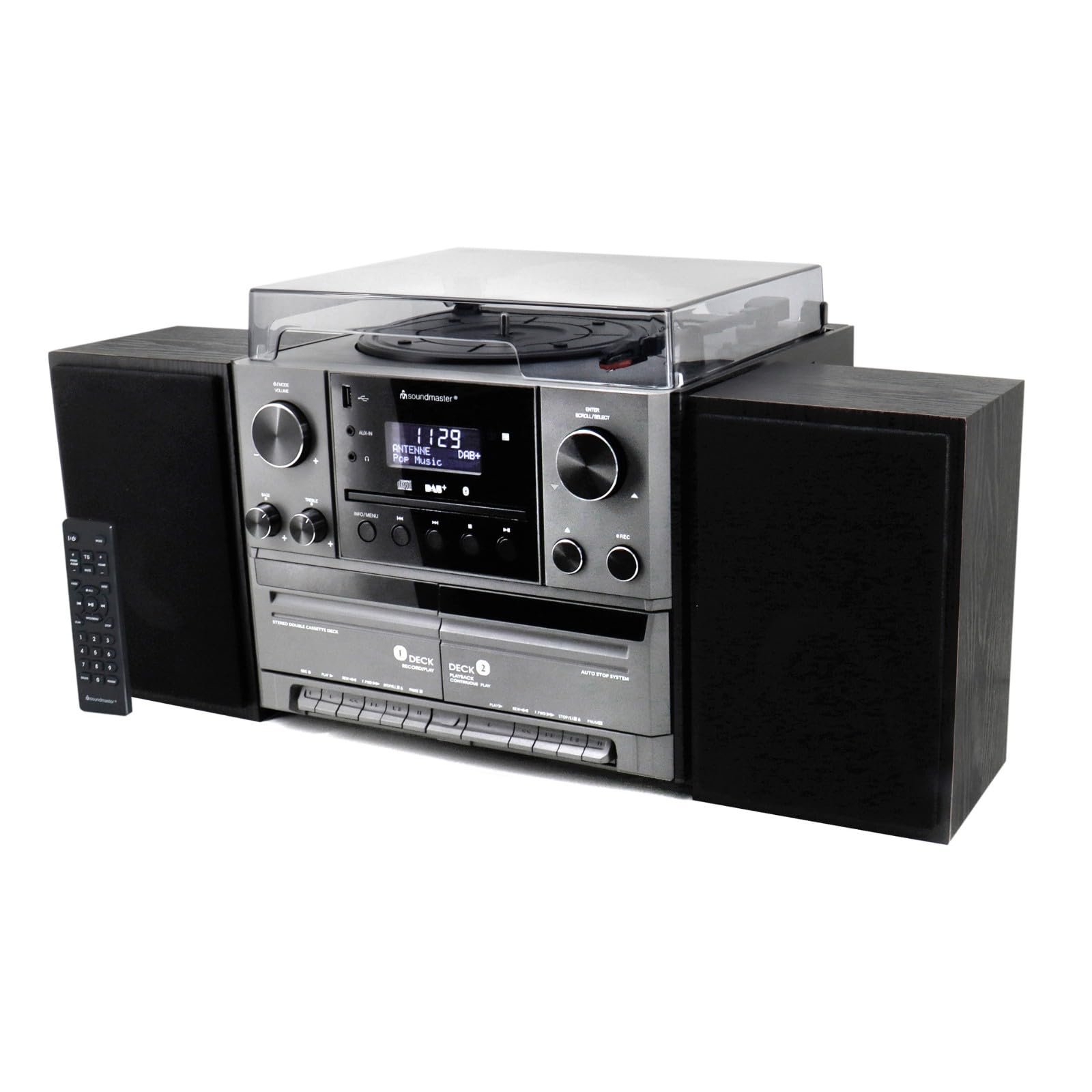
Figur 4.1: Front view of the Soundmaster MCD5600 stereo system, showing the main unit flanked by two speakers, with the remote control positioned to the left. The display, control knobs, and various media inputs are visible.

Figur 4.2: Front view of the Soundmaster MCD5600 stereo system with the CD tray open and a cassette tape inserted into one of the two cassette decks. This image highlights the multi-media capabilities of the unit.
5. Opsætning
5.1 Tilslutning af højttalere
Connect the included speakers to the speaker terminals on the rear of the main unit. Ensure correct polarity (red to red, black to black) for optimal sound quality. Place speakers equidistant from the listening position for the best stereo effect.
5.2 Antenneforbindelse
Connect the supplied 75 Ohm antenna to the FM/DAB+ antenna input on the rear panel. Extend the antenna fully and position it for the best possible radio reception.
5.3 Strømtilslutning
Plug the power cable into the AC inlet on the rear of the unit, then connect the other end to a standard wall outlet.
6. Betjeningsvejledning
6.1 Generelle kontroller
- Power knap: Tryk for at tænde eller slukke enheden.
- Lydstyrkeknap: Rotate to adjust the overall sound volume.
- Kilde/funktionsknap: Press repeatedly to cycle through available audio sources (CD, Phono, Tape, FM, DAB+, Bluetooth, USB).
- Vise: Viser aktuel tilstand, sporinformation, radiofrekvens og tid.
6.2 Betjening af cd-afspilleren
- Tryk på CD source button.
- Tryk på ÅBN/LUK knappen for at åbne CD-skuffen.
- Place a CD (CD/CD-MP3/CD-R/CD-RW/WMA compatible) with the label side up into the tray.
- Trykke ÅBN/LUK igen for at lukke skuffen. Enheden vil læse disken.
- Trykke AFSPIL/PAUSE for at starte eller sætte afspilningen på pause.
- Bruge SPRING FREM/TILBAGE knapper til at navigere i spor.
- De PROGRAM og GENTAGE functions allow for customized playback sequences and continuous repetition.
6.3 Record Player Operation
- Tryk på FONO source button.
- Select the appropriate speed (33, 45, or 78 RPM) using the speed selector switch based on your record type.
- Place a record on the turntable platter. For 45 RPM singles, use the included adapter.
- Carefully lift the tonearm using the cueing lever and position it over the desired track on the record.
- Lower the tonearm gently onto the record. Playback will begin automatically.
- At the end of the record, lift the tonearm and return it to its rest.
6.4 Betjening af kassettebåndoptageren
The unit features two cassette decks: Deck 1 (Record/Play) and Deck 2 (Continuous Play).
- Tryk på Bånd source button.
- Tryk på STOP/Skub ud button on the desired deck to open the cassette door.
- Insert a cassette tape with the open edge facing upwards. Close the door.
- Trykke SPIL for at starte afspilningen.
- Bruge HURTIG FREM og SPOLE TILBAGE knapper til at navigere på båndet.
- To record, ensure Deck 1 is selected, insert a blank tape, select your desired input source (e.g., Phono, CD, Radio), and press the OPTAGE knap.
6.5 Radio (FM/DAB+) Operation
- Tryk på FM or DAB+ source button.
- For FM radio, use the TUNING knob or buttons to manually tune or auto-scan for stations.
- For DAB+ radio, the unit will automatically scan for available digital stations. Use the SCROLL/VÆLG knob to browse and select stations.
- To save a station as a preset, refer to the specific instructions in the full manual for your model.
6.6 Bluetooth-betjening
- Tryk på BLUETOOTH source button. The display will show "PAIRING" or similar.
- Aktiver Bluetooth på din eksterne enhed (smartphone, tablet osv.).
- Søg efter "MCD5600" (or similar device name) in your device's Bluetooth settings and select it to pair.
- Once paired, you can play audio from your device through the stereo system.
6.7 USB-afspilning
- Indsæt et USB-flashdrev i USB-porten på frontpanelet.
- Tryk på USB source button.
- The unit will read the contents of the USB drive. Use the navigation buttons to browse folders and select MP3 files til afspilning.
6.8 Digitization (Encoding)
The MCD5600 allows you to convert audio from vinyl records, cassette tapes, or radio broadcasts directly to MP3 files på et tilsluttet USB-drev.
- Indsæt et USB-flashdrev i USB-porten.
- Select the desired audio source (Phono, Tape, FM, DAB+).
- Start playback of your chosen source (e.g., start a record, play a cassette, tune to a radio station).
- Tryk på OPTAGE button on the main unit. The display will indicate recording is in progress.
- Trykke STOP when you wish to end the recording. The audio will be saved as an MP3 file på dit USB-drev.
7. Vedligeholdelse
- Rengøring af enhed: Wipe the exterior surfaces with a soft, dry, lint-free cloth. Do not use abrasive cleaners or solvents.
- Record Player Stylus: Periodically check the stylus for dust and debris. Clean gently with a soft brush designed for styli, brushing from back to front. Replace the stylus if sound quality deteriorates significantly.
- Kassettehoveder: After extended use, clean the cassette heads, pinch rollers, and capstans with a cotton swab lightly dampafsluttet med isopropylalkohol.
- CD Lens: Avoid touching the CD lens. If cleaning is necessary, use a specialized CD lens cleaner disc.
8. Fejlfinding
| Problem | Mulig årsag | Løsning |
|---|---|---|
| Ingen strøm | Strømkabel ikke tilsluttet; stikkontakt defekt | Kontroller strømkablets forbindelse; prøv en anden stikkontakt |
| Ingen lyd | Lydstyrken er for lav; Forkert kilde valgt; Højttalere er ikke tilsluttet | Øg lydstyrken; Vælg den korrekte kilde; Kontroller højttalertilslutningerne |
| CD'en springer over eller afspiller ikke | CD dirty or scratched; CD inserted incorrectly | Clean CD; Insert CD label-side up |
| Dårlig radiomodtagelse | Antennen er ikke trukket ud eller placeret korrekt | Extend and reposition antenna; Try auto-scan for DAB+ |
| Bluetooth-parring mislykkes | Device too far; Bluetooth not enabled on external device | Move device closer; Ensure Bluetooth is enabled and in pairing mode |
9. Specifikationer
- Modelnummer: MCD5600SW
- Mærke: Soundmaster
- Farve: Sort
- CD-afspiller: CD, CD-MP3, CD-R, CD-RW, WMA compatible; Program/Repeat functions
- Record Player: 33/45/78 RPM speeds
- Kassettedeck: Double cassette (Deck 1: Record/Play, Deck 2: Continuous Play)
- Radio: FM-PLL with preset stations, DAB+ Digital Radio (75 Ohm antenna connection)
- Forbindelse: USB-port, Bluetooth
- Særlige funktioner: Digitization (CD, cassette, radio to USB-MP3 encoding)
10. Garantioplysninger
This Soundmaster MCD5600 Stereo System comes with a manufacturer's warranty. Spare parts availability is guaranteed for 1 year from the date of purchase. For detailed warranty terms and conditions, please refer to the warranty card included with your product or contact your retailer. Keep your proof of purchase for any warranty claims.
11. Support
If you encounter any issues not covered in the troubleshooting section or require further assistance, please contact your retailer or the Soundmaster customer support. Contact details can typically be found on the manufacturer's webwebstedet eller i din produktemballage.