
Indledning
This manual provides detailed instructions for the GAMFAMI TERIOS Wireless Controller. Please read this manual carefully before using the product to ensure proper operation and to maximize your gaming experience. This controller is designed for use with PlayStation 4, PS4 Pro, and PS4 Slim consoles.
Produktegenskaber
- Hall-effekt joysticks: Equipped with Hall joysticks to prevent drift and ensure a longer lifespan with smooth, precise control.
- Makro programmering: Two programmable back buttons (M1, M2) allow mapping of various inputs (X, O, Triangle, Square, Up, Down, Left, Right, L3, R3, L1, R1, L2, R2) for enhanced gameplay.
- Trådløs forbindelse: Enjoy a seamless wireless gaming experience with Bluetooth technology.
- Dobbelt stødvibration: Enhanced dual shock motors provide immersive haptic feedback for a realistic gaming experience.
- Turbofunktion: Activate the Turbo feature for rapid, repeated button presses, offering a competitive advantage.
- Langtidsholdbart batteri: Features a 1000mAh rechargeable battery for extended play sessions.
- Ergonomisk design: Lightweight and durable ABS construction with textured grips for comfortable handling.
- Built-in Speaker & 3.5mm Audio Jack: Provides high-quality audio directly from the controller and supports headset connection.
Pakkens indhold
Kontroller venligst pakkens indhold ved udpakning:
- GAMFAMI TERIOS Wireless Controller
- USB opladningskabel
- Instruktionsmanual
Controller layout
Familiarize yourself with the buttons and features of your GAMFAMI TERIOS Wireless Controller.
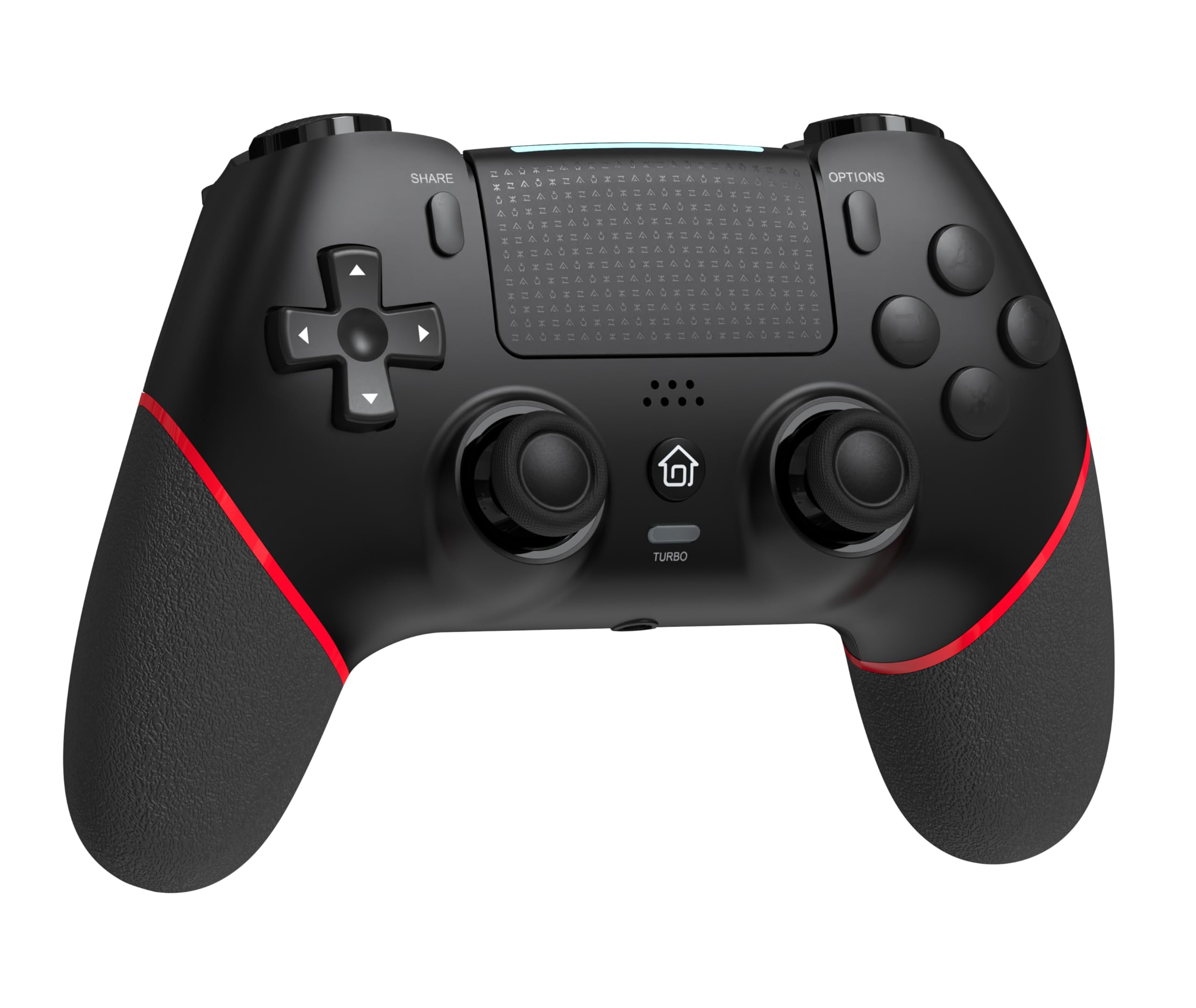
Front view of the GAMFAMI TERIOS Wireless Controller, showing the joysticks, D-pad, action buttons, Share, Options, Home, and Turbo buttons, and the touchpad.
- Retningstastatur (D-pad): Til retningsbestemt input.
- Handlingsknapper (Trekant, Cirkel, Kryds, Firkant): Standard PlayStation-handlingsknapper.
- Venstre/højre analoge pinde: For precise movement and camera control. Features Hall Effect technology.
- DEL-knap: Til deling af spilindhold.
- INDSTILLINGER-knap: For menuer og muligheder i spillet.
- PS-knap (Hjem-knap): To access the PS4 system menu.
- L1/R1 knapper: Skulderknapper.
- L2/R2-udløsere: Analoge udløsere.
- Touchpad: Multi-touch input area.
- M1/M2 knapper: Programmerbare tilbageknapper.
- TURBO knap: Aktiverer/deaktiverer turbofunktionen.
- 3.5 mm headsetstik: For connecting a compatible headset.
- USB-C-port: Til opladning og kabelforbindelse.

Tilbage view of the controller, highlighting the M1 and M2 programmable buttons and product information.
Opsætning og tilslutning
Pairing with PS4/PS4 Pro/PS4 Slim
- Sørg for, at din PS4-konsol er tændt.
- Connect the controller to your PS4 console using the included USB charging cable.
- Press the PS button on the controller. The light bar will flash, indicating it is pairing.
- Once the light bar turns solid, the controller is successfully paired and ready for use.
- You can now disconnect the USB cable for wireless play.
Reconnecting to PS4
After initial pairing, simply press the PS button on the controller to reconnect wirelessly to your PS4 console.
Betjeningsvejledning
Brug af Turbo-funktionen
- Tryk og hold på TURBO knap.
- Mens du holder TURBO, press the action button (e.g., Cross, Circle, Square, Triangle, L1, R1, L2, R2) you wish to apply the turbo function to.
- Release both buttons. The selected action button will now rapidly repeat its input when held down.
- For at deaktivere turbo for en bestemt knap, gentag processen: hold nede TURBO and press the turbo-enabled action button.
- To disable turbo for all buttons, press and hold the TURBO knappen i 5 sekunder.
Macro Programming (M1/M2 Buttons)
The M1 and M2 buttons on the back of the controller can be programmed to replicate other button inputs.
- Tryk og hold på DELE knappen og M1 or M2 button simultaneously for 3 seconds until the light bar flashes rapidly. This indicates macro programming mode.
- Press the button(s) you wish to map to M1 or M2 (e.g., X, O, Triangle, Square, Up, Down, Left, Right, L3, R3, L1, R1, L2, R2). You can map a single button or a sequence of buttons.
- Tryk på M1 or M2 button again to save the macro. The light bar will stop flashing rapidly and return to its normal state.
- To clear a macro, repeat step 1, then press the M1 or M2 button twice without pressing any other buttons.

Illustration of the advanced buttons and their programming capabilities.
Opladning og batteristyring
The controller is equipped with a 1000mAh rechargeable battery.
Opladning af controlleren
- Connect the included USB charging cable to the USB-C port on the controller.
- Connect the other end of the cable to a USB port on your PS4 console (when powered on or in rest mode) or a compatible USB wall adapter (5V/1A recommended).
- The light bar on the controller will slowly pulse orange while charging.
- Når den er fuldt opladet, slukker lysbjælken.
Indikation af batteriniveau
The controller's light bar will indicate battery status. A low battery will cause the light bar to flash red. It is recommended to charge the controller when this occurs.
Opretholdelse
- Rensning: Brug en blød, tør klud til at rengøre controlleren. Brug ikke skrappe kemikalier eller slibende materialer.
- Opbevaring: Opbevar controlleren et køligt, tørt sted væk fra direkte sollys og ekstreme temperaturer.
- Undgå dråber: Beskyt controlleren mod fald og stød, som kan beskadige de interne komponenter.
Fejlfinding
| Problem | Løsning |
|---|---|
| Controlleren opretter ikke forbindelse/parrer ikke. |
|
| Controller experiences input lag or disconnection. |
|
| Joysticks exhibit drift. |

Illustration of Hall Effect joystick technology, designed to prevent drift. |
| Controlleren oplader ikke. |
|
Specifikationer
| Modelnavn | TERIOS |
| Mærke | GAMFAMI |
| Kompatible enheder | PS4, PS4 Pro, PS4 Slim |
| Controller type | Gamepad |
| Forbindelsesteknologi | Bluetooth (trådløs) |
| Strømkilde | Batteridrevet |
| Batterikapacitet | 1000mAh |
| Varens vægt | 0.37 kilo |
| Farve | Sort Rød |
Garanti og support
For warranty information and technical support, please refer to the documentation included with your purchase or visit the official GAMFAMI webwebsted. Gem din købskvittering som købsbevis i tilfælde af garantikrav.
For further assistance, please contact GAMFAMI customer service through their official channels.