
Indledning
This manual provides essential information for the safe and efficient operation, installation, and maintenance of your new Carrier 1.5 Ton 5 Star Window Inverter Air Conditioner, Model ESTRELLA EXI 5 STAR. Please read this manual thoroughly before using the appliance and retain it for future reference.
Your Carrier air conditioner is designed to provide optimal cooling comfort with advanced features such as Flexicool inverter technology, a 5-star energy rating, and a durable copper condenser coil with Aqua Clear Protection.
Vigtige sikkerhedsoplysninger
Følg altid grundlæggende sikkerhedsforanstaltninger, når du bruger elektriske apparater, for at mindske risikoen for brand, elektrisk stød eller personskade.
- Læs alle instruktioner, før du bruger klimaanlægget.
- Sørg for, at strømforsyningen matcher voltagsom angivet på enhedens typeskilt.
- Brug ikke klimaanlægget med en beskadiget netledning eller stik.
- Stik ikke fingre eller genstande ind i luftindtaget/-udtaget.
- Hold børn væk fra enheden.
- Forsøg ikke selv at reparere eller modificere enheden. Kontakt kvalificeret servicepersonale.
- Sørg for korrekt jording for at forhindre elektrisk stød.
- Sluk for strømforsyningen, før du rengør eller udfører vedligeholdelse.
Produktegenskaber
Your Carrier ESTRELLA EXI 5 STAR Window Inverter Air Conditioner comes equipped with several advanced features for enhanced performance and comfort:
- Flexicool inverterteknologi: Variable speed compressor adjusts power based on heat load, offering Convertible 4-in-1 cooling and up to 50% energy savings.
- 100% kobber kondensatorspole: Ensures better cooling efficiency, durability, and low maintenance, protected by Aqua Clear Protection against rust and corrosion.
- 5 Star Energy Rating: High energy efficiency for reduced electricity consumption.
- Støvfilter: Helps in filtering out dust particles for cleaner air.
- Turbo Cool: Provides faster cooling when rapid temperature reduction is desired.
- Hydro Blue Coating: Enhances the lifespan of the unit and provides long-lasting comfort.
- Refrigerant Leakage Detector: Alerts you to potential refrigerant leaks.
- Bilrens: Helps maintain the cleanliness of the indoor unit.
- ADC Sensor: Advanced sensor technology for precise temperature control.

Billede: Forside view of the Carrier ESTRELLA EXI 5 STAR Window Inverter Air Conditioner, showcasing the front grille and Carrier logo.

Image: Energy efficiency label (BEE 5 Star rating) for the Carrier Window AC, detailing ISEER and annual energy consumption.
Opsætning og installation
Proper installation is crucial for the optimal performance and longevity of your air conditioner. It is highly recommended to have the unit installed by a qualified technician.
Kontrol før installation:
- Vindues kompatibilitet: Ensure your window opening meets the minimum height (32 cm) and width (96 cm) requirements for the unit.
- Strømforsyning: Verify that a dedicated 230V AC power outlet with proper grounding is available near the installation site.
- Strukturel støtte: The window frame and surrounding structure must be strong enough to support the unit's weight (approximately 37 kg).
- Dræning: Ensure there is a slight tilt to the unit after installation to allow for proper condensate drainage.
Generelle installationstrin (for kvalificerede teknikere):
- Forbered vinduesåbningen, og sørg for, at den er ren og fri for blokeringer.
- Løft forsigtigt klimaanlægget op og placer det i vinduesåbningen.
- Secure the unit firmly using mounting brackets and screws provided, ensuring it is level or slightly tilted outwards for drainage.
- Seal any gaps around the unit with weatherstripping or insulation to prevent air leakage.
- Tilslut netledningen til den jordforbundne stikkontakt.
- Perform a test run to ensure all functions are operating correctly and there are no unusual noises or vibrations.
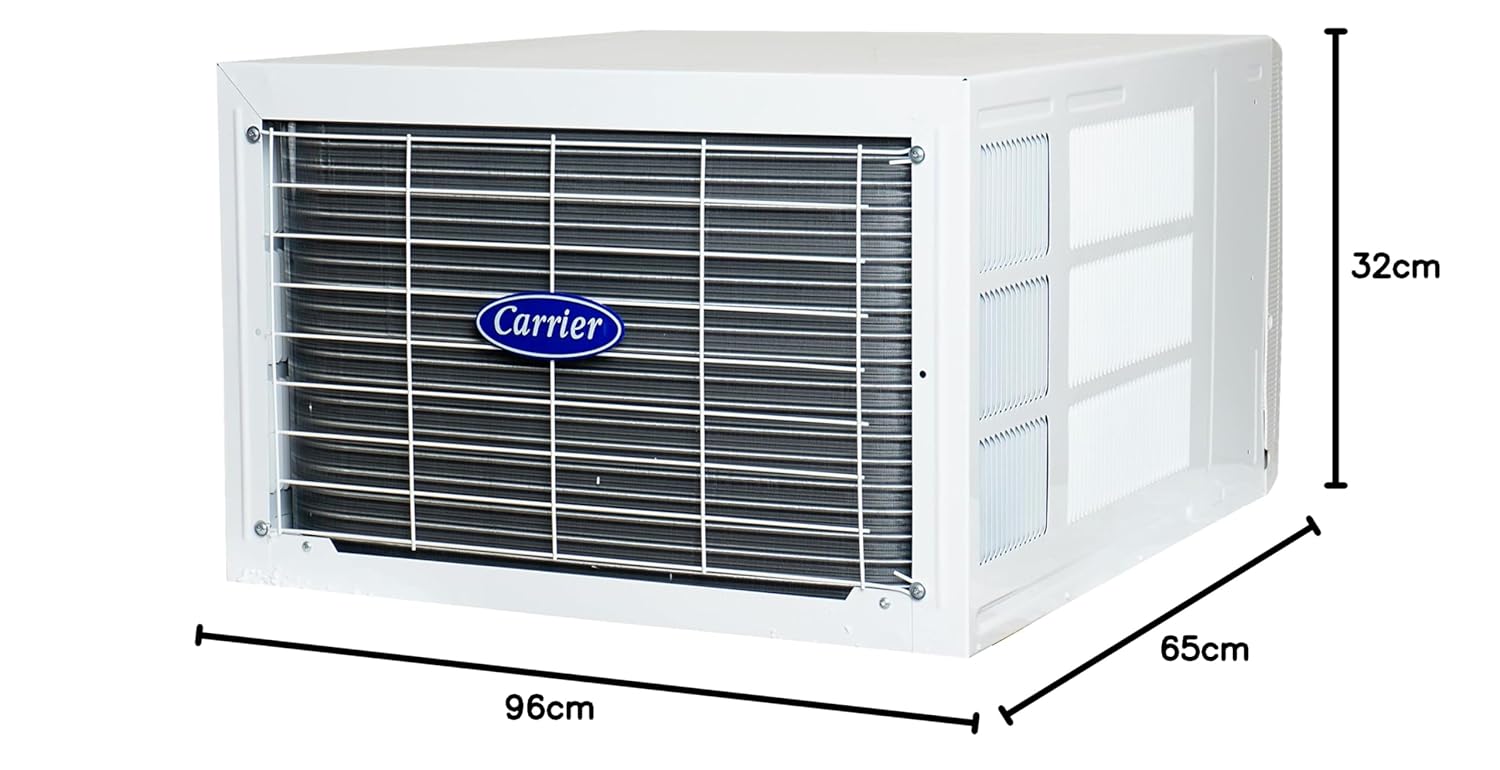
Image: Diagram showing the dimensions of the Carrier Window Inverter Air Conditioner: 96cm (width), 65cm (depth), 32cm (height).

Image: A Carrier Window AC unit shown installed in a window, illustrating its placement.
Betjeningsvejledning
Your air conditioner can be operated using the control panel on the unit or the provided remote control.
Kontrolpanel:

Image: Close-up of the control panel on the Carrier Window AC, showing buttons for mode, fan speed, turbo, power, swing, sleep, timer, and temperature adjustment.
The control panel provides direct access to basic functions. Refer to the labels next to each button for specific operations.
Fjernbetjening:

Image: The remote control for the Carrier Window Inverter Air Conditioner, featuring buttons for power, mode, fan speed, temperature, swing, sleep, timer, and turbo cool.
The remote control offers full functionality and convenience. Ensure batteries are correctly inserted.
Grundlæggende operationer:
- Tænd/sluk: Tryk på MAGT knappen for at tænde eller slukke for enheden.
- Valg af tilstand: Tryk på MODE button to cycle through modes: Cool, Dry, Fan.
- Cool tilstand: For cooling the room. Adjust temperature using TEMP/TID knapper.
- Tør tilstand: Til affugtning.
- Ventilatortilstand: Cirkulerer luft uden afkøling.
- Temperaturjustering: Brug TEMP/TID up/down arrows to set your desired temperature.
- Blæserhastighed: Tryk på BLÆSERHASTIGHED button to select fan speed (Low, Medium, High, Auto).
- Turbo tilstand: Trykke TURBO COOL for rapid cooling.
- Swing funktion: Trykke SWING to activate or deactivate the automatic air swing.
- Sove mode: Trykke SOVE for comfortable sleeping conditions with gradual temperature adjustments.
- Timer funktion: Bruge TIMER TIL/FRA buttons to set a specific time for the unit to turn on or off.
Opretholdelse
Regular maintenance ensures efficient operation and extends the lifespan of your air conditioner. Always disconnect power before performing any maintenance.
Rengøring af luftfilter:
- Sluk for klimaanlægget, og afbryd det fra strømforsyningen.
- Åbn enhedens frontpanel.
- Carefully remove the dust filter(s).
- Rengør filteret/filtrene med en støvsuger, eller vask dem med lunkent vand og et mildt rengøringsmiddel.
- Rinse thoroughly and allow the filter(s) to dry completely in a shaded area before re-installing.
- Luk frontpanelet og genopret strømmen.
Frekvens: Rengør luftfilteret hver anden uge eller oftere, hvis enheden bruges i et støvet miljø.
Generel rengøring:
- Tør ydersiden af enheden af med en blød, damp klæde. Brug ikke skrappe kemikalier eller slibende rengøringsmidler.
- Ensure the drainage pan and hose are clear of obstructions to prevent water leakage.
- Periodically check the condenser coils at the back of the unit for dirt and debris. If heavily soiled, professional cleaning may be required.
Note: For internal cleaning or any complex maintenance, contact authorized Carrier service personnel.
Fejlfinding
Før du kontakter service, se følgende tabel for almindelige problemer og løsninger på disse.
| Problem | Mulig årsag | Løsning |
|---|---|---|
| Enheden starter ikke | No power supply; Power cord unplugged; Blown fuse/tripped breaker; Remote control batteries dead. | Check power connection; Plug in power cord; Reset breaker/replace fuse; Replace remote control batteries. |
| Utilstrækkelig køling | Dirty air filter; Blocked air intake/outlet; Room too large; Doors/windows open; Temperature setting too high. | Clean air filter; Clear obstructions; Ensure room size is appropriate; Close doors/windows; Lower temperature setting. |
| Vandlækage | Unit not tilted correctly for drainage; Drain pan/hose blocked. | Adjust unit tilt; Clear drain pan/hose. |
| Usædvanlig støj | Loose parts; Unit not installed securely; Fan obstruction. | Check for loose parts; Ensure secure installation; Remove any fan obstructions. |
| Fjernbetjening virker ikke | Batterier døde eller forkert isat; Blokering mellem fjernbetjening og enhed. | Udskift batterierne; Sørg for korrekt polaritet; Fjern forhindringer. |
Hvis problemet fortsætter efter at have forsøgt disse løsninger, bedes du kontakte Carriers kundesupport.
Specifikationer
Detailed technical specifications for the Carrier ESTRELLA EXI 5 STAR Window Inverter Air Conditioner:
- Mærke: Transportør
- Modelnavn: ESTRELLA EXI 5 STAR
- Kapacitet: 1.5 tons
- Kølekraft: 18000 britiske termiske enheder
- BEE Star Rating: 5 Stjerne
- Sæsonbestemt energieffektivitetsforhold (SEER): 3.85
- Årligt energiforbrug: 620 kilowatt
- Produktmål (D x B x H): 65D x 96B x 32H Centimeter
- Varens vægt: 37000 gram (37 kg)
- Farve: Hvid
- Støjniveau: 48 decibel
- Kølemiddel: R-32
- Inverter type: Har inverter
- Installationstype: Vindue
- Kompressor type: Roterende rulning
- Voltage: 230 volt (AC)
- Kontrolmetode: Fjernbetjening
- Særlige funktioner: Dust Filter, Flexicool Inverter Compressor, Convertible 4-in-1 cooling, HD Filter, Turbo Cool, Hydro Blue Coating, Refrigerant Leakage Detector, Auto Cleanser, ADC Sensor.
Garanti og support
Garantioplysninger:
Your Carrier air conditioner comes with the following warranty:
- 1 års fabriksgaranti on the entire unit.
- 5 Years Warranty on PCB (Printed Circuit Board).
- 10 Years Warranty on Compressor.
Additionally, you are entitled to 2 Free Preventive Maintenance Services during the warranty period. Please retain your purchase receipt for warranty claims.
Kundesupport:
For any service requests, technical assistance, or warranty claims, please contact Carrier customer care:
- Kundeservicenummer: 18001033333
- Producentens adresse: Carrier Midea India Pvt. Ltd., 1st Floor, Pearl Tower, Plot no. 51, Sector-32, Gurgaon-122001
You can also visit the official Carrier webwebsted for mere information og supportressourcer.