
1. Introduktion
Thank you for choosing the SUUNY DT102 Smartwatch. This manual provides essential information for the safe and efficient use of your device. Please read it thoroughly before using the smartwatch and keep it for future reference.
The DT102 Smartwatch features a 1.9-inch HD display, NFC access control, wireless charging, GPS movement tracking, comprehensive health monitoring, and call management capabilities.
2. Sikkerhedsoplysninger
- Forsøg ikke at adskille eller modificere enheden.
- Hold enheden væk fra ekstreme temperaturer og direkte sollys.
- Undgå at udsætte enheden for kraftige stød eller fald.
- Consult a medical professional before starting any new exercise regimen or if you have pre-existing health conditions. The health monitoring features are for reference only and not for medical diagnosis.
- Sørg for, at opladningskablet er korrekt tilsluttet for at forhindre skader.
3. Pakkens indhold
Når du åbner pakken, skal du kontrollere, at alle varer er til stede og i god stand.
- SUUNY DT102 Smartwatch
- Silicone Strap (pre-installed or separate)
- Additional Strap (e.g., Milanese loop, if included)
- Trådløst ladekabel
- Brugervejledning (dette dokument)

Image 1: SUUNY DT102 Smartwatch with included straps. The watch features a pink silicone strap and an additional rose gold Milanese loop strap is shown next to it. The watch display shows a clock face with distance, calorie, and steps trackers, along with a 100% battery indicator and heart rate of 98.
4. Opsætning
4.1 Opladning af smartwatchet
Oplad dit smartwatch helt før første brug.
- Connect the wireless charging cable to a USB power adapter (not included).
- Place the back of the smartwatch onto the charging pad. The watch will magnetically align and begin charging.
- The charging indicator will appear on the screen. Allow approximately 2-3 hours for a full charge.
4.2 Tænd/sluk
- Tænd: Press and hold the side button for a few seconds until the SUUNY logo appears.
- Sluk: Press and hold the side button, then select "Power Off" on the screen, or navigate to the settings menu and choose "Power Off".
4.3 Download og parring af app
To unlock the full functionality of your smartwatch, download the wearpro app på din smartphone.
- Scan the QR code provided in the watch's packaging or search for "Wearpro" in the Apple App Store (for iOS 10.0 and above) or Google Play Store (for Android 4.4 and above).
- Install and open the Wearpro app.
- Sørg for, at Bluetooth er aktiveret på din smartphone.
- In the Wearpro app, navigate to "Device" or "Add Device" and search for your DT102 Smartwatch.
- Select "DT102" from the list of available devices to pair. Confirm the pairing request on both your phone and smartwatch.
Når uret er parret, synkroniserer det data med din telefon, og du kan tilpasse indstillingerne via appen.
5. Betjeningsvejledning
5.1 Grundlæggende navigation
- Berøringsskærm: Stryg til venstre, højre, op eller ned for at navigere gennem menuer og skærme. Tryk for at vælge et element.
- Side knap: Tryk for at vende tilbage til startskærmen eller vække enheden. Langt tryk for strømindstillinger.
5.2 Tilpasning af urskiver
The DT102 Smartwatch supports over 500 watch faces. You can change them directly on the watch or through the Wearpro app.
- På vagt: From the home screen, long-press the display. Swipe left or right to browse available watch faces and tap to select.
- Via app: Open the Wearpro app, go to "Dial Market" or "Watch Faces" to explore and download more options.
5.3 Opkaldsfunktioner
Når det er parret, kan du administrere opkald direkte fra dit smartwatch.
- Besvarelse af opkald: Når du modtager et opkald, skal du trykke på det grønne ikon på urskærmen for at besvare.
- Foretage opkald: Access the "Dial" or "Contacts" function on your watch to initiate a call.
- Opkald påmindelse: The watch will vibrate and display incoming call notifications.
5.4 Beskednotifikationer
Receive notifications from your smartphone directly on your smartwatch.
- Ensure message notifications are enabled in the Wearpro app settings.
- Stryg ned fra toppen af urskiven for at view nylige notifikationer.
5.5 Sundhedsovervågning
The DT102 Smartwatch offers various health tracking features.
- Heart Rate Monitoring: Access the heart rate function on the watch to measure your current heart rate. Continuous monitoring can be enabled via the app.
- Skridttæller og kalorieregistrering: The watch automatically tracks your steps and estimated calorie consumption throughout the day.
- Søvnsporing: Wear the watch to bed to monitor your sleep patterns. View detailed reports in the Wearpro app.
- Blood Monitor: The watch includes a blood monitor function. For accurate readings, ensure the watch is snug on your wrist.
- Påmindelse om kvinders menstruationscyklus: Set up your cycle information in the Wearpro app to receive reminders and track your menstrual and ovulation periods.

Image 2: Women's menstrual cycle reminder feature. A woman is shown with a smartwatch, and a smartphone screen displays a calendar interface for tracking menstrual periods and ovulation.
5.6 Fitness Tracking (GPS Movement Track)
Utilize the GPS movement tracking feature for outdoor activities.
- Open the Wearpro app and enable the running function.
- The app will record your GPS movement track, accurately logging your steps and distance.
- Calorie consumption data will be pushed to the watch and stored for review.

Image 3: GPS movement track feature. Two smartphone screens display detailed outdoor running data, including distance, calories, pace, and cadence. A smartwatch screen shows a map of an outdoor running route.
5.7 NFC-adgangskontrol
The DT102 Smartwatch supports NFC access control for quick entry.
- The watch supports simulation of unencrypted door cards on the market with a frequency of 13.56MHz.
- To use, raise your wrist near a compatible NFC door lock to quickly open doors at home or the office.
- Refer to the Wearpro app for detailed setup instructions for NFC access.
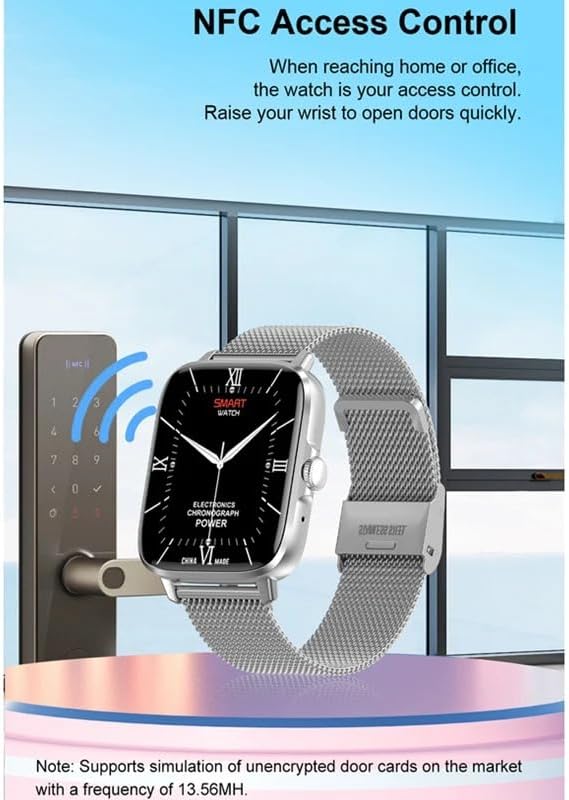
Image 4: NFC Access Control feature. A smartwatch with a metallic strap is shown near a digital door lock, indicating its use for quick access. The watch face displays a classic analog clock design.
5.8 Bedside Lamp Mode (Gravity Sensor)
The gravity sensor allows the watch to automatically switch between vertical and horizontal display modes, making it convenient for use as a bedside clock while charging.
- When charging, the display will remain on, showing the time and battery status.
- The display orientation adjusts automatically based on how the watch is placed.

Image 5: Bedside lamp mode with gravity sensor. The image shows the smartwatch displaying the time (10:08 and 10:02) in both horizontal and vertical orientations, highlighting its automatic display adjustment feature while charging.
5.9 Menuformater
The DT102 Smartwatch offers 11 different menu styles, allowing you to customize the interface to your preference.
- Naviger til menuen "Indstillinger" på dit ur.
- Select "Menu Style" or "UI Style" to browse and choose from the available options.

Image 6: 11 menu styles feature. The image displays several different smartwatch screens, each showcasing a unique menu layout with various icon arrangements, demonstrating the customization options available.
5.10 Andre funktioner
- Chronograph: Brug stopursfunktionen til at tage tid på aktiviteter.
- Alarm: Indstil alarmer direkte på uret eller via appen.
- Fjernbetjening: Styr din telefons kamera eller musikafspilning.
- Nedtælling: A timer function for various needs.
- Belysning: Juster skærmens lysstyrke.
- Bevægelseskontrol: Use wrist gestures for certain actions (e.g., wake screen).
- Sprogindstillinger: The device supports multiple languages including English, French, German, Spanish, Italian, Japanese, Korean, Chinese, and more. Adjust in settings.
6. Vedligeholdelse
6.1 Rengøring af dit smartwatch
- Tør urets skærm og kabinet af med en blød, fnugfri klud.
- Ved genstridige pletter, let dampRengør kluden med vand. Undgå at bruge skrappe kemikalier eller slibende materialer.
- Rengør opladningskontakterne regelmæssigt for at sikre korrekt opladning.
6.2 Vandtæthed (IP68)
The DT102 Smartwatch is rated IP68 waterproof, meaning it is resistant to dust and can withstand immersion in water up to 1.5 meters for up to 30 minutes.
- Den er velegnet til daglig brug, såsom håndvask, regn og lavvandet svømning.
- Undgå: Hot water, saunas, diving, or high-pressure water activities, as these can compromise the water seal.
- Hvis uret bliver vådt, skal det tørres grundigt, inden det oplades eller knapperne bruges.
6.3 Pleje af batterier
- For at forlænge batteriets levetid bør du undgå at aflade batteriet helt ofte.
- Oplad uret regelmæssigt, selvom det ikke er i brug i længere perioder.
- Brug kun det medfølgende trådløse opladningskabel.
7. Fejlfinding
If you encounter issues with your SUUNY DT102 Smartwatch, refer to the following common solutions.
7.1 Uret tænder ikke
- Sørg for, at uret er fuldt opladet. Tilslut det til opladeren i mindst 30 minutter.
- Press and hold the side button for 10-15 seconds to perform a forced restart.
7.2 Kan ikke parres med telefon
- Sørg for, at Bluetooth er aktiveret på din telefon og uret.
- Ensure the Wearpro app is installed and running.
- Genstart både din telefon og smartwatch.
- If previously paired, try unpairing the device from your phone's Bluetooth settings and then re-pairing through the Wearpro app.
- Check if your phone's operating system meets the compatibility requirements (Android 4.4+ / iOS 10.0+).
7.3 Unøjagtige sundhedsdata
- Sørg for, at uret sidder tæt på dit håndled, cirka en fingers bredde over håndledsknoglen.
- Rengør sensoren på bagsiden af uret.
- Movement during measurement can affect accuracy. Remain still for heart rate or blood oxygen readings.
- Remember that health monitoring features are for reference and not medical-grade.
7.4 Notifikationer vises ikke
- Bekræft, at uret er parret med din telefon.
- Check notification settings within the Wearpro app and your phone's system settings to ensure permissions are granted.
- Sørg for, at uret ikke er i "Forstyr ikke"-tilstand.
8. Specifikationer
| Feature | Detalje |
|---|---|
| Modelnummer | DT102 |
| Mærke | SUUNY |
| Skærmstørrelse | 1.9 tommer |
| Skærmopløsning | 240 x 283 pixels |
| CPU-chip | RTL8762DK |
| Bluetooth version | BT5.0 |
| Batterikapacitet | 260 mAh |
| Vandmodstand | IP68 |
| Kompatibilitet | Android 4.4 eller nyere, iOS 10.0 eller nyere |
| Companion app | wearpro |
| NFC-frekvens | 13.56MHz (for unencrypted door cards) |
| GTIN / UPC | 749420979205 |
9. Garanti og support
SUUNY products are designed for reliability and performance. For information regarding warranty coverage, please refer to the warranty card included with your purchase or contact your retailer.
For technical support or further assistance, please contact SUUNY customer service through the contact information provided on the official SUUNY webwebsted eller din købsplatform.
- Reservedeles tilgængelighed: Oplysninger ikke tilgængelige.
- Software updates guaranteed until: Information unavailable.