
Indledning
The Zunate Q24 Professional Sound Interface is a high-fidelity, 24-bit/192kHz audio recording device designed for live broadcast, streaming, and studio applications. This second-generation all-metal interface supports simultaneous two-channel microphone, line, and instrument input and playback. It features independent headphone and speaker output control, real-time monitoring, and DSP effects for enhanced audio quality.
Nøglefunktioner omfatter:
- Realtidsovervågning: Low latency monitoring for accurate sound reproduction through headphones.
- Real Noise Reduction: Eliminates external noise for clearer and fuller vocals without losing original audio details.
- Tabsfri lydkvalitet: Supports OTG lossless technology for HiFi sound quality, preserving minute sound details with a built-in 16-bit converter.
- Internal Recording & Streaming: Mix streaming input sound and transfer synchronized data for voice card recording, creating cover songs, and live webstøbning.
- Lyd i høj opløsning: Supports 24-bit/192kHz HD sound quality with a built-in AD/DA converter for flexible sampling rate switching.
Produkt overview
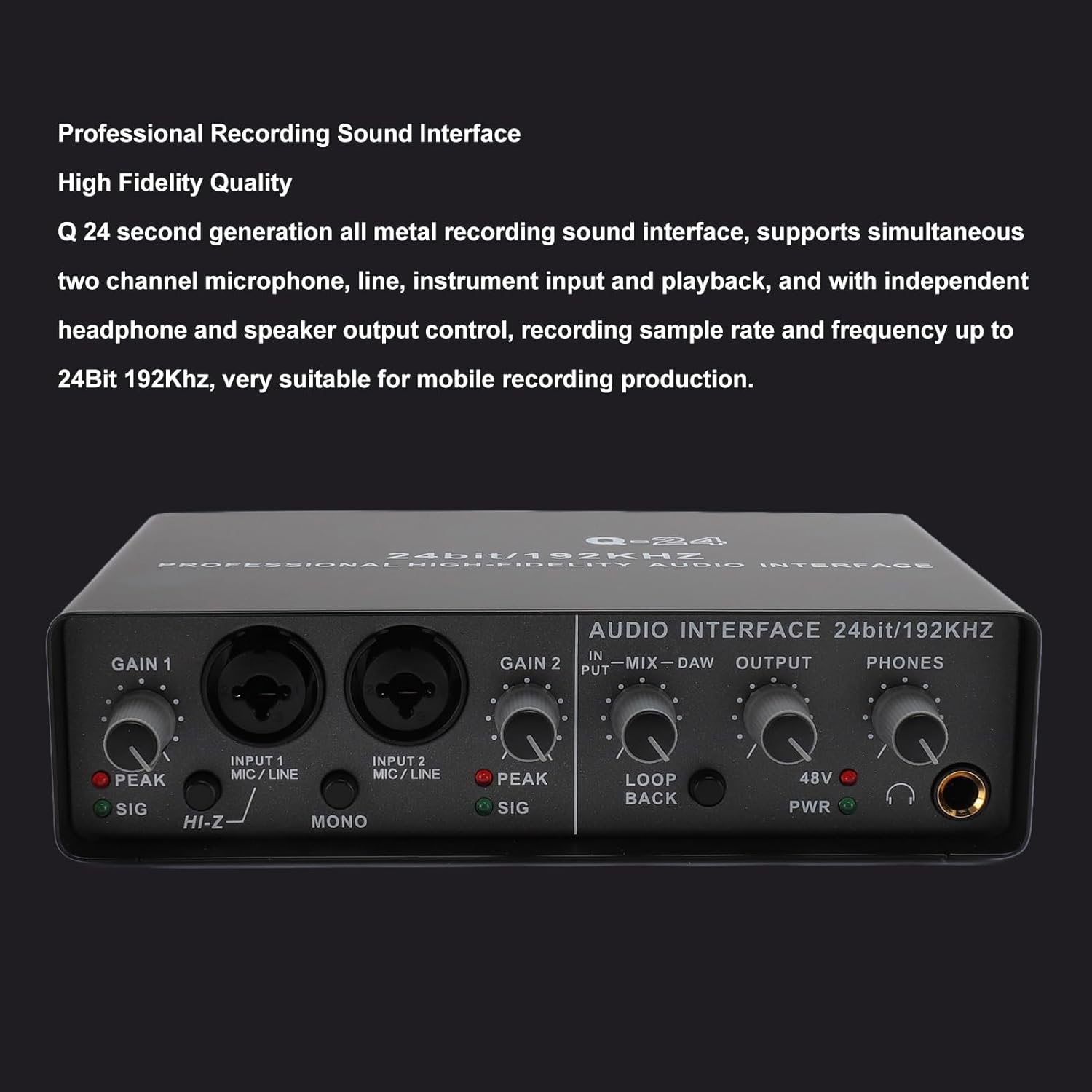
Figur 1: Forside view of the Zunate Q24 Professional Sound Interface, showing input gains, input jacks, and output controls.

Figure 2: Detailed diagram illustrating the controls and connectors on both the front and rear panels of the Q24 interface.
Kontrol på frontpanelet:
- GAIN 1 / GAIN 2: Input volume knobs for Microphone/Line inputs 1 and 2.
- PEAK-indikator: Lyser, når indgangssignalet er for højt, hvilket indikerer potentiel klipning.
- SIG-indikator: Lights up when an input signal is detected.
- INPUT 1 MIC/LINE / INPUT 2 MIC/LINE: Combo XLR/TRS jacks for connecting microphones or line-level instruments.
- HI-Z-knap: High impedance switch for Input 1, suitable for direct guitar/bass connection.
- MONO-knap: Combines stereo input into a mono signal.
- IN-MIX-DAW Knob: Blends the direct input signal with the DAW playback signal for monitoring.
- OUTPUT knap: Styrer den primære udgangslydstyrke.
- PHONES knap: Controls the headphone output volume.
- 48V PWR Button: Aktiverer +48V fantomstrøm til kondensatormikrofoner.
- PWR-indikator: Angiver, at enheden er tændt.
- Hovedtelefonstik: 1/4-inch stereo jack for headphone monitoring.
Tilslutninger bagpanel:
- PC USB2.0 Port: Connects to a computer for data transfer and power.
- DC5V IN: Power input port for external 5V power supply, especially for mobile use with iOS devices.
- POWER SOURCE Switch: Selects between USB power and external DC5V power.
- +48V POWER Switch: On/Off switch for phantom power.
- GROUND Connector: Jordingsterminal.
- RCA Input (IN L/R): Stereo RCA input jacks.
- RCA Output (OUT L/R): Stereo RCA output jacks.
- MAIN OUTPUTS (1/L, 2/R): 1/4-inch TRS balanced output jacks for connecting to studio monitors or amplivførere.
Opsætning
Follow these steps to set up your Zunate Q24 Professional Sound Interface:
- Strømtilslutning: Connect the included power cable to the sound interface. If connecting to a computer, use the USB-A end to connect to your computer. The device can be powered via USB. For mobile music production with an iOS tablet, use the 5V MicroUSB port for external power.
- Driverinstallation (hvis nødvendigt): The Q24 is designed for driverless connection. However, ensure your operating system (Windows/macOS) recognizes the device. If issues arise, check the manufacturer's webwebsted for specifik chaufførinformation.
- Tilslutning af inputenhed:
- Mikrofoner: Connect microphones to the INPUT 1 or INPUT 2 combo jacks. If using a condenser microphone, activate the +48V phantom power using the 48V PWR button on the front panel and the +48V POWER switch on the rear panel.
- Instruments (e.g., Guitar/Bass): Connect instruments to INPUT 1 or INPUT 2. For high-impedance instruments, press the HI-Z button for Input 1.
- Linjeniveau-enheder: Connect line-level devices (e.g., keyboards, synthesizers) to INPUT 1 or INPUT 2, or use the RCA IN L/R jacks on the rear panel.
- Tilslutning af outputenhed:
- Hovedtelefoner: Connect headphones to the 1/4-inch PHONES jack on the front panel.
- Studio Monitors/Amplivsstil: Connect your studio monitors or amplifier to the MAIN OUTPUTS (1/L, 2/R) 1/4-inch TRS jacks or the RCA OUT L/R jacks on the rear panel.
- Computertilslutning: Connect the USB2.0 port on the rear panel to your computer.
- Tænd: Once all connections are secure, power on the device. The PWR indicator on the front panel will illuminate.

Figure 3: Illustration of various input devices (microphone, electronic piano, electric guitar) connected to the Q24 interface.

Figure 4: Illustration of output connections from the Q24 interface to a computer, cell phone, CD player, and amplivligere.
Betjeningsvejledning
Recording and Monitoring:
- Juster indgangsforstærkning: Use the GAIN 1 and GAIN 2 knobs to set appropriate input levels for your microphones or instruments. Observe the SIG indicator for signal presence and the PEAK indicator to avoid clipping. Adjust the gain so the PEAK light only flashes occasionally on the loudest parts.
- Monitormix: The IN-MIX-DAW knob allows you to blend the direct input signal (IN) with the audio playback from your computer (DAW). Turn towards "IN" for more direct monitoring (lower latency) and towards "DAW" to hear more of your computer's audio.
- Outputvolumen: Use the OUTPUT knob to control the volume of your main studio monitors. Use the PHONES knob to adjust your headphone volume independently.
- Fantomkraft: If using condenser microphones, ensure both the front panel 48V PWR button and the rear panel +48V POWER switch are engaged.
Lyd i høj opløsning:

Figure 5: The Q24 interface supports 24-bit/192kHz high-definition sound quality.
The Q24 supports high-resolution audio up to 24-bit/192kHz. This ensures clear, detailed sound with low noise. The built-in AD/DA converter allows for flexible switching of sampling rates (44.1K, 48K, 88.2K, 96K, 176.4K, 192K HZ) to match your project requirements.
Internal Recording and Streaming:

Figure 6: The Q24 enables internal recording and mixing of streaming audio.
The interface allows you to mix sound from streaming inputs and transmit synchronized data to the internet. This functionality is useful for voice card recording, creating cover songs, and live webstøbning.
Opretholdelse
Proper maintenance ensures the longevity and optimal performance of your Q24 Sound Interface:
- Rensning: Brug en blød, tør klud til at rengøre enhedens yderside. Undgå at bruge flydende rengøringsmidler eller opløsningsmidler, da de kan beskadige overfladen eller de indvendige komponenter.
- Opbevaring: Opbevar grænsefladen et køligt, tørt sted væk fra direkte sollys, ekstreme temperaturer og for meget støv.
- Håndtering: Håndter enheden forsigtigt. Undgå at tabe den eller udsætte den for hårde stød.
- Kabelstyring: Sørg for, at alle kabler er tilsluttet korrekt og ikke er under belastning. Undgå at bøje kablerne skarpt.
Fejlfinding
If you encounter issues with your Q24 Sound Interface, refer to the following common troubleshooting steps:
- Ingen strøm:
- Sørg for, at USB-kablet er korrekt tilsluttet til både grænsefladen og din computer.
- If using external power, verify the DC5V IN cable is connected and the power source is active.
- Check the POWER SOURCE switch on the rear panel is set correctly (PC for USB power, DC5V IN for external power).
- Confirm the PWR indicator on the front panel is illuminated.
- Ingen lydoutput:
- Check that your headphones or speakers are properly connected to the PHONES jack or MAIN OUTPUTS.
- Ensure the PHONES and OUTPUT volume knobs are turned up.
- Verify the Q24 is selected as the audio output device in your computer's sound settings and your Digital Audio Workstation (DAW) software.
- Adjust the IN-MIX-DAW knob to ensure you are hearing the desired signal (input or DAW playback).
- Intet indgangssignal:
- Ensure your microphone or instrument is correctly connected to INPUT 1 or INPUT 2.
- Check the GAIN knobs are turned up.
- Verify the SIG indicator lights up when sound is present.
- If using a condenser microphone, ensure +48V phantom power is activated (both front and rear switches).
- If connecting a guitar/bass to Input 1, ensure the HI-Z button is engaged.
- Check your DAW software to ensure the correct input channel is selected and armed for recording.
- Forvrænget lyd (klipning):
- Reduce the GAIN knobs for the input channels. The PEAK indicator should only flash occasionally.
- Check the input levels within your DAW software.
- Enhed genkendes ikke af computeren:
- Prøv at tilslutte USB-kablet til en anden USB-port på din computer.
- Genstart din computer.
- Sørg for, at dit operativsystem er opdateret.
- While driverless, sometimes a system restart or USB port change can resolve recognition issues.
Specifikationer
| Feature | Specifikation |
|---|---|
| Varetype | Lydgrænseflade |
| Materiale | Aluminiumlegering, ABS |
| Vægt | Ca. 846 g / 29.8 oz |
| A/D-nøjagtighed | 24 BIT, 192KHZ |
| Dynamisk rækkevidde | 82dB, THD+N 0.03%, 1kHz |
| Maksimalt inputniveau | 6dBu Input Positive 10KQ |
| Få rækkevidde | 3dB-60 dB |
| Interface Type | Microphone Input Hole, Left And Right Channel Output Input Hole, Headphone Output Hole, Power Supply Connector |
| Sampling Rate | 44.1K, 48K, 88.2K, 96K, 176.4K, 192K HZ (Freely Switch) |
| Forbindelsesteknologi | USB, XLR |
| Kompatible enheder | Personlig computer |
| Lydindgang | USB |
| Maksimum Sample Sats | 192 KHz |
Garanti og support
The Zunate Q24 Professional Sound Interface comes with a manufacturer's warranty for 90 days from the date of purchase.
For technical support, troubleshooting assistance beyond this manual, or warranty claims, please contact Zunate customer service through their official channels or the retailer where the product was purchased.