
Indledning
The Beeitzie Ultra Airplane Bluetooth 5.4 Transmitter (Model BF01) is designed to provide a seamless wireless audio experience across various devices. It converts wired audio outputs into Bluetooth signals, allowing you to use your wireless headphones with non-Bluetooth sources. This device supports dual headphone connections and features aptX-Adaptive and aptX-Low Latency for high-quality, synchronized audio.
Hvad er der i æsken

Image: Packaging Accessories. This image displays the contents of the product package.
- 1 x Beeitzie Ultra Bluetooth Transmitter (Model BF01)
- 1 x RCA Audio Cable (Lotus Line)
- 1 x AUX Adapter (Dual 3.5mm Male to Female Adapter)
- 1 x Type-C ladekabel
- 1 x brugermanual
Produkt overview
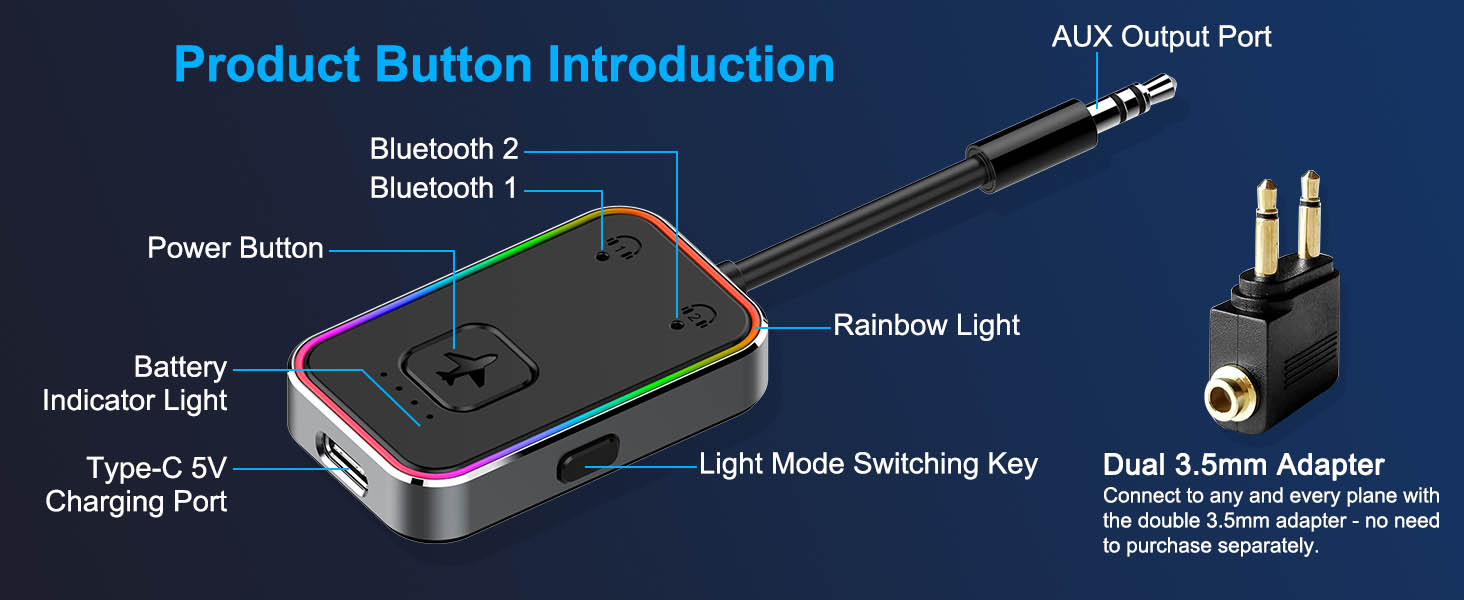
Image: Product Diagram. This diagram labels the various components of the transmitter.
- AUX Output Port: 3.5mm jack for connecting to audio sources.
- Bluetooth 1 & Bluetooth 2 Indicators: Blue LEDs indicating connection status for two separate headphones.
- Power knap: Used for powering on/off and initiating pairing.
- Batteriindikatorlys: Four LEDs showing remaining battery charge (one light = 25%).
- Type-C 5V Charging Port: Til opladning af enheden.
- Light Mode Switching Key: Button to cycle through rainbow light modes (breathing, marquee, off).
- Regnbuelys: Decorative LED lighting around the device edge.
Opsætningsinstruktioner
1. Opladning af senderen
Before first use, fully charge the transmitter using the provided Type-C charging cable. Connect the cable to the Type-C port on the transmitter and a 5V USB power source. The battery indicator lights will show charging progress. A full charge takes approximately 2 hours and provides up to 26 hours of use.

Image: Charging the Transmitter. The image illustrates connecting the Type-C charging cable to the device.
2. Tilslutning til en lydkilde
Plug the 3.5mm AUX output port of the transmitter into the audio output jack of your desired device (e.g., airplane entertainment system, TV, computer, treadmill, tablet). If your device requires a dual-pin adapter (common in older airplane systems), use the provided AUX adapter.

Image: Compatible with Two Different Types of Plugs Simultaneously. This image shows how to connect the transmitter to various audio jacks.
Video: Beeitzie Ultra Bluetooth Transmitter in use. This video demonstrates connecting the transmitter to an airplane's audio system and pairing headphones.
For devices with RCA audio outputs (red and white ports), use the provided RCA Audio Cable. Connect the 3.5mm end of the RCA cable to the transmitter's AUX output port, and the red/white RCA plugs to the corresponding output ports on your audio source.
3. Powering On and Pairing the First Headphone
- Press and hold the Power Button for 2 seconds. The Bluetooth 1 and Bluetooth 2 indicator lights will illuminate briefly, then Bluetooth 1 will blink, indicating pairing mode.
- Place your first Bluetooth headphone (e.g., AirPods) into pairing mode.
- The transmitter will automatically connect to your headphone. Once successfully connected, the Bluetooth 1 indicator light will turn solid blue.

Image: Enter Pairing. This image illustrates the steps to pair the first device.
4. Pairing the Second Headphone (Optional)
The transmitter supports simultaneous connection to two Bluetooth headphones.
- After the first headphone is connected, single-click the Power Button. The Bluetooth 2 indicator light will begin to blink, indicating pairing mode for the second headphone.
- Place your second Bluetooth headphone into pairing mode.
- The transmitter will automatically connect to your second headphone. Once successfully connected, the Bluetooth 2 indicator light will turn solid blue. Both Bluetooth 1 and Bluetooth 2 indicator lights will be solid blue when two devices are connected.

Image: The Second Device Pairing. This image illustrates the steps to pair a second device.
Operation
Tænd/sluk
- Tænd: Tryk og hold tænd/sluk-knappen nede i 2 sekunder.
- Sluk: Tryk og hold tænd/sluk-knappen nede i 2 sekunder.
Kontrol af batteriniveau
Double-click the Power Button to check the remaining battery charge. Each illuminated battery indicator light represents approximately 25% charge.
Skift af lystilstand
Press the Light Mode Switching Key to cycle through the rainbow light effects:
- Short press for rainbow breathing light.
- Short press again for marquee light.
- Short press a third time to turn off the rainbow light.

Image: Light Mode Switching Key. This image explains how to control the device's rainbow lighting.
Opretholdelse
- Keep the device in a dry environment. Avoid extreme temperatures, dust, or humidity.
- Do not drop or subject the product to strong impacts to prevent damage.
- Rengør enheden med en blød, tør klud. Brug ikke skrappe kemikalier eller slibende materialer.
- Do not attempt to disassemble or modify the device. Unauthorized disassembly voids the warranty.
Fejlfinding
No Response When Booting
- Sørg for, at tænd/sluk-knappen holdes nede i 2 sekunder.
- Check if the device has sufficient battery. If not, charge it fully.
Device is Not Playable
- Verify that the connected device is functioning normally.
- Clear Bluetooth pairing history on your headphones and the transmitter, then re-pair.
- Ensure the audio cable is securely plugged into the correct output port of the source device.
Device is Not Chargeable
- Unplug and re-plug the charging cable.
- Prøv et andet Type-C-opladerkabel eller en anden strømadapter.
Bluetooth Headphones Cannot Connect to the Device
- Ensure your headphones and the transmitter are unpaired from any other devices before attempting to reconnect.
- Place both devices in pairing mode and keep them close to each other.
Specifikationer
| Modelnummer | BF01 |
| Bluetooth version | 5.4 |
| Understøttede codecs | aptX-Adaptive, aptX-Low Latency, LDAC, AAC, SBC |
| Batterikapacitet | 300mAh Lithium Ion |
| Arbejdstid | Op til 26 timer (efter fuld opladning) |
| Opladningstid | Cirka 2 timer |
| Transmissionsafstand | Over 10 meters (barrier-free) |
| Produktdimensioner | 4.33 x 1.18 x 0.39 tommer |
| Varens vægt | 2.89 ounce |
| Materiale | Metal Frame, Plastic |
| Forbindelsesteknologi | Bluetooth |
| Strømkilde | Batteridrevet |
Garanti og support
Beeitzie offers a 12-month free warranty for this product. For any inquiries or issues, please contact us via email: support@beeitzie.com.
Garantipolitik
- Free Lifetime Repair Service
- Hassle-Free Refund or Exchange
- Comprehensive Warranty Coverage
Sikkerhedsoplysninger
The Beeitzie Ultra Bluetooth Transmitter (BF01) meets global safety standards, including FCC, CE, RoHS, and BQB certifications. It features overcurrent and short-circuit protection for safe operation.
Vigtig bemærkning: This device is equipped with transmission functionality only and does not have receiving capabilities. Therefore, it should not be used in vehicles as it cannot receive audio signals.