
Indledning
The UPERFECT M14 2K 14-inch Laptop Screen Extender is designed to enhance your productivity by providing an additional high-resolution display for your laptop. This portable monitor features a 2240x1400p QHD IPS display, a patented 360° swivel hinge with 180° automatic rotation, and wide compatibility with various operating systems and devices. It offers a plug-and-play experience with a single cable connection for convenience.
Pakkens indhold
- UPERFECT M14 2K 14-inch Portable Monitor
- USB-C to USB-C Cable (for power and video signal)
- USB-A to USB-C Cable (for power)
- Mini HDMI til HDMI-kabel (til videosignal)
- Power Adapter (Wall adapter)
- Brugermanual

Image: The UPERFECT M14 package contents, showing the monitor, various connection cables (USB-C to USB-C, USB-A to USB-C, Mini HDMI to HDMI), and a power adapter.
Opsætning
- Attaching to Laptop:
The extender features a frame designed to attach to laptops between 14-17 inches. Extend the frame to fit your laptop screen. The monitor slides into the frame. Ensure a secure fit to prevent accidental detachment.
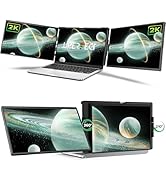
Image: The UPERFECT M14 screen extender attached to a laptop, demonstrating its secure fit.
- Connecting to Laptop:
- Enkelt kabelforbindelse (USB-C): If your laptop has a full-featured USB-C port (supporting power and video), use the provided USB-C to USB-C cable. Connect one end to the monitor's USB-C port (data/video) and the other to your laptop's USB-C port.
- Dual Cable Connection (HDMI + USB-A/C for Power): If your laptop does not have a full-featured USB-C port, use the Mini HDMI to HDMI cable for video signal and a USB-A to USB-C or USB-C to USB-C cable for power. Connect the Mini HDMI end to the monitor and the HDMI end to your laptop. Connect the USB-C end of the power cable to the monitor's power USB-C port and the other end to a USB-A or USB-C port on your laptop or the provided power adapter.

Image: Connection options for the UPERFECT M14, illustrating single USB-C or dual HDMI + USB-C connections.
- Tænd for skærmen:
The monitor can draw power directly from your laptop via a full-featured USB-C connection. If additional power is needed or if using HDMI, connect the provided power adapter to the monitor's power USB-C port and a wall outlet.

Image: The UPERFECT M14 connected to a laptop and an external power source, demonstrating reverse charging capability.
Betjeningsvejledning
- Tænd/sluk: Tryk og hold tænd/sluk-knappen på siden af skærmen nede for at tænde eller slukke den.
- Skærmtilstande:
- Udvid tilstand: The monitor acts as an extension of your laptop's display, allowing for a larger workspace.
- MirrorMode: The monitor duplicates your laptop's display.
- Adjust these settings through your operating system's display settings (e.g., Windows Display Settings, Mac System Preferences > Displays).
- Swivel Hinge and Rotation:
The patented swivel hinge allows for 360° vertical orientation and 210° horizontal swivel. The monitor features a gravity sensor for automatic 180° rotation when changing orientation.

Image: The UPERFECT M14 demonstrating its 360-degree swivel hinge for flexible viewing vinkler.

Image: The UPERFECT M14 illustrating its 210-degree horizontal swivel capability.
- On-Screen Display (OSD) menu:
Use the control buttons on the side of the monitor to navigate the OSD menu. This allows you to adjust settings such as brightness, contrast, color temperature, aspect ratio (default 16:10, can be changed to 16:9), and input source.

Billede: Et nærbillede view of the UPERFECT M14's ports (HDMI, USB-C) and control buttons for menu navigation.
- Freestanding Mode: The integrated stand allows the monitor to be used independently from the laptop, supporting both landscape and portrait orientations.
- Non-Glare Matte Screen: The non-glare matte screen helps improve visibility and reduce eye fatigue, especially in bright environments.
Opretholdelse
- Keep the monitor clean by gently wiping the screen with a soft, lint-free cloth. Avoid using harsh chemicals or abrasive materials.
- Opbevar skærmen på et køligt, tørt sted, når den ikke er i brug.
- Handle the swivel hinge and connections with care to prevent damage.
Fejlfinding
- Intet display/signal:
- Sørg for, at alle kabler er korrekt tilsluttet.
- Verify that the monitor is receiving adequate power. Use the provided power adapter if necessary.
- Check your laptop's display settings to ensure the external monitor is detected and configured correctly (Extend or Mirror mode).
- Confirm your laptop's USB-C port supports video output if using a single USB-C cable.
- Ingen lyd: The monitor does not have built-in speakers. Audio will play through your connected laptop's speakers or other external audio devices.
- Incorrect Aspect Ratio: The default aspect ratio is 16:10. You can manually change it to 16:9 through the monitor's OSD menu.
- PS5 Connection Issues: The monitor does not support 1440P output when connected to a PS5. Adjust the PS5's video output settings to a supported resolution (e.g., 1080P).
- Unstable Attachment: Ensure your laptop screen is within the recommended 14-17 inch range for optimal fit. Adjust the extender's frame for a snug fit.
Specifikationer
| Feature | Detalje |
|---|---|
| Mærke | OPERFEKT |
| Modelnummer | M14 |
| Skærmstørrelse | 14 tommer |
| Opløsning | 2240x1400 (2K QHD) |
| Aspektforhold | 16:10 (Default, adjustable to 16:9) |
| Displayteknologi | IPS |
| Lysstyrke | 300 cd/m² |
| Kontrastforhold | 1000:1 |
| Opdateringshastighed | 60 Hz |
| Viewi vinkel | 180 grader |
| Forbindelse | 2x USB Type-C (Full-featured), 1x Mini HDMI |
| Yderligere funktioner | Patented 360° Swivel Hinge, 180° Automatic Rotation, Integrated Stand, Non-Glare Matte Screen |
| Kompatible enheder | Laptops (14-17 inches), Desktops, Gaming Consoles, Smartphones (with compatible USB-C) |
| Strømforbrug | 6 watt |
Garanti og support
The UPERFECT M14 Laptop Screen Extender comes with a 3-year manufacturer warranty. For technical support, troubleshooting assistance, or warranty claims, please contact UPERFECT customer service through their official webwebstedet eller kontaktoplysningerne på din produktemballage.
Produkt overview Video
Video: An official UPERFECT video showcasing the features and functionality of the 2K Laptop Screen Extender, including its unique swivel hinge and various usage scenarios.