
1. Introduktion
Tak for købetasing the RCA 50-inch UHD 4K LCD TV. This manual provides essential information for setting up, operating, and maintaining your television. Please read this manual thoroughly before using the product to ensure safe and optimal performance. Keep this manual for future reference.
2. Vigtige sikkerhedsoplysninger
Følg altid disse grundlæggende sikkerhedsforanstaltninger, når du bruger dit fjernsyn:
- Udsæt ikke tv'et for regn eller fugt for at undgå brand eller elektrisk stød.
- Bloker ikke ventilationsåbningerne. Sørg for tilstrækkelig plads omkring tv'et for korrekt luftgennemstrømning.
- Placer tv'et på en stabil, plan overflade for at forhindre det i at falde ned.
- Brug kun den netledning, der følger med tv'et. Overbelast ikke stikkontakter.
- Tag stikket ud af tv'et under tordenvejr eller når det ikke bruges i længere perioder.
- Åbn ikke tv-skabet. Overlad al service til kvalificeret servicepersonale.
- Hold små dele og batterier utilgængeligt for børn.
3. Pakkens indhold
Carefully unpack your television and check that all items are included. If any items are missing or damaged, please contact your retailer.

Figur 3.1: Medfølgende tilbehør
- RCA 50-inch UHD 4K LCD TV
- Fjernbetjening (kræver 2 AAA-batterier, medfølger)
- Strømkabel
- TV Stand Bases (x2)
- Screws for Stand Installation (x4)
- Anti-tip Screw (x1) and Clips (x3)
- Brugsanvisning (japansk)
4. Opsætning
4.1. Physical Setup (Stand / Wall Mount)
You can install your TV on the included stand or mount it on a wall using a VESA-compatible bracket (sold separately).

Figure 4.1: TV Dimensions and Stand Installation
Montering af stativ:
- Placer tv-skærmen med nedad på en blød, flad overflade for at forhindre skader.
- Juster stativets baser med skruehullerne i bunden af tv'et.
- Fastgør stativbaserne med de medfølgende skruer.
Vægmontering:
This TV supports VESA mount standard 400x300mm. Use a compatible wall mount bracket and follow the instructions provided with the bracket. Ensure the wall can support the TV's weight (approximately 9 kg).

Figure 4.2: Wall Mounting Options
4.2. Tilslutning af eksterne enheder
Connect your external devices to the appropriate ports on the TV's rear and side panels.

Figure 4.3: TV Connectivity Ports

Figure 4.4: Rear Panel and Connection Terminals
| Porttype | Beskrivelse |
|---|---|
| HDMI (x3) | Connect to Blu-ray players, game consoles, set-top boxes, etc. HDMI 2 supports ARC. |
| USB (x2) | Connect external USB HDD for recording (FAT32 format compatible). |
| AV-indgang | Tilslut ældre enheder ved hjælp af kompositvideo- og stereolydkabler. |
| Optisk digital lydudgang | Tilslut til en soundbar eller et hjemmebiografsystem for digital lyd. |
| LAN | For service or firmware updates. This TV does not support internet streaming services. |
| mini B-CAS Slot | Insert your mini B-CAS card for digital broadcast reception. |
| BS/CS Antenna Input | Connect to a BS/CS satellite antenna. |
| Terrestrial Digital Antenna Input | Connect to a terrestrial digital antenna. |
| 3.5 mm lydindgang | Tilslut eksterne lydkilder. |
4.3. Initial Power On and Channel Setup
- Når du har tilsluttet alle nødvendige kabler, skal du sætte netledningen i en stikkontakt.
- Tryk på tænd/sluk-knappen på fjernbetjeningen eller på tv'et.
- Follow the on-screen instructions to perform initial setup, including language selection and channel scanning.
5. Betjeningsvejledning
5.1. Fjernbetjeningsfunktioner
The remote control allows you to access all TV functions. Insert two AAA batteries (included) into the remote control before use.

Figure 5.1: Remote Control Layout and Key Functions
- Magt: Tænder eller slukker for tv'et.
- Nummerknapper (0-12): Vælg kanaler direkte.
- Input: Vælg inputkilde (HDMI, AV osv.).
- Lydstyrke (+/-): Juster lydstyrken.
- Kanal (op/ned): Skift kanal sekventielt.
- Directional Buttons (Up/Down/Left/Right) & OK: Naviger i menuer og bekræft valg.
- Menu: Få adgang til hovedindstillingsmenuen.
- EPG (elektronisk programguide): Vis programguiden.
- Optage: Start recording the current program.
- Afspilningskontroller: Play, Pause, Stop, Fast Forward, Rewind for recorded content.
5.2. Background Program Recording
Your RCA TV is equipped with dual tuners, allowing you to record one digital broadcast program while watching another. An external USB Hard Disk Drive (HDD) is required for recording (FAT32 format compatible, up to 6TB).

Figure 5.2: Dual Tuner Recording Function

Figure 5.3: External HDD Recording
Optagelsestrin:
- Connect a FAT32-formatted external USB HDD to one of the TV's USB ports.
- Access the program guide (EPG) to select a program for recording.
- Use the remote control to set a recording timer or initiate instant recording.
- The TV supports series recording and automatically adjusts for broadcast time changes or extended final episodes.
5.3. Billed- og lydindstillinger
Optimer din viewoplevelse ved at justere billed- og lydindstillinger.
Billedkvalitet:
This TV features a high-performance image processing engine that reproduces fine details and natural colors. It supports UHD 4K resolution and HDR content for enhanced contrast and vibrant colors.
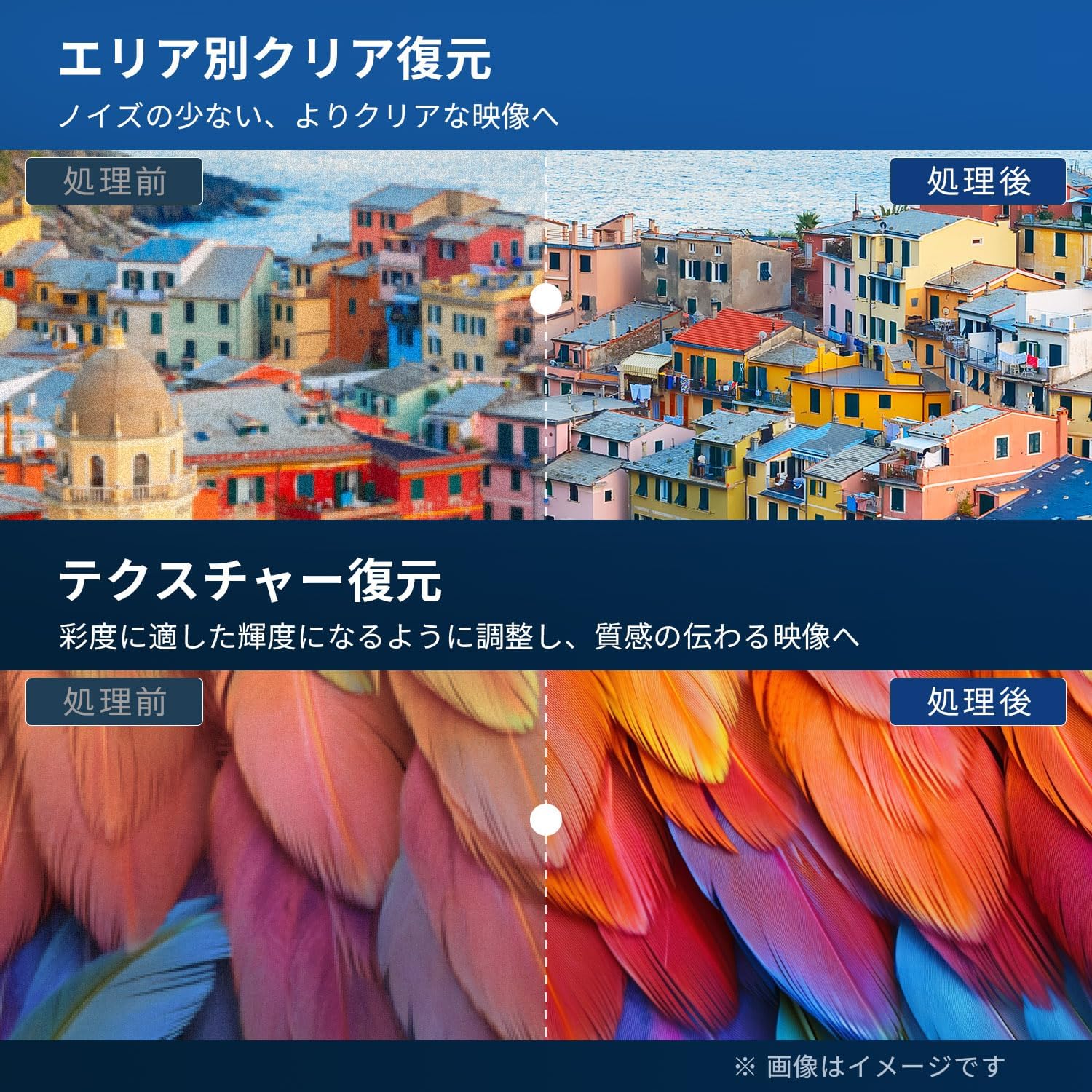
Figure 5.4: Image Processing for Clarity and Texture

Figure 5.5: High-Performance Multi-Speed Processing for Motion Clarity
Spiltilstand:
Activate Game Mode to reduce input lag and image processing delay, providing a smoother and more responsive gaming experience, especially for fast-paced games like FPS and fighting games.
Dolby Audio:
Experience immersive, high-quality sound with built-in Dolby Audio technology. Adjust sound modes in the audio settings menu to suit your preferences.

Figure 5.6: Dolby Audio for Immersive Sound
6. Vedligeholdelse
Korrekt vedligeholdelse sikrer dit TV's levetid og ydeevne.
- Rengøring af skærmen: Gently wipe the screen with a soft, lint-free cloth. For stubborn marks, use a screen cleaner specifically designed for LCD/LED displays. Do not spray cleaner directly onto the screen.
- Rengøring af kabinettet: Brug en blød, tør klud til at tørre tv-kabinettet af. Brug ikke slibende rengøringsmidler, voks eller opløsningsmidler.
- Ventilation: Sørg for, at ventilationsåbningerne på bagsiden af tv'et ikke er blokerede.
- Strømledning: Kontrollér regelmæssigt strømkablet for skader. Kontakt kundesupport for udskiftning, hvis det er beskadiget.
7. Fejlfinding
Før du kontakter kundesupport, kan du prøve følgende løsninger på almindelige problemer:
| Problem | Mulig løsning |
|---|---|
| Ingen strøm | Check if the power cord is securely plugged into the TV and the outlet. Press the power button on the remote or TV. |
| Intet billede, men der er lyd | Kontrollér inputkilden. Sørg for, at eksterne enheder er tændt og tilsluttet korrekt. |
| Ingen lyd, men der er billede | Kontroller lydstyrkeniveauet. Sørg for, at Mute ikke er aktiveret. Kontroller lydkabler til eksterne enheder. |
| Fjernbetjening virker ikke | Udskift batterierne. Sørg for, at der ikke er nogen forhindringer mellem fjernbetjeningen og tv'ets IR-sensor. |
| Poor picture quality / distorted image | Check antenna connection. Adjust picture settings in the menu. Try a different input source. |
| Kan ikke optage programmer | Ensure an external USB HDD is connected and formatted to FAT32. Check available storage space. Verify tuner reception. |
| TV freezes or becomes unresponsive | Unplug the TV from the power outlet, wait for 1 minute, then plug it back in and power on. |
8. Specifikationer
| Feature | Detalje |
|---|---|
| Modelnummer | RCA-NS-50Q1 |
| Skærmstørrelse | 50 tommer |
| Displayteknologi | LED modul |
| Opløsning | 4K UHD (3840 x 2160) |
| Opdateringshastighed | 60 Hz |
| Aspektforhold | 16:9 |
| Viewi vinkel | 178 grader |
| Svartid | 2 ms |
| Kontrastforhold | 200:1 |
| Max lysstyrke | 220 cd/m² |
| HDR-understøttelse | HDR |
| Tunere | Dual Terrestrial/BS/110-degree CS Digital Tuners (ISDB-T) |
| Indspilning | External USB HDD Recording (FAT32 compatible, up to 6TB) |
| Lyd | Dolby Audio, Built-in Speakers (Max Output: 10W) |
| Forbindelse | HDMI (x3), USB (x2), AV Input, Optical Digital Audio Out, LAN, 3.5mm Audio Input |
| VESA-monteringsstandard | 400 x 300 mm |
| Strømforsyning | AC 100-240V, 50/60Hz |
| Strømforbrug | 120 W |
| Dimensioner (med stativ) | 111.8 cm (B) x 69.6 cm (H) x 21.5 cm (D) |
| Vægt (med stativ) | Ca. 9 kg |
| Smart TV-funktioner | None. This TV does not support internet connection or streaming services. |
9. Garanti og support
9.1. Produktgaranti
This RCA television comes with a Tre-års garanti from the date of purchase, covering manufacturing defects. Please retain your proof of purchase for warranty claims. Note that some specific components may have a 12-month quality guarantee.

Figur 9.1: Garantioplysninger
9.2. Kundesupport
For any inquiries, technical assistance, or warranty claims, please contact our customer support team. Our offices are located in Tokyo, and our customer service team provides nationwide support.

Figure 9.2: RCA Customer Support Network
Kontaktmetoder:
- LINE-support: Scan the QR code below to add our after-sales service account on LINE for quick assistance.
- E-mail support: Send your inquiries to our dedicated email address. We aim to respond within 24 hours.

Scan for LINE Support: https://lin.ee/AOq4pQs

E-mail: tutu@tutuelec.com