
Indledning
The Singtronic KSP-4000Pro is a 3-in-1 professional karaoke system designed for high-quality audio performance. It integrates a 4000W Class D amplifier, a digital mixer with anti-feedback DSP, and includes two wireless microphones. This system is suitable for various applications, from home karaoke to professional events.
Hvad er der i æsken
Kontroller venligst pakkens indhold omhyggeligt ved udpakning:
- Singtronic KSP-4000Pro Digital 4000W Mixing Amplifier Karaoke Unit
- 2 x UHF Professional Wireless Microphones with Anti-Howling & Feedback Suppressor
- Fjernbetjeningsenhed
- Operating Manual Book (this document)
- Strømledning
Nøglefunktioner
- Høj effekt: 2000W + 2000W Max Output for robust sound.
- Advanced HDMI ARC: Improved HDMI ARC for "Upstream" and "Downstream" signal over HDMI Port on TV, ideal for YouTube streaming karaoke.
- Digital Mixer with Anti-Feedback: Built-in Digital Equalizer with individual control for Music, Microphone, and Effect, featuring anti-howling and feedback suppression.
- Trådløse mikrofoner: Includes two professional UHF wireless microphones.
- Omfattende tilslutningsmuligheder: HDMI-Arc, Optical, Bluetooth, USB, and Banana Plug Speaker Connectors.
- Master Volume Controls: Separate Master Microphone Volume and Master Music Volume.
- Key Pitch Control: Adjust pitch with +- 5 key up & down.
Produkt overview
Frontpanel

Figur 1: Front view of the Singtronic KSP-4000Pro amplifier. This image displays the main display screen, input selection buttons (VOD, DVD, OPT, HDMI1, HDMI2, HDMI3, ARC, Bluetooth, SET, MP3), music and microphone volume controls, effect controls, and the power button. The two wireless microphone antennas are visible on top.
Dimensioner

Figur 2: Side view of the Singtronic KSP-4000Pro amplifier with dimensions. The unit measures approximately 17.24 inches in width, 13.15 inches in depth, and 4.33 inches in height.
Bagpanel

Figur 3: Bag view of the Singtronic KSP-4000Pro amplifier. This panel includes various input and output ports: HDMI IN (1, 2, 3), HDMI ARC IN, HDMI OUT, Optical IN, RCA audio inputs (DVD, VOD, AUX), RCA audio outputs (REC, SUB, OUTPUT), microphone gain controls (MIC 1, MIC 2), and speaker output terminals (Banana Plug Speaker Connectors).
Trådløse mikrofoner
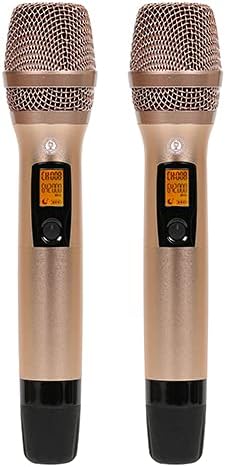
Figur 4: Two professional UHF wireless microphones included with the KSP-4000Pro system. Each microphone features a digital display showing channel information and controls for operation.
Fjernbetjening
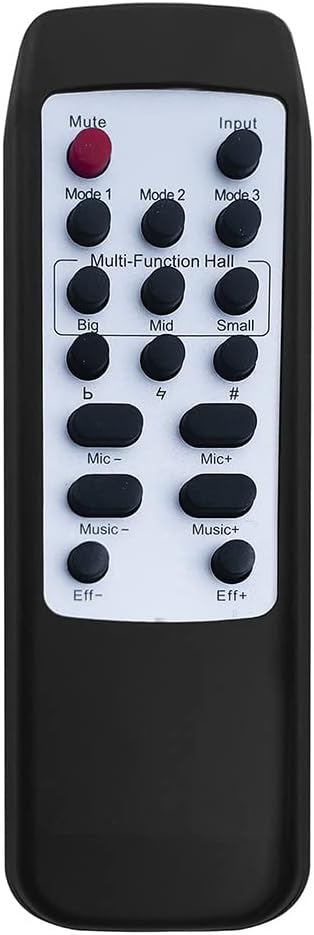
Figur 5: The remote control unit for the KSP-4000Pro. It provides buttons for Mute, Input selection, Mode selection (Mode 1, 2, 3, Multi-Function Hall with Big, Mid, Small settings), Key Pitch Control (flat, sharp, natural), and individual volume adjustments for Microphone, Music, and Effect.
Opsætningsinstruktioner
Tilslutning af dit system

Figur 6: Connection diagram illustrating how to connect various audio and video sources to the KSP-4000Pro amplifier, and how to connect the amplifier to speakers and a display. This includes connections for TV Box, Jukebox, Computer, DVD player, Main Speakers, and Active Subwoofer.
- Strømtilslutning: Connect the provided power cord to the KSP-4000Pro unit and then to a suitable power outlet.
- Højttalerforbindelse: Connect your main speakers to the "CH R" and "CH L" banana plug speaker terminals on the rear panel. Ensure correct polarity (+ to + and - to -). For an active subwoofer, connect its input to the "SUB OUTPUT" RCA port.
- Audio/Video Source Connection:
- HDMI Devices (TV Box, DVD, Computer): Connect HDMI cables from your source devices to the HDMI IN 1, 2, or 3 ports.
- HDMI ARC (Smart TV for YouTube Karaoke): Connect an HDMI cable from your TV's HDMI ARC port to the KSP-4000Pro's "ARC IN" port. This allows audio from your TV to be sent to the amplivligere.
- Optisk lyd: Connect an optical cable from your TV or other device's optical output to the "OPTICAL IN" port.
- RCA-lyd: For devices with RCA audio outputs (e.g., older DVD players, VOD systems), connect them to the "DVD," "VOD," or "AUX" RCA input ports.
- Bluetooth: For wireless audio streaming, enable Bluetooth on your mobile device (Android, iPad, iPhone) and pair it with the KSP-4000Pro.
- Mikrofonopsætning: Insert batteries into the wireless microphones. The system automatically pairs with the included microphones. Ensure the microphone antennas on the amplifier are upright for optimal reception.
- Skærmforbindelse: Connect an HDMI cable from the KSP-4000Pro's "HDMI OUT" port to your TV or monitor to display video from connected HDMI sources.
Betjeningsvejledning
Grundlæggende betjening
- Tænd/sluk: Tryk på MAGT knappen på frontpanelet eller fjernbetjeningen for at tænde eller slukke enheden.
- Valg af input: Use the input buttons (VOD, DVD, OPT, HDMI1, HDMI2, HDMI3, ARC, Bluetooth, MP3) on the front panel or remote to select your desired audio/video source.
- Lydstyrkekontrol:
- Master Music Volume: Adjust the "MUSIC" knob on the front panel or use the "Music+" / "Music-" buttons on the remote.
- Master Microphone Volume: Adjust the "MIC" knob on the front panel or use the "Mic+" / "Mic-" buttons on the remote.
- Effektvolumen: Adjust the "EFFECT" knob on the front panel or use the "Eff+" / "Eff-" buttons on the remote.
- Mikrofonforstærkning: Use the "GAIN" knobs on the rear panel for MIC 1 and MIC 2 to fine-tune the input sensitivity of each wireless microphone.
Avancerede funktioner
- HDMI ARC-funktionalitet: When using HDMI ARC, ensure your TV's audio output is set to "External Speaker" or "ARC" and that CEC (Consumer Electronics Control) is enabled on your TV for seamless operation. This allows audio from your Smart TV (e.g., YouTube Karaoke) to play through the KSP-4000Pro.
- Bluetooth-forbindelse: Select "Bluetooth" input. On your smart device, search for "KSP-4000Pro" and pair. Once connected, you can stream audio wirelessly.
- Digital Equalizer Control: The KSP-4000Pro features a built-in digital equalizer. Use the "SET" button on the front panel or remote to access EQ settings for Music, Microphone, and Effect. Adjust parameters to customize your sound.
- Key Pitch Control: Use the dedicated pitch control buttons (flat, sharp, natural) on the remote control to adjust the key of the music by up to 5 steps up or down, allowing singers to match their vocal range.
- Anti-Feedback System: The integrated DSP actively suppresses howling and feedback from microphones, ensuring clear vocal performance.
Opretholdelse
- Rensning: Brug en blød, tør klud til at rengøre enhedens yderside. Brug ikke flydende rengøringsmidler eller opløsningsmidler.
- Ventilation: Sørg for, at ventilationsåbningerne på enheden ikke er blokerede for at forhindre overophedning.
- Opbevaring: When not in use for extended periods, store the unit in a cool, dry place, away from direct sunlight and extreme temperatures. Remove batteries from wireless microphones if storing for a long time.
- Kabelstyring: Kontrollér regelmæssigt alle kabler for skader, og sørg for, at de er korrekt tilsluttet.
Fejlfinding
| Problem | Mulig årsag | Løsning |
|---|---|---|
| Ingen strøm | Netledning ikke tilsluttet; Stikkontakt defekt; Enhedens sikring er sprunget. | Check power cord connection; Try a different outlet; Contact service center if fuse is suspected. |
| Ingen lyd fra højttalerne | Incorrect input selected; Speaker cables loose or incorrect polarity; Volume too low; Mute activated. | Select correct input; Check speaker connections and polarity; Increase master music volume; Deactivate mute. |
| Ingen lyd fra mikrofoner | Microphones off or low battery; Microphone volume too low; Incorrect input selected; Microphone gain too low. | Turn on microphones and replace batteries; Increase master microphone volume; Ensure correct input is selected; Adjust microphone gain on rear panel. |
| Feedback/Howling from microphones | Microphone too close to speakers; Microphone volume too high; Incorrect EQ settings. | Move microphones away from speakers; Reduce microphone volume; Adjust EQ settings to reduce high frequencies. The anti-feedback DSP should minimize this. |
| HDMI ARC virker ikke | TV ARC/CEC not enabled; Incorrect HDMI port used; HDMI cable faulty. | Ensure TV's HDMI ARC and CEC functions are enabled; Use the correct HDMI ARC port on both TV and KSP-4000Pro; Try a different HDMI cable. |
| Problemer med Bluetooth-forbindelse | Bluetooth er ikke aktiveret på enheden; Enhed for langt væk; Interferens. | Ensure Bluetooth is enabled on your device and KSP-4000Pro is in pairing mode; Move device closer to the unit; Reduce other wireless interference. |
Specifikationer
| Feature | Detalje |
|---|---|
| Model | KSP-4000Pro |
| Max udgangseffekt | 4000W (2000W + 2000W) |
| Amplivligere Type | Klasse D |
| Antal kanaler | 2 |
| Lydindgange | HDMI (3x IN, 1x ARC IN), Optical, Bluetooth, USB, RCA (DVD, VOD, AUX) |
| Lydudgange | HDMI OUT, RCA (REC, SUB, OUTPUT), Banana Plug Speaker Terminals |
| Mikrofoner | 2 x UHF Professional Wireless Microphones |
| DSP funktioner | Anti-Feedback, Digital Equalizer (Music, Microphone, Effect) |
| Key Pitch Control | +/- 5 steps |
| Forbindelsesteknologi | Bluetooth, USB, HDMI, Optical |
| Strømkilde | Stik i el |
| Materiale | Metal |
| Monteringstype | Bordplade |
| UPC | 756740985632 |
| ASIN | B0CZT17VH4 |
Garanti og support
For warranty information and technical support, please refer to the warranty card included with your product or visit the official Singtronic website. You may also contact Singtronic customer service directly for assistance with product operation, troubleshooting, or service requests.
Fabrikant: Singtronic
Mærkebutik: Visit the SINGTRONIC Store on Amazon