1. Introduktion
This document provides comprehensive instructions for the Generic Replacement Remote Control, designed for use with specific Jiepak Heavy Bass Bluetooth Home Theatre Systems. This remote functions as an infrared (IR) replacement. Please ensure your original remote control matches the appearance of this replacement for optimal compatibility. While this remote is designed to replicate core functions, some advanced or unique features of your original system's remote may not be fully supported.
Compatible Jiepak Models: SZ-11, JP-8088, JP-A3, JP-C1, JP-C2, JP-3011.
If your specific model is not listed, please verify compatibility before use. The remote requires two AAA batteries (not included).
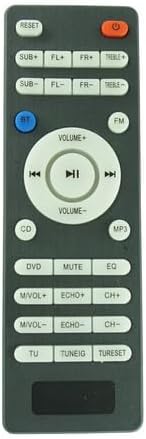
Figur 1: Forside view of the Generic Replacement Remote Control. This image displays the layout of all buttons, including power, volume, playback controls, and various input/audio adjustments.
2. Opsætning
2.1 Batteriinstallation
The remote control requires two AAA batteries for operation. Follow these steps to install them:
- Find batterirummets dæksel på bagsiden af fjernbetjeningen.
- Press down on the latch and slide the cover downwards to open the compartment.
- Isæt to AAA-batterier, og sørg for, at de positive (+) og negative (-) poler er justeret korrekt med markeringerne inde i batterirummet.
- Skub batteridækslet tilbage på plads, indtil det klikker sikkert.
Note: Udskift altid begge batterier på samme tid. Bland ikke gamle og nye batterier eller forskellige typer batterier.

Figur 2: Tilbage view of the remote control, highlighting the battery compartment cover at the bottom.
3. Betjeningsvejledning
Point the remote control directly at the infrared receiver on your Jiepak Home Theatre System. Ensure there are no obstructions between the remote and the system.
3.1 Knapfunktioner ovenforview
The remote control features a standard layout for common home theatre functions. Refer to the image below for button identification.

Figur 3: Vinklet view of the remote control, providing a clear perspective of the button layout for operational reference.
- POWER (rød knap): Turns the home theatre system on or off.
- NULSTIL: Resets system settings to default.
- SUB+/SUB-: Adjusts subwoofer volume levels.
- FL+/FL-: Adjusts front left speaker volume levels.
- FR+/FR-: Adjusts front right speaker volume levels.
- TREBLE+/TREBLE-: Adjusts treble audio levels.
- BT (Blue Button): Switches input to Bluetooth mode.
- FM: Switches input to FM radio mode.
- VOLUME+/VOLUME-: Increases or decreases overall system volume.
- PLAY/PAUSE (►▮▮): Afspiller eller sætter medieafspilning på pause.
- PREVIOUS (◀◀): Springer til forrige nummer/station.
- NEXT (►►): Springer til næste nummer/station.
- CD: Switches input to CD mode.
- MP3: Switches input to MP3 mode (e.g., USB playback).
- DVD: Switches input to DVD mode.
- STUM: Slår lyden fra eller til.
- EQ: Skifter gennem equalizer-forudindstillinger.
- M/VOL+/M/VOL-: Adjusts microphone volume (if applicable).
- ECHO+/ECHO-: Adjusts echo effect levels (if applicable).
- CH+/CH-: Changes channels (e.g., FM radio) or navigates menus.
- DU: Likely for tuner functions.
- TUNEIG: Likely for tuning adjustments.
- TURESET: Resets tuner settings.
4. Vedligeholdelse
4.1 Rengøring af fjernbetjeningen
Sådan bevarer du fjernbetjeningens udseende og funktionalitet:
- Tør overfladen af med en blød, tør klud.
- For genstridigt snavs, let dampda kluden med vand eller et mildt, ikke-slibende rengøringsmiddel.
- Undgå at bruge skrappe kemikalier, opløsningsmidler eller slibende rengøringssvampe, da disse kan beskadige fjernbetjeningens overflade eller interne komponenter.
4.2 Udskiftning af batteri
Replace batteries when the remote control's range decreases or it stops responding. Refer to Section 2.1 for detailed battery installation instructions. Always dispose of used batteries responsibly according to local regulations.
5. Fejlfinding
| Problem | Mulig årsag | Løsning |
|---|---|---|
| Fjernbetjeningen virker ikke. |
|
|
| Nogle funktioner virker ikke. |
|
|
6. Specifikationer
- Produkttype: Replacement Infrared Remote Control
- Mærke: Generisk
- Fabrikant: Easytry
- Kompatible enheder: Jiepak Home Theatre Systems (Models: SZ-11, JP-8088, JP-A3, JP-C1, JP-C2, JP-3011)
- Strømkilde: 2 x AAA batterier (medfølger ikke)
- Farve: Sort
- Særlige funktioner: Ergonomic design, direct replacement functionality.
7. Support
For further assistance or inquiries regarding this replacement remote control, please contact your retailer or the manufacturer, Easytry. When contacting support, please provide the product's ASIN (B0CZRDK9VP) for quicker service.


