
1. Introduktion
Thank you for choosing the ESSAGER USB 2.0 Hub. This ultra-slim 4-port USB A splitter is designed to expand the connectivity of your devices, providing additional USB 2.0 ports for peripherals such as mice, keyboards, flash drives, and printers. This manual provides detailed instructions for setup, operation, maintenance, and troubleshooting to ensure optimal performance and longevity of your device.
2. Produktet er slutview og funktioner
The ESSAGER 4-Port USB 2.0 Hub is a compact and efficient solution for expanding your device's USB capabilities. It features a durable design and high-speed data transmission.
Nøglefunktioner:
- 4-in-1 USB A Hub: Expands one USB A port into four USB 2.0 ports.
- Højhastighedstransmission: Supports data transfer speeds up to 480 Mbps.
- Strong Power Supply: Capable of driving a 2TB hard drive without external power.
- Holdbart design: Constructed with a high-quality aluminum shell for durability and efficient heat dissipation.
- Plug and Play: Ingen drivere kræves til de fleste operativsystemer.
- Kompakt og bærbar: Ultra-slim design with a 15cm cable for easy portability and connection.
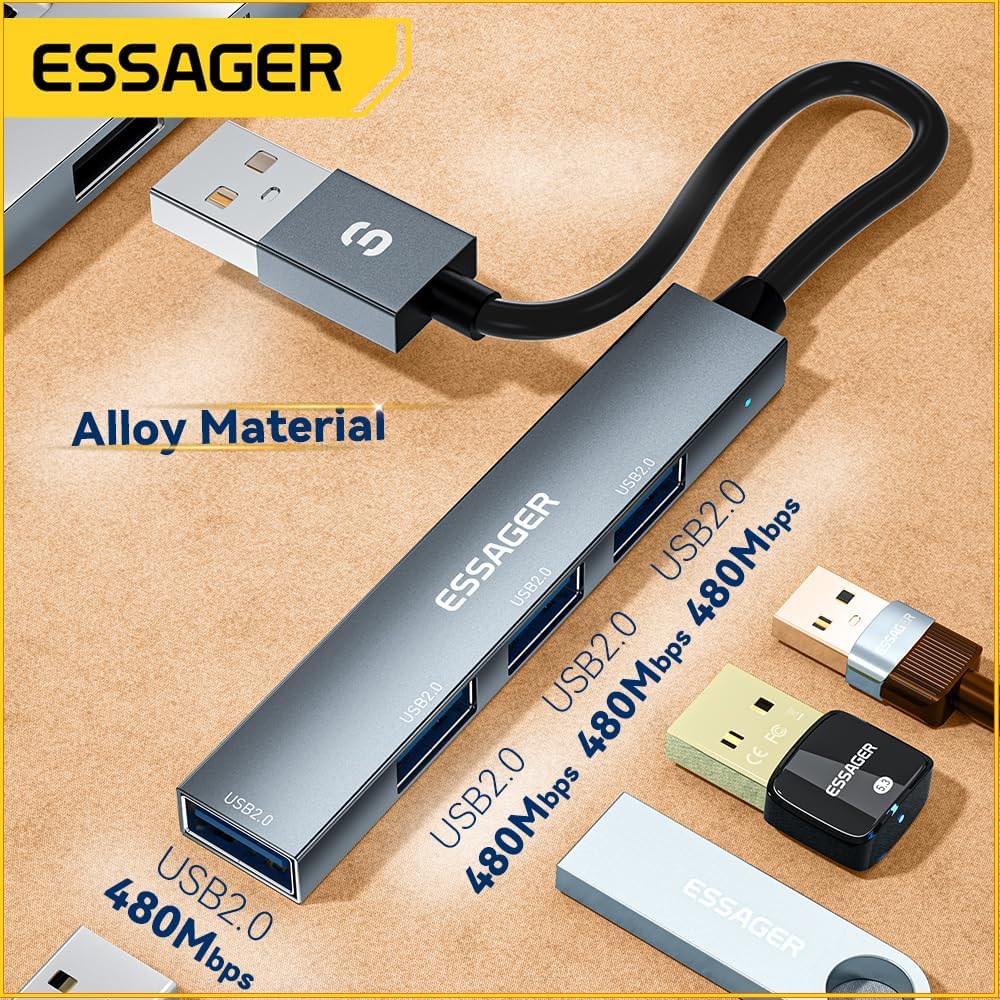
Image 1: The ESSAGER 4-Port USB 2.0 Hub, highlighting its alloy material construction and four USB 2.0 ports, each capable of 480Mbps data transfer.

Image 2: The ESSAGER USB 2.0 Hub in use, connected to a laptop, illustrating its strong power supply for external hard drives and its 480Mbps data transfer rate.
3. Opsætningsvejledning
Setting up your ESSAGER USB 2.0 Hub is a simple plug-and-play process.
Tilslutning af hub'en:
- Locate an available USB A port on your host device (laptop, desktop PC, Xbox, PS5, etc.).
- Plug the USB A connector of the ESSAGER Hub into the available USB A port on your host device.
- The hub is now ready for use. No additional drivers or software installation is typically required.
Tilslutning af eksterne enheder:
- Connect your USB devices (e.g., mouse, keyboard, flash drive, printer) into the available USB 2.0 ports on the ESSAGER Hub.
- Ensure that each device is securely plugged in.
4. Betjeningsvejledning
Once connected, the ESSAGER USB 2.0 Hub functions as a direct extension of your device's USB ports.
Dataoverførsel:
- Insert your USB flash drives or external hard drives into any of the four USB 2.0 ports.
- Data transfer will occur at speeds up to 480 Mbps, which is standard for USB 2.0.
- For optimal performance, avoid transferring extremely large files simultaneously across all four ports if you experience slowdowns.
Strømforsyning af enheder:
- The hub can provide sufficient power for most USB peripherals.
- It is capable of driving a 2TB hard drive, making it suitable for connecting high-power devices without an external power adapter.
5. Vedligeholdelse
Proper care will help extend the life of your ESSAGER USB 2.0 Hub.
- Rensning: Use a soft, dry cloth to wipe the surface of the hub. Avoid liquid cleaners or abrasive materials.
- Opbevaring: Når hubben ikke er i brug, skal den opbevares køligt og tørt, væk fra direkte sollys og ekstreme temperaturer.
- Håndtering: Undgå at tabe enheden eller udsætte den for hårde stød. Forsøg ikke at skille hubben ad.
6. Fejlfinding
If you encounter issues with your ESSAGER USB 2.0 Hub, please refer to the following common solutions:
- Enhed ikke genkendt:
- Ensure the hub is securely connected to your host device's USB A port.
- Try connecting the hub to a different USB A port on your host device.
- Ensure the peripheral device (e.g., mouse, flash drive) is securely connected to the hub.
- Genstart din værtsenhed.
- Langsom dataoverførsel:
- Verify that the connected devices are USB 2.0 compatible. USB 1.1 devices will operate at slower speeds.
- Avoid connecting multiple high-bandwidth devices simultaneously if possible.
- Ensure your host device's USB A port is functioning correctly.
- External Hard Drive Not Powering On:
- While the hub supports 2TB drives, some high-power external hard drives may require their own external power supply.
- Ensure the hard drive cable is fully inserted into the hub.
If these steps do not resolve the issue, please contact ESSAGER customer support for further assistance.
7. Specifikationer
| Feature | Specifikation |
|---|---|
| Model | B0CZP1HCWK |
| Produktdimensioner | 3.2 x 0.55 x 0.28 tommer |
| Varens vægt | 0.634 ounce |
| Hardware-interface | USB 2.0 |
| Samlet USB-porte | 4 |
| Dataoverførselshastighed | Op til 480 Mbps |
| Speciel funktion | Letvægts, Plug and Play |
| Kompatible enheder | Laptops, Desktop PCs, Xbox, PS5, Card Readers, Tablets, Mouse, Keyboard, Flash Drive, U Disk, Printer |
| Fabrikant | ESSAGER |
8. Garanti og support
ESSAGER is committed to providing high-quality electronic products and ensuring customer satisfaction. We offer comprehensive after-sales support for our products.

Image 3: ESSAGER's Brand Philosophy and commitment to customer service, including free replacement for malfunctions, 24/7 support, and professional technical assistance.
Vores forpligtelse:
- One-Year After-Sales Service: We provide a one-year after-sales service for all customers.
- Gratis erstatning: In case of any malfunction, please contact our customer service for a free replacement.
- 24/7 kundeservice: Vores supportteam er tilgængeligt 24 timer i døgnet, 7 dage om ugen for at hjælpe dig.
- Professionel teknisk support: Access to professional technical assistance for any product-related queries.
If you encounter any problems while using your ESSAGER USB 2.0 Hub, please do not hesitate to contact ESSAGER customer service. Your satisfaction is our priority.