
1.Overview
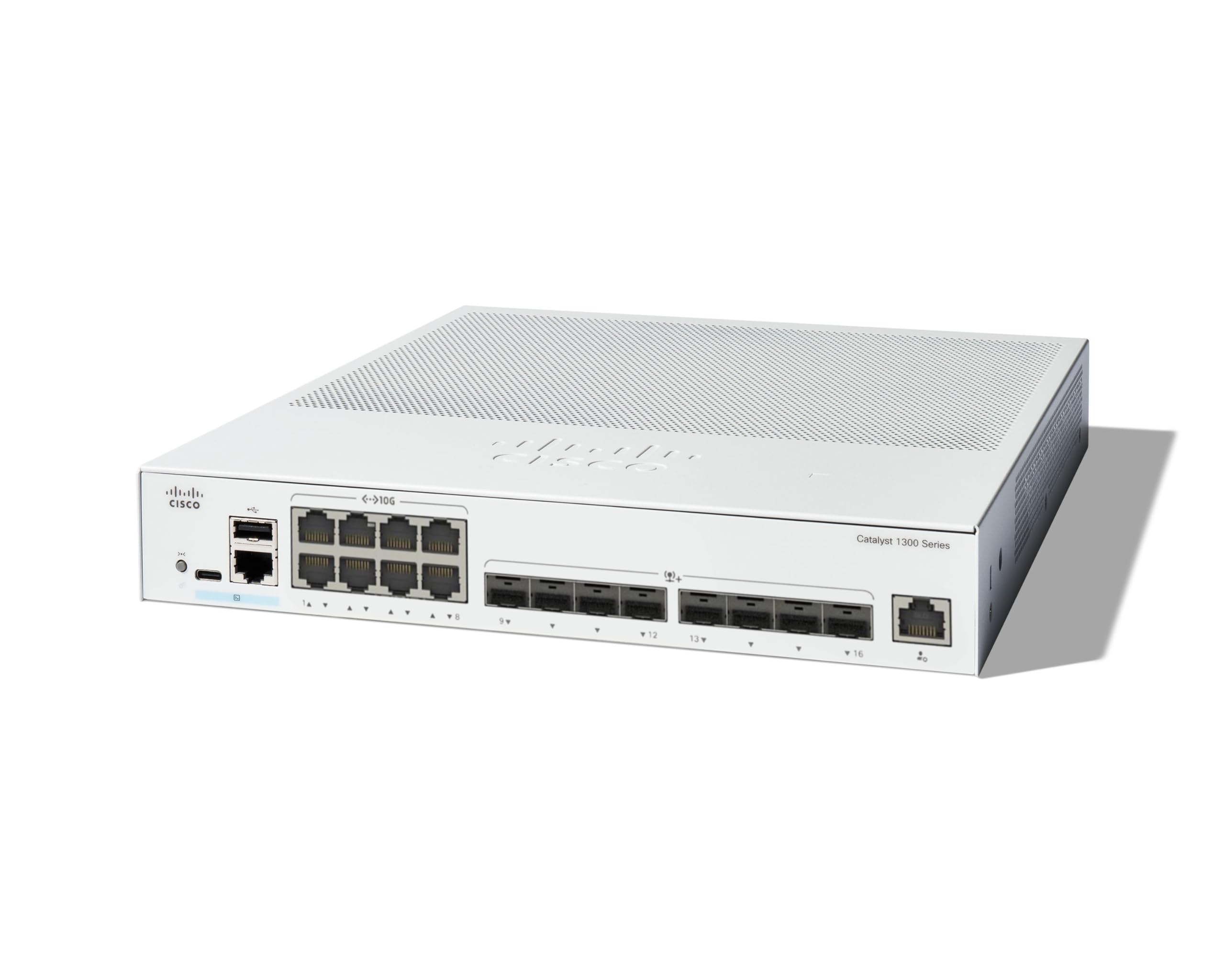
The Cisco Catalyst 1300-16XTS is a fully managed switch designed to provide reliable and secure connectivity for small business networks. This switch offers full Layer 2/3 capabilities, an intuitive web dashboard, advanced networking features, and Power over Ethernet Plus (PoE+) support.
Nøglefunktioner omfatter:
- Skift porte: 8 ports 10G Copper + 8x 10GE SFP+ ports + 1x GE Management Port.
- Forenklet styring: Intuitive Cisco Business mobile app and local web interface for setup, management, and monitoring.
- Forbedret sikkerhed: IP-MAC port binding and IPv6 First Hop Security for network protection.
- Energieffektivitet: Optimizes power usage, compliant with IEEE 802.3az Energy Efficient Ethernet.
- Business Ready: No subscription or licenses required, includes limited lifetime hardware warranty and complimentary 1-year technical support.
2. Pakkens indhold
Bekræft, at din pakke indeholder følgende varer:
- Cisco Catalyst 1300-16XTS Managed Switch unit
- Netledning eller adapter
- USB Type-C kabel
- Monteringsudstyr
Hvis der mangler eller er beskadigede dele, bedes du kontakte din leverandør eller Cisco-support.
3. Opsætning
Follow these steps to set up your Cisco Catalyst 1300-16XTS Managed Switch:
- Tilslut strøm: Connect the power adapter to the switch's power input and then plug the power cord into an electrical outlet. Ensure the power LED on the switch illuminates.
- Tilslut til router/netværk: Use an Ethernet cable to connect one of the switch's 10G copper ports (or SFP+ ports with appropriate transceivers) to your router or existing network infrastructure.
- Tilslut enheder: Connect your network devices (e.g., computers, servers, wireless access points) to the remaining available ports on the switch.
- Initial Configuration (Mobile App):
- Download the Cisco Business mobile app from your device's app store.
- Launch the app and follow the on-screen instructions to create your site and add your switch.
- The app will guide you through basic configuration, including setting up site credentials and adding wired/wireless devices.
- Initial Configuration (Web UI): Alternatively, you can access the switch's web-baseret brugergrænseflade (Web UI) by connecting a computer directly to the switch and navigating to its default IP address (refer to the Quick Start Guide for details).

4. Betjeningsvejledning
Once the switch is powered on and connected, it will begin forwarding network traffic. For advanced configuration and monitoring, use the following tools:
- Cisco Business Mobile-app: Provides real-time monitoring of device status, network activity, and connected clients. It also allows for basic actions like rebooting devices and upgrading firmware.
- Web Brugergrænseflade (Web UI): Offers comprehensive configuration options for all Layer 2/3 features, including VLANs, QoS, security settings, and port management.
- Cisco Business Dashboard: For managing multiple Cisco Business devices across different sites, the Dashboard provides a centralized platform for monitoring, configuration, and troubleshooting.
Refer to the detailed documentation available via the QR code on the product packaging or the Cisco support website for in-depth configuration guides.
5. Vedligeholdelse
To ensure optimal performance and longevity of your Cisco Catalyst 1300-16XTS switch, consider the following maintenance practices:
- Firmwareopdateringer: Regularly check for and apply the latest firmware updates to benefit from new features, performance improvements, and security patches.
- Miljøforhold: Ensure the switch is operated within its specified temperature and humidity ranges. Avoid placing it in direct sunlight or near heat sources.
- Fysisk inspektion: Periodically inspect the switch for any physical damage, loose cables, or excessive dust accumulation. Clean vents and ports as needed to maintain proper airflow.
- Backupkonfiguration: Regularly back up your switch configuration to prevent data loss in case of unexpected issues.
6. Fejlfinding
If you encounter issues with your switch, try these basic troubleshooting steps:
- Ingen strøm: Verify that the power cord is securely connected to both the switch and the electrical outlet. Check the power adapter and outlet for functionality.
- Ingen netværksforbindelse:
- Check the Ethernet cables connecting devices to the switch and the switch to the router. Ensure they are securely plugged in and not damaged.
- Observe the link/activity LEDs on the switch ports. A solid green or amber light typically indicates a valid connection, while a blinking light indicates activity. No light may suggest a cable or device issue.
- Verify IP address settings on connected devices and the switch.
- Langsom ydeevne:
- Check for excessive network traffic or loops using the switch's management interface.
- Ensure all devices are connected at their optimal speed (e.g., 10G devices to 10G ports).
- Consider updating firmware.
- Adgang til administrationsgrænseflade: Hvis du ikke kan få adgang til Web UI or mobile app, ensure your device is on the same network segment as the switch or connected directly. Verify the switch's IP address.
For more complex issues, refer to the comprehensive troubleshooting guides on the Cisco support webwebstedet eller kontakt teknisk support.
7. Specifikationer
| Feature | Detalje |
|---|---|
| Mærke | Cisco |
| Modelnummer | C1300-16XTS |
| Antal havne | 16 (8x 10G Copper, 8x 10GE SFP+) + 1x GE Management Port |
| Dataoverførselshastighed | 80 Gigabit i sekundet |
| Switch Type | Administreret netværksswitch |
| Interface | PoE, SFP |
| Varedimensioner (L x B x H) | 11.81 cm L x 10.55 cm B x 1.73 cm H |
| Varens vægt | 3.6 kilo |
| Etuimaterialetype | Kobber |
| UPC | 889728521482 |
8. Garanti og support
The Cisco Catalyst 1300-16XTS Managed Switch comes with a Begrænset livstidsgaranti på hardware, which includes return-to-factory replacement. Additionally, you receive 1-year complimentary phone support to the Small Business Support Center.
For technical assistance, warranty claims, or to access additional resources, please visit the official Cisco support website or contact the Small Business Support Center.